Configs for Remnawave
XHTTP NGINX Configuration (To be configured on EACH Node where you want to use XHTTP and NOT the Panel)
map $http_upgrade $connection_upgrade {
    default upgrade;
    ""      close;
}

ssl_protocols TLSv1.2 TLSv1.3;
ssl_ecdh_curve X25519:prime256v1:secp384r1;
ssl_ciphers ECDHE-ECDSA-AES128-GCM-SHA256:ECDHE-RSA-AES128-GCM-SHA256:ECDHE-ECDSA-AES256-GCM-SHA384:ECDHE-RSA-AES256-GCM-SHA384:ECDHE-ECDSA-CHACHA20-POLY1305:ECDHE-RSA-CHACHA20-POLY1305:DHE-RSA-AES128-GCM-SHA256:DHE-RSA-AES256-GCM-SHA384:DHE-RSA-CHACHA20-POLY1305;
ssl_prefer_server_ciphers on;
ssl_session_timeout 1d;
ssl_session_cache shared:MozSSL:10m;

ssl_stapling on;
ssl_stapling_verify on;
resolver 1.1.1.1 1.0.0.1 8.8.8.8 8.8.4.4 208.67.222.222 208.67.220.220;

server {
    server_name YOUR_DOMAIN_NAME;
    listen unix:/dev/shm/nginx.sock ssl proxy_protocol;
    http2 on;

    #SSL Certs required for TLS, but is generally recommended even if it's not TLS
    ssl_certificate "PATH_TO_SSL_FULLCHAIN_CERT";
    ssl_certificate_key "PATH_TO_SSL_PRIVKEY";
    ssl_trusted_certificate "PATH_TO_SSL_FULLCHAIN_CERT";

}

server {
    listen unix:/dev/shm/nginx.sock ssl proxy_protocol default_server;
    server_name _;
    ssl_reject_handshake on;
    return 444;
}
XHTTP Configuration with REALITY
{
      "tag": "XHTTP with REALITY",
      "port": 443,
      "protocol": "vless",
      "settings": {
        "clients": [],
        "decryption": "none"
      },
      "sniffing": {
        "enabled": true,
        "destOverride": [
          "http",
          "tls",
          "quic"
        ]
      },
      "streamSettings": {
        "network": "xhttp",
        "security": "reality",
        "xhttpSettings": {
          "host": "example.com",
          "mode": "auto",
          "path": "/any-path-you-want",
          "extra": {
            "xmux": {
              "cMaxReuseTimes": 0,
              "maxConcurrency": "16-32",
              "maxConnections": 0,
              "hKeepAlivePeriod": 0,
              "hMaxRequestTimes": "600-900",
              "hMaxReusableSecs": "1800-3000"
            },
            "noSSEHeader": true,
            "xPaddingBytes": "100-1000",
            "scMaxBufferedPosts": 30,
            "scMaxEachPostBytes": 1000000,
            "scStreamUpServerSecs": "20-80"
          }
        },
        "realitySettings": {
          "dest": "/dev/shm/nginx.sock",
          "show": false,
          "xver": 1,
          "spiderX": "",
          "shortIds": [
            "ENTER_YOUR_SHORTID"
          ],
          "publicKey": "ENTER_YOUR_PUBLICKEY",
          "privateKey": "ENTER_YOUR_PRIVATEKEY",
          "serverNames": [
            "example.com"
          ]
        }
      }
    }
Host Configuration

XHTTP NGINX Configuration (To be configured on EACH Node where you want to use XHTTP and NOT the Panel) (Add this code to your existing nginx.conf which should look like the one in the REALITY section)
    # gRPC Proxy
    location /VLSpdG9k {
        grpc_pass grpc://127.0.0.1:2023;
        grpc_set_header Host $host;
        grpc_set_header X-Forwarded-For $proxy_add_x_forwarded_for;
    }
XHTTP Configuration with TLS (Which is already mentioned in the NGINX and will terminate there) (Don't forget to replace the default values)
    {
      "tag": "Give any tag you want",
      "port": 2023,
      "listen": "127.0.0.1",
      "protocol": "vless",
      "settings": {
        "clients": [],
        "decryption": "none"
      },
      "sniffing": {
        "enabled": true,
        "destOverride": [
          "http",
          "tls",
          "quic"
        ]
      },
      "streamSettings": {
        "network": "xhttp",
        "xhttpSettings": {
          "path": "/VLSpdG9k"
        },
      }
    }
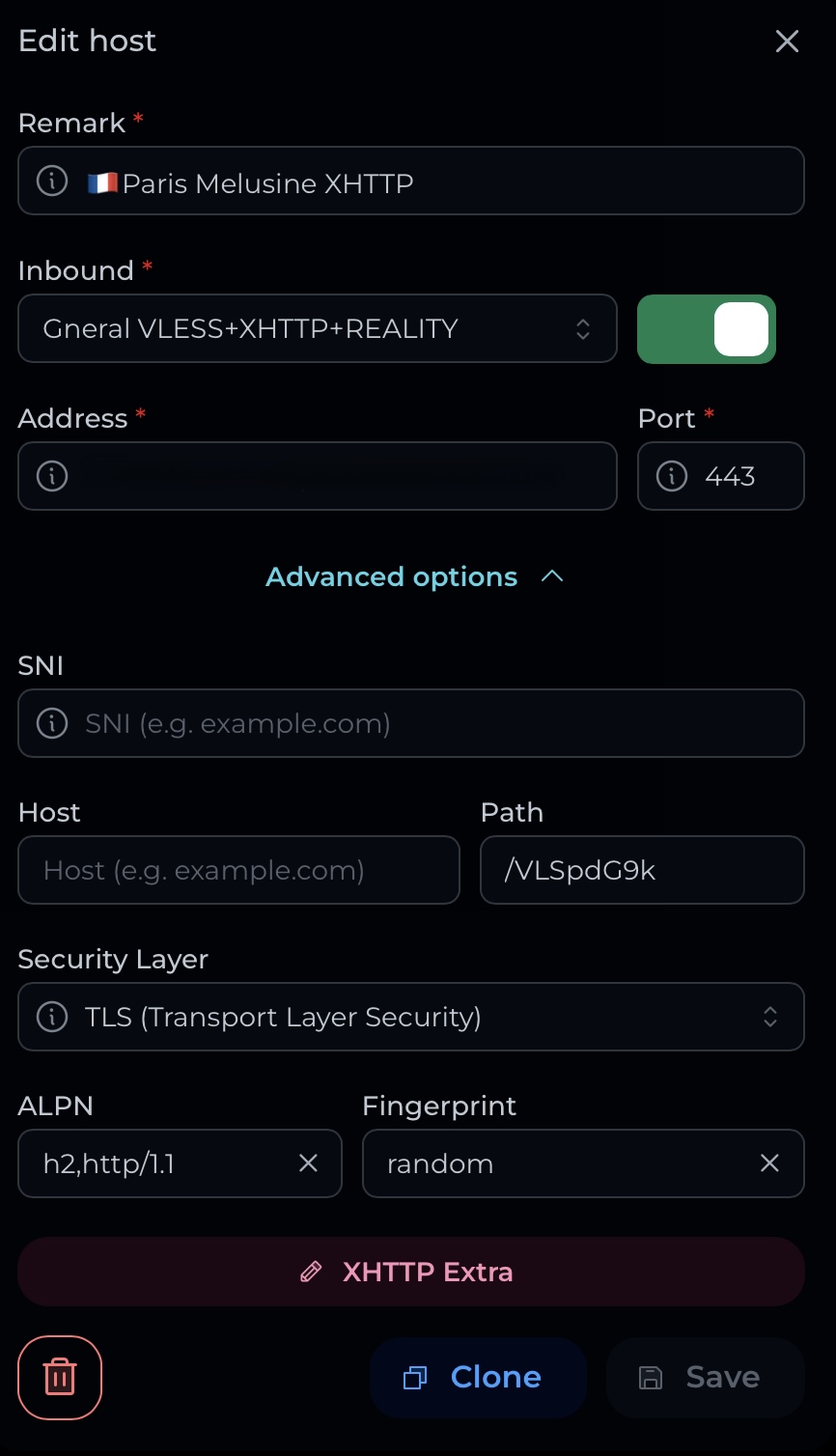
XHTTP Host Config
- Run the script using this shell command and follow the instructions from the script.
cd && bash <(curl -fsSL https://gitlab.com/fscarmen/warp/-/raw/main/menu.sh) w- After setting up the script, setup the setup this outbound and routing rules in xray config
Outbounds
{
  "outboundTag": "warp",
  "domain": ["geosite:google", "geosite:openai"],
  "type": "field"
}
Routing (Use the port you setup in the script)
{
  "tag": "warp",
  "protocol": "socks",
  "settings": {
    "servers": [
      {
        "address": "127.0.0.1",
        "port": 40000
      }
    ]
  }
}