Repository navigation
Account Recovery
Who this is for: anyone who cannot sign in, and guardians helping a family member get back in.
There is no "forgot password" email link. That is on purpose: whoever controls an email inbox could otherwise take over the account. Instead, a guardian gives you a one-time reset code in person or by phone.
- Call or talk to a guardian. Ask for a reset code.
- They give you a code like
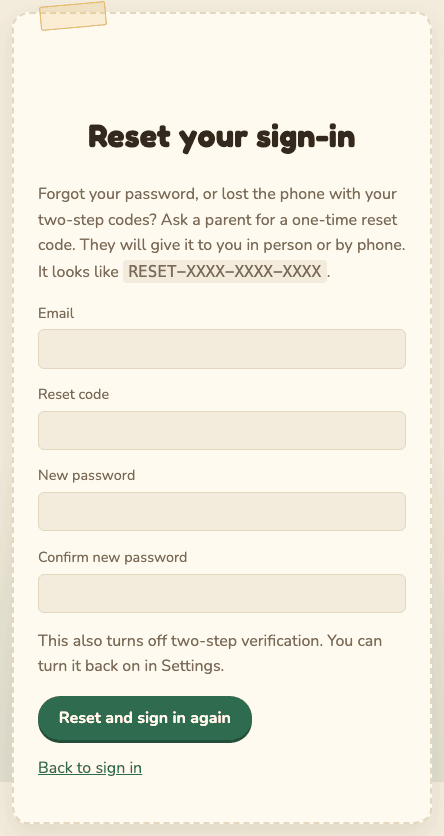
RESET-XXXX-XXXX-XXXX. It works once, for 24 hours. - On the Sign In page, select Use a reset code from a parent (or go to
/reset). - Type your Email, the Reset code, and a New password twice.
- Select Reset and sign in again.
- You are taken back to the Sign In page with "Your sign-in was reset. Sign in with your new password." Sign in.
Using a reset code also:
- turns off two-step verification (turn it back on in Security),
- signs out every other device,
- emails you and the guardians.
If you see "That reset code cannot be used...", it may be mistyped, used, expired, not active yet, or for a different email. Ask for a new one.
If you use two-step verification and lose the phone with your authenticator app:
- Sign in with your email and password as usual.
- When asked for the 6-digit code, type one of your recovery codes instead (they look like
ABCDE-FGHJK). - Go to Security right away. Select Make new recovery codes, and print or write down the new ones.
- To move two-step verification to a new phone, you need a reset code from a guardian. (Turning it off yourself needs a code from the old phone.) You can keep signing in with recovery codes until then, one code per sign-in.
- If the phone might be in someone else's hands, select Sign out everywhere and change your password.
Ask a guardian for a reset code and follow I forgot my password. The reset also turns off two-step verification, so you can set it up again on your new phone.
After 8 wrong passwords, sign-in pauses for 15 minutes: "Too many failed attempts. Please wait 15 minutes and try again." Wait, then try again carefully. If you still cannot remember it, ask for a reset code.
If you did not cause the lockout, someone may be guessing your password. Tell a guardian.
- Sign in.
- Open your menu and choose Security.
- Under Reset codes, select Cancel any pending reset code.
- Tell the guardians. They are emailed that you cancelled it.
-
Make sure it is really them. Call them. Do not trust an email or a text message.
-
Open Admin, find them in Members, and select Reset sign-in.
-
Confirm. You may be asked to confirm it is you.
-
The code appears once, at the top of the page:

-
Write it down before you leave the page. It is not shown again. If you lose it, select Reset sign-in again; the new code replaces the old one.
-
Read it to them by phone or in person. Never send it by email or text.
-
They follow I forgot my password.
The member is emailed that a code was issued, so they will notice one they did not ask for.
Other things a guardian can do:
- Remove and revoke a member whose account may be in the wrong hands. It signs them out everywhere at once. You can Restore access later (with the other guardian's approval).
- Revoke unexpected open codes in Invite codes.
- First try a recovery code in place of the 6-digit code. Then make new codes in Security.
- No recovery codes? The other guardian selects Reset sign-in for you.
- On the family's real site, a guardian's reset code only starts working after 24 hours.
- You get an email at once. If you did not ask for it, sign in (if you still can) and cancel it under Security, then talk to the other guardian.
- This stops one guardian from quietly taking over the other's account.
- After the delay, use the code at
/reset. Then turn two-step verification back on right away and save the new recovery codes.
If there is only one guardian and they are locked out, forgot their password, or lost both their phone and their recovery codes, ask the person who runs the site. If they set up a support account, they can, from its Support page:
- Unlock sign-in after too many wrong passwords,
- Reset the password: they read you a temporary password by phone, and you choose a new one as soon as you sign in,
- Reset two-step verification: you sign in with your password, then set it up again on your new phone.
They will check it is really you first. Each action emails you and every guardian, shows you a notice the next time you sign in, and is recorded in the audit trail (Admin, Audit trail) under their name. The support account cannot see photos, albums or comments, and guardians can remove it in Admin, Members.
If there is no support account, whoever runs the server can issue a reset code there. The steps are in the runbook. It is also recorded in the audit trail.
Avoid this by having two guardians and keeping printed recovery codes somewhere safe.