Repository navigation
Deliverable 2 Solution design Functionality preview

GeoRank runs as a single Django application on a Linux server. Client devices — desktop and mobile browsers — reach it over HTTP. The server itself talks over HTTP to two external endpoints: the customer website being analyzed, and the Gemini API.
| Node | Technology | Version |
|---|---|---|
| Client device | Browser on Windows, macOS, Linux, Android or iOS | Any modern version |
| GeoRank server | Linux | — |
| Python | 3.13.9 (requires 3.12 or higher) | |
| uv | 0.9.11 | |
| git | 2.43.0 | |
| Application | Django, with the analysis and accounts apps |
6.0.7 |
| Libraries | beautifulsoup4 | 4.15.0 |
| requests | 2.34.2 | |
| google-genai | 2.16.0 | |
| python-dotenv | 1.2.2 | |
| reportlab | 5.0.1 | |
| Database | SQLite | 3.50.4 |
| External services | Analyzed customer website | — |
| Gemini API, model gemini-2.5-flash | — |

The system is split into two software modules.
| Module | Responsibility | Interfaces it provides |
|---|---|---|
analysis |
Runs the analysis pipeline: scrapes the site, calls the AI, stores scores and recommendations, and serves the results | submit, history, result, score history, competitors, comparison, PDF export, email notification |
accounts |
Manages identity: registration, authentication, profile, company membership and plan limits | register, login, logout, profile, password recovery |
analysis depends on accounts through the profile interface: it reads the
user's plan to enforce the daily limit, the industry sector to specialize the
recommendations, and the company to restrict access to reports.

Seven tables. analysis_analysis carries two foreign keys: user_id says who
owns the run, and competitor_id — which is nullable — distinguishes the user's
own sites from competitor sites.
| Relationship | Cardinality | Note |
|---|---|---|
userprofile → auth_user
|
1:1 | One profile per user, created on registration |
userprofile → company
|
N:1 | Nullable, ON DELETE SET NULL. Members of a company share reports |
competitor → auth_user
|
N:1 | Unique on (user, url), max 10 per user |
analysis → auth_user
|
N:1 | Owner of the analysis |
analysis → competitor
|
N:1 | Null for own sites, set for competitor sites |
score → analysis
|
1:1 | Visibility, readability and citability |
recommendation → analysis
|
N:1 | Priority 1-3 and category |
Wireframes of the views where the Sprint 2 requirements are reflected. The blue annotations under each screen describe the interaction.
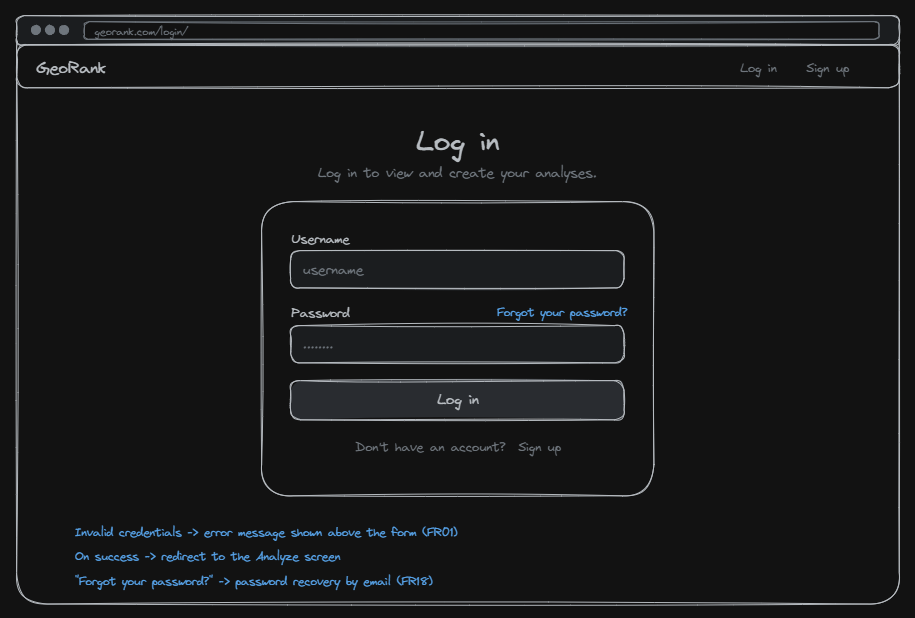
What. Navigation bar, page title, and a single credentials form. Where. The form is centred and is the only action on the screen, so there is nothing competing with it. How. Wrong credentials show an error above the form (FR01). A successful login redirects to the Analyze screen (FR09). "Forgot your password?" starts the email recovery flow (FR18).
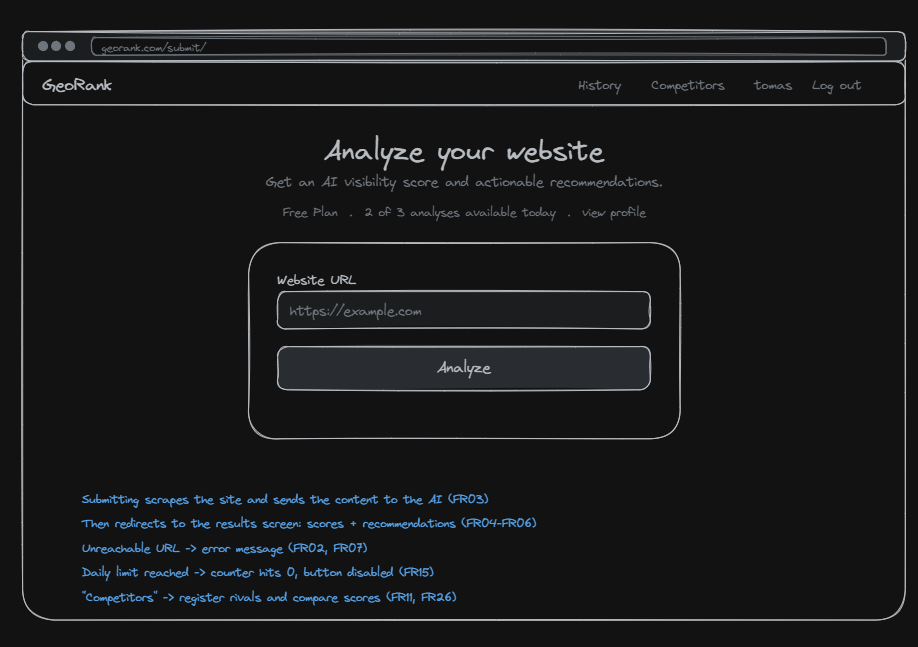
What. Navigation bar with History and Competitors, title, the free-plan counter, and the URL form. Where. The counter sits above the form so the remaining quota is visible before the user commits to an analysis. How. Submitting scrapes the site and sends the content to the AI (FR03), then redirects to the results with the score and recommendations (FR04-FR06). An unreachable URL shows an error message (FR02, FR07). When the daily limit is reached the counter hits zero and the button is disabled (FR15). "Competitors" leads to registering rivals and comparing scores (FR11, FR26).
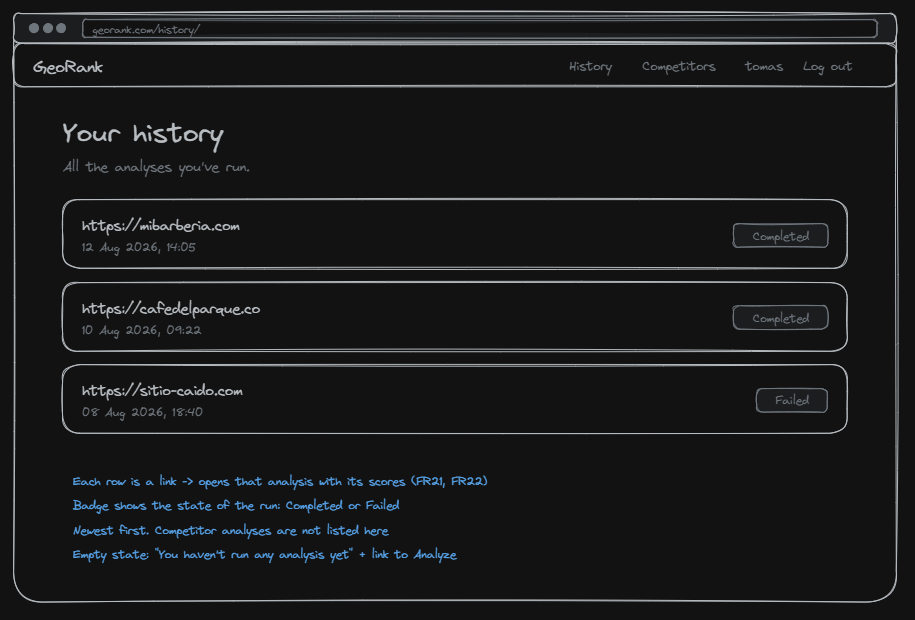
What. A list of previous analyses, each with its URL, date and state. Where. Newest first. The state badge is right-aligned so the column can be scanned without reading the URLs. How. Each row is a link that opens that analysis with its scores (FR21, FR22). The badge shows whether the run completed or failed. Competitor analyses are not listed here. When there are none, the screen shows an empty state with a link to the Analyze screen.
Repository: https://github.com/Unbot2313/GeoRank
All three team members have commits in the repository, and every commit message
follows the Conventional Commits format (feat:, fix:, chore:, docs:)
describing the change it introduces.
| Member | GitHub |
|---|---|
| Tomas Ramirez Galeano | @unbot2313 |
| Miguel Angel Alzate Osorno | @alzate4664 |
| Alessandro Soccol Mejia | @AlessandroSoccol |
requirements.txt — lists the 34 pinned packages required to run the project. It is generated from the lockfile, so the versions match the ones the team develops with.
README — contains the instructions to run the project: prerequisites, cloning, installing dependencies, setting the environment variables, applying migrations, creating a superuser and starting the development server, with the command for each step.
| Section | From |
|---|---|
| Pitch | 0:00 |
| Requirements addressed in this delivery | 1:05 |
| Evidence of the implemented functionality | 2:33 |
Length: 4:25. All team members appear in the video.
Recorded on the Weekly Meetings page. Each member answers what they did last week, what they will do this week, and whether there are any obstacles.
- Splitting the requirements between members and working each one on its own branch
with a pull request, which keeps
mainalways working. - Holding the weekly meeting, including the sessions with the monitors.
- Recording the weekly meetings right after they happen, instead of writing several of them at once later.
- Writing automated tests for the features as they are built.
- Hardcoding configuration values in the code. A configuration value was found exposed in the repository and had to be moved to environment variables.
Recorded on the Class Activities page.
Tracked on the GeoRank Backlog board, where each requirement is an issue with its status and responsible member.
Sprint 1 covers the requirements delivered in the first iteration: the analysis pipeline, the results views, authentication and the user profile. Sprint 2 covers what was added for this delivery: competitor comparison, PDF export, email notifications, password recovery, sector-specific recommendations and company-level access to reports.
| ID | Requirement | Priority | Sprint | Status | Responsible |
|---|---|---|---|---|---|
| FR01 | Display authentication error for invalid credentials | Must | Sprint 1 | Done | Alessandro |
| FR02 | Display error for an invalid or unreachable URL | Must | Sprint 1 | Done | Tomas |
| FR03 | Accept a valid website URL for analysis | Must | Sprint 1 | Done | Tomas |
| FR04 | Generate an AI visibility score | Must | Sprint 1 | Done | Tomas |
| FR05 | Generate a readability and citability report | Must | Sprint 1 | Done | Tomas |
| FR06 | Generate prioritized recommendations | Must | Sprint 1 | Done | Tomas |
| FR07 | Display an error when website analysis fails | Must | Sprint 1 | Done | Tomas |
| FR08 | Register a user account | Must | Sprint 1 | Done | Alessandro |
| FR09 | Authenticate a user with valid credentials | Must | Sprint 1 | Done | Alessandro |
| FR10 | Restrict dashboard access to authenticated users | Must | Sprint 1 | Done | Alessandro |
| FR11 | Compare visibility scores with competitors | Should | Sprint 2 | Done | Tomas |
| FR12 | Export an analysis report as PDF | Should | Sprint 2 | Done | Miguel |
| FR13 | Validate password strength during registration | Should | Sprint 1 | Done | Alessandro |
| FR14 | Confirm successful completion of an analysis | Should | Sprint 1 | Done | Tomas |
| FR15 | Restrict analyses after reaching the free-plan limit | Should | Sprint 1 | Done | Alessandro |
| FR16 | Store completed website analyses | Could | Sprint 1 | Done | Tomas |
| FR17 | Send an email notification when an analysis report is ready | Could | Sprint 2 | Done | Miguel |
| FR18 | Send a password recovery link | Could | Sprint 2 | Done | Miguel |
| FR19 | Update user profile information | Could | Sprint 1 | Done | Miguel |
| FR20 | End an authenticated user's session | Must | Sprint 1 | Done | Alessandro |
| FR21 | Display previous website analyses | Could | Sprint 1 | Done | Tomas |
| FR22 | Display the details of a selected analysis | Must | Sprint 1 | Done | Tomas |
| FR23 | Display the AI visibility score | Must | Sprint 1 | Done | Tomas |
| FR24 | Display readability and citability results | Must | Sprint 1 | Done | Tomas |
| FR25 | Display prioritized recommendations | Must | Sprint 1 | Done | Tomas |
| FR26 | Register a competitor for comparison | Should | Sprint 2 | Done | Tomas |
| FR27 | Display historical AI visibility scores | Could | Sprint 1 | Done | Miguel |
| UR01 | Complete website submission efficiently | Must | Sprint 1 | Done | Alessandro |
| UR02 | Present analysis results clearly | Must | Sprint 1 | Done | Alessandro |
| UR03 | Access main functions from the dashboard | Should | Sprint 1 | Done | Alessandro |
| UR04 | Provide understandable validation feedback | Must | Sprint 1 | Done | Alessandro |
| UR05 | Support responsive use on common screen sizes | Should | Sprint 1 | Done | Alessandro |
| UR06 | Achieve user satisfaction with core tasks | Should | Sprint 1 | Done | Alessandro |
| PR01 | Data generated for each user | Must | Sprint 1 | Done | Alessandro |
| PR02 | Limitation of three analysis per day | Should | Sprint 1 | Done | Alessandro |
| PR03 | Enable features for users with a paid plan | Could | Sprint 1 | Done | Alessandro |
| PR04 | Specialized recommendations for each company | Should | Sprint 2 | Done | Alessandro |
| PR05 | Restrictions on access to information for members not belonging to the company | Should | Sprint 2 | Done | Tomas, Miguel, Alessandro |
| PR06 | Preservation of all reports produced | Must | Sprint 1 | Done | Tomas |
All 39 requirements are Done. Beyond the specification, one technical issue was raised during code review and closed in Sprint 2: limiting the number of competitors a user can register (responsible: Tomas).