Repository navigation
Releases: UnderwaterOverground/tailscale-nx
Release list
tailscale-nx 1.1.3

tailscale-nx 1.1.3 adds a Connections page to the overlay, so you can see whether your stream is going directly to your PC or through a Tailscale relay, and how fast it is.
New: Connections
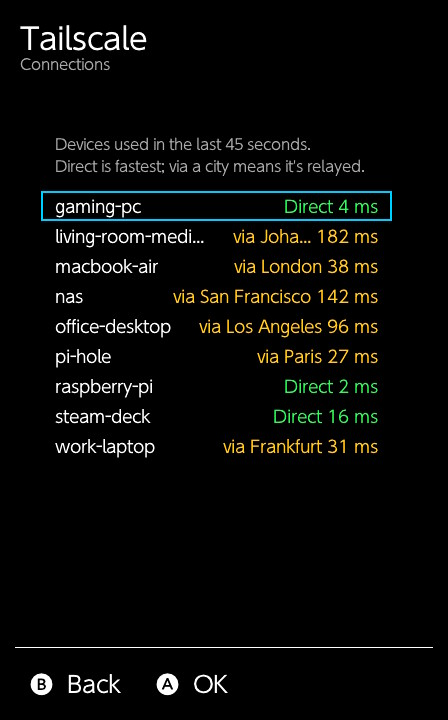
Open the overlay and choose Connections to see the devices the Switch has used in the last 45 seconds, by name, and how each one is reached:
- Direct (green): straight to the device, the fastest way.
- via a city (yellow): relayed through Tailscale's server in that city. This works anywhere, but adds latency, so streams may be less smooth.
Each shows its latency, the time a message takes to get there and back. Hotel, mobile and other restrictive networks often block direct connections; if Moonlight feels slow away from home, this is the place to check.
The list scrolls, and long names scroll when selected.
Fixes
- The overlay could wrongly say "Not responding" around sleep, while tailscale-nx was paused for it. It no longer does.
Update
Download tailscale-nx-1.1.3.zip below and copy it to your SD card over the old files, then restart the console. Your settings and login are kept. The README shows how, step by step, on Windows and on a Mac.
Known issue: Moonlight and sleep
Putting the console to sleep during a Moonlight stream and waking it can crash the console (an orange screen). This is a Moonlight-Switch bug (#306), and it happens with tailscale-nx turned off too. Until Moonlight fixes it, end the stream before sleeping.
Questions or problems? Ask on Discord or open an issue, and include config/tailscale-nx/sysmodule.log.
SHA-256 tailscale-nx-1.1.3.zip: f58adacad1a1e5ae3b5043459b2cf5697616edf3d7e3e4c732e1a1c4ef7b6e37
tailscale-nx 1.1.2
tailscale-nx 1.1.2 makes Artemis work over the tailnet and fixes a crash that could happen while apps' traffic goes through a Tailscale relay. Updating is recommended.
Fixes
- Artemis now works. Artemis-Switch (and any homebrew that opens a lot of network sessions) got no network at all with tailscale-nx running: "Search is unavailable" when it started, and "Failed to connect ... after 0 ms" for every host, even on your home network. tailscale-nx now makes room for it. Moonlight was not affected.
- No more crash when traffic is relayed. When the Switch can't reach a device directly, Tailscale relays the traffic through its servers (DERP). Starting a relayed connection, for example while pairing with your PC away from home, could run tailscale-nx out of stack space and crash it. It now has plenty of headroom.
Homebrew launched from sphaira works the same as from hbmenu, in both full-memory (hold R on a game) and applet mode.
Update
Download tailscale-nx-1.1.2.zip below and copy it to your SD card over the old files, then restart the console. Your settings and login are kept. The README shows how, step by step, on Windows and on a Mac.
Known issue: Moonlight and sleep
Putting the console to sleep during a Moonlight stream and waking it can crash the console (an orange screen). This is a Moonlight-Switch bug (#306), and it happens with tailscale-nx turned off too. Until Moonlight fixes it, end the stream before sleeping.
Questions or problems? Ask on Discord or open an issue, and include config/tailscale-nx/sysmodule.log.
SHA-256 tailscale-nx-1.1.2.zip: d24b0dc730d92c46adfeaea4bd3533c94259fca1a77b75cda5d2f59891f7df3c
tailscale-nx 1.1.1
tailscale-nx 1.1.1 adds Taildrop, subnet routes, home-screen forwarders and stop/start from the overlay, and fixes a hang when the network drops and a crash when pausing during a stream. Updating is recommended.
(There was no 1.1.0 release: a last-minute fix made it 1.1.1.)
New
- Taildrop: send files to the Switch from your phone or computer with Send with Tailscale. They land in the SD card's
Taildropfolder, with a toast when each one arrives. Only your own devices can send. See the setup guide. - Subnet routes: reach devices on networks your tailnet shares through a subnet router, such as a PC at home that doesn't run Tailscale.
- Home-screen forwarders reach the tailnet like homebrew launched from hbmenu. Forwarders with title IDs starting
01need listing inmitm_titles(details). - Stop and Start in the overlay end and restart tailscale-nx without restarting the console (close homebrew apps first).
- Update notice: once per boot, shortly after connecting, a toast tells you when a newer release is out. Turn it off with Check for updates in the overlay.
- Clearer overlay status: "Reconnecting...", "Offline" when the Switch has no internet, and "Not responding" if tailscale-nx stops answering, with the last error underneath.
Fixes
- Losing Wi-Fi no longer hangs tailscale-nx. Turning on Airplane Mode or dropping off a network could leave it stuck until a restart, and the overlay could freeze with it. It now keeps retrying and reconnects within seconds when the network is back.
- Turning Tailscale off during a stream no longer crashes tailscale-nx. Pausing it while an app such as Moonlight was sending over the tailnet could use up its memory within seconds.
- The overlay can't freeze if tailscale-nx is busy: it shows "Not responding" instead, and pausing never waits.
- A failed connection to Tailscale's server now reads "couldn't reach the control server" instead of "/key: Incomplete".
- Reconnects faster when the network comes back, and finds Wi-Fi at boot sooner.
Memory
tailscale-nx now uses exactly 2.5 MB, fixed when it starts (1.0.1 used about 2.7 MB). The overlay shows how much system memory is left. Started from the overlay, it won't start if that would leave less than 1 MB.
Update
Download tailscale-nx-1.1.1.zip below and copy it to your SD card over the old files, then restart the console. Your settings and login are kept. The README shows how, step by step, on Windows and on a Mac.
Known issue: Moonlight and sleep
Putting the console to sleep during a Moonlight stream and waking it can crash the console (an orange screen). This is a Moonlight-Switch bug (#306), and it happens with tailscale-nx turned off too. Until Moonlight fixes it, end the stream before sleeping.
Questions or problems? Ask on Discord or open an issue, and include config/tailscale-nx/sysmodule.log.
SHA-256 tailscale-nx-1.1.1.zip: 2b061690e7819f25c189671531a395df3bfffde63dd3d30f3ba87f8d004a4555
tailscale-nx 1.0.1
A stability update for tailscale-nx 1.0.0. Updating is recommended.
Fixes
- No more crashes when apps open many network connections. When the console's socket service ran out of sessions, tailscale-nx crashed and took Moonlight (and sys-ftpd, if served) down with it. Now only the request that can't be served fails, and tailscale-nx uses fewer sessions to begin with.
- Restarting the console no longer trips the crash guard. Before, a few quick restarts in a row (common while setting things up) could make tailscale-nx turn itself off. Only real crashes count now.
- The overlay always opens. It used to hang if tailscale-nx wasn't running. Now it says why, and if the crash guard turned tailscale-nx off, a Turn back on item re-enables it after a restart.
- sys-ftpd keeps working if tailscale-nx stops while serving it over the tailnet.
Update
Download tailscale-nx-1.0.1.zip below, extract it to the root of your SD card (replacing the old files), and restart the console. Your settings and login are kept.
Note on sys-ftpd over the tailnet
The optional mitm=homebrew,sys-ftpd setting uses extra system sessions. On consoles running many sysmodules, other homebrew (such as Moonlight) may then be unable to connect while it's on. If that happens, set mitm=homebrew and restart.
Known issue: Moonlight and sleep
Putting the console to sleep during a Moonlight stream and waking it can crash the console (an orange screen). This is a Moonlight-Switch bug (#306), and it happens with tailscale-nx turned off too. Until Moonlight fixes it, end the stream before sleeping.
Questions or problems? Ask on Discord or open an issue, and include config/tailscale-nx/sysmodule.log.
SHA-256 tailscale-nx-1.0.1.zip: b728293bcfb4b99e72b2df87f11091082e8953c61d9b6e52a2e3a80f93bd3ae8
tailscale-nx 1.0.0

The first release of tailscale-nx: Tailscale for the Nintendo Switch. It runs in the background on a Switch with Atmosphère and puts homebrew such as Moonlight on your tailnet. You can reach your PC, NAS and other devices by their tailnet address or name, from anywhere, without opening ports.
Highlights
- Starts at boot and stays connected through sleep and wake.
- Homebrew reaches your tailnet: apps launched from hbmenu connect to
100.x.y.zaddresses and MagicDNS names, with nothing to set up per app. - Direct connections where possible, with Tailscale's relays (DERP) as a fallback.
- Ultrahand overlay: status, the Switch's tailnet IP, a pause switch, a login QR code, and a "Connected" notice at boot that you can turn off.
- Easy login: scan a QR code, or use an auth key. An expired key is renewed automatically, and the Switch keeps its name and address.
- Respects your tailnet's access rules (ACLs) for incoming connections.
- Optional: sys-ftpd over the tailnet (
mitm=homebrew,sys-ftpd). - About 2.6 MB of memory.
Install
- Download tailscale-nx-1.0.0.zip below and extract it to the root of your SD card, merging folders.
- Restart the console.
- When the "Tailscale: log in needed" notification appears, open the overlay (default L + D-pad Down + R3), choose Tailscale and scan the QR code.
- In the Tailscale admin console, turn off key expiry for the Switch.
The setup guide covers auth keys, settings and troubleshooting.
Requirements
- Atmosphère custom firmware. Tested with 1.12.0 on firmware 22.5.0 (Mariko).
- Ultrahand Overlay, recommended for the overlay and the login prompt.
- A Tailscale account or a headscale server.
Known limitations
- Homebrew launched from hbmenu only. Games, Nintendo apps and home-screen forwarders don't use the tailnet.
- No subnet routes, exit nodes, Taildrop or Tailscale SSH.
- Turning tailscale-nx off takes a restart.
Questions or problems? Ask on Discord or open an issue, and include config/tailscale-nx/sysmodule.log.
SHA-256 tailscale-nx-1.0.0.zip: 2d570bba762475800ec82d9b826b6da6db824432a9e1722a4dc7c2eeada3742f
tailscale-nx is an unofficial community project, not affiliated with or endorsed by Tailscale Inc. or Nintendo.