HDR Output support#5962
Conversation


…eader with functions
| float slopeHigh; // log-log slope of high linear extension | ||
| }; | ||
|
|
||
| half segmented_spline_c9_fwd(half x, SegmentedSplineParams_c9 params) |

There was a problem hiding this comment.
Note: we will need to mention this change in upgrade guide
There was a problem hiding this comment.
Is this because we expect external code to use this? It is trivial to add back the original version with the default in as before.
There was a problem hiding this comment.
We can't know if users have used this function or not, so either we keep the old function, or as we expect it is a rarely used function, we inform the users in upgrade guide. But we should avoid to be silent when doing those kind of breaking change
There was a problem hiding this comment.
Yeah to be safe I added the old signature/version so it is compatible and should work like before
| int hdrTonemapMode = m_Mode.value.intValue; | ||
| if (m_Mode.value.intValue == (int)TonemappingMode.Custom || hdrTonemapMode == (int)TonemappingMode.External) | ||
| { | ||
| EditorGUILayout.HelpBox("The selected tonmapping mode is not supported in HDR Output mode. Select a fallback mode.", MessageType.Warning); |
| #define _SizePerDim _HDRxyBufferDebugParams.xy | ||
| #define _IsRec709 (int)(_HDRxyBufferDebugParams.w == 1) | ||
|
|
||
| float2 RGBtoxy(float3 rgb) |
There was a problem hiding this comment.
same remark than for the other debug code, move to color.hlsl?
There was a problem hiding this comment.
Moved at least partially


 kecho
left a comment
kecho
left a comment
kecho
left a comment
There was a problem hiding this comment.
I dont see tests, are you planning to have some?
| TextureHandle postProcessDest = RenderPostProcess(m_RenderGraph, prepassOutput, colorBuffer, backBuffer, cullingResults, hdCamera); | ||
|
|
||
| TextureHandle afterPostProcessBuffer = RenderAfterPostProcessObjects(m_RenderGraph, hdCamera, cullingResults, prepassOutput); | ||
| TextureHandle postProcessDest = RenderPostProcess(m_RenderGraph, prepassOutput, colorBuffer, backBuffer, uiBuffer, afterPostProcessBuffer, cullingResults, hdCamera); |
There was a problem hiding this comment.
Not sure I understand this. After FinalPass.shader we output a buffer in the OETF space. Looks like after you also apply (which is for dev only) again the signal to OETF and again apply UI.
I guess in dev mode we do the blit in a separate shader? Its just very confusing how its written. Perhaps we should be more explicit, such has having an enum with the schedule of the time we apply OETF. APPLY_OETF_IN_FINALPOST == OETF_APPLICATION_TIME etc etc.
This might make it more obvious. Otherwise I cant tell whats going on.
Another silly question, after our final frame is there, what takes care of the swap chain format? I dnt see any code that takes care of say HDR10 / etc on swap chain. Is this all already handled internally in the backend?
There was a problem hiding this comment.
Not sure I understand this. After FinalPass.shader we output a buffer in the OETF space. Looks like after you also apply (which is for dev only) again the signal to OETF and again apply UI.
Nope. There is an already fairly explicit PostProcessIsFinalPass(HDCamera hdCamera) . The OETF by very definition needs to always be applied as the final pass, so it would be redundant to add an extra field that just says that.
There was a problem hiding this comment.
Another silly question, after our final frame is there, what takes care of the swap chain format? I dnt see any code that takes care of say HDR10 / etc on swap chain. Is this all already handled internally in the backend?
Yes, handled engine side.

|
For HDR screenshot comparison, what you can do is do something like bracketing. Take your frame buffer, and compare against a few stops. You will likely have to write a small test component. You could also do a histogram comparison instead, but I think comparing image to image will be tricky. What we want to test is the sanity of the pipe. Thoughts? |
|
Of course adding tests makes no sense :-) No HDR screen will be connected and no eye ballswill be there to look at HDR output anyhow. This is just something better handled with manual testing. |
|
We could setup a whole exr capture grab and comparison, but it is way too overkill. We might consider that later on. |

 JMargevics
left a comment
JMargevics
left a comment
JMargevics
left a comment
There was a problem hiding this comment.
Hello, made a thorough pass, things tested:
- All Tonemapping modes
- Debug modes
- Runtime script to toggle HDR mode
- All Windows platforms + PS4 Pro
More details in Conflunece doc
All good, and currently no issues from my side. Many thanks for making such a detailed and complete PR 👍✔
# Conflicts:
#	TestProjects/VisualEffectGraph_HDRP/Assets/HDRPDefaultResources/HDRenderPipelineGlobalSettings.asset
|
The smoke test fail is known and reported, OSX passed upon re-runs https://unity-ci.cds.internal.unity3d.com/job/9655035 Merging. |

POI: https://jira.unity3d.com/browse/POI-512

This PR introduces support for HDR Output to URP.
This includes HDR10 and scRGB output standards, bringing parity with HDRP. Tonemapping was extended when HDR output is active to include more control: 3 new ACES workflow presets (1k, 2k and 10k nits), range reduction mode on neutral tonemapper with or without hue shift, control over target min/max nits and paper white brightness.

When outputting to HDR, overlay UI needs to be handled differently so that white is maintained as paper white. The new pass `m_DrawOffscreenUIPass` takes the rendering of overlay canvas away from the engine and into an offscreen render texture, before post processing is applied. Since compositing the UI needs handling with the color encoding, and that color encoding needs to happen in the last pass, the UI texture is passed to multiple passes but only applied if that pass encodes the color.
If HDR output is not enabled but overlay UI is to be rendered by URP, then there's a new pass `m_DrawOverlayUIPass` happening after everything that renders directly onto the backbuffer/current target texture. This keeps the behaviour similar to when the engine renders it.

The [previous HDRP implementation](#5962) has also been reworked to align with URP (using the common `HDROutputUtils`), and to allow for future color gamuts to be added more easily. The most notable change is the keywords separated into `HDR_COLORSPACE_XXX` (color primairies & white point) that determines the colorspace rotation, and `HDR_ENCODING_XXX` (transfer function). This also adds `ColorGamutUtility` helper functions to define more clearly the `ColorGamut` reported by the display/platform.

Other additions:
- Warning in the editor UI have been added for incompatible features, as well as UX changes for some platforms (See [this document](https://docs.google.com/document/d/1BN06A8254NNv-OgQD0rC-6424AFIBERL9XllMqlFg6A/edit#) for visuals and details.)
- Internal mode to fake HDR on devices not connected to an HDR display, needed for automated testing.
- Platform-specific fixes
    - Vulkan now uses the 10-bit or 16-bit depth selected in Player Settings.
    - Changed the bit depth name in Player settings so that it doesn't say D3D and added automatic upgrade for scripts to use the new enum by replacing the old one.
    - Changed the way we tonemap the game view window. We used to extract the title bar and tonemap it, but changed it to tonemap upfront before the gameview window is copied into it so that we can avoid all the code to extract out the titlebar from the window.
- Use SDR swapchain for URP scene camera (HDRP scene camera already uses SDR swapchain). The code to use HDR swapchain for Scene window is a little more involved and will try to tackle it in a later PR. It wasn't part of this Jira item and was a stretch goal.

Automated testing and documentation will land separately.
5 participants


NOTE: PR has lots of files that have lots of actual changes compressed by github, please when reviewing expand the diff.
This PR introduces proper HDR Output support for HDRP.
TL;DR of the features and characteristics:
When enabling HDR all the HDR Output tunable parameters are shown in the Tonemapping volume component
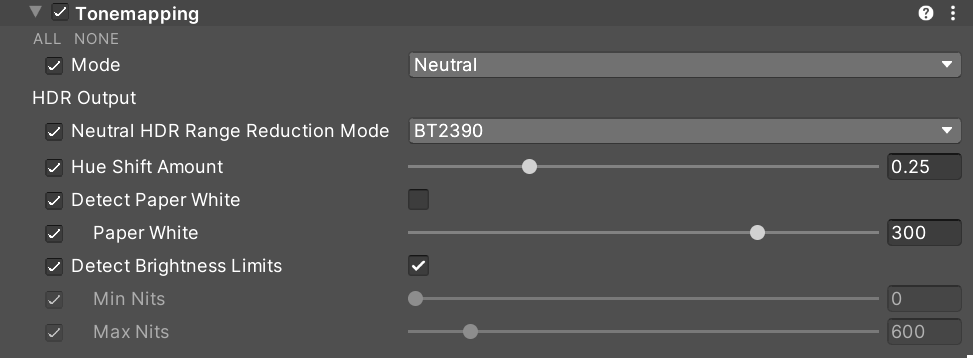
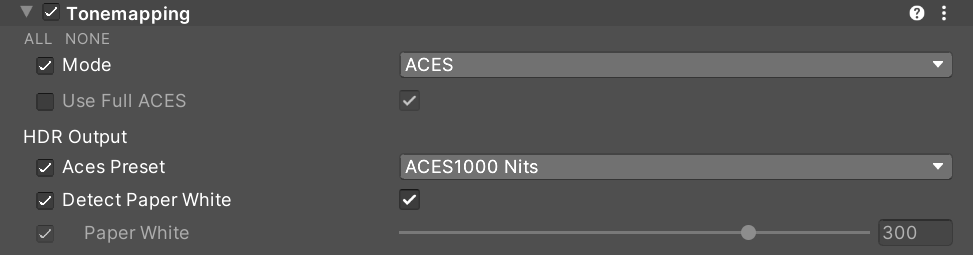
Unfortunately cannot post images as they wouldn't show much on LDR screens and LDR screenshots :D The debug view can be seen here though
Most of the math for conversion and tone curves are in HDROutput.hlsl I tried to be verbose with comments there and added a bunch of desmos
A lot more can be written, but I am keeping this PR description tight. Please reach out and I am happy to discuss any aspect in more details.
I will be start writing docs now and will probably open a separate doc PR when I am done. Though I also need to find a way to fake a LDR/HDR comparison in LDR for Docs, and I have no clue how to do that :D