Repository navigation

Release 021 · October 20, 2026 · Current
VEX v0.4.1
Docker is gone. Vex moved in.
Remember installing Docker Desktop just to try VEX? Waiting for the engine to wake up? Watching containers eat your RAM while the app was closed?
That's over.
0.4.1 puts everything VEX needs inside VEX. The database, the vector search and the embeddings engine now ship in the app itself. Download it, open it, start trading. And when it opens, you'll meet the new desk, rebuilt around Vex herself.
Already on Docker? One click moves everything over, and VEX proves the copy matches before it trusts it.
This release covers the work merged after 0.4.0.
381 commits · Zero Docker · No database migrations · New: Windows on Arm
01 · Docker is gone
Download. Open. Go.
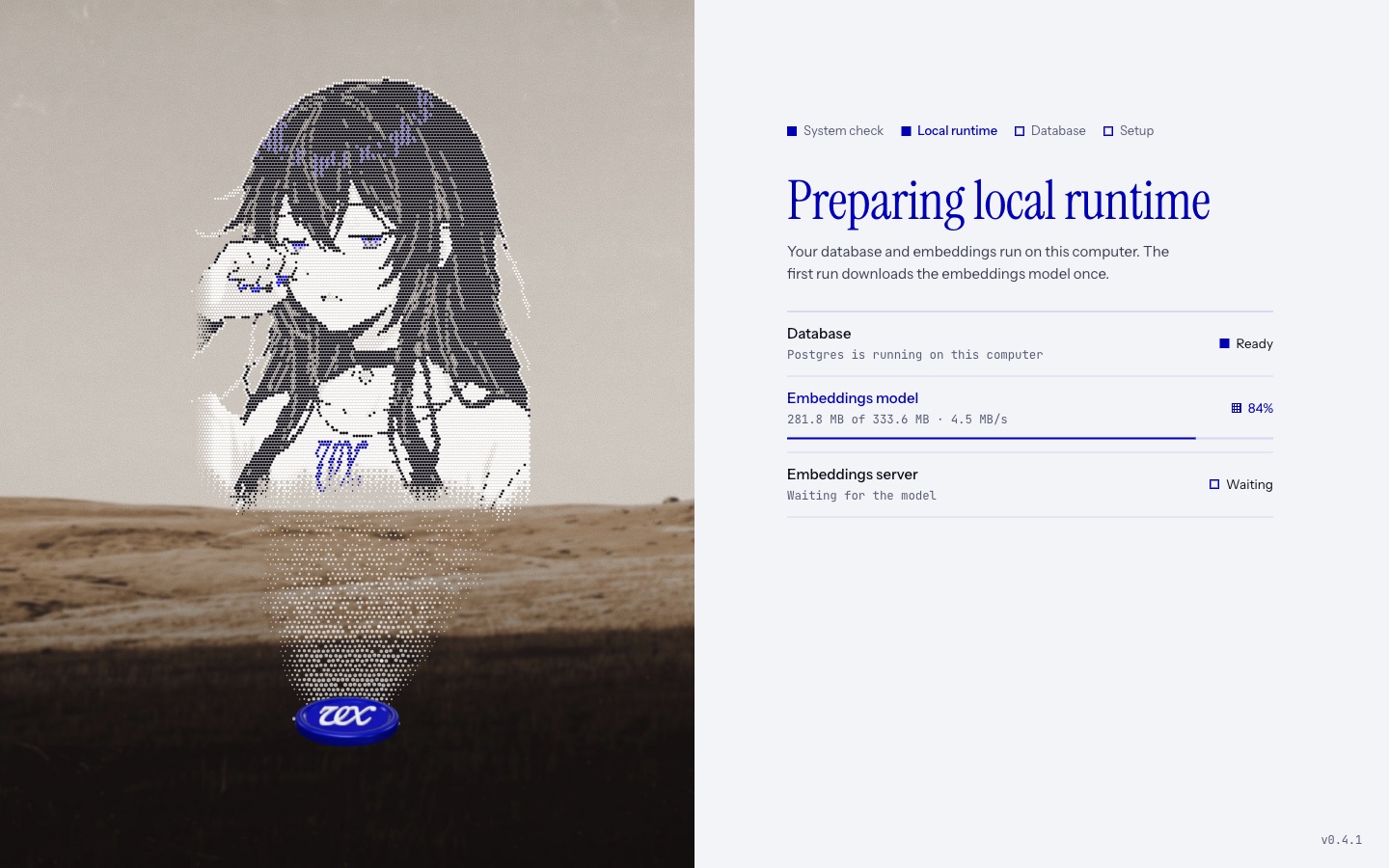
01 · One app. That's the install. VEX now carries its own PostgreSQL 18.6 with pgvector 0.8.7, and a local llama.cpp embeddings server (b9115) running Google's EmbeddingGemma 300M. No Docker Desktop, no licence screen, no "is the engine running?", no images to pull.
02 · Every desktop we ship. macOS on Apple silicon and Intel, Windows on x64 and, new in this release, Windows on Arm, and Linux as AppImage or deb.
03 · First run, step by step. VEX creates your local database, runs its migrations, checks for the embedding model, downloads it if needed, verifies it and starts the embeddings server. Each step has its own row with a live status, so you always know what it is doing.
04 · A smart download. The model is about 333 MB and downloads once. It is checked against a pinned fingerprint as it streams, and nothing unverified is ever used. Interrupted? It resumes where it stopped instead of starting over. It goes through your system proxy and certificate store, so corporate networks work too.
05 · Off means off. VEX starts its services when you open it and stops them when you quit. No virtual machine humming in the background. No containers squatting on your memory while you sleep.
06 · Stays on your machine. The database and the embeddings server listen on 127.0.0.1 and nowhere else. Your database gets a password generated for your install. The embeddings server gets a brand new port and key every launch, and the key is held only in memory. Studio talks to its tools over a local socket (a named pipe on Windows), not a network port.
07 · Less to break. No engine that refuses to start. No port fights with other containers. No WSL detour on Windows. If the embeddings server crashes, VEX brings it back on a fresh port and key, and if it keeps failing, VEX tells you instead of looping forever.
02 · Your machine, checked first
System Check knows what the runtime needs.
01 · Disk, before it bites. System Check measures the drive VEX lives on. If there isn't room for the model download plus the database, setup stops and tells you how much space it needs, instead of failing halfway.
02 · Early warnings. Under 2 GB free, or under 10% free on a small drive, you get a heads-up before things get tight.
03 · Memory. Machines with less than 4 GB of memory get a warning, so a slow first run isn't a mystery.
03 · Settings · Local runtime
Your runtime, in plain view.
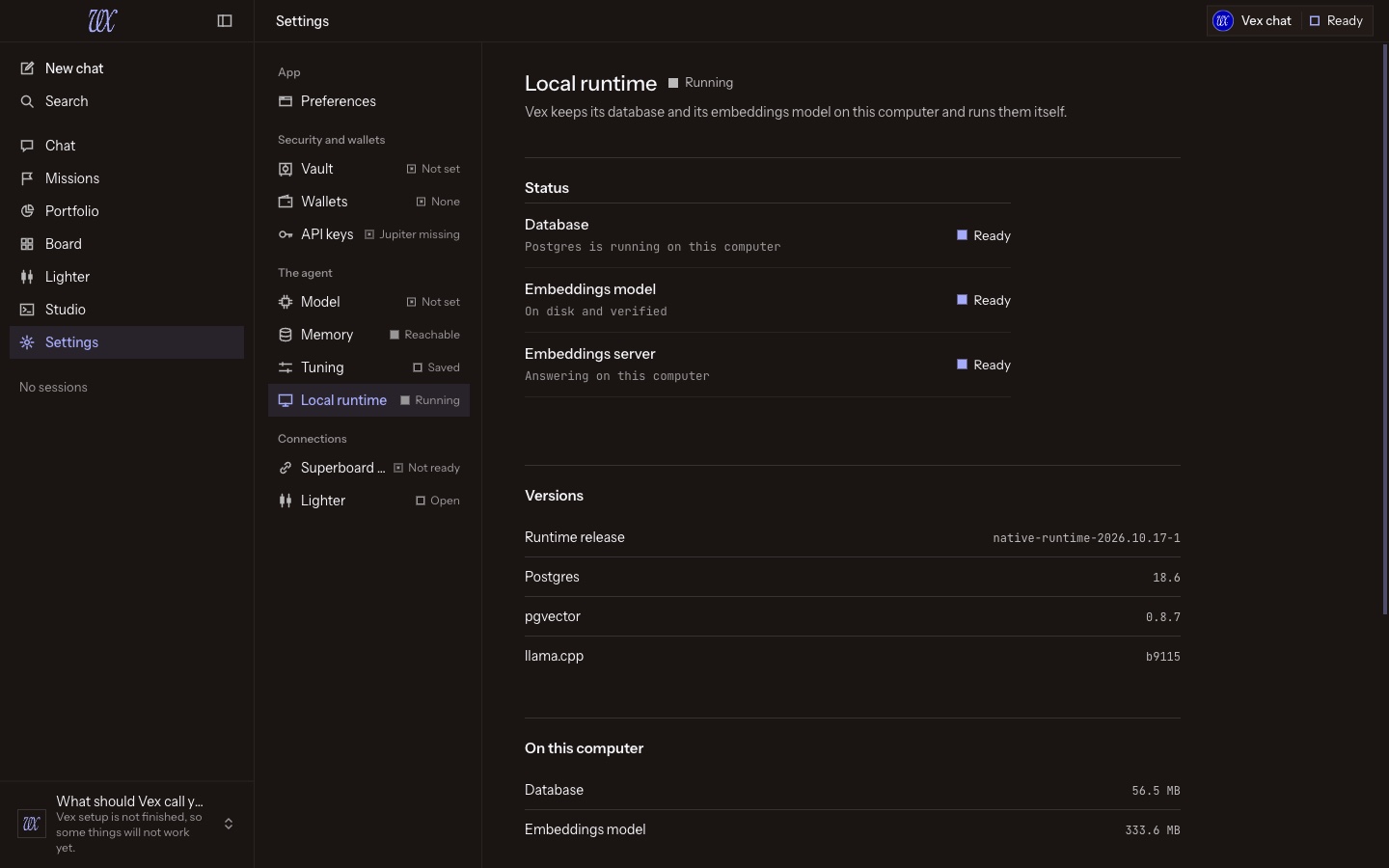
01 · Live status. The database, the embeddings model and the embeddings server, each with its own row, live.
02 · Versions and data size. See exactly which PostgreSQL, pgvector and llama.cpp builds you're running, and how much space your database and model take.
03 · Restart in one click. Restart the runtime and watch it come back step by step. VEX reconnects the agent to the fresh database on its own.
04 · Reset local data. Want a clean database? Reset it behind a typed confirmation. Your wallets, vault, config and the downloaded model are left alone.
05 · Logs, one click away. Open the logs folder straight from Settings when support asks for it.
06 · Safe by design. Restart and reset refuse while a migration or a data move needs the database, and an update waits for a restart to finish. Nothing gets pulled out from under you.
04 · Bring everything with you
Your data moves in one click, and it's proven.
Already running VEX on Docker? Nothing gets left behind.
01 · Move my data. First launch after the update, hit Move my data. Sessions, missions, memory, Lighter history and settings all come across. VEX starts your old database in Docker on its own, copies it, and restores it into the new local runtime in a single transaction that lands whole or not at all.
02 · Proven, not assumed. Before VEX switches over, it compares the old and new databases fact by fact: the schema version, the exact row count and a fingerprint of every row in every table, every stored vector byte for byte, plus sequences, indexes, constraints and extensions. One changed value anywhere and the copy is rejected.
03 · Space checked first. VEX makes sure there's room for the copy before it starts, and tells you exactly how much it needs if there isn't.
04 · Pull the plug, it's fine. Laptop dies mid-move? App quits? The next launch resumes from the last step that finished: copied, restored, verified. Nothing is redone that doesn't need to be.
05 · A failed move tells you why. You see the real error, not a generic one. The full output and the database log are saved in a migration-failed-attempt folder for support. The failed copy is discarded, so Try again starts clean.
06 · Your keys never move. Wallet keystores are files, not database rows. The move never touches them.
07 · Your old data stays safe. The move only ever reads your Docker data. VEX never deletes it on its own: removing it is always your call, from Settings · Local runtime · Old Docker data. Then Docker can go for good.
08 · Or start fresh. Want a clean slate instead? Start fresh, and your Docker data is still left alone.
05 · Meet the new desk
Built around Vex.
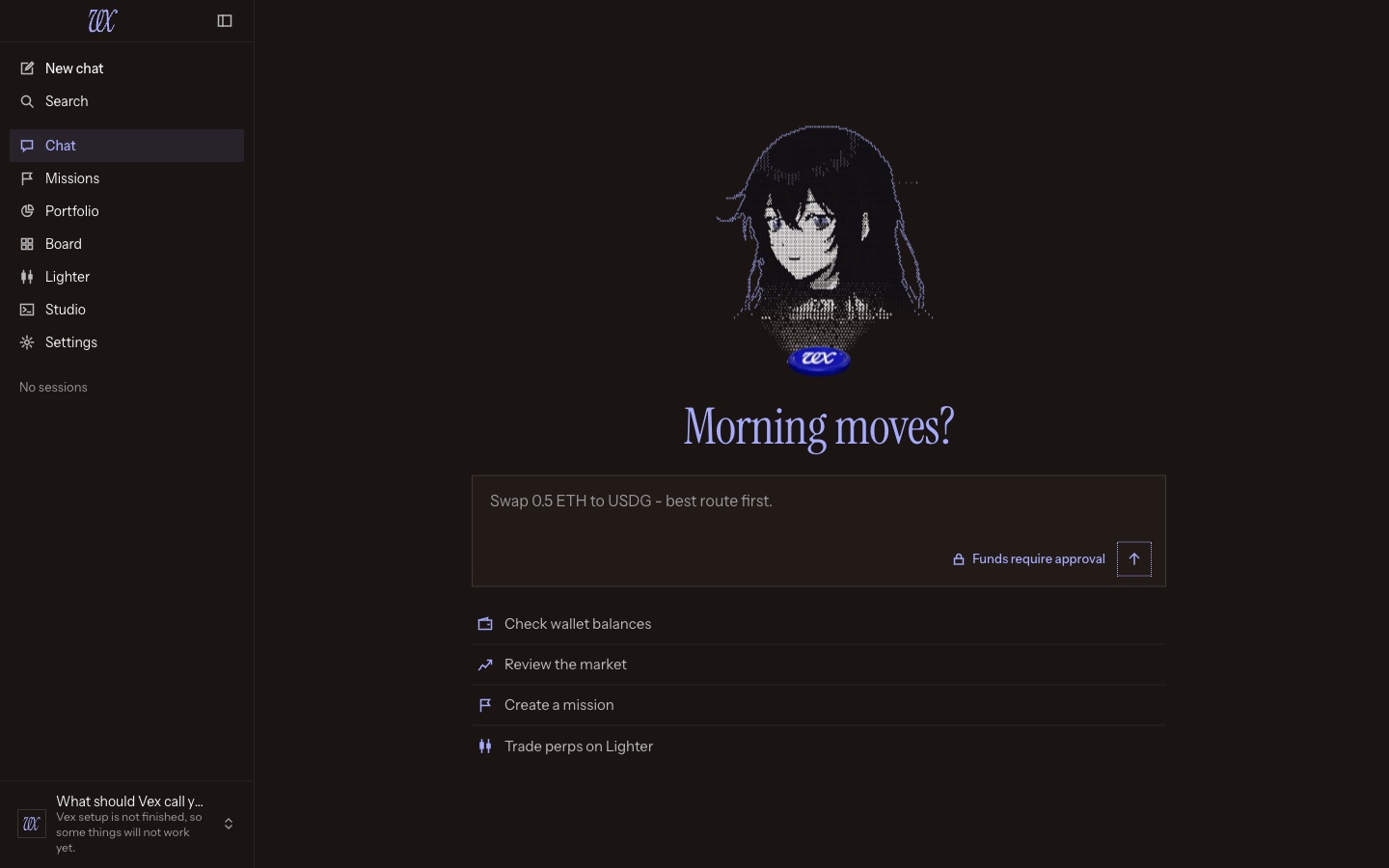
01 · Vex lives here now. She rises from the vx token and sits in her own sidebar, showing what the agent is up to: working, waiting on you, idle or asleep. She looks at you by default, blushes, hums, gestures, and when you come back she wakes up, stands, yawns and rubs her eyes. On the welcome page, tap the token to flip between Vex and the coin.
02 · Light on your machine. Her moments run at 30 frames a second, idle at 10, and she pauses completely when the window is hidden.
03 · Rather not have her around? Flip off Show avatar in Settings and the token, a state ring and a word take her place. You can also choose whether her sidebar opens in chats.
04 · Three calm columns. Navigation, search and your sessions by name on the left, folding to a rail on narrow windows. The conversation in the middle. Vex on the right, tucked away with ⌘⇧. / Ctrl⇧. whenever you want the room.
05 · Never miss a call. Needs you · N sits in the title bar at all times, next to the token chip, with a page listing everything waiting for your decision.
06 · A quieter transcript. Tool calls fold into quiet rows with live timers, so the conversation stays readable while the agent works.
07 · Easier on the eyes. Instrument Serif for titles, Instrument Sans for reading, JetBrains Mono for numbers. The pixel font is gone, and 97 crisp line icons replace the pixel sprites. Trading green and red show up only on trading values.
08 · Every page, redone. Portfolio with the $VEX line, Agent Scan, token history, All assets, Board as its own page with Ask Vex in her sidebar, the Lighter desk with review right in the ticket, Studio inside the left sidebar, Memory, How Vex works, and the sessions library.
09 · Settings on one page. Grouped navigation, with the new Local runtime section and the avatar options.
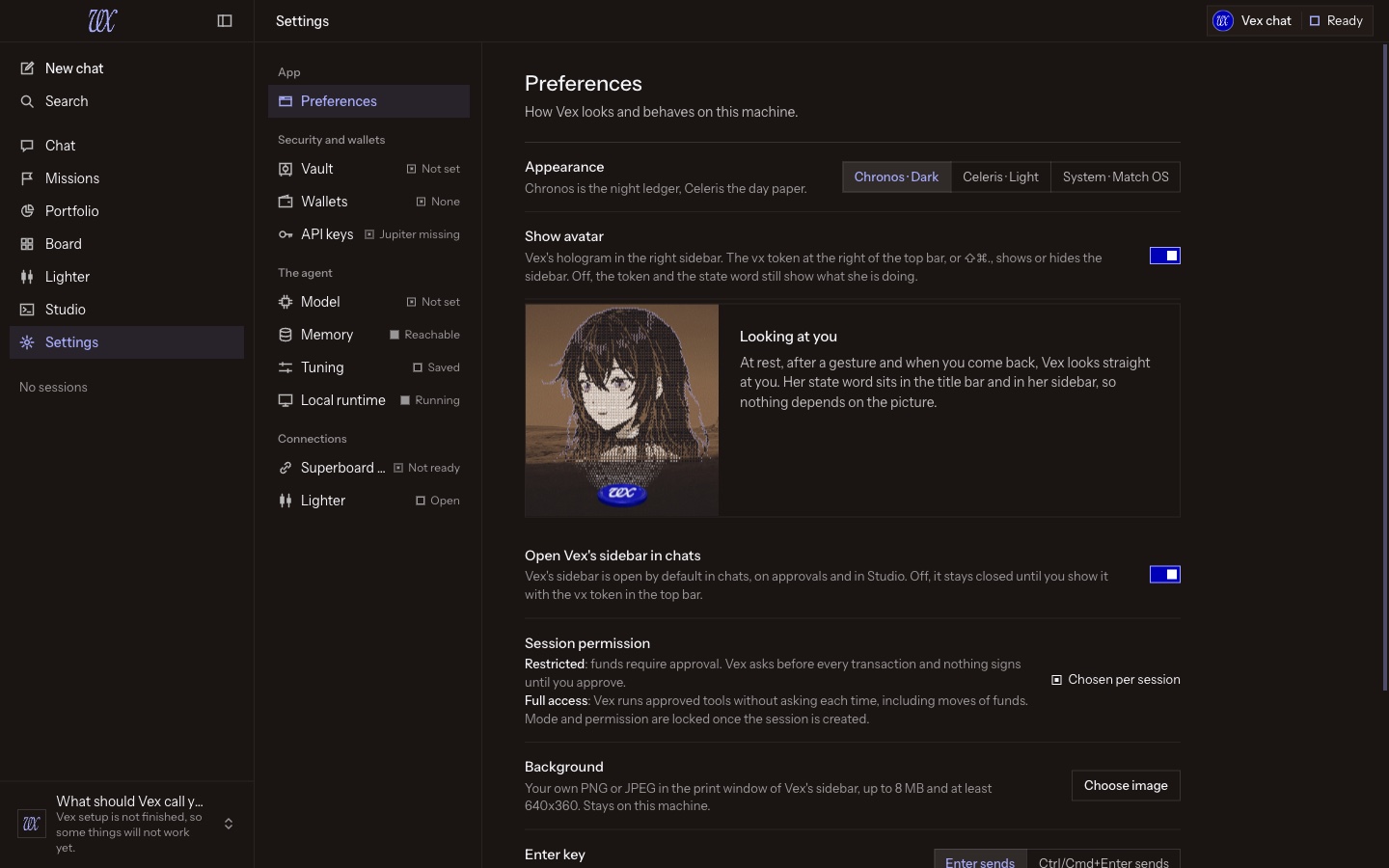
10 · From first launch. Wake, unlock, first run and the setup wizard all happen on one stage, with Vex alongside.
Same colours you know: Celeris by day, Chronos Night Ledger by night, one blue, square edges.
06 · Approvals that speak human
Real funds, said plainly.
01 · A sentence first. Every approval card leads with one plain sentence: what's about to happen.
02 · Then the money. The amounts that matter come next. Where a value isn't available, the card says "Not available" instead of guessing.
03 · Then every signed field. Nothing that gets signed is hidden.
04 · Buttons say what they do. "Approve order", "Approve bridge", not just "Approve". Reject keeps first focus.
05 · Protection untouched. REAL FUNDS framing, the 4-second second click on high-risk approvals and the signing states work exactly as before.
07 · Proved without Docker
Tested on machines that never had it.
Every platform we ship ran a clean-machine gate: the packaged app installed on a fresh machine with Docker removed and proven gone, then taken through System Check, database creation and every migration, the model download, the setup wizard, a quit that stops both services, and a relaunch. All five passed: macOS Apple silicon and Intel, Linux x64, Windows x64 and Windows on Arm.
That gate now stands in front of every release: if any platform fails it, no release is drafted and nothing is signed.
The move from Docker was tested with real user data on macOS and on a real Windows install, alongside automated tests that move a database out of a real Docker container. The macOS builds are signed and notarized, and the Windows builds are signed. Main CI results.
08 · Before you update
What to know.
On Docker today? Keep Docker installed and running for your first 0.4.1 launch, so VEX can read your old database, and leave room on disk for a second copy. Once the move is done and you've removed the old data in Settings · Local runtime · Old Docker data, Docker can go.
New here? You'll never need Docker.
Everything carries over. Sessions, missions, memory, wallets and settings. Sessions now show by name instead of number.
No database migrations ship in this release: your data keeps its current schema.
First launch needs the internet once to download the embedding model.
On WSL? Hardware rendering is opt-in: start VEX with VEX_WSL_GPU=1 to use your GPU.
09 · Squashed
Little things, fixed.
Lighter
- Account setup now shows the fee authorization as its own step, so you see exactly what you're approving.
- Confirmed a leverage change? The sheet closes and stays closed.
- Approvals made on the desk no longer haunt your chat as a ghost "Needs you".
Chat
- A lone
~no longer strikes your text through; strikethrough needs~~.