Repository navigation
Floating Kit
The kit at /kit is the floating UI application kit: input tiles, LCD banner, peek mode, cycle, and (in the app) a power switch. /panel is the browser-only control panel.
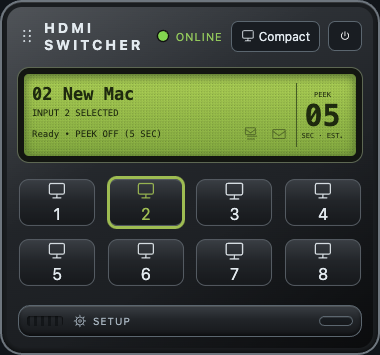
On the server, configure once and leave the listener running:
tesmartctl install
tesmartctl quickstart
Then open the kit in a browser at http://127.0.0.1:<port>/kit, or as a frameless window:
tesmartctl kit
tesmartctl kit --fresh    # ignore saved window prefs once
<port> is TESMART_HTTP_PORT from that install (the wizard default is 8080).
App mode adds the red power switch (quits the kit) and persists appearance / window prefs on the Mac.
| Control | Action |
|---|---|
| Input buttons | Select that input. A disabled input is shown as disabled and is not selectable. Right-click still renames it. Display names puts the local name on the button. An input with no name keeps its number. Hide disabled inputs shows the enabled inputs only, in number order. |
| Cycle Inputs | Open the cycle list (silver chrome), then start cycling |
| PEEK (LCD) | Cycle Off → Once → Always |
| Banner area | Shows sticky / timed messages from tesmartctl banner or Hubitat (pushed over SSE) |
| Message list | Last ~10 banners; pick one to show again |
| Appearance | Body / LCD / highlight / glass themes (saved in the app) |
Defaults: black body, green LCD, olive highlight when using silver+green.
The kit opens GET /api/events (Server-Sent Events) so input changes, name edits, enable and disable changes, and banners appear as soon as the listener knows about them. A background /api/state poll is only a fallback (~30s while online). If the HDMI switch is powered off, the LED goes offline and the headline says CONTROLLER OFFLINE; when it comes back the kit probes about every 2 seconds until connected again (SSE to the listener stays up even while the switch is down). Ctrl-C on the listener sends shutdown first. The headline then says CONTROLLER SHUTDOWN, and the input buttons stay as they were. A crash or a lost connection, with no shutdown event, shows CONTROLLER OFFLINE.
Needs a running listen --http (add --panel for the UI):
tesmartctl banner "Door unlocked"           # timed (~8s)
tesmartctl banner Meeting in 5 --seconds 12
tesmartctl banner "Stay on camera" --sticky
tesmartctl banner --dismiss
tesmartctl banner --history
Banners are not written to the switch hardware LCD; they are local UI messages.
The macOS kit remembers:
- Window size / position
- Body, LCD, highlight, and glass choices
- Hide disabled inputs, and display names on the buttons
- Cycle list selection
Use tesmartctl kit --fresh if prefs get in the way.
- App: red power switch, or Ctrl+C in the terminal that launched
tesmartctl kit - Browser tab: close the tab (listener keeps running)
Repo doc: Docs/panel.md (kit + panel).