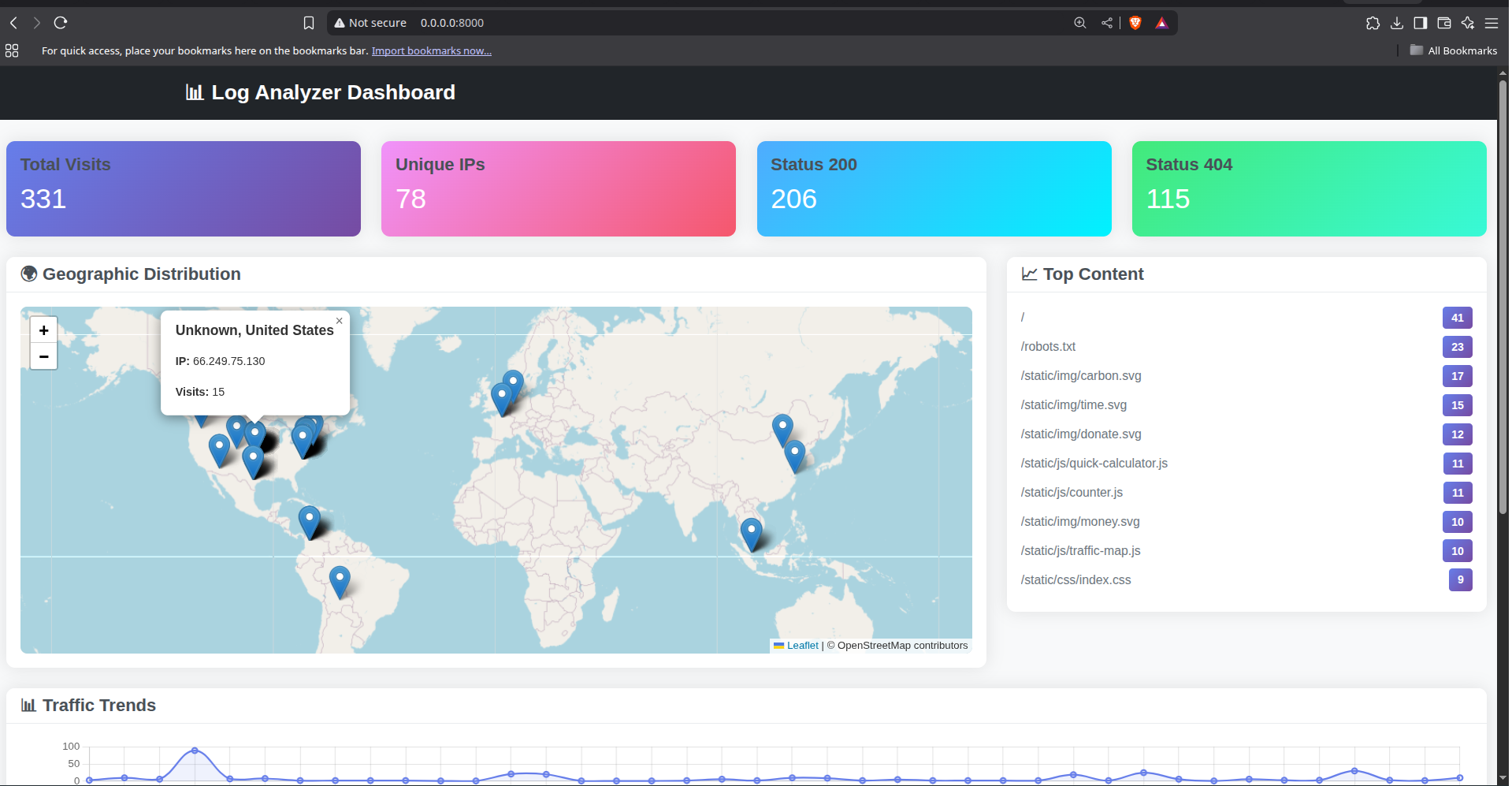
A powerful Python-based platform to analyze web access logs via:
- 🧭 User Journey Analysis
- 🔍 Search Engine Visibility
- 💡 Engagement with Core Features
- 🌍 Geographic Insights (via IP geolocation)
- 📌 Interest in Specific Content
- 📈 Website Traffic Trends
Follow these steps to set up and start using the FastAPI Log Analyzer:
git clone https://github.com/werevi/log-analyzer.git
cd log-analyzerMake sure you have Python 3.8+ installed, then run:
pip install -r requirements.txtCreate a file named log_config.yaml in your FastAPI project with the following content:
version: 1
disable_existing_loggers: False

formatters:
  access:
    format: "%(asctime)s - %(levelname)s - %(message)s"

handlers:
  access_file:
    class: logging.FileHandler
    filename: access.log
    formatter: access
    level: INFO

loggers:
  uvicorn.access:
    handlers: [access_file]
    level: INFO
    propagate: False
This configuration will save incoming request logs to a file named access.log.
Use the following command to start your FastAPI server with logging:
uvicorn core.main:app \
    --log-config log_config.yaml \
    --host 127.0.0.1 \
    --port 9876 \
    --workers 4
Replace
core.main:appwith the path to your actual FastAPI app if it's different.
After running your server, copy the generated access.log file from your FastAPI project into the log-analyzer directory:
cp /path/to/your/project/access.log ./access.logOnce the file is in place, you can run the analyzer and explore detailed statistics.
Ensure your access.log follows this format:
2025-06-14 17:47:34,797 - INFO - 190.158.28.5:10242:0 - "GET / HTTP/1.1" 200
2025-06-16 12:33:29,584 - INFO - 66.249.66.6:58625:0 - "GET /robots.txt HTTP/1.1" 404
Download the GeoIP database (choose one):
- Register at MaxMind GeoLite2
- Download
GeoLite2-City.mmdb - Place the
.mmdbfile in the project root
Update the file paths in the script main.py :
GEOIP_DB_PATH = "dbip-city-lite.mmdb"  # or GeoLite2-City.mmdb
LOG_PATH = "access.log"Outputs include:
- 📌 Top URLs
- 🌍 IP Geolocation (City & Country)
- 💡 Core JS Feature Access
- 📈 Traffic by Hour
- 🔍 Bot & Scraper Detection
- 🧭 Example User Journeys
Run the web server:
uvicorn main:app --host 0.0.0.0 --port 8000 --reloadThen open your browser at:
http://localhost:8000
- 📌 Statistics Cards: Total hits, unique IPs, HTTP status codes
- 🌍 Interactive Map: IP geolocation via OpenStreetMap
- 📈 Hourly Traffic Graphs
- 📑 Most Popular URLs
- 🧭 Detailed User Journeys
| Endpoint | Description |
|---|---|
GET / |
Main dashboard |
GET /api/locations |
IP → Location JSON data |
GET /api/stats |
Global traffic stats |
If your log format differs, change the LOG_PATTERN in main.py:
LOG_PATTERN = re.compile(r'your_custom_pattern_here')Edit static/css/dashboard.css for appearance tweaks.
Change map tiles in static/js/dashboard.js:
L.tileLayer('https://your-tile-provider/{z}/{x}/{y}.png', {
  attribution: 'Your attribution'
}).addTo(map);🧭 User Journey Samples
IP: 190.158.28.5
2025-06-14 17:47:34 - / [200]
2025-06-14 17:47:35 - /static/img/background_logo_figure.webp [200]
🌍 Geographic Insights
190.158.28.5 → Bogotá, Colombia
📈 Hourly Traffic Trends
2025-06-14 17:00 → 3 hits
| Insight | Description |
|---|---|
| User Journey | IP-wise page flow tracking |
| Search Engine Activity | Detects bots like Googlebot, Bingbot |
| Feature Usage | Tracks visits to /static/js/... endpoints |
| Geolocation | IP-based city & country lookup |
| Content Popularity | Top visited endpoints |
| Traffic Trends | Hourly breakdown of hits |
- Python 3.7+
geoip2fastapi,uvicornjinja2,aiofiles- GeoIP
.mmdbfile from DB-IP or MaxMind
| Problem | Solution |
|---|---|
| Log file not found | Verify access.log path |
| GeoIP errors | Ensure .mmdb exists & matches GEOIP_DB_PATH |
| Map doesn't load | Check tile URL or internet connection |
| Dashboard blank | Check browser console for JS errors |
- No database required — logs are parsed on-the-fly
- Fully responsive dashboard (desktop & mobile)
- Auto-refresh for real-time traffic monitoring
- Perfect for dev teams, SEO audits, or traffic debugging
We welcome PRs! Feel free to fork, star ⭐, or suggest new features.
GPLv3 License. See LICENSE file for details.