Releases: WietseWind/MowerBar
Release list
MowerBar 1.2.0 — recent events and API compatibility

 WietseWind
Wietse Wind
WietseWind
Wietse Wind
ad85fc3
WietseWind
Wietse Wind
MowerBar now shows Recent Events for each mower, giving context for how it reached its current status. Open the submenu to see up to ten timestamped events from the last 30 days; select an event for its complete explanation and Mammotion's suggested remedy.
History loads on demand, is cached for five minutes, and can be refreshed manually. Routine charging and rest stops appear alongside faults. Historical events do not change live status, commands, or notifications. Failed refreshes keep previous results visible with their last update time.
This release also fixes compatibility with Mammotion's changed API status values: Mowing and TaskPaused now work alongside Working and Paused.
- Keep offline mowers in the fleet when the API omits status and battery.
- Show unfamiliar statuses in the submenu and flag unavailable telemetry instead of treating it as idle.
- Apply the menu's action checks to URL commands too.
- Show Wi-Fi IP addresses when supplied, add
--status --verbosefor submenu diagnostics, and--status --eventsfor history and remedies. - Avoid recovery notifications when the new status is unknown, and avoid claiming an offline mower is off its dock.
Validated with 27 regression tests, isolated API fixtures covering offline history and request failures, and live status/history reads from a three-mower Luba 2 fleet. No mower movement commands were issued during validation.
Universal macOS 13+ build for Apple Silicon and Intel, Developer ID signed and notarized by Apple. Download MowerBar.zip, quit MowerBar, and replace your existing app.
MowerBar 1.1.4 — paste works in Settings
WietseWind
Wietse Wind
c511c57
WietseWind
Wietse Wind
You can paste into Settings now. Thanks to the reporter on r/MammotionTechnology —
this one made the Settings window close to useless and I had not noticed, because my own
credentials went in before the window existed.
Fixed
Paste did nothing in the Client ID and Client Secret fields. Both are long opaque
strings nobody types by hand, so the practical answer was to edit config.json by hand —
exactly the thing the window is supposed to save you from.
Two separate causes, neither of them the text fields:
- A menu bar app has no menu bar of its own, and macOS dispatches ⌘X/⌘C/⌘V/⌘A/⌘Z through
the main menu before anything in the responder chain sees the keystroke. MowerBar
never installed one, so those shortcuts were delivered nowhere at all. There is now an
Edit menu carrying them. - An accessory app cannot reliably take keyboard focus — macOS showed the Settings
window while leaving the previously active app in front, so keystrokes went to that app
instead. Settings now becomes a regular app while it is open (briefly showing a Dock
tile) and returns to menu-bar-only when you close it. That also makes the Edit menu
visible if you would rather use the mouse.
Client ID appeared truncated. The field was 300pt wide for a 41-character identifier.
Now 420pt in a wider window, and both credential fields are monospaced so you can check a
value character by character.
build.sh --native never worked. macOS ships bash 3.2, where expanding an empty
array under set -u is an unbound-variable error. Only affects building from source.
Nothing else changed
No API changes, no config changes, no behaviour changes to monitoring or notifications.
Your existing settings and remembered fleet carry over untouched.
Install
Download MowerBar.zip, unzip, drag MowerBar.app to /Applications.
Universal — Apple Silicon and Intel. Signed with a Developer ID and notarized by Apple.
Requires macOS 13+.
sha256 770a0ecf345e8f37a61bf208558ba8ebe910d97b6c58eb202a750c73f3cbf54c
Full changelog: v1.1.3...v1.1.4
MowerBar 1.1.3 — universal (Apple Silicon + Intel)
WietseWind
Wietse Wind
d70c78b
WietseWind
Wietse Wind
Now runs on Intel Macs.
Every release up to and including 1.1.2 was Apple Silicon only, which quietly excluded
every Intel Mac — including plenty still running macOS 13 and 14 perfectly well. If you
tried an earlier build on an Intel machine and it would not launch, that is why.
1.1.3 ships a universal binary: one download, runs natively on both architectures.
No Rosetta, no separate download to pick between.
$ lipo -info MowerBar.app/Contents/MacOS/MowerBar
Architectures in the fat file: x86_64 arm64
Both slices are signed with the same Developer ID and carry the hardened runtime;
notarization covers the whole bundle. The download grows from 574 KB to 805 KB, which
seemed a fair trade for working on half the Macs in existence.
Note on earlier releases
v1.1.2 and older remain Apple Silicon only. Their published sha256 values are what
people verified against, so replacing those assets in place would have invalidated them.
Intel users: start at 1.1.3.
Everything else
Unchanged from 1.1.2. No
behaviour differences, no API changes, no config changes.
Install
Download MowerBar.zip, unzip, drag MowerBar.app to /Applications.
Requires macOS 13+ on Apple Silicon or Intel.
sha256 3fa1a876a61724613cbdea15af9a56b8b3d46e189ba8a92cd373db1844e0b02c
Full changelog: v1.1.2...v1.1.3
MowerBar 1.1.2 — it's macOS, and it's a menu bar
WietseWind
Wietse Wind
9227d77
WietseWind
Wietse Wind
Apple Silicon only. Intel Mac support arrived in v1.1.3 — this build will not launch on Intel.
Terminology, courtesy of r/MammotionTechnology.
"OSX" stopped being the name in 2016 — it is macOS. And "tray" was never the name on
this platform at all; that is Windows. macOS has a menu bar, and the things sitting
in it are status items or menu bar extras.
The prose was already right. The leftovers were internal, plus the GitHub repo
description, which said "OSX Mammotion Tray Icon" and now does not.
Changed
trayIconHeightinconfig.jsonis nowmenuBarIconHeight.
If you already set it, your value still works — the old key is read whenever the
new one is absent. Verified across all four combinations of present/absent.- Internal renames:
trayImage→menuBarImage, and the comments that still said
"tray". - GitHub repo description corrected.
Nothing else changed. No behaviour differences, no API changes. If you are on 1.1.1 and
do not care what the config key is called, there is nothing here for you.
Install
Download MowerBar.zip, unzip, drag MowerBar.app to /Applications.
Signed with a Developer ID and notarized by Apple. Requires macOS 13+.
sha256 5dddbb2eb5537c2e5a7d727285406a6b6979fad05d3dbd6e198b5f9a8bd9c286
Full changelog: v1.1.1...v1.1.2
MowerBar 1.1.1 — both radios, in plain language
WietseWind
Wietse Wind
81bf290
WietseWind
Wietse Wind
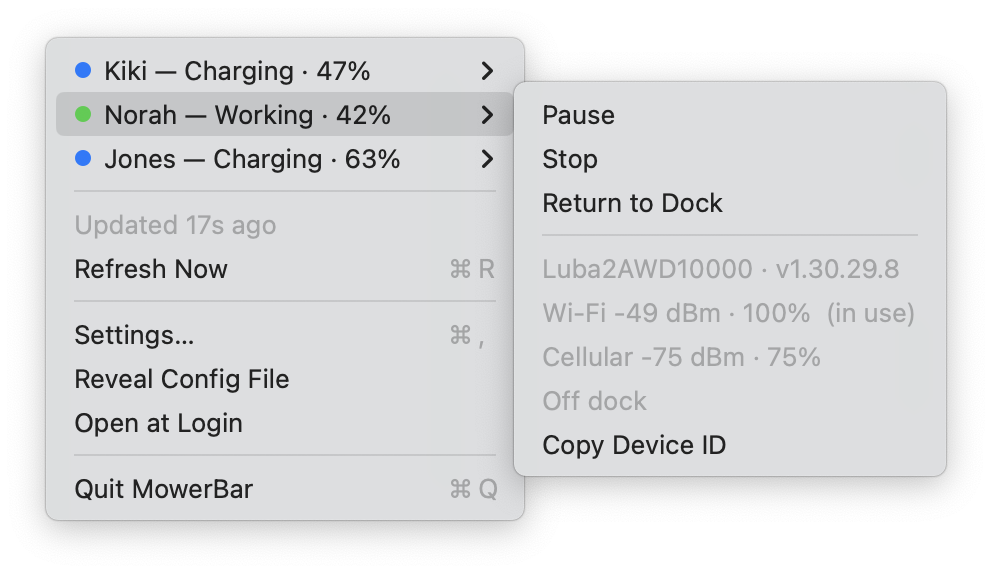
Both radios, in language people can read.
The Mammotion API reports Wi-Fi and cellular signal on every call, regardless of
which one is actually carrying traffic. MowerBar was showing one and discarding the
other — which hid the useful part: whether a mower drifting to the edge of Wi-Fi has
4G to fall back on before it drops off entirely.
Changed
- Both Wi-Fi and cellular are listed, with
(in use)marking the active one. - Each dBm figure is paired with a percentage.
-49 dBmmeans nothing to most
people. The percentage is linear over a 40 dB span with the endpoints set where
each radio stops being useful — roughly −50…−90 for Wi-Fi, −65…−105 for cellular.
It is a rule of thumb, not a measurement, which is why the dBm stays next to it. - A radio the device does not report is omitted rather than shown as an empty row.
Documented
No satellite count or RTK fix quality is available anywhere pollable — not in
/v1/mower/{deviceId}, not in work-params, and there are no undocumented fields
in the raw response. The subscription API lists a LOC_SRC ("Location source status")
property, but the REST spec documents no way to receive those events: no webhook URL,
no MQTT endpoint, no callback parameter. Now stated plainly in the README's
"What it cannot do".
Install
Download MowerBar.zip, unzip, drag MowerBar.app to /Applications.
Signed with a Developer ID and notarized by Apple. Requires macOS 13+.
Your existing config and remembered fleet carry over untouched.
sha256 6978bd6807a05913e7e31039206b40e4c3f709d0ca4d08c8d0ad677a19e4c3da
Full changelog: v1.1.0...v1.1.1
MowerBar 1.1.0 — charging ≠ stuck
WietseWind
Wietse Wind
47552dd
WietseWind
Wietse Wind
Charging is not the same thing as stuck.
The Mammotion API reports Paused for two situations that could not be more different:
a mower stalled in the middle of the lawn, and one sitting on its dock charging.
v1.0.0 treated them alike, so a mower doing exactly what it should raised a red badge
and a notification.
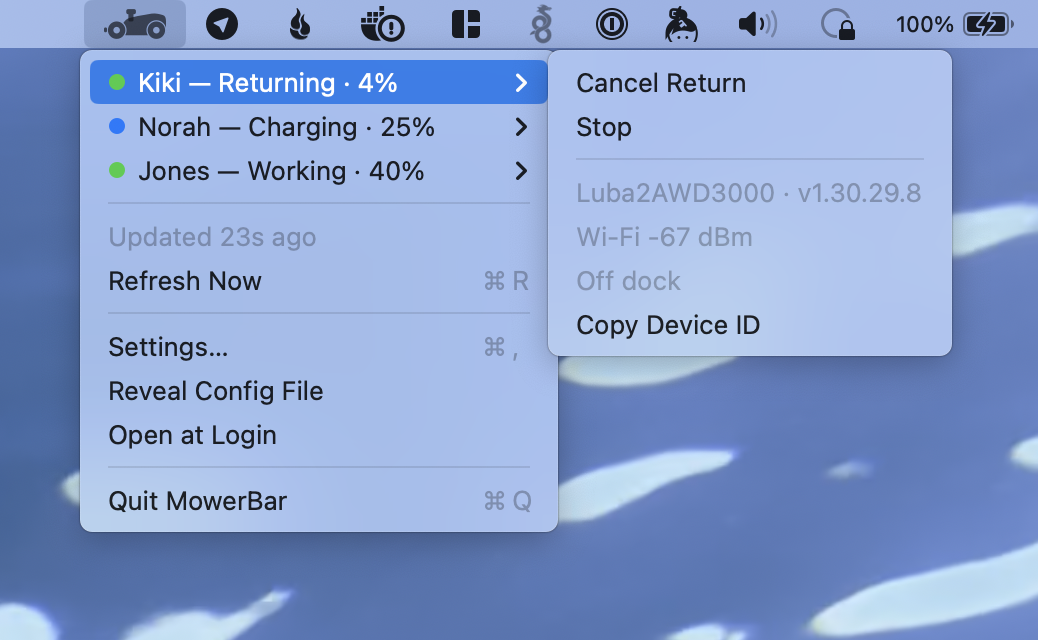
chargeStatus is the only field that separates them. Now:
| status | chargeStatus | shown as | dot | notifies |
|---|---|---|---|---|
Paused |
0 — off dock |
Paused | 🔴 red | "<name> is stuck" |
Paused |
non-zero — on dock | Charging (or Docked at 100%) | 🔵 blue | silent |
Changed
- Stuck mowers are red, not amber. Paused off the dock is the worst of the
recoverable states — the mow is not happening and will not resume on its own.
With amber no longer meaning anything, it is gone. - New blue "Charging" state. Does not raise the menu bar badge and does not notify.
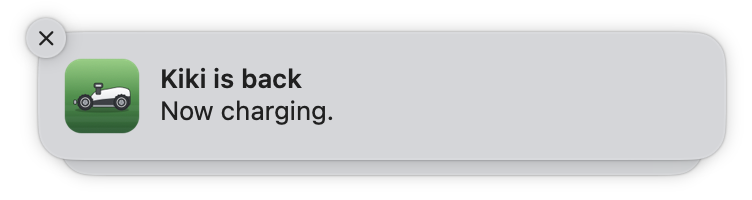
Reads Docked once it hits 100%. - Notification wording says what happened rather than echoing the API:
"<name> is stuck — Paused mid-job, off the dock". Recovery names the real state too,
so a mower that limps home now reports charging rather than paused:
- Return to Dock is no longer offered to a mower already on the dock.
Fixed
chargeStatus: 2was documented here as "docked and full". It has since been observed
at 17% battery, so it does not mean full. Only zero versus non-zero is treated as
meaningful:0is off the dock, anything else is on it.
Unchanged, but worth showing
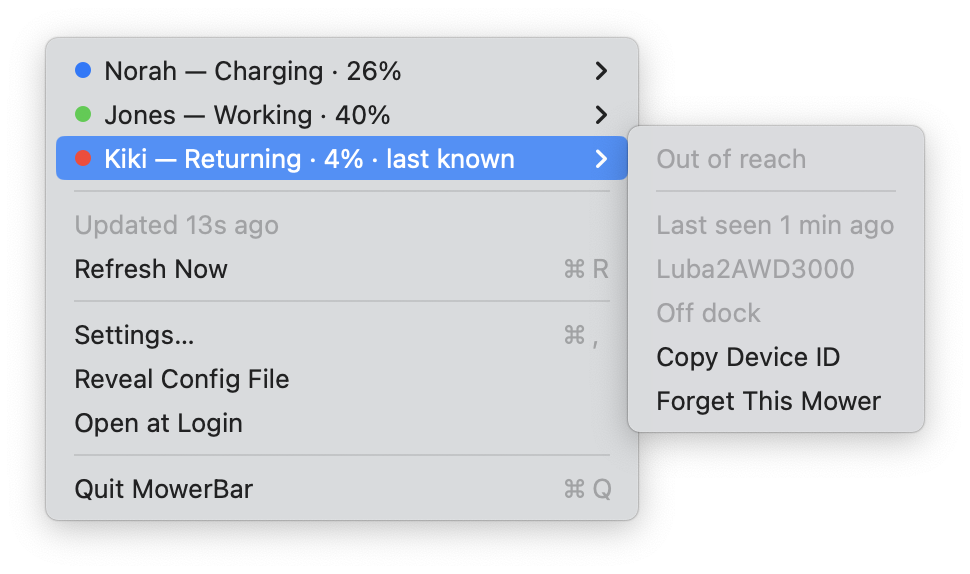
A mower that drops off the account's device list keeps its row, in red, still carrying
what it was last seen doing — and is never offered commands it cannot hear:
Install
Download MowerBar.zip, unzip, drag MowerBar.app to /Applications.
Signed with a Developer ID and notarized by Apple. Requires macOS 13+.
Your existing config and remembered fleet carry over untouched.
sha256 d0d905180206da0509373b12033206a9355b9ebcd39b14defc979af56debe207
Full changelog: v1.0.0...v1.1.0
MowerBar 1.0.0
WietseWind
Wietse Wind
512f697
WietseWind
Wietse Wind
Your robot mowers in the macOS menu bar. First release.
Install
Download MowerBar.zip, unzip, drag MowerBar.app to /Applications, open it.
Signed with a Developer ID and notarized by Apple, so it opens without a Gatekeeper prompt.
Look for the mower in your menu bar — there is no Dock icon and no window.
On first launch it has no credentials. Open Settings…, paste your own from
developer.mammotion.com, press Sign In.
What's in it
- Every mower on your account with status, battery and charge state
- Start / Pause / Resume / Stop / Return to Dock / Cancel Return — only the ones the mower's
current status can accept, so a paused mower offers Resume, never Start - Start a saved task by name
- Red badge in the menu bar when anything is offline, faulted, or paused mid-job
- Notifications on transitions only, so a stalled mow nags once rather than every poll
- Mowers that drop off the device list keep their row, carrying their last known state
- Open at login, and a
mowerbar://URL scheme for scripting
Read this first
This drives real machinery, with no confirmation dialogs. It is a weekend project tested against
one account and three mowers. Not affiliated with, endorsed by, or supported by Mammotion.
Provided as-is, no warranty — see the dragons section.
Requires macOS 13+. Per Mammotion, the Developer API only covers models released in 2025 onward.
Verify
sha256 5da2a9921afa2bc63253cfd46bb5f5141c2ed50e986e0abd5e372313f27a6df3
codesign -dv --verbose=2 /Applications/MowerBar.app   # Developer ID Application: Mithra B.V. (PYB22G3PR6)
spctl --assess --type execute -vv /Applications/MowerBar.app   # accepted, source=Notarized Developer ID