
Modern Windows debloater with Windows 11‑style settings, script‑based persistence, and custom ISO builder – all in one portable tool.


Most Windows debloaters either delete system files aggressively, break future updates, or force you to redo everything after a fresh install or a major Windows Update. Winhance solves this fragmentation by offering a safe, auditable, and persistent approach.
Winhance solves one specific problem: keeping Windows 10 and Windows 11 clean, private, and responsive — without losing the ability to update or restore settings. No registry bombing. No telemetry bypass hacks. Just a clean interface that works like native Windows 11 Settings.
If you are tired of re‑running debloat scripts every month, losing your tweaks after Windows Update, or manually building lightweight installation ISOs, Winhance is exactly what you need.
| Feature | What It Means |
|---|---|
| One job, done well | Winhance focuses on debloating, settings persistence, and ISO customization – no crypto miners, no driver updaters, no unrelated tools. |
| Light on resources | Winhance runs under 80 MB RAM, closes immediately after applying changes, and leaves no background agents. |
| Remembers your choices | Every tweak you make in Winhance can be saved as a PowerShell script. If Windows Update reverts something — one click reapplies your Winhance profile. |
| Instant response | The Winhance interface opens in under 0.5 seconds. Toggles feel native. No “are you sure?” spam. |
| Version | Summary |
|---|---|
| 2.4 | Full Windows 11 24H2 support + ISO trim mode (removes Edge WebView2 completely) |
| 2.3 | Script export now includes “undo” blocks – every Winhance action is reversible |
| 2.2 | Custom ISO builder with integrated Winhance preset – install once, stay debloated |
| 2.1 | Dark mode refinements, 40% faster settings enumeration |
| 2.0 | Complete GUI rewrite – matches Windows 11 Settings exactly |
| 1.5 | First stable Winhance release with script persistence and telemetry blocklist |
- Power users – Keep Windows 11 lean without fighting the OS after every update.
- IT administrators – Deploy Winhance presets across hundreds of workstations via exported scripts.
- Privacy advocates – Disable telemetry, advertising IDs, and activity tracking through a clean Winhance interface.
- Gamers – Eliminate background apps, Xbox services, and GameDVR for higher FPS using Winhance.
- Developers – Remove OneDrive, Copilot, and Teams Chat from clean Windows installations using Winhance ISO builder.
- System integrators – Create custom Winhance‑optimized ISOs for clients or internal deployment.
- Low‑RAM device owners – Run Windows 11 on 4GB tablets after applying the Winhance memory‑saver profile.
- Get Winhance – Download the portable
.exe(no admin rights strictly required, but recommended for full debloating). - Launch – Double‑click
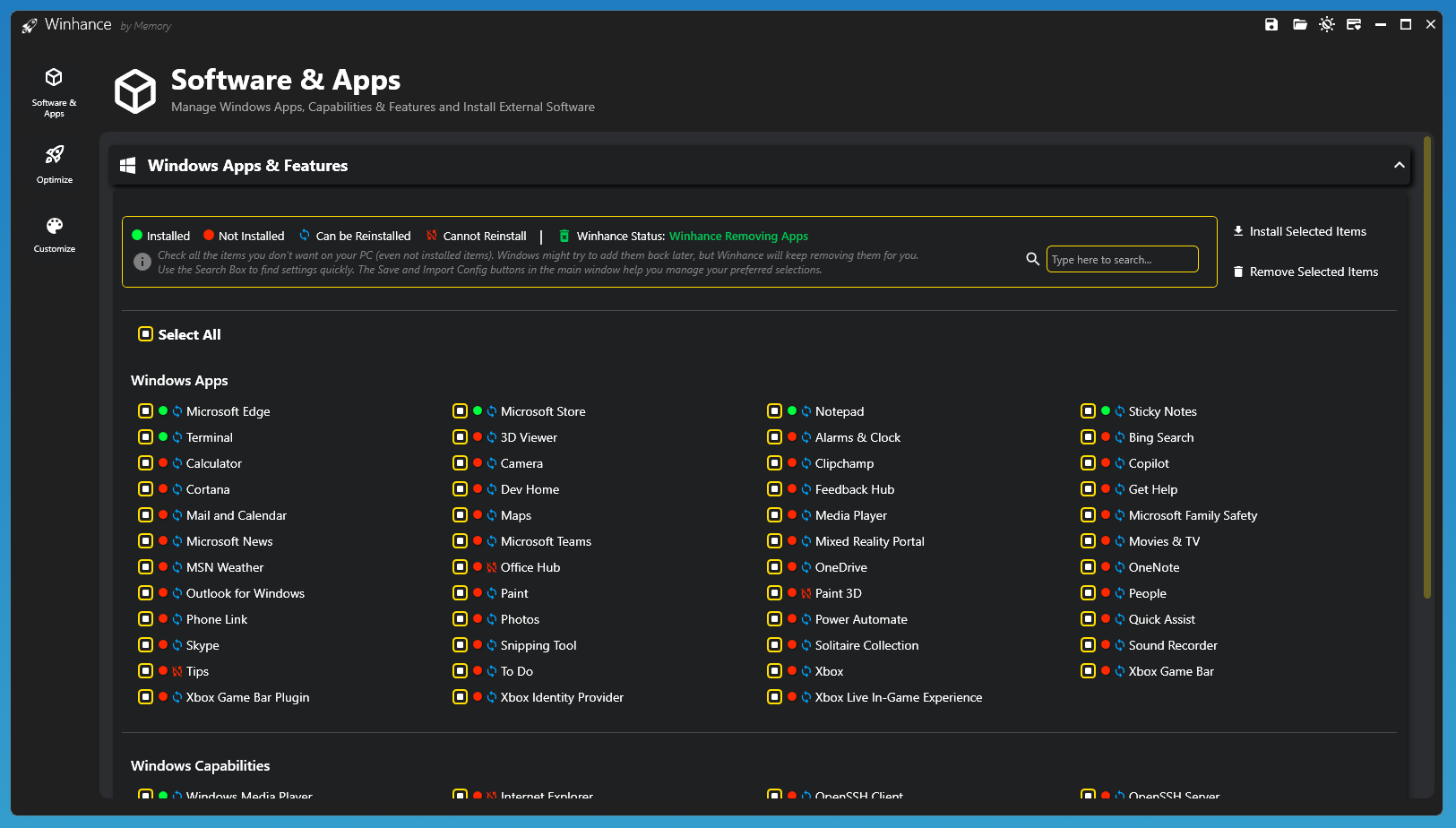
Winhance.exe. You will see a Windows 11‑style Settings window. - Apply your first debloat – Go to “System → Debloat” and toggle off items like Xbox, Teams Chat, OneDrive, and Telemetry.
- Save as script – Click “Export Winhance script”. Save it anywhere. If Windows Update reverts anything later – run that script again.
- Build a custom ISO – In Winhance go to “Tools → Custom ISO”. Select a base Windows 11 ISO, choose your tweaks, and generate a fresh ISO with Winhance presets pre‑applied.
- Adjust (optional) – Change Winhance theme, backup settings, or create auto‑apply USB media.
- Work normally – Winhance does not run in background. Your system stays clean until you change something.
Winhance is not just another debloater. It combines three essential tools:
- Windows 11‑style interface – every toggle, slider, and dropdown looks and behaves like native Windows Settings. No ugly WinForms or outdated dialogs.
- Script persistence engine – Winhance records every change as a reversible PowerShell script. If Windows Update overwrites your settings, run the same Winhance script again – identical result.
- Custom ISO builder – integrate any Winhance profile directly into a Windows 10/11 installation image. Install once, stay debloated forever.
- Safety net – all Winhance debloating actions are non‑destructive. Disabled features can be re‑enabled. No files are deleted – only unregistered or hidden.
- Telemetry and services manager – fine‑tune scheduled tasks, services, and background apps without touching the registry manually.
- Export / import profiles – share your perfect Winhance configuration across multiple machines.
All these components work together seamlessly. You never need separate scripts, ISO tools, or registry cleaners.
Scenario 1: Deploy a standard work‑from‑home image
Create a Winhance profile that removes consumer bloat but keeps Defender and corporate VPN compatibility. Export as script. Push via GPO or USB.
Scenario 2: Recover after a Windows feature update
Windows 11 24H2 re‑enables Copilot, Teams Chat, and advertising ID. Open Winhance, click “Reapply last profile” – fixed in 8 seconds.
Scenario 3: Build a lightweight gaming ISO
Use Winhance ISO builder to strip out 3GB of non‑essential packages (OneDrive, Xbox, News, Weather, Help, Tips). Install on gaming PC – cleaner and faster.
Scenario 4: On‑call technician with a USB stick
Copy portable Winhance folder to a USB drive. Walk to any Windows 11 PC, run Winhance, apply your debloat script without installing anything.
Scenario 5: Annual clean install without losing tweaks
Export your Winhance settings as a script. Clean install Windows. Run the exported Winhance script once – system fully reconfigured to your preferences.
| Minimum | Recommended | |
|---|---|---|
| OS | Windows 10 (21H2+) | Windows 11 (24H2) |
| CPU | 1.2 GHz | 2.0 GHz+ |
| RAM | 2 GB | 8 GB (for ISO building) |
| Storage | 100 MB + 8 GB free for ISO cache | 20 GB free (SSD) |
| Display | 1024x768 | 1920x1080 |
| Architecture | 64-bit | 64-bit |
Winhance does not require:
- Administrator rights for viewing settings (only for applying changes)
- Internet connection for core debloating
- Microsoft account
- Third‑party runtimes (no .NET or VC++ required – native Windows API)
| Feature | Winhance | Traditional Scripts (GitHub) | Privacy Apps | ISO Trim Tools |
|---|---|---|---|---|
| Windows 11‑style GUI | Yes | No (text scripts) | Partial | No |
| Persists after Windows Update | Yes (reapplies via saved script) | No (manual re‑run) | No | No |
| Custom ISO builder | Yes | No | No | Partial |
| Non‑destructive debloat | Yes (reversible) | Sometimes | Often aggressive | Varies |
| Script export / import | Yes | Yes | No | No |
| Single portable EXE | Yes | No | Mixed | No |
| No telemetry / no uploads | Yes | Varies | Yes | Yes |
Winhance replaces multiple scripts, registry cleaners, and ISO tools with one consistent, safe, and modern interface.
Winhance ğü Winhance Windows debloater ğü Winhance Windows 11 debloater ğü Winhance custom ISO tool ğü Winhance privacy settings ğü Winhance script persistence ğü Winhance telemetry blocker ğü Winhance lightweight Windows ğü Winhance gaming optimization ğü Winhance portable utility ğü Winhance Windows 10 cleaner ğü Winhance no reinstall debloat ğü Winhance USB tool ğü Winhance system administration ğü Winhance Windows 11 tweaks ğü Winhance modern interface ğü Winhance ISO customization ğü Winhance safe debloat ğü Winhance update‑proof settings ğü Winhance enterprise deployment ğü Winhance Windows 11 utility ğü Winhance Windows 10 tool