Documentation: Try using Storybook#1009
Conversation


.storybook/config.js
Outdated
| import * as element from 'element'; | ||
|
|
||
| function loadStories() { | ||
| console.log( 'aloooooo' ); |

There was a problem hiding this comment.
This is still WIP :) (Trying to find an excuse)
.storybook/config.js
Outdated
| console.log( 'aloooooo' ); | ||
| window.wp = { ...window.wp, element }; | ||
| require( '../components/story' ); | ||
| require( '../components/button/story' ); |
There was a problem hiding this comment.
These 2 lines should use tabs for indentation
Edit: I would think eslint would have caught both of these issues. Maybe it is not running in this directory?
There was a problem hiding this comment.
Yes, it's not I'll fix it
components/button/story/index.js
Outdated
| @@ -0,0 +1,16 @@ | |||
| /** | |||
| * External components | |||
components/story/index.js
Outdated
| @@ -0,0 +1,12 @@ | |||
| /** | |||
| * External components | |||

|
This is pretty cool, one drawback is that it seems like this will require a good bit of work to integrate with all of our components. One thing that might help (later on, once we have 3-4 examples of component stories) is creating a wrapper to take a readme and a component demo, and build a story out of it, including some common headings and styling for the demo + documentation sections. Is it possible to do a static build of the |

There are already some Storybook addons and community addons to answer some of these questions and we can also write custom addons. I'll explore more with the addons and see what's relevant to us.
It's already possible with |

|
I'm having some issue with the button appearing styled. With
Do you know if there is good support/precedent/examples of applying a custom appearance to the Storybook explorer? I love the usability of it, and think it's great to showcase interactive demonstrations this way, but am curious if the effort will be for naught if it can't be made to integrate well into WordPress' own documentation style. |

Yes, I'm aware of this issue, this happens because we're assuming the WP Admin stylesheet is present when writing our components (We could question this later). My proposed solution is loading the WP Admin Styles from a CDN or something. (maybe directly from wordpress.org).
To be honest, I've no idea :) But I'll take a look tomorrow. |

 youknowriad
force-pushed
the
try/storybook
branch
from
youknowriad
force-pushed
the
try/storybook
branch
from
794b51e to
f93e7f4
Compare
|
I'm loading the WP stylesheets, so the buttons should behave as expected.
What kind of integration are you thinking of? The stories can have fullscreen URLs (to be embedded as iframes maybe) but I don't think we can do much more. |
youknowriad
force-pushed
the
try/storybook
branch
from
f93e7f4 to
d8aa20b
Compare

| import readme from '../README.md'; | ||
|
|
||
| storiesOf( 'Components', module ) | ||
| .add( 'Welcome', () => <ReactMarkdown source={ readme } /> ); |

There was a problem hiding this comment.
Do we want to add withKnobs as a decorator here? Currently when navigating from Button to Welcome, the Button's knobs remain.
| import './style.scss'; | ||
|
|
||
| function loadStories() { | ||
| window.wp = { ...window.wp, element }; |
There was a problem hiding this comment.
Hmm, are we needing to recreate the window global here for everything the components might depend on? We might need a more scalable approach (eventually?).
There was a problem hiding this comment.
Actually, we only need it for element because of the pragma defined in the .babelrc.
Hopefully we'd be able to remove element and use React directly :)
.storybook/webpack.config.js
Outdated
| @@ -0,0 +1,28 @@ | |||
| const config = require( '../webpack.config' ); | |||
| config.module.rules = [ | |||
| ...config.module.rules.filter( ( rule ) => ! rule.test.test( 'file.scss' ) ), | |||
There was a problem hiding this comment.
What is this? (specifically file.scss)
There was a problem hiding this comment.
We need to redefine the sass loader to avoid the ExtractTextPlugin, and the only way I've found to exclude it is to run the test with a dummy file.scss
There was a problem hiding this comment.
Ah, okay. We might want to add a comment explaining this. Probably enough to test '.scss' too.
| The following props are used to control the display of the component. Any additional props will be passed to the rendered `<a />` or `<button />` element. The presence of a `href` prop determines whether an anchor element is rendered instead of a button. | ||
|
|
||
| * `isPrimary`: (bool) whether the button is styled as a primary button. | ||
| * `href`: (string) if this property is added, it will use an `a` rather than a `button` element. |
There was a problem hiding this comment.
Many more props than this for <Button />. Are there any Storybook addons to use or automate props from the component's code?
There was a problem hiding this comment.
There's a very nice way to automate this, but we need to define the PropTypes for this, which we've been avoiding for now.
There was a problem hiding this comment.
I might be open to reconsidering that if it serves good purpose for documentation.
| @@ -0,0 +1,52 @@ | |||
| @import url( 'https://wordpress.org/wp-admin/load-styles.php?c=0&dir=ltr&load%5B%5D=common,buttons,dashicons,forms' ); | |||
|
|
|||
| html { | |||
There was a problem hiding this comment.
Where do these additional styles come from?
There was a problem hiding this comment.
I came up with these styles to match the info addon. The infoAddon automatically applies some styling to its output, and for the stories that don't use it, I came up with the styles to unify the output
I don't really have anything specific in mind, except perhaps fitting into Handbook style docs, or similar to Developer site function reference:
To not have it feel so "off-site" / standalone / unfamiliar. An |
|
We reached a point here we need to take a short term decision on whether we'd want to merge this and continue adding stories or ditch it (maybe in favour of a custom solution). Storybook suffers from the difficulty to customise the surroundings but has the advantage of the ease-of-use. We may want to merge this and if we decide that we no longer want to use it, we could keep the stories and adapt them to our chosen solution, I don't think the work there would be lost completely. |
I'm thinking with a combination of embedding as iframe and injecting custom styles with through their I'm okay to give this a shot and see how it works out. |
youknowriad
force-pushed
the
try/storybook
branch
3 times, most recently
from
320eb84 to
7b1b287
Compare
youknowriad
force-pushed
the
try/storybook
branch
from
7b1b287 to
4634d69
Compare
|
Auto-deploy on merge to master in place http://gutenberg-devdoc.surge.sh |
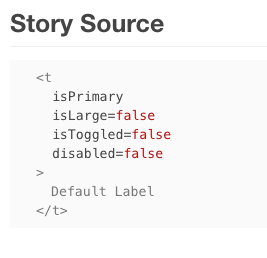
Awesome! One issue I see is that it's showing code snippets with the minified component name.
Wonder if we can avoid minification for building this? Else I think a resolution might involve component |
 youknowriad
force-pushed
the
try/storybook
branch
2 times, most recently
from
youknowriad
force-pushed
the
try/storybook
branch
2 times, most recently
from
b78bdf3 to
64f80eb
Compare
|
@aduth Good catch, It kind of annoys me to make the |
youknowriad
force-pushed
the
try/storybook
branch
from
64f80eb to
63f7419
Compare

3 participants


Maybe this is not the direction we want to go with the components/selectors and any other documentation but this PR tries to explore this possibility.
npm run storybook