Repository navigation
Releases: X-F1REBALL-X/HearBridge-PS5
Release list
HearBridge PS5 1.2.0

Bluetooth headphones for a jailbroken PS5: game and system audio, no dongle.
Download
- HearBridge-PS5-1.2.0.elf: one file for every PS5
What's new since 1.1.0 and the mtk test
- one file now for MediaTek and Marvell, the chip is picked by itself
- the HearBridge icon moves to Games
- PSM fallback fix
Tested on: PS5 fat CFI-10xx (Marvell/NXP), PS5 Slim CFI-2008 (MediaTek)
Run: send the elf to port 9021, open http://<console-ip>:8090. Problems? report with the log
MediaTek scan-pause and USB pipe fix, plus HCI debug tool, by ZiZc3 (#6)
SHA-256: 46a94292e95fd6f4e3601e5aa001c301faf9b9b2604e874a121578054766f4ab
Developed by X-F1REBALL-X
HearBridge PS5 1.1.0
Bluetooth headphones for a jailbroken PS5: game and system audio, no dongle.
Download
- HearBridge-PS5-1.1.0.elf: for most consoles
- HearBridge-PS5-1.1.0-mtk-test.elf: test build for MediaTek chip (every Pro, some fat and Slim). Which chip do I have?
What's new since 1.0.2
- one elf for all firmwares
- equalizer and codec picker (auto sbc, sbc hq / sbc-xq when supported)
- louder boost with a limiter, buffer 60–200ms, settings saved per headset
- saved headsets connect on their own and switch when you take out another pair, audio starts without opening the page
- clean forget / disconnect, xbox wireless headset connects, 20s scan
- live log and your bluetooth chip on the page
Tested on PS5 fat CFI-10xx (Marvell/NXP), mtk-test on PS5 Slim CFI-2008 (MediaTek). Run: send the elf to port 9021, open http://<console-ip>:8090. Problems? report with the log
SHA-256
- 1.1.0:
9dd8f616ae6ac26b91a91bfb3f95f96ac3a716324256f3fdc30646636d0790d5 - mtk-test:
79eafb31723c80e9e6079f454605c6e1d777290f6694cfacf21cf8205023bd06
Developed by X-F1REBALL-X
HearBridge PS5 1.1.0 mediatek test
Test build for any PS5 with a MediaTek Bluetooth chip (every Pro, and some fat and Slim models). Tested on a PS5 Slim CFI-2008 (MediaTek).
Download: HearBridge-PS5-1.1.0-mtk-test.elf
Which chip do I have? run 1.1.0 and look at the Chip row at the bottom of the Status panel, or find usb: /dev/ugen0.2 is 1286:2059 … in /data/hearbridge/hearbridge.log (the ugen number can differ)
-
MediaTek (0e8d:…)= use this build (1.1.0 also shows an orange hint pointing here) -
Marvell/NXP (1286:…)= use 1.1.0 -
every Pro has MediaTek. fats (CFI-11xx/12xx) and Slims can have either chip
-
same as 1.1.0, plus fixes for the MediaTek chip. they only kick in when that chip is found
-
the page shows your chip too
-
more on models and chips: which chip do I have
Please report how it went with /data/hearbridge/hearbridge.log and diag.txt.
SHA-256: 79eafb31723c80e9e6079f454605c6e1d777290f6694cfacf21cf8205023bd06
Developed by X-F1REBALL-X
HearBridge PS5 1.0.2
HearBridge PS5 1.0.2
Bluetooth headphones for a jailbroken PS5: game and system audio, no dongle.
Download: HearBridge-PS5-1.0.2.elf
Firmware 13.60 (experimental): HearBridge-PS5-1.0.2-fw13.60.elf
What's new: home-screen icon and "already running" fixes
- The home-screen icon is reinstalled on every run. If you deleted the HearBridge icon, running HearBridge again brings it back. Before, it stayed missing because HearBridge thought it was already installed.
- Re-registering an icon that is already there is treated as success, so you don't get a false "icon could not be added" message.
- No false "already running" after a crash, a forced quit or a leftover lock file. The lock is released automatically when HearBridge exits for any reason, so a new run always starts.
- If HearBridge really is already running, running it again still refreshes the icon before showing "already running".
- If
/data/hearbridgeis not writable, you now get a separate message instead of "already running".
Audio, connections and the control page are unchanged from 1.0.1.
Not tested on a real console yet. These changes pass all host tests, but they have not been run on a PS5 yet. If something does not work, please report it with the log files.
Tested on: HearBridge was developed and tested on a PS5 fat (original model, CFI-10xx) running firmware 10.20. Other models (Slim, Pro, later fat revisions) and other firmwares are untested and may use a different Bluetooth chip, so reports from them are welcome.
Run: send the ELF to elfldr on port 9021, then open http://:8090.
Instructions: README (also in العربية, Español, Français, Deutsch, Português, Русский, 日本語, 中文, Italiano and עברית). Troubleshooting: README.
SHA-256: 02a00da62602bde14001dad730e21ca251a3867c6ed351b31a9b7a3f1c9813a6
Firmware 13.60 (experimental)
If you are on firmware 13.60 and get no HearBridge icon on the home screen, try HearBridge-PS5-1.0.2-fw13.60.elf instead of HearBridge-PS5-1.0.2.elf. It has the same version (1.0.2), the same page and audio, and every fix listed above. It also:
- is meant to fix the missing home-screen icon on newer firmware. It registers the icon on every run, with a fallback install call and system rights;
- adds diagnostics:
/data/hearbridge/diag.txtand http://:8090/api/diag (firmware, console model, each install step with its result code, USB/Bluetooth devices, audio libraries). There is also a diag.txt link on the page, and an on-screen message if the icon could not be added; - keeps the page and diagnostics up when Bluetooth cannot start.
Not tested on a real console yet. As far as I can tell it should also work on other firmwares, but that is unverified. If it does not work, please report it with diag.txt and the log file.
Source: fw-13.60 branch
SHA-256 (fw13.60): 5e98ee5742ef74c731e40260a2b04d2a99d572fc29c75ca391bed3ac2435f36b
Developed by X-F1REBALL-X
HearBridge PS5 1.0.1
HearBridge PS5 1.0.1
Bluetooth headphones for a jailbroken PS5: game and system audio, no dongle.
Download: HearBridge-PS5-1.0.1.elf
Firmware 13.60 (experimental): HearBridge-PS5-1.0.1-fw13.60.elf
If you are on firmware 13.60 and get no HearBridge icon on the home screen, try this file instead of HearBridge-PS5-1.0.1.elf. Same version (1.0.1), same page and audio. It:
- is meant to fix the missing home-screen icon on newer firmware (the icon is registered with a fallback install call and system rights, and registered again if it went missing);
- adds diagnostics:
/data/hearbridge/diag.txtand http://:8090/api/diag (firmware, console model, each install step with its result code, USB/Bluetooth devices, audio libraries), plus an on-screen message if the icon could not be added; - keeps the page and diagnostics up when Bluetooth cannot start, and no longer says "already running" when
/data/hearbridgeis not writable.
Not tested on a real console yet. As far as I can tell it should also work on other firmwares, but that is unverified. If it does not work, please report it with the log files.
Tested on: HearBridge was developed and tested on a PS5 fat (original model, CFI-10xx) running firmware 10.20. Other models (Slim, Pro, later fat revisions) and other firmwares are untested and may use a different Bluetooth chip, so reports from them are welcome.
Source: fw-13.60 branch · Troubleshooting: README
SHA-256 (fw13.60): 65d815eb4bde5c31d2d80410a456d34627369e5a5162410b7b6d079af1bb027c
What's new: redesigned control page
- One-screen layout: the whole page fits the TV screen (1920x1080 and 1280x720) without scrolling.
- Clearer status panel: compact details, codec and format at a glance, clean level meters.
- Tighter volume controls: big readable numbers and sliders that are easy to move with the controller.
- Clearer device list: one card per device, the connected device is highlighted, signal bars for nearby devices.
- Better D-pad focus: the focused button and its device row are clearly highlighted.
- Phone layout: the page works on a phone screen too.
Audio, connections and the page's functions are unchanged from 1.0.0.
Run: send the ELF to elfldr on port 9021, then open http://:8090.
Instructions: README (also in العربية, Español, Français, Deutsch, Português, Русский, 日本語, 中文, Italiano and עברית).
SHA-256: 4617f645a110802b56beaf49d9c1706057585023a0049648a1567081074edd61
Developed by X-F1REBALL-X
HearBridge PS5 1.0.0
HearBridge PS5 1.0.0
Bluetooth headphones for a jailbroken PS5: game and system audio, no dongle.
Download: HearBridge-PS5-1.0.0.elf
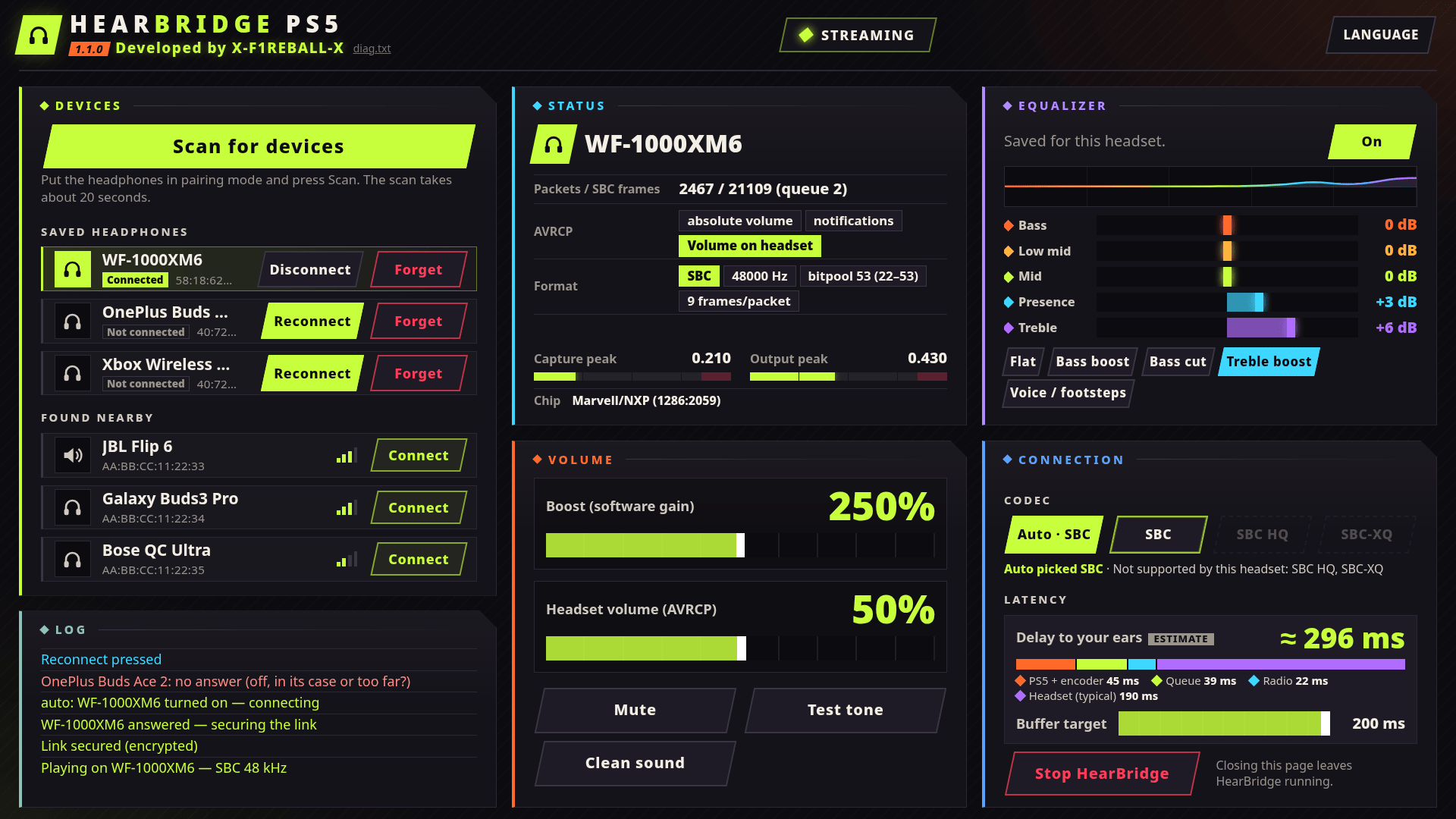
- Streams game and system audio to A2DP headphones or speakers over the PS5's built-in Bluetooth (SBC).
- Web page on port 8090 (11 languages): scan (about 20 s), connect, disconnect, forget, boost and headset volume (AVRCP).
- Manual connections only: nothing connects in the background.
Run: send the ELF to elfldr on port 9021, then open http://:8090.
Instructions: README (also in العربية, Español, Français, Deutsch, Português, Русский, 日本語, 中文, Italiano and עברית).
SHA-256: 1e2c2163b1edacdba1aff5153fd5d41d888e858aff68e0be30ffeb9861f05783
Developed by X-F1REBALL-X