Repository navigation
Help
Note: The following article is for a future build in early 2024. It exists as a guidance for future builds.
To report a website, click the security overview button in the menu bar and click the report unsafe site button. You can also report unsafe websites by going into the menu and clicking the report unsafe site button.
Upon reporting, The YBlaze Team will check this website in a VM to check for malicious or illegal content. If such content is found, the site will get reported and added to a list where the malicious site icon will appear in the security overview and an alert box will appear asking you to return to the last known safe site or continue to the malicious site.
When a site has been reported, it probably had a good reason to be reported. If you think that a website has been incorrectly reported, continue to the website and click the security overview then, click the appeal report button to repeal the ban. The website will be re-checked for malicious content. Often, appeals are rejected due to the site having a good reason to be reported.
To change search engines, start typing in the search box and a popup will appear.
It looks like this:
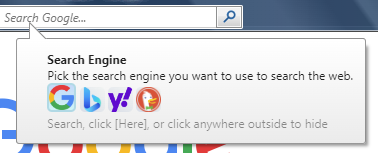
Select which engine you want to use. This balloon will hide when you search, click on the [Here] text or when you click outside the balloon.
To change search engines on a new tab, click on the gear icon and three search engines will appear.

Note: This only affects the new tab search bar, not the global one.