Repository navigation
Releases: YOU-SHOULD-KNOW-ME/antigrative-dashboard
Release list
Antigrative Dashboard v0.8.5

Antigrative Dashboard v0.8.5
Long conversations: missing speed, cache and context
A user reported that a conversation with a large processed corpus stopped showing all three statistics, while account quota and saved monthly usage still worked. The screenshot explicitly reported the collector's response-size limit. This is not evidence that the model context window was full.
- Stop polling
GetCascadeTrajectoryfor statistics. Read conversation summaries and the distinct step/generator-metadata offset interfaces instead; generator requests setincludeMessages: false. - Reuse complete, projected immutable prefixes. Revalidate the last model request and unresolved timed tools; periodically check settled tails. Explicit refresh, rewinds, changed settled histories, account changes and backend changes invalidate the relevant cache.
- Validate and project JSON as it arrives. Skip prompts, attachments and tool/executor output without buffering their contents; retain only statistical fields and the minimal step semantics needed for tool-only timing classification.
- Remove the provisional 512 MiB whole-response cap for successful statistical streams. An 8 MiB projected-statistics/cache budget, bounded parser depth/fields and timeouts remain. Over-budget or inconsistent pages fail explicitly and cannot overwrite a complete cached revision.
- Preserve request deduplication, timing classification, token/cache/context values, local usage identities and persisted preferences. Error messages are localized.
Evidence and limits
The 8 MiB budget is an engineering choice informed by isolated local HTTP experiments, not an optimal universal number or exact heap guarantee. A 640 MiB artificial text stream with 1,024 request records succeeded while keeping about 0.49 MiB of serialized statistics. The 16,384-record case retained about 7.92 MiB and added roughly 48 MiB sampled heap; the 32,768-record case is rejected under the selected budget. Numeric results remain correct. Resource workload commands and measurements are documented in LONG_CONVERSATIONS.md.
The host exposes offsets but no requested page-size field. A cold step page can still contain large text. This release streams and discards it; it does not claim that the host always returns fixed-size or body-free pages. Generator requests disable message contents. Unknown associations cause conservative re-reads. Stats larger than the memory budget or acquisitions exceeding timeouts remain explicit limitations.
Signed-in Windows App checks compared every metric and usage record with the full reference for a 27-request conversation: identical. Automated regressions cover large HTTP pages, pagination, evolving records, late tools, rewinds, cache eviction, scope changes and malformed streams. Release gates run Windows/Linux/macOS automated tests and the 640 MiB/over-budget experiments, plus official desktop resource checks. The reporting user's exact original conversation and signed-in Linux/macOS GUI operation remain separate, unverified acceptance scopes.
Downloads and update
- Desktop App / CLI:
antigrative-dashboard-0.8.5.zipand its.sha256. Extract and usepython manage.py installfor App, orpython manage.py install-clifor CLI; Linux/macOS usepython3. - Standalone Antigravity IDE:
antigrative-dashboard-ide-0.8.5.vsixand its.sha256. Install from VSIX; retain the documented debugging launch flags.
Desktop App and standalone IDE include the shared collector repair. CLI functionality is unchanged. Fully quit and reopen the host after installation so its collector loads the new modules. Language preferences, saved statistics and usage records are retained. Other editor integrations remain unsupported.
中文摘要
修复长对话出现“会话数据超过采集上限”后速率、缓存和上下文全部空白的问题:停止整包对话轮询,使用独立偏移分页和增量读取;大段文本、附件和工具输出边读边跳过,保留计时判定需要的最小字段。
移除过渡版 512MiB 整包响应限制,改用有资源实验依据的 8MiB 统计缓存预算,并保留解析和超时保护。640MiB 人工内容响应测试通过,本地真实对话统计与参考结果一致。官方接口不能指定页大小,冷启动仍可能收到较大的步骤页;反馈用户的原始对话仍需实际验收。
桌面 App 与独立 IDE 同步共享采集修复,CLI 功能不变。安装后完整退出并重新打开宿主,已有语言、统计和用量记录保留。
Antigrative Dashboard v0.8.4
Antigrative Dashboard v0.8.4
Issue #11 — Windows discovery and frozen sidecar panels
- Keep netstat as the normal socket source. If it fails or provides no listening socket for a candidate, run one asynchronous, hidden and time-bounded Get-NetTCPConnection query for all missing PIDs. Avoid per-process PowerShell loops.
- Recognize localized listening states and try the Windows .gemini/antigravity/logs/language_server.log location after the profile log. Explicit log overrides remain authoritative.
- A log port still has to belong to the detected standalone backend PID before it can be paired with that process's credential. Do not accept an unverified log-only port.
- Serve a self-contained classic JavaScript panel bundle instead of importing ESM dependencies from plugin://. Both the SDK sidecar and standalone preview use the same bundle generator.
- Defer the entry script, wait for DOM readiness, guard missing widgets and prevent duplicate initialization.
Persistent App side panel
- Speed, cache and context cards remain visible and double as detail tabs. The default speed details are shown immediately; there is no large empty hover placeholder.
- Five-hour and weekly quota summaries stay visible while inspecting any metric.
- Click to switch details. Pointer departure no longer hides the selected information. Arrow/Home/End keyboard navigation and focusable detail panels are supported.
- Keep the outer frame stable across detail/language changes. Long content scrolls within the detail panel. The layout was checked at 280/360/440-pixel browser widths and in the real App's narrow pane.
- Theme/background/accent adaptation continues to work. The iframe background also follows the derived dashboard theme despite the SDK's inline body styling.
Open it from the right auxiliary pane: + → Extensions → Antigrative Dashboard. The input-strip hover cards and Token usage window remain separate views.
Coherent resource updates
Panel HTML gives its script and styles the same content-based version, including layout, translations, theme source and CSS. Resource responses use no-store headers. This prevents a new layout being combined with cached older JavaScript/styles, which caused raw translation keys and broken layout during local review.
Verification scope
Windows signed-in plugin:// checks reproduced the old uninitialized module panel, then verified the restarted classic/deferred panel with real metrics matching the inline strip, quota details, language switching and manual refresh. Real speed/cache/context tab switches retain the same outer dimensions; the reporting user's original machine is a separate acceptance scope.
Browser regressions cover opaque sandboxed frames, ordinary and early classic loading, deferred startup, data/cache/context/quota display, automatic recovery, duplicate scripts, language/manual refresh, stable geometry, keyboard selection, internal scrolling and stale unversioned resource rejection. Shared theme/custom-color and persisted-language checks are included. Publication requires Windows/Linux/macOS CI and official desktop resource checks; signed-in Linux/macOS GUI acceptance remains outstanding.
Downloads and update
- Desktop App / CLI: antigrative-dashboard-0.8.4.zip and .zip.sha256. Extract and run
python manage.py installfor App orpython manage.py install-clifor CLI (python3 on Linux/macOS). - Standalone Antigravity IDE: antigrative-dashboard-ide-0.8.4.vsix and .vsix.sha256. Use Install from VSIX... and retain the documented loopback debugging launch flags.
Fully quit and reopen App/IDE after installing updated collector code. Language preferences, saved statistics and usage records are retained. The redesigned side panel belongs to the desktop App; IDE receives the shared discovery/platform changes. CLI functionality is unchanged. Other editor integrations remain unsupported.
中文摘要
修复 Issue #11:Windows 端口列表为空时增加一次受限的 PID 兜底查询和日志路径回退,继续校验端口归属;侧栏改用自包含普通脚本,配合 defer、DOM 就绪和重复初始化保护,解决 plugin:// 模块加载限制及初始化中断。
侧栏重新设计为常驻仪表盘:关键数据和共享额度持续显示,点击切换详情,鼠标移开不再消失;外框尺寸稳定,长内容内部滚动,并跟随宿主主题。脚本与样式按内容统一换版本,修复更新时新旧资源混用导致的翻译键外露和排版错乱。
入口:右侧辅助栏顶部「+ → Extensions → Antigrative Dashboard」。安装后请完整退出并重新打开宿主,保留已有语言、统计与用量数据。桌面 App 已完成本地实机验收;IDE 同步共享发现修复,CLI 功能不变。
Antigrative Dashboard v0.8.3
Antigrative Dashboard v0.8.3
The v0.8.2 candidate was blocked by its startup/navigation regression before package publication. This release includes the completed data-channel recovery fix.
Cold-start recovery
- Separate application/RPC errors from endpoint loss. An unavailable historical conversation, ordinary API error or malformed response no longer clears a healthy endpoint and triggers another process scan.
- Coalesce concurrent discovery. Failed cold starts use a 3-second initial delay with exponential backoff capped at 30 seconds. Connection refusal/reset and credential failures still recover automatically, with a scan cooldown.
- A late failure from an old endpoint cannot invalidate a newly discovered endpoint. Existing PID/port/credential pairing and loopback restrictions remain in place.
- Track top-frame navigation and trusted default contexts, including context creation arriving before navigation. If hooks exist without a tracked main context, resynchronize Runtime events on the same socket.
- Re-register data bindings after Runtime domain resynchronization and release abandoned requests without temporarily disabling the widget. Runtime.disable clears binding subscriptions; retaining the page function alone does not restore notifications. See the V8 implementation.
- Reject prior contexts at navigation and remove a failed session's preload before reconnecting, so repeated navigation errors do not accumulate injection scripts.
The renderer already waits for the DOM and observes composer creation; this release does not assume every loading delay is a renderer bug. Historical usage import remains enabled, with conversation errors isolated from connection recovery.
Verification and limits
- Local HTTP regressions cover unavailable history, malformed responses, concurrent discovery, cold-start/auth cooldown and backend port/PID restarts.
- In the synthetic application-error scenario, process discovery drops from 39 scans to 1; this is a regression result, not a measurement of the reporting user's machine.
- Real Chromium/CDP tests cover five rounds per CI run, plus a local 30-round stress run of delayed composer creation and interrupted startup navigation, recovering live metrics without disable/enable.
- Protocol fixtures cover top-frame replacement, reversed event order, missing context events, and remote/iframe exclusion.
- The remount hover regression moves the pointer away before restoring controls, isolating cancellation of the removed control's timer from a legitimate new pointer entry.
- Publication requires Windows/Linux/macOS automated tests, package checks and official desktop resource checks. The reporting user's exact environment and original failure remain unverified; signed-in Linux/macOS GUI acceptance is still outstanding.
Downloads and update
- Desktop App / CLI:
antigrative-dashboard-0.8.3.zipand.zip.sha256. Extract and usepython manage.py installfor App orpython manage.py install-clifor CLI. Use python3 on Linux/macOS. - Standalone Antigravity IDE:
antigrative-dashboard-ide-0.8.3.vsixand.vsix.sha256. Install from VSIX and retain the documented loopback debugging launch flags. Shared client/runtime fixes are included; these changes were not diagnosed as an IDE-specific report.
After installing the App/IDE update, fully quit and reopen the host so its collector loads the new modules. No language preferences, historical statistics or usage-ledger data are cleared. CLI metrics and rendering are unchanged from v0.8.1. Other editor integrations remain unsupported.
Report a recurring problem
Please open an Issue with the OS/version, host type (App/IDE/CLI), host and plugin versions, installation method, reproduction steps/frequency, exact error text, screenshots and relevant logs. Mention whether disable/enable or restart restores operation. Redact credentials, account details and private conversation contents before posting public logs.
中文摘要
本版针对冷启动会话发现与注入恢复进行加固:区分会话/接口错误和后台连接失效,避免历史请求报错触发反复进程重扫;合并并发扫描,失败时以 3~30 秒退避重试;页面初始跳转后重新同步主渲染上下文,并清理失败的注入脚本。
更新后请完整退出并重新打开 App/IDE,以加载新的采集模块。保留语言设置、历史统计和用量记录,不会清空本地数据。用户原始故障仍需结合其版本和日志进一步确认。
若再次遇到类似问题,请到项目下提交 Issue,并尽量附上系统和版本、使用端、宿主与插件版本、安装方式、复现步骤和频率、错误提示、截图及相关日志,以及禁用/启用或重启是否能恢复。公开日志前请遮盖凭据、账号和对话隐私。
Antigrative Dashboard v0.8.1
Antigrative Dashboard v0.8.1
Teamwork and nested subagents — Issue #9
- Match the active composer's own visible editor and controls. Ignore hidden/inert editors and descendants owned by deeper agent inputs.
- Recognize send, stop, cancel, tooltip and English/Chinese ARIA control semantics. Generation no longer invalidates the composer solely because its action button changes.
- Discover static icon/text badges without requiring title/span; measure painted text safely and reject ambiguous anchors.
- Prefer the current composer's nearest valid data-cascade-id over the parent route. Invalid explicit IDs clear conversation statistics; late responses cannot overwrite the current agent's metrics.
Usage-window lifecycle and language fixes
- Recreate the strip and usage controller together after a closed-dialog composer teardown. Fix View token usage becoming unresponsive after subagent navigation.
- Invalidate pending requests from discarded mounts.
- Context language choices update Today / This month / View token usage immediately and keep the statistics window synchronized.
- Preserve an already-open account usage window across composer replacement and pointer/keyboard hover dismissal when returning to chat.
CLI current-request cache percentages
- Prioritize cache percentage, with read tokens as secondary text when terminal width permits.
- Support empirically checked CLI 1.3.2/1.3.3 Sonnet 4.6 and GPT-OSS 120B scopes, plus CLI 1.3.3 Gemini 3.8 Flash (High), with zero cache writes. Use cacheRead / (input + cacheRead) for these scopes.
- Busy/tool/initializing zero-cache snapshots show Cache --, instead of treating temporary zero counters as completed 0% hits. Valid idle zero reads still show 0%; available nonzero busy counters remain usable.
- Unknown semantics remain unavailable. Do not borrow a previous request's percentage or include output tokens in the denominator.
See CLI counter semantics. CLI tok/s still requires streaming-duration data absent from the documented payload.
Downloads and update
- App / CLI: antigrative-dashboard-0.8.1.zip and .zip.sha256. Extract and run
python manage.py installfor App orpython manage.py install-clifor CLI. Use python3 on Linux/macOS. Confirm your host before choosing the installer. - Standalone Antigravity IDE: antigrative-dashboard-ide-0.8.1.vsix and .vsix.sha256. Use Install from VSIX... and retain the documented loopback remote-debugging launch flags.
Plugin identity, preferences and recorded usage are retained. Shared usage fixes are included in the IDE package; desktop Teamwork discovery belongs to the App adapter. VS Code, Visual Studio, JetBrains, Zed and Xcode integrations remain unsupported.
Verification scope
Windows real App checks cover main-to-three-level subagent delegation, independent metrics, return navigation and a generating-state screenshot. Real App usage checks confirm opening and English/Chinese synchronization. Chromium regressions cover six-level nested DOM, unchanged-route ownership, working controls, late responses, ambiguity and main/subagent usage remounts. Shared usage tests cover App and IDE, including Trusted Types.
CLI numerical tests cover Windows and Linux, with tested server CLI/model samples. Publication is gated by Windows/Linux/macOS data, lifecycle, Chromium, package and official desktop resource checks. Signed-in Linux/macOS GUI acceptance remains outstanding; fixtures do not establish support for every future host layout.
中文摘要
修复 Issue #9:Teamwork 与多层子代理的输入框定位、生成时控件消失、无 title/span 徽章异常,以及子代理会话归属和旧请求串数据问题。额外修复切换子代理后「查看用量统计」失效,以及从上下文详情切换中英文后用量入口和统计页面不同步。
CLI 新增已实测口径的当前请求缓存率;运行或工具执行期间的临时零值显示「Cache --」,不再误报完成请求的 0%。未知口径保留不可用,不借用上一轮数据。
提供 App/CLI ZIP 与独立 IDE VSIX,保留已有偏好和用量记录;其他编辑器扩展尚未兼容。
Antigrative Dashboard v0.8.0
Antigrative Dashboard v0.8.0
Local Token usage for the App and standalone IDE
- Open the database/cache card and choose View token usage. Daily/weekly contribution grids and model charts by day, week and month show local recorded consumption, with model filtering and exact-count tables.
- Colors follow the host theme, accent and background. Custom year menus, stable window geometry, aligned controls and K/M/B formatting keep the interface consistent.
- The cache card includes a compact two-column Today / This month summary.
- First-use guidance explains local history import, incomplete coverage, UTC+8 date boundaries, storage and deletion. Acknowledgment survives restarts and language/theme changes; failed saves offer retry.
- Records are isolated by account. Available local history is imported and repeated requests are deduplicated. Deleting a conversation does not subtract previously recorded usage. Only numeric metadata and hashed identities are retained; prompts, replies and credentials are not stored.
- This is local observed usage, not an account bill. The desktop App and IDE use separate ledgers; missing/deleted history cannot be reconstructed.
TPS timing quality - Issue #8
- Match output counters to request timing, reject conflicting duplicate/retry summaries, and quarantine conservative short tool-only and same-model statistical outliers.
- Preserve ordinary short responses and sustained high speeds. There is no fixed speed cap, fabricated duration or TTFT added to the streaming denominator.
- Show uncertain latest timing as unavailable instead of reusing an earlier speed. Token usage, cache and context remain available independently.
- Recalculate legacy saved rates when complete trajectories become readable. The host API does not expose chunk timing, so exact server generation time and buffering cannot be reconstructed.
See TPS policy and usage accounting and cleanup.
Interaction fixes
- Revise agent installation guidance: detect the OS and host, confirm App/CLI/standalone IDE before downloading or changing settings, and use only the selected adapter. App and CLI share the ZIP but use separate installers; IDE uses VSIX.
- Keep the usage window open across polling, temporary missing snapshots and composer replacement; account switches clear stale displayed data.
- Queue manual refresh behind polling and complete its visible rotation.
- Restore pointer and keyboard focus correctly when closing usage. Hover cards auto-dismiss after the pointer leaves.
- Update English/Chinese README previews using the latest production widget and clearly labeled illustrative data.
Downloads
- Desktop App / CLI:
antigrative-dashboard-0.8.0.zipand.zip.sha256. Extract and runpython manage.py installfor the App orpython manage.py install-clifor the CLI. Usepython3on Linux/macOS. The CLI feature set is unchanged. - Standalone Antigravity IDE:
antigrative-dashboard-ide-0.8.0.vsixand.vsix.sha256. Choose Install from VSIX... in Extensions. Fully quit, then start with--remote-debugging-port=0 --remote-debugging-address=127.0.0.1; retain these flags on subsequent launches.
Updates retain the plugin identity, preferences and saved statistics. IDE users do not need the desktop App. VS Code, Visual Studio, JetBrains, Zed and Xcode integrations are not supported.
Verification scope: real local Windows App/IDE use plus automated data, lifecycle, package and Chromium regressions. Publication requires Windows/Linux/macOS CI and official desktop resource checks. Signed-in Linux/macOS GUI acceptance remains outstanding. README figures illustrate the desktop widget and are not live IDE screenshots.
中文摘要
本版为桌面 App 和独立 Antigravity IDE 增加本地 Token 用量统计:每日/每周活动格、按模型区分的天/周/月柱状图、主题配色和首次使用提示。缓存卡提供今日/本月入口。统计自动汇总可读取的本地历史,按请求去重;不保存对话正文,删除对话不会扣除已经记录的用量。这些统计不是账户账单,App 与 IDE 分开保存。
针对 Issue #8 加强 Token 与耗时配对,隔离计时可疑的样本,保留正常短回复与持续高速输出,不设置固定速率上限。异常计时不影响 Token、缓存或上下文统计。
同时修复用量窗口偶发消失、刷新动效不稳定、关闭统计页后悬浮卡不收起等问题,并更新中英文演示图。CLI 功能保持原有范围。Windows 本地已实测;Linux/macOS 有自动化覆盖,登录后 GUI 仍待实机验收。
Antigrative Dashboard v0.7.0
Antigrative Dashboard v0.7.0
Standalone Antigravity IDE adapter
- Add a dedicated VSIX for Google's own Antigravity IDE. Its narrow Agent input
shows three interactive icons; widening the pane reveals numeric summaries.
Native controls keep their space and the dashboard hides only when the icons
cannot fit safely. - Read speed, cache, context and account quotas from the IDE's main language
server. Bind each input to its actual conversation, reject stale/other-profile
sources, and restore saved statistics without guessing the most recent chat. - Count tool follow-up requests separately even when they share an execution ID.
Prefer response/message IDs for deduplication, preserving real cache reads. - Render fixed templates with DOM operations under the IDE's existing Trusted
Types policy. Preserve hover-card scroll, focus and menus across unchanged polls. - Retain theme adaptation, saved English/Chinese choices and first-use guidance.
Updates preserve the extension identity and user global-storage directory. - Include a host-checked Python install/launch/uninstall helper using the IDE's
bundled runtime, a complete allowlisted VSIX and SHA256 checksums. Fresh health
reporting prevents old state files from appearing connected.
Scope: Windows 11 / Antigravity IDE 2.5.5 has passed real local use. Linux/macOS
have automated process/installer/package/browser coverage; signed-in IDE GUI
acceptance is still outstanding. VS Code, Visual Studio, JetBrains, Zed and Xcode
extensions are not supported by this adapter. Default IDE profiles only.
Hover improvements from PR #7
Thanks to @qwqZYLqwq for the hover interaction contribution.
First hover waits 250ms; moving between cards is immediate while warm. Leaving
has a 120ms grace period and a 350ms warm window. Click and keyboard focus remain
immediate. Delayed tasks are cancelled on navigation, unmount and disposal;
16 production-widget browser cases cover the behavior, including macOS timing.
Downloads and installation
- Desktop App / CLI:
antigrative-dashboard-0.7.0.zipand.zip.sha256.
Extract and runpython manage.py installfor the App, or
python manage.py install-clifor the CLI. Usepython3on Linux/macOS. - Antigravity IDE:
antigrative-dashboard-ide-0.7.0.vsixand.vsix.sha256.
Choose Install from VSIX… in the IDE's Extensions view. Then fully quit and
start the IDE with--remote-debugging-port=0 --remote-debugging-address=127.0.0.1.
Append these flags to your IDE shortcut for subsequent launches.
The IDE does not require the desktop App. Ordinary launches without the flags
cannot attach the inline dashboard. The debugging endpoint stays on loopback;
application binaries and CSP settings remain untouched.
See IDE installation and data cleanup.
Publication requires Windows/Linux/macOS data, lifecycle, desktop/IDE Chromium
regressions and official desktop resource checks. Automated fixtures do not
replace signed-in Linux/macOS GUI acceptance. The existing desktop screenshots
illustrate the desktop widget; they are not IDE screenshots.
中文摘要
本版新增反重力自己的 Antigravity IDE 专用 VSIX。窄输入栏显示速率、缓存和
上下文三个图标,拉宽后显示详细数值;修复真实会话识别、工具跟进请求漏计及
悬浮卡轮询时反复刷新/滚动位置重置的问题。语言、引导和历史统计继续保留。
IDE 用户可直接安装 .vsix,无需桌面 App。安装后完全退出 IDE,用带上述两个
调试参数的快捷方式启动。Windows IDE 2.5.5 已实测;Linux/macOS IDE 的登录后
界面尚待实机验证。其他编辑器中的 Antigravity 扩展暂未兼容。
同时包含已合并 PR #7 的悬停优化及补充生命周期修复,感谢贡献者 @qwqZYLqwq。
Contributors

Assets 6
Antigrative Dashboard v0.6.4
Antigrative Dashboard v0.6.4
Language settings and first-use guidance
- Address issue #6: remove the duplicate toolbar language button. Keep explicit English / 简体中文 choices at the bottom of context details, near the context trigger.
- English remains the default. To help first-time Chinese users discover the setting, a small bilingual tip points to the context chip. Clicking it opens details, scrolls to the language choices and focuses them. Initial tip display does not take focus from the composer.
- Selecting either language, including the current language, completes onboarding. Closing the tip keeps the saved language. Completion persists across restarts and renderer origins; failed saves remain visible and retryable.
- Show the compact guide only in the main composer. Existing saved language choices remain intact; subagent composers do not repeat the guide.
Current interface
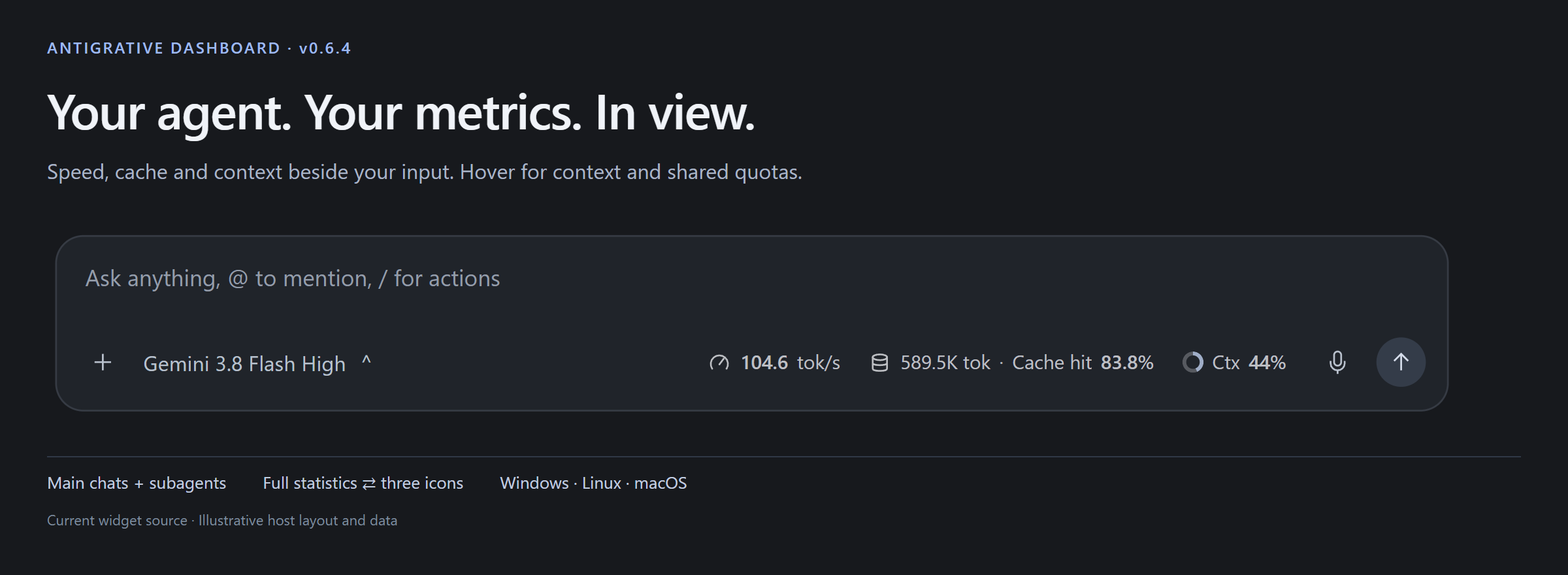
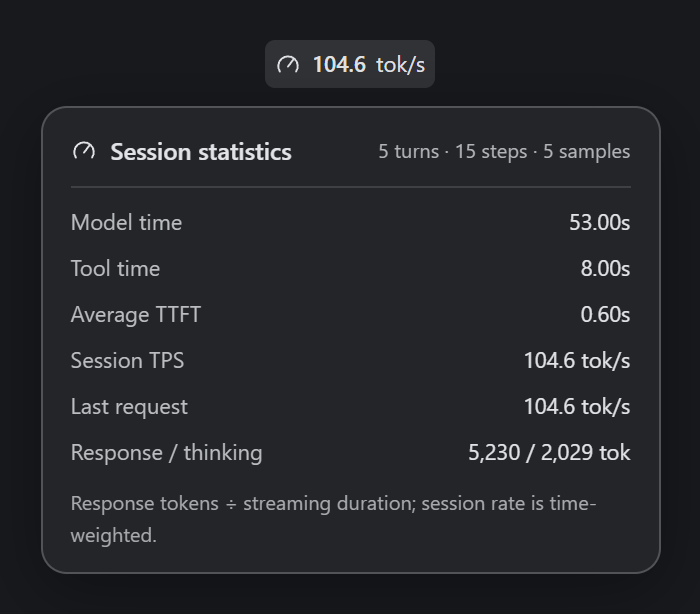 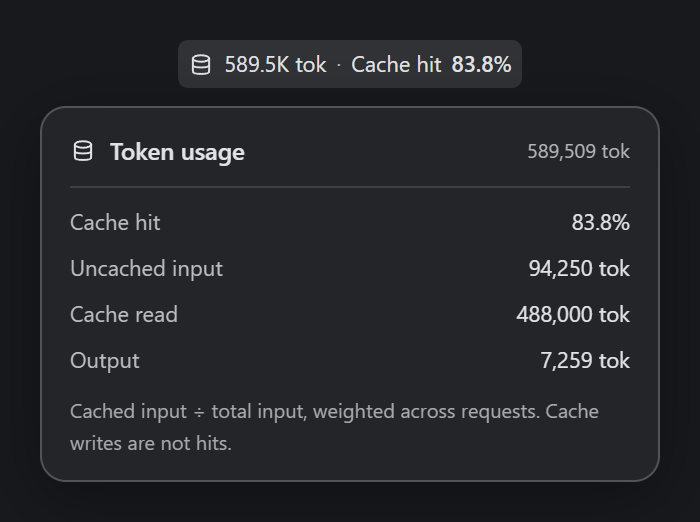 | 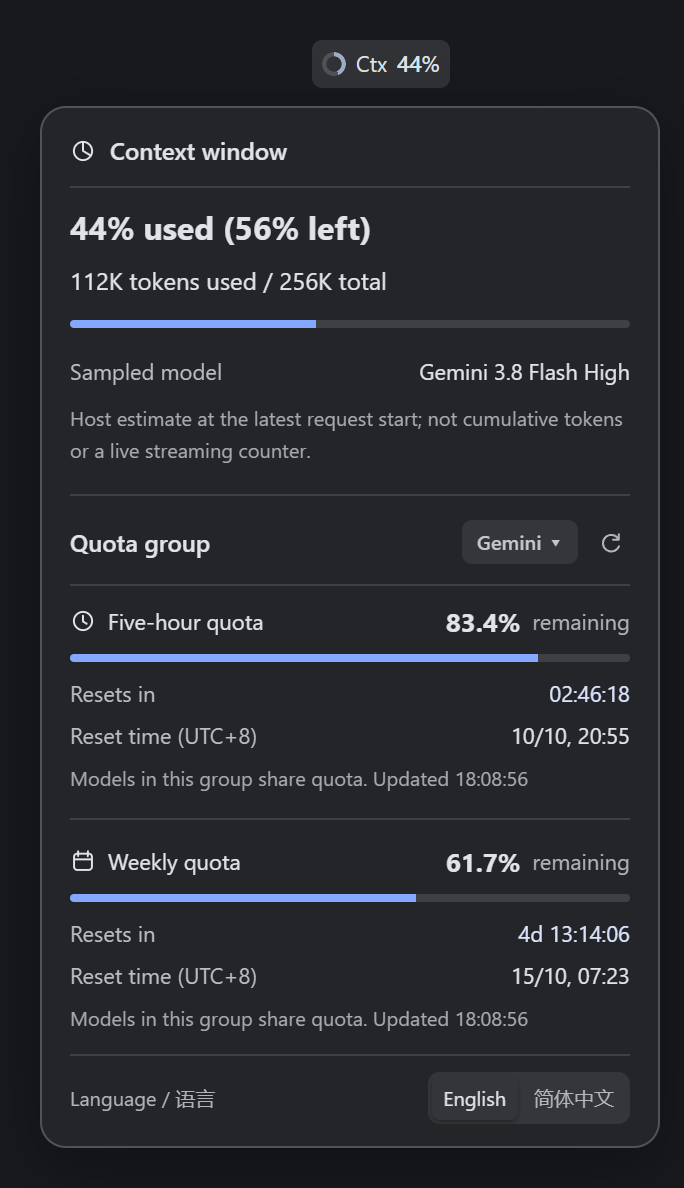 |
Figures render the current production widget with illustrative host layouts and sample data.
Native subagent controls in narrow layouts
- Reserve natural space for the native subagent label and icons. Switch to three plugin icons before the native label wraps or its SVG shrinks.
- Release the plugin's width, flex space and margins if the three icons cannot fit safely. Restore icons or full statistics when the sidebar closes and space returns.
- Preserve responsive transitions. Exclude changing width reservations from full-layout probe keys and avoid redundant class changes during dragging.
Documentation and verification
- Refresh English/Chinese README and release artwork from the current widget source, including removal of the old rightmost language button. Document the new first-use flow.
- Include the bounded Windows CI shell-startup correction from the previous maintenance commit.
- Regression coverage includes first use, no initial focus theft, three-icon guidance, explicit English/Chinese choices, dismissal without language changes, failed-save retry, new-origin/backend persistence and native label/icon geometry.
- Windows local data, lifecycle and complete production-renderer browser regressions passed. Publication requires Windows/Linux/macOS data, lifecycle and Chromium gates and official desktop resource/SDK checks. The Windows desktop language flow and narrow-layout fixes passed local user acceptance. Signed-in Linux/macOS GUI acceptance remains separate.
- CLI rendering and metric definitions are unchanged. Local acceptance helpers, account data and private screenshots are excluded.
Install or update
Download antigrative-dashboard-0.6.4.zip and .zip.sha256, verify the checksum and extract. Run:
python manage.py installUse python3 on Linux/macOS. Fully quit and reopen Antigravity when no task is running. Saved language settings and conversation statistics are retained. The same ZIP contains the CLI adapter; CLI users can run python manage.py install-cli and reopen agy.
中文摘要
采纳 Issue #6 建议,移除状态条上重复且低频的语言按钮,保留上下文详情最底部的 English / 简体中文 切换。
考虑到默认英文,首次中文用户可能找不到隐藏的切换入口,加入轻量双语提示;点击即可打开详情并定位到底部语言选项。提示出现时不抢输入焦点,仅在主对话显示。选择语言或关闭提示后,完成状态跨重启保存;关闭提示不会改变已有语言,保存失败允许重试。
修复侧边栏挤压子代理输入框时原生标签换行、图标缩小的问题:先为原生控件预留空间,再收缩为三个图标;连图标都放不下时释放全部插件占位,空间恢复后自动展开。保留已有过渡动画与拖动优化。
中英文 README 和本发布页演示图均使用当前源码重新渲染,移除旧版最右侧语言按钮。示意宿主及示例数据用于展示,不包含账号或对话内容。Windows 本地验收已通过;三平台自动测试作为发布门槛,Linux/macOS 登录后的实机 GUI 验收仍待单独确认。
Antigrative Dashboard v0.6.3
Antigrative Dashboard v0.6.3
Release gate correction
- v0.6.2 was not published: the macOS animation-reversal check failed. Its tag remains unchanged; v0.6.3 includes the accepted responsive changes and the correction.
- Capture interrupted visual positions before changing flex layout, eliminating the small reversal jump. Retain source metadata for outgoing labels so rapid reversals can reconstruct their current appearance.
- Sample intermediate animation frames at exact WAAPI times instead of wall-clock sleeps. Tighten the reversal continuity gate from 45px to under 1px; continuous dragging, rapid switching and cleanup still run in real time.
Responsive motion without resize stutter
- Add a 240ms interruptible transition between full statistics and three interactive icons. Values fade out, speed/cache/context icons move into place, and the native model name fades in after the outgoing labels clear. Icon details remain clickable throughout.
- Fix resize-drag stutter and trailing copies: continuing to drag no longer cancels and rebuilds animations every frame. Keep one animation clock per actual density change and crop the existing visual ribbon to current safe bounds.
- Capture visual elements only for density changes. Avoid repeatedly expanding the strip to measure it while shrinking; filter unrelated control rectangles before reading visibility styles.
- Use 12px of recovery headroom to avoid full/icon flicker near the threshold. Content, language and native control changes can trigger fresh fit checks.
- Preserve host layout styles. Inert, accessibility-hidden visual copies never intercept input; protect native actions and immediately cancel on unsafe placement, navigation, reparenting or disposal.
- Retain full default motion, with short fades for the system reduced-motion preference. Metric polls and ordinary message scrolling do not replay transitions.
- Add browser regressions for continuous resize/translation, threshold jitter, animation-layer counts, outgoing-label cleanup and restoration of the full layout. Windows local desktop drag and transition changes passed user acceptance; publishing requires Windows/Linux/macOS automated gates. Signed-in Linux/macOS GUI acceptance remains separate.
Includes the v0.6.1 fixes
Subagent layout and responsive controls
- Fix issue #5: the auxiliary pane's Git filter could be mistaken for a model selector, placing the strip over the top toolbar. Mount only beside a valid local composer; reject headers, distant toolbars and ambiguous layouts.
- Show current subagent throughput, cache and context beside its input box. Detail cards identify current subagent statistics and account-wide shared quotas. Parent values are never used as a child fallback.
- When full statistics cannot fit, keep three interactive icons: speed gauge, token database and context ring. Hover, click or focus for details. Language switching remains in the context card. Hide only when the icons cannot fit safely or collide with host actions; restore when space returns.
- Fix disappearance during message scrolling. A message control clipped or covered behind the composer no longer counts as a visible collision. Local composer actions and actually painted floating controls remain protected.
- Preserve host flex/min-width styles. Recheck after resizing, scrolling, DOM changes and composer replacement; dismiss details when placement is unsafe.
Conversation switching
- Refresh immediately after parent/child navigation, independently of the previous request and polling clock.
- Reject obsolete successes and failures, including returning to the same conversation after visiting another one. Reject mismatched returned conversation IDs; discard pending work on disposal.
- Skip full conversation enumeration when the composer supplies its exact ID. Preserve queued manual refresh and rotation feedback.
Install or update
Download antigrative-dashboard-0.6.3.zip and .zip.sha256, verify the checksum and extract. Run from the extracted directory:
python manage.py installUse python3 on Linux/macOS. Fully quit and reopen Antigravity when no task is running so the sidecar loads the new sources. Per-account conversation statistics and language preferences are retained. The same ZIP includes the existing CLI adapter; CLI users can run python manage.py install-cli and reopen agy.
Verification and limits
- Windows Antigravity desktop 2.22.0: real subagent metrics, auxiliary toolbar hit targets and Add menu, parent/child navigation, normal restart and reload were checked. Scroll disappearance was reproduced in a real main conversation and checked at the same position after the fix.
- Local Node tests: 88 passed, 1 platform skip. Python lifecycle/package tests: 28 passed, 1 permission skip. Production-renderer browser regressions passed in English/Chinese, covering icons, covered scroll controls, visible overlays, host styles, stale responses, themes and language persistence.
- Publication requires Windows/Linux/macOS data, lifecycle and Chromium regressions and the existing official desktop resource/SDK checks. Browser tests use illustrative host fixtures. Signed-in Linux/macOS desktop GUI acceptance remains outstanding.
- Unknown host DOM/SDK/debugging/metric changes may require maintenance. Unsupported layouts decline inline mounting; the native side panel remains available when its SDK is compatible. Arbitrary floating child windows and several simultaneous composers on one page are not promised.
- CLI behavior and documented metric limits are unchanged. No account details, conversation statistics or local test screenshots are included in this release.
中文摘要
v0.6.2 因 macOS 动画反向检查失败未发布,原标签保留。v0.6.3 修复布局改变后再读取旧动画位置造成的小幅跳变;使用固定动画时间采样,将反向连续性检查收紧至 1px 以内,连续拖动仍用真实时间验证。
v0.6.3 为完整统计与三个图标加入平滑过渡:文字淡出、图标收拢、模型名称淡入,支持反向切换且按钮始终可点击。修复拖动时逐帧重建动画造成的卡顿与残影;复用同一次过渡,仅调整安全裁剪。恢复完整数值留出 12px 余量,避免临界宽度来回闪切。默认完整动画保留,Windows 本地验收已通过。
包含 v0.6.1 的 Issue #5 子代理工具栏重叠修复,展示子代理自己的速度、缓存率和上下文,额度注明账号共享。窄窗口先保留仪表盘、数据库、上下文圆圈三个可交互图标,连图标都放不下才隐藏,拉宽后恢复;语言可在上下文详情中切换。
同时修复滚动时把输入框后面的消息按钮误判为碰撞,以及父子对话切换等待旧请求的问题。旧请求成功、失败及返回同一对话后的晚到响应都不能覆盖新数值。Windows 真实界面已验证;Linux/macOS 共用代码并运行 CI,登录后的实机 GUI 验收仍未完成。
解压后运行 python manage.py install(Linux/macOS 用 python3),无任务运行时完全退出重开 Antigravity。保留语言与对话统计;同一 ZIP 继续包含 CLI 适配器。
Antigrative Dashboard v0.6.1
Antigrative Dashboard v0.6.1
Subagent layout and responsive controls
- Fix issue #5: the auxiliary pane's Git filter could be mistaken for a model selector, placing the strip over the top toolbar. Mount only beside a valid local composer; reject headers, distant toolbars and ambiguous layouts.
- Show current subagent throughput, cache and context beside its input box. Detail cards identify current subagent statistics and account-wide shared quotas. Parent values are never used as a child fallback.
- When full statistics cannot fit, keep three interactive icons: speed gauge, token database and context ring. Hover, click or focus for details. Language switching remains in the context card. Hide only when the icons cannot fit safely or collide with host actions; restore when space returns.
- Fix disappearance during message scrolling. A message control clipped or covered behind the composer no longer counts as a visible collision. Local composer actions and actually painted floating controls remain protected.
- Preserve host flex/min-width styles. Recheck after resizing, scrolling, DOM changes and composer replacement; dismiss details when placement is unsafe.
Conversation switching
- Refresh immediately after parent/child navigation, independently of the previous request and polling clock.
- Reject obsolete successes and failures, including returning to the same conversation after visiting another one. Reject mismatched returned conversation IDs; discard pending work on disposal.
- Skip full conversation enumeration when the composer supplies its exact ID. Preserve queued manual refresh and rotation feedback.
Install or update
Download antigrative-dashboard-0.6.1.zip and .zip.sha256, verify the checksum and extract. Run from the extracted directory:
python manage.py installUse python3 on Linux/macOS. Fully quit and reopen Antigravity when no task is running so the sidecar loads the new sources. Per-account conversation statistics and language preferences are retained. The same ZIP includes the existing CLI adapter; CLI users can run python manage.py install-cli and reopen agy.
Verification and limits
- Windows Antigravity desktop 2.22.0: real subagent metrics, auxiliary toolbar hit targets and Add menu, parent/child navigation, normal restart and reload were checked. Scroll disappearance was reproduced in a real main conversation and checked at the same position after the fix.
- Local Node tests: 88 passed, 1 platform skip. Python lifecycle/package tests: 28 passed, 1 permission skip. Production-renderer browser regressions passed in English/Chinese, covering icons, covered scroll controls, visible overlays, host styles, stale responses, themes and language persistence.
- Publication requires Windows/Linux/macOS data, lifecycle and Chromium regressions and the existing official desktop resource/SDK checks. Browser tests use illustrative host fixtures. Signed-in Linux/macOS desktop GUI acceptance remains outstanding.
- Unknown host DOM/SDK/debugging/metric changes may require maintenance. Unsupported layouts decline inline mounting; the native side panel remains available when its SDK is compatible. Arbitrary floating child windows and several simultaneous composers on one page are not promised.
- CLI behavior and documented metric limits are unchanged. No account details, conversation statistics or local test screenshots are included in this release.
中文摘要
v0.6.1 修复 Issue #5 子代理工具栏重叠,展示子代理自己的速度、缓存率和上下文,额度注明账号共享。窄窗口先保留仪表盘、数据库、上下文圆圈三个可交互图标,连图标都放不下才隐藏,拉宽后恢复;语言可在上下文详情中切换。
同时修复滚动时把输入框后面的消息按钮误判为碰撞,以及父子对话切换等待旧请求的问题。旧请求成功、失败及返回同一对话后的晚到响应都不能覆盖新数值。Windows 真实界面已验证;Linux/macOS 共用代码并运行 CI,登录后的实机 GUI 验收仍未完成。
解压后运行 python manage.py install(Linux/macOS 用 python3),无任务运行时完全退出重开 Antigravity。保留语言与对话统计;同一 ZIP 继续包含 CLI 适配器。
Antigrative Dashboard v0.6.0
Antigrative Dashboard v0.6.0
Antigravity CLI support
This release adds an independent adapter for the official Antigravity CLI statusLine interface. The portable ZIP includes both the desktop plugin and CLI adapter.
- Context occupancy and current cache read tokens appear first, followed by agent state.
- Gemini and Claude/GPT quotas occupy separate rows; each groups five-hour and weekly balances with reset countdowns.
- Remaining quota numbers and bars are green at ≥70%, yellow at ≥30% and <70%, red below 30%. Low balances also show
!for monochrome terminals. - The shared quota label distinguishes Claude #DA7756 from GPT #F8FAFC; a supplied light-background terminal hint makes GPT use the default foreground for readability.
- English/Chinese, CJK/emoji cell widths, compact narrow layouts and optional details are supported. Only foreground colors and text weight are set; the terminal background is preserved.
- Independent installation, upgrade, status and uninstall preserve unrelated settings and restore the prior status line. Runtime files live in the user directory and survive replacement of the CLI binary.
- Windows shell transport is fixed for the real agy Go/CMD runner, with UTF-8 input/output and literal quoted paths. Linux/macOS use POSIX shell quoting.
- Unicode installation paths remain usable when a redirected Windows console uses a legacy encoding.
Install or update
Download antigrative-dashboard-0.6.0.zip and its .zip.sha256, verify the checksum, and extract the archive. Install the official Antigravity CLI separately, using Google's instructions.
Run from the extracted project directory (Node.js 20+ and Python 3.10+ required):
python manage.py install-cli
python manage.py status-cli
Use python3 on Linux/macOS. Reopen agy after installation. To fix the language independently of the desktop preference, add --language en or --language zh-CN to install-cli. Restore the previous status line with python manage.py uninstall-cli.
Desktop users can update with python manage.py install (Linux/macOS: python3), then fully quit and reopen Antigravity when no task is running. Desktop statistics and language preferences are retained.
Verification and limits
- Locally verified on Windows Antigravity CLI 1.3.2, including two real signed-in replies and live context/quota status. A redacted real screenshot and full usage guide are included.
- Publication requires Windows, Linux and macOS data/lifecycle/Chromium regressions and the existing official desktop resource/SDK checks. Signed-in CLI interactive acceptance on Linux/macOS remains outstanding. The real Windows test returned cache read 0; nonzero live cache behavior was not observed.
- CLI tok/s is omitted because the official payload has no streaming duration. Cache read is a token count, not an inferred cache hit ratio. Missing data displays
--, and real zero values remain zero. - The adapter reads only the current status-line input; it makes no network calls, reads no transcripts and creates no new metric history. Future incompatible host interfaces may still require adaptation.
中文摘要
v0.6.0 新增独立 CLI 状态栏:上下文占用、缓存读取量、状态、Gemini / Claude-GPT 分组额度与重置倒计时。额度数字与进度条按剩余量变色:≥70% 绿色、≥30% 且 <70% 黄色、<30% 红色并附 !。支持中英文、窄窗口及深浅终端背景;修复 Windows 命令传输与中文编码问题,提供独立安装、更新、状态检查和卸载还原。
解压后运行 python manage.py install-cli(Linux/macOS 用 python3),重新打开 agy。同一 ZIP 仍包含桌面版。Windows CLI 1.3.2 已完成真实登录后的两轮对话验证;Linux/macOS 登录后的 CLI 实机验收尚未完成。官方输入缺少流式耗时,因此暂不显示 tok/s;缓存展示读取数量,不推算命中率。