Repository navigation
Pages
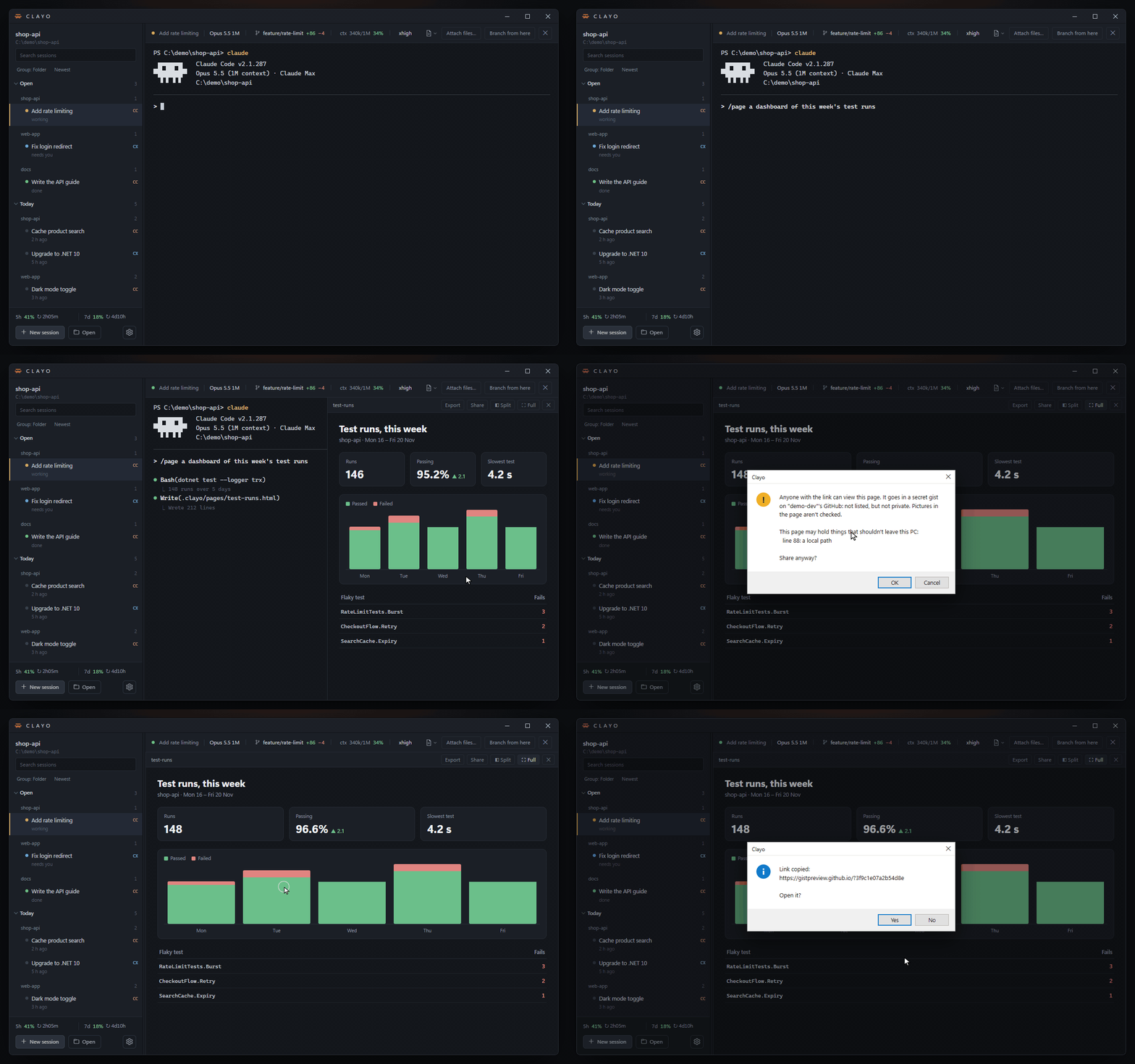
Ask a session for a page and it makes one: a report, a dashboard, a diagram or a slide deck, as an HTML file shown beside the terminal like a markdown doc. Works with Claude Code and Codex.
-
Ask for one. Type
/page <what you want>in a pane, or/pagealone for a page of what you just discussed. The Page button in the pane header types/pagefor you. In Claude you see only your/pageline; Codex gets one short line. -
Change one. With a page open,
/page make the title shorteredits that page instead of making a new one. - Offer pages when useful. In the Page button's menu. The session keeps answering in chat and, when a reply would be clearer as a page, asks "Want this as a page?". It makes one only if you say yes. Per session.
-
Where they live.
<project>/.clayo/pages/<name>.html, beside the guide and templates Clayo copies into.clayo/. Clayo adds.clayo/to.git/info/exclude, so git ignores it. In Claude,/pageis a project command in.claude/commands/page.md, also excluded; apage.mdof your own is never overwritten. A page also opens straight in a browser. - What a page can do. Text, tables, charts, Mermaid diagrams and slides, light and dark. What it can't: it runs sealed off, so it can't reach Clayo, your files or the network. Links ask before they open in your browser.
- Slides. A deck gets ← →, a slide counter and ▶ Present (full screen, Esc to leave).
- Export. Export › PDF / PNG in the viewer bar. A deck exports one slide per PDF page, or one PNG per slide.
- Themes. Settings › Pages picks one of five looks. Every page follows, old and new, on screen, in Present and in exports.
- The Pages view. Pages at the bottom of the sidebar shows every page from every session. Search, filter by project, agent, session, Shared or Slides, and sort. Right-click a page (or a selection) to open it, go to its session, export, share, show it in Explorer, or delete it (to the Recycle Bin).
-
Share. Share in the viewer bar or on a card:
- Save a copy… writes one file with everything inlined. It opens anywhere, offline.
-
Create public link… puts the page in a secret GitHub gist and copies a preview
link. Anyone with the link can view it. Clayo first checks the page for tokens, keys,
local paths and internal hosts, and lists what it finds before you confirm. The first
time, you sign in to the Clayo Pages GitHub App with a code: it can reach your gists
and nothing else. Clayo never uses your
ghor Git login. Settings › Pages › Public links › Disconnect signs out and opens GitHub to revoke it. - Update public link sends the new version to the same link. Remove public link… deletes the gist. The link shows an update, or stops working, within a minute or two. Pages with diagrams are too large for that link and use another preview service, which keeps its own copy for a while, so there an update or a removal can take some time to show.