Repository navigation
Home
Every Claude Code session in one Windows window, plus an island that tells you which one needs you.

Clayo is a Windows desktop app (WPF, .NET 8). Your sessions are listed on the left, grouped by folder, with branches nested under the session they came from. On the right is a real terminal: the Claude Code TUI itself, running under ConPTY and drawn by xterm.js in WebView2. A small island at the top of the screen tells you when a session needs you, has finished, or when you are near a usage limit.
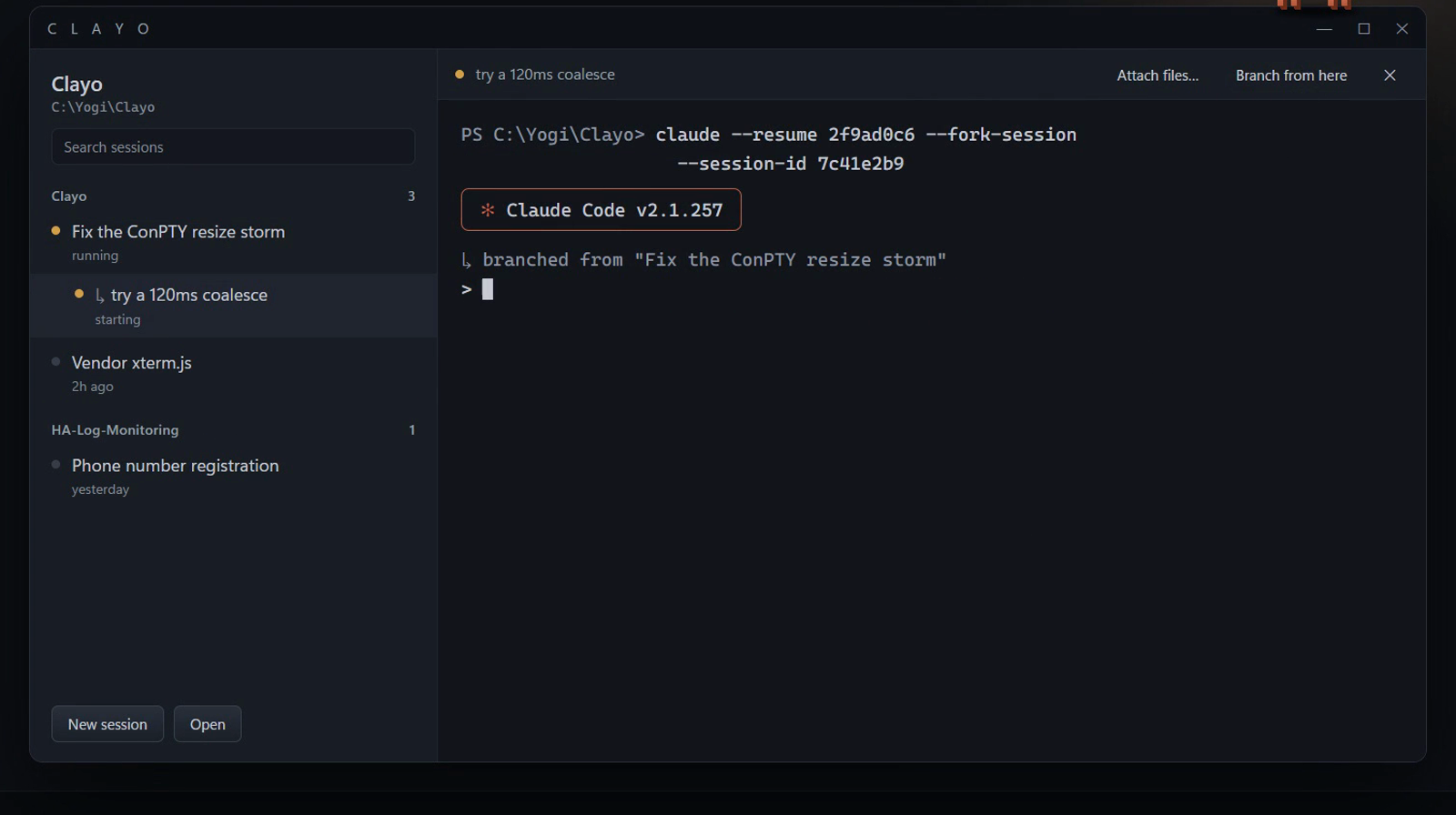
You run several Claude Code sessions at once on Windows, in several folders, and you lose track of which one is waiting on you. Clayo keeps them in one window and keeps them running when you close it.
-
A real terminal. The genuine Claude Code TUI, slash commands and permission prompts included. Clayo starts PowerShell and types the
claudecommand into it, so when Claude exits you land on a prompt. - Sessions by folder, branches as a tree. "Branch from here" copies a conversation into a new session and shows it indented under its parent. See Sessions and Branching.
- The island. Needs you, finished, near a limit. It never takes focus, and you can drop a file or folder on it. See The Island.
- Status in the pane header. Model, branch and diff, context used and effort, plus your 5-hour and 7-day limits in the sidebar footer. See Status Bar and Limits.
-
Type
clayoin Explorer. Type it in any folder's address bar and a session opens there, in the window you already have. See Install. - Close to hide, start at login. Closing the window keeps sessions running. Clayo can start hidden at login, and the island greets you.
| Page | What's in it |
|---|---|
| Install | Prerequisites, publishing, PATH, updating, uninstalling |
| Sessions and Branching | The sidebar, new / open / branch, attaching files, keyboard and mouse |
| The Island | Notices, peeking, glow colours, dropping files |
| Status Bar and Limits | Pane header fields, footer limits, themes, warning near a limit |
| Settings | Every setting, its default, where it is stored |
| Troubleshooting | Known rough edges and fixes |
| How It Works | Module map, the byte bridge, where Clayo keeps its files |
| Building and Checks | Building from source and running the self-checks |
| Contributing | Branches, pull requests, reporting security issues |
| Roadmap | What's coming and what's parked |
Clayo is an independent project. It reads ~/.claude/projects, never writes to it. Clayo keeps its own files under %LOCALAPPDATA%\Clayo (see How It Works).