Repository navigation
Releases: Zesty0wl/hypervisaur
Release list
Hypervisaur 0.9.0

Changes
- Windows' display is faster. It comes through memory that QEMU shares with Hypervisaur and is drawn with Metal, rather than being encoded, sent and decoded over VNC. Hypervisaur uses about a third of the processor time it did to show a busy Windows desktop. The keyboard, the pointer and the clipboard work as before.
- The library uses far less of the processor. The rack's lights, displays and meters move with Core Animation, each unit is only updated when its own figures change, and nothing in the rack is measured or moves while the library window is covered or minimised. They look as they did.
- Windows can no longer reach services that only listen on your Mac's loopback interface (127.0.0.1), such as development servers. Hypervisaur runs Windows' network itself with libslirp, which comes with QEMU, so that it doesn't. Sessions saved with an earlier version resume with QEMU's networking until Windows next starts.
Security fixes
- Guests can't stop a file transfer by acknowledging more than was sent, or slow the agent connection to a crawl with a burst of small messages.
- A guest's desktop picture is decoded at a bounded size, whatever the guest sends.
- The Linux agent, which runs as root, can't be made to write a transfer somewhere the signed-in user couldn't.
- The Windows agent and its status tasks, which run as the system, keep their scripts where users can't create or change them, deliver files as the user who's signed in, and only run setup from the read-only DRIVERS drive.
- Restrictions turned on by MDM or with defaults while a virtual machine runs now reach it.
- A virtual machine's provisioning password is only read from the keychain item Hypervisaur saved for it.
- A restore image is always downloaded into the downloads folder, whatever its URL ends with, and a virtual machine can't be renamed to a name that would move it out of the library.
- vbmcp's screenshot tool only replaces a .png file at the path it's given.
Updating from 0.8.2
- Open the installer package to replace Hypervisaur 0.8.2. Your virtual machines stay as they are.
- Restart Windows virtual machines once, so Windows updates the agent from the DRIVERS drive. The Linux agent and the macOS Guest app update themselves.
Requirements
- A Mac with Apple silicon and macOS 14 or later
- For Windows: Homebrew, the Windows 11 ARM64 disc image and your own Windows license
See the README for details.
Hypervisaur 0.8.2
Changes
- The Storage and New Virtual Machine buttons are part of the rack. The library's toolbar is replaced by a controller unit at the top of the rack:
- Lights for the rack as a whole: power, whether any virtual machine is running, and disk activity across all of them.
- A display saying how many units the rack holds and how many are powered, backlit while one is running.
- The memory meter, and a new storage meter for the library's volume, with what's free.
- A DISK key that opens the Storage window, as does clicking the storage meter, and a NEW key for a new virtual machine.
- A blanking plate below the last virtual machine starts a new one too.
- File › New Virtual Machine (⌘N) is new.
Updating from 0.8.1
- Open the installer package to replace Hypervisaur 0.8.1. Your virtual machines stay as they are.
Requirements
- A Mac with Apple silicon and macOS 14 or later
- For Windows: Homebrew, the Windows 11 ARM64 disc image and your own Windows license
See the README for details.
Hypervisaur 0.8.1
Changes
- A virtual machine's settings are on a single page. There's no sidebar of pages to click through any more: the settings are in two columns, each section only as tall as its settings, so most of them can be seen at once.
- Storage devices, shared folders and USB devices are listed as rows with a button below to add one, rather than in lists that took up the same space when they were empty. Remove one with the button on its row, or from its context menu.
- The pointing device, keyboard, network interface and MAC address have their labels beside them, and the pointing device and keyboard are no longer both labelled Device Type.
Updating from 0.8.0
- Open the installer package to replace Hypervisaur 0.8.0. Your virtual machines stay as they are.
Requirements
- A Mac with Apple silicon and macOS 14 or later
- For Windows: Homebrew, the Windows 11 ARM64 disc image and your own Windows license
See the README for details.
Hypervisaur 0.8.0
New
- New versions of macOS show up as soon as Apple releases them. The list of versions to install no longer waits for Hypervisaur's catalog to be updated:
- Every build of macOS that Apple still signs for virtual machines is listed, including betas and release candidates, from AppleDB.
- Apple's newest release is listed the moment it's out, from the same list that macOS itself uses.
- Builds that Apple no longer signs, and so can't be installed, are left out.
- When a release candidate turns out to be the release, it's listed as the release.
- A new major version of macOS is listed from its first beta.
- Restore images are always downloaded from Apple.
- Check for New Versions (⌘R) in the list of versions checks again, for a release that's only just come out.
- This adds macOS 27.2, macOS 27.2 betas 3 and 4, macOS 26.6 beta 3, and releases of macOS Monterey that were missing.
Updating from 0.7.0
- Open the installer package to replace Hypervisaur 0.7.0. Your virtual machines stay as they are.
- The first time you show the list of versions, it takes a few seconds to check for new ones. After that, it only takes as long as AppleDB takes to say that nothing's changed.
Requirements
- A Mac with Apple silicon and macOS 14 or later
- For Windows: Homebrew, the Windows 11 ARM64 disc image and your own Windows license
See the README for details.
Hypervisaur 0.7.0
New
- Shared folders for Windows. Add folders in a Windows virtual machine's Sharing settings, and each one appears in File Explorer as a network drive named after it, starting at Z:, once you've signed in to Windows.
- The Hypervisaur agent connects the drives for whoever signs in, so there's nothing to set up in Windows.
- Folders marked Read Only can't be changed from Windows.
- The folders are served by Samba on your Mac, which only the virtual machine can reach, over signed SMB 3 connections with a password of the virtual machine's own.
- Folders you add or remove are shared or disconnected the next time the virtual machine starts.
- The Sharing settings for Windows now have the shared folders and Share Clipboard together.
Updating from 0.6.0
- Open the installer package to replace Hypervisaur 0.6.0. Your virtual machines stay as they are.
- Windows needs Samba from Homebrew to share folders. A Windows virtual machine's Sharing settings offer to install it, and it's installed with everything else when you create a new Windows virtual machine.
- Windows installs the new Hypervisaur agent from the DRIVERS disk by itself the first time it starts after updating.
Requirements
- A Mac with Apple silicon and macOS 14 or later
- For Windows: Homebrew, the Windows 11 ARM64 disc image and your own Windows license
See the README for details.
Hypervisaur 0.6.0
New
- Your virtual machines in a rack. The library has a look of its own: each virtual machine is a unit in an equipment rack.
- Lights show whether it's powered on, whether its Hypervisaur agent is connected (pulsing blue while it starts, teal once shells, logs and copying files work) and when it's reading or writing its disk.
- A backlit character display shows its name and the exact system its agent reports, and scrolls text that's too long for it. The backlight is on while it runs.
- A small screen shows what's on its display, a plate shows its processors, memory, disk space and network, and meters show how much of its processors and memory it's using.
- The power button starts it, and holding it down shuts it down. The top of the rack shows how much of the Mac's memory running virtual machines are using between them.
- Start straight away. Clicking a virtual machine in the library starts or resumes it as its window opens, without pressing play.
- Start Without Window. Right-click a virtual machine and choose Start Without Window (or Resume Without Window) to run it in the background from the start. Click it to open its window later.
- Settings on one screen. A virtual machine's settings list every section down the side with a summary of it, beside the one you're changing, so they fit a Mac's screen without scrolling. Copy Settings From is now a menu next to Done.
Fixed
- Hypervisaur no longer keeps a virtual machine's session in memory after it stops when its menu in the library has been opened.
Updating from 0.5.2
- Open the installer package to replace Hypervisaur 0.5.2. Your virtual machines stay as they are.
- The display shows a virtual machine's system once its agent has connected while running this version.
Requirements
- A Mac with Apple silicon and macOS 14 or later
- For Windows: Homebrew, the Windows 11 ARM64 disc image and your own Windows license
See the README for details.
Hypervisaur 0.5.2
New
- Change the resolution from the window. A running virtual machine's toolbar has a display menu that lists the resolutions it can switch to, with the current one checked. It's also in Guest › Resolution.
- macOS and Linux switch straight away and start at that resolution from then on. The menu isn't shown when the display is set to follow the size of the window.
- Windows lists the resolutions its display driver offers, which Windows' own display settings don't, and switches once somebody has signed in. Windows remembers the resolution and starts at it next time.
- Start in Full Screen. Right-click a virtual machine in the library and choose Start in Full Screen to start it full screen, in a space of its own, at the resolution it has. A saved virtual machine offers Resume in Full Screen, and a running one Show in Full Screen.
Updating from 0.5.1
- Open the installer package to replace Hypervisaur 0.5.1. Your virtual machines stay as they are.
Requirements
- A Mac with Apple silicon and macOS 14 or later
- For Windows: Homebrew, the Windows 11 ARM64 disc image and your own Windows license
See the README for details.
Hypervisaur 0.5.1
Fixes
- Measure Again shows that it's measuring. In the Storage window, measuring usually takes a fraction of a second and finds the same numbers, so the Measure Again button looked like it did nothing. It now shows a spinner while it measures, and the volume says when it was last measured, which is also updated by the measurements taken every 30 seconds.
- The Storage window explains each kind of space. Hold the pointer over the volume's bar or its legend to see what's counted as virtual machines, downloads, the Trash, other files and purgeable space: space that's in use, but that macOS frees by itself when it's needed, such as caches and local Time Machine snapshots.
Updating from 0.5.0
- Open the installer package to replace Hypervisaur 0.5.0. Your virtual machines stay as they are.
Requirements
- A Mac with Apple silicon and macOS 14 or later
- For Windows: Homebrew, the Windows 11 ARM64 disc image and your own Windows license
See the 0.5.0 release for the Storage window, and the README for details.
Hypervisaur 0.5.0
What's new
-
See where your space goes. The new Storage window (Window › Storage, ⌥⌘0, or the drive button in the library's toolbar) shows how virtual machines use the space on your library's volume.
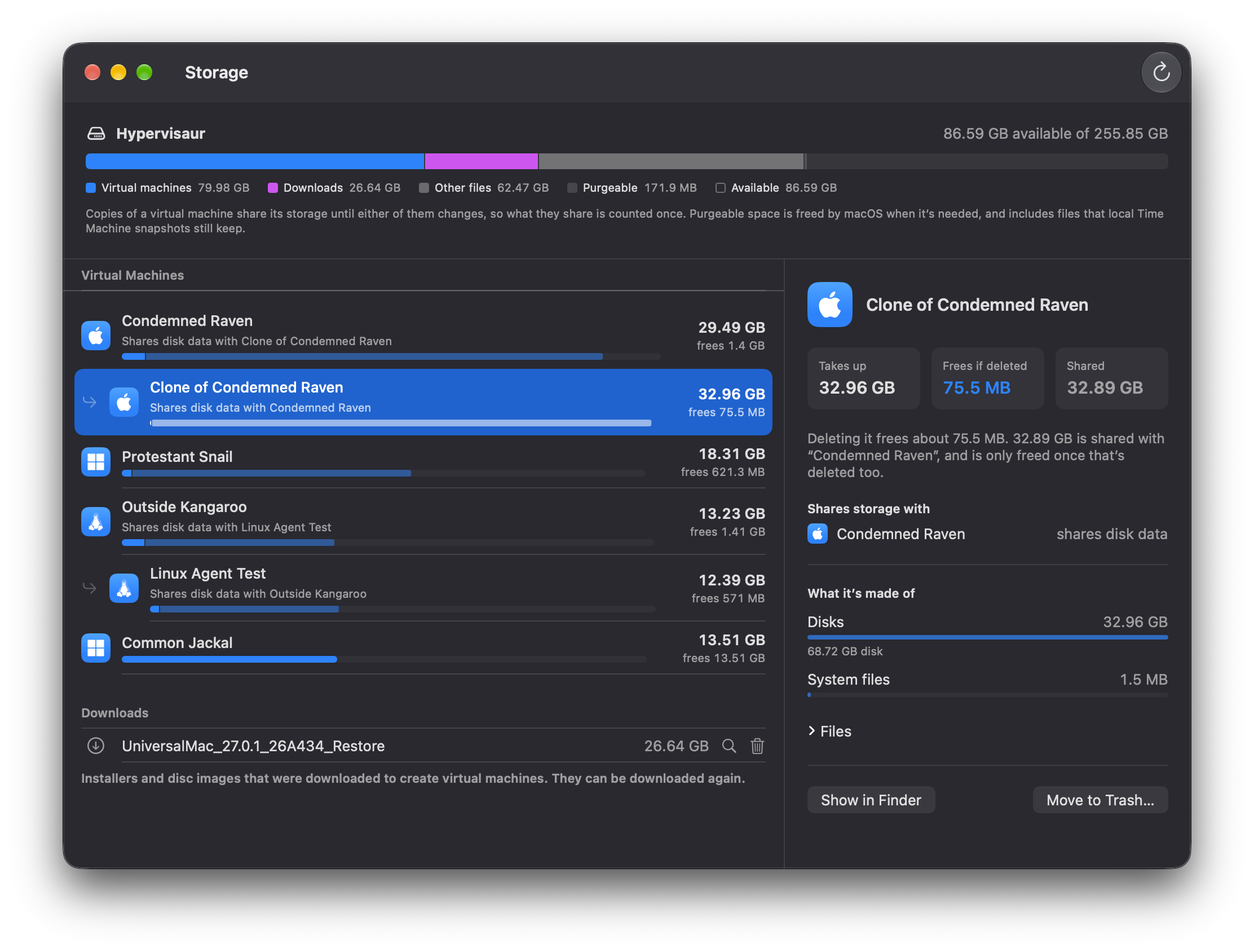
- What deleting each virtual machine would actually free. A clone shares its storage with the virtual machine it came from until either of them changes, so deleting one of them only frees what's changed in it. Each virtual machine shows what it takes up, what deleting it frees, and what it shares.
- Which virtual machine came from which. Clones and duplicates are shown under the virtual machine they came from, with the virtual machines they share storage with named. Hypervisaur now records where copies come from, and finds the copies you made with earlier versions from the data their disk images still share.
- The whole volume at a glance: virtual machines, downloads, virtual machines in the Trash, other files, space macOS can free when it needs to, and what's available.
- Downloads and the Trash. Downloaded installers and disc images can be moved to the Trash from the Storage window, and virtual machines in the Trash are listed, since they take up space until you empty it.
-
Know what Move to Trash frees. Moving a virtual machine to the Trash from the library now asks first, saying how much space it frees, and what it shares with which virtual machines.
Updating from 0.4
- Open the installer package to replace Hypervisaur 0.4. Your virtual machines and their saved sessions stay as they are.
Requirements
- A Mac with Apple silicon and macOS 14 or later
- For Windows: Homebrew, the Windows 11 ARM64 disc image and your own Windows license
Much of this release was written with Claude Code. See the README for details.
Hypervisaur 0.4.1
Fixes
- Saved Windows sessions resume. In 0.4.0, a saved Windows virtual machine couldn't be resumed if it had sound and its DRIVERS drive attached, which Windows virtual machines normally have, and Hypervisaur said that QEMU couldn't load the saved state because of an unknown
usb-hub. Hypervisaur now starts QEMU with the USB devices on the same ports as when the session was saved.- Sessions saved with 0.4.0 resume with 0.4.1. A session that failed to resume hasn't changed: open the virtual machine and press Resume again.
Updating from 0.4.0
- Open the installer package to replace Hypervisaur 0.4.0. Your virtual machines and their saved sessions stay as they are.
Requirements
- A Mac with Apple silicon and macOS 14 or later
- For Windows: Homebrew, the Windows 11 ARM64 disc image and your own Windows license
See the 0.4.0 release for what's new in 0.4, and the README for details.