
This project or part of this project was developed as part of the SD Capstone course at GGC under Dr. B.
Many ways exist of storing references for art and photography, as well as storing documents. In many cases, it can be difficult to organize and put your things together for art projects or worldbuilding, and MuralDB is supposed to help with that issue. Using visually appealing boards, site organization, image storage and user data, ths site allows users to store all of their art related things in an organized place, while also being able to keep track of their priorities and recent work. Users can even see the boards of others, given their permission. There are also helpful tools for the creative process, alongside resource references to help you get started.
- Repository Home
- Working site, using my Firebase config. Live version, the version on github is for testing and personal use.
- User Manual
- JavaScript
- TypeScript
- Node.js
- React
- Clip Studio Paint
- Figma
- Firebase
- Tailwind CSS
- Vite
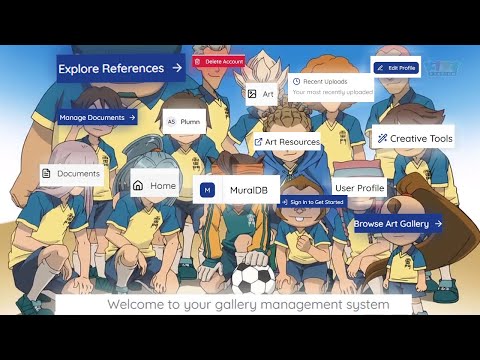
- Home Page
- Directs users to different parts of the site
- Accessible login and sign-up functions
- Recent uploads section to show the last added images and documents
- Gallery Pages
- Pages that store different galleries for users. Pages for references, created art/ photos, and uploaded documents.
- Tags can be applied for categorization and organization.
- Pins
- Normal pins allow you to prioritize up to 3 of your most important boards.
- Showcase pins allow you to choose which boards you want to share with others.
- Tags
- Images and documents can be tagged for better organization site-wide
- Tags are saved in a database, can be used to filter galleries.
- Cam ne designed with pre-set colors, or a custom color throguh the color picker.
- Database
- Stores images with login information, alongside documents, profile picture, and more.
- Proper password rest function.
- Tools
- A tools section dedicated to fun and helpful resources.
- Character prompt generator, toggle-able parameters.
- Color palette generator, generates five random colors and can generate ten random shades.
- More tools to come.
- Resources
- Contains references to helpful resources for creatives.
- Includes drawing tablets, sketchbooks, cameras, digital art software, and where to buy.
- UI/UX
- Smooth UI, closeable navigation.
- Dark mode/ light mode toggle for users.
- Seamless page switching.
- Tailwind allows for proper mobile CSS, though a bit rough.
- Public Page
- Public page, allows for the viewing of other users galleries.
- You can see and search through galleries that users have given showcase pins to.
- Galleries can be bookmarked, allowing for quick access to other boards.
- Known Issues
- Still need to make the dark mode toggle permanent, as opposed to temporary.
- File names do not save after being changed.
- View Gallery in user information page does not work.
- Download and extract
- Run
npm install - In the src folder, create a folder named config, with a file named
firebase.ts. - Go to
firebase.tsinsrc/config/firebase.ts, add your config.import { initializeApp } from 'firebase/app'; import { getAuth } from 'firebase/auth'; import { getFirestore } from 'firebase/firestore'; import { getStorage } from 'firebase/storage'; const firebaseConfig = { //Replace with your github configuration. }; // Initialize Firebase const app = initializeApp(firebaseConfig); // Initialize Firebase services export const auth = getAuth(app); export const db = getFirestore(app); export const storage = getStorage(app); export default app; - Replace the firebase configuration with your own firebase configuration (assuming the site is being installed for testing and development)
- Create
.firebasercin the root folder, and replace with your project ID.
{
  "projects": {
    "default": "your project id"
  }
}
- Create
.envin the root folder, and add your config. - Follow the instructions in FIREBASE_SETUP.md, FIREBASE_INTEGRATION_COMPLETE.md, and DEPLOYMENT_QUICKSTART.md.
- If hosting app:
npm install -g firebase-tools
firebase login
firebase deploy --only firestore:rules,storage:rules,firestore:indexes
npm run build
firebase init hosting
Select yes when asked to proceed. Make build your public directory (You can just type build)
The app is on a single page, so select yes to configure as a single app. Select your preference for automatic builds, and do not overwrite the build file.
firebase deploy --only hosting --project "your project id (remove quotations)"
-
From the src directory, run:
npm startThis will automatically start the app in a new tab.
-
Create and account or log in using an existing account.
- After creating an account, you should be automatically signed in.
Abdou Senghore
UI/UX Design, Database design, documentation, and code.
Figma was used to work on the basic UI, alongside some aspects for the site.
MuralDB Sprint Presentation #1
MuralDB Sprint Presentation #2
MuralDB Sprint Presentation #3 (FINAL)
MuralDB Sprint Code Demo #1

MuralDB Sprint Code Demo #2

MuralDB Sprint Code Demo #3 (FINAL)

This work is licensed under the GNU General Public License. You can use it as long as aany changes/modifications you make are available for others to do so as well. Any alternative versions must be licensed under the GPL.