- Ubuntu 20.04 or 22.04 (64-bit)
- CPU: 4+ cores
- RAM: 4-16GB+
- Disk Storage: 125 - 500GB+ SSD
- Network: 100Mbps+ connection with low latency
sudo apt update && sudo apt upgrade -y
sudo apt install curl wget unzip -ymkdir -p ~/adera-node && cd ~/adera-node
wget https://github.com/adera-one/adera-go/releases/download/genesis-awakening/geth -O adera-go
chmod +x adera-go
mv adera-go /usr/local/bin/adera-go📦 Check latest release here: https://github.com/adera-one/adera-go/releases
wget https://github.com/adera-one/adera-go/releases/download/genesis-awakening/genesis.json
wget https://github.com/adera-one/adera-go/releases/download/genesis-awakening/config.tomlTwo accounts require preparation before running a validator: the Consensus account and the BLS Vote account. Ensure these accounts match the corresponding ones when creating a new validator.
- Generate Consensus Address
echo {your-password for the BLS wallet} > blspassword.txt
adera-go account new --datadir ${YOUR_PATH_DATADIR_PASTE_HERE} --password ~/adera-node/blspassword.txt
🔐 This command will provide the public address (consensus address) and the path to your private key. Remember to back up the key file safely! A sample consensus address is 0x83eee6D6596600a412e0fa41a0D24921c7C35fCf.
- Generate BLS Vote Address
adera-go bls account new --datadir ${YOUR_PATH_DATADIR_PASTE_HERE} --show-private-key --blspassword ~/adera-node/blspassword.txt- Retrieve BLS Address
adera-go bls account list --datadir ${YOUR_PATH_DATADIR_PASTE_HERE} --blspassword ~/adera-node/blspassword.txt🔐 A sample BLS Address is f1fe571aa1b39e33c2735a184885f737a59ba689177f297cba67da94bea5c23dc71fd4deefe2c0d2d21851eb11081dee.
- Generate Proof Address
adera-go bls account generate-proof --datadir ${YOUR_PATH_DATADIR_PASTE_HERE} --chain-id 28058 ${OPEATOR_ADDRESS} ${VOTE_ADDRESS} --blspassword ${BLSPASSWORD PATH} - YOUR_PATH_DATADIR_PASTE_HERE : The directory path to store your key files.
- OPEATOR_ADDRESS: The address of your account, which will be recognized as the operator of the new validator.
- VOTE_ADDRESS: The bls vote address created in the last step.
🔐 A sample BLS Proof is 0xaf762123d031984f5a7ae5d46b98208ca31293919570f51ae2f0a03069c5e8d6d47b775faba94d88dbbe591c51c537d718a743b9069e63b698ba1ae15d9f6bf7018684b0a860a46c812716117a59c364e841596c3f0a484ae40a1178130b76a5.
🔐 Save all data such as : Consensus Address, BLS Vote Address, BLS Vote Proof in a safe place, this data will later be used to register in the dashboard and operator node validator.
adera-go --datadir ~/adera-node/database --state.scheme=hash --cache.preimages init genesis.jsonadera-go \
--config ~/adera-node/config.toml \
--datadir ~/adera-node/database \
--password ~/adera-node/blspassword.txt \
--blspassword ~/adera-node/blspassword.txt \
--nodekey ~/adera-node/geth/nodekey \
--unlock ${OPEATOR_ADDRESS} \
--miner.etherbase ${OPEATOR_ADDRESS} \
--rpc.allow-unprotected-txs \
--allow-insecure-unlock \
--ws.addr 127.0.0.1 \
--ws.port 8546 \
--http.addr 127.0.0.1 \
--http.port 8545 \
--enabletrustprotocol \
--http.corsdomain "*" \
--networkid 28058 \
--syncmode snap \
--gcmode full \
--cache 18000 \
--mine \
--vote \
--crypto.kzg "gokzg" \
--log.compress \
--log.file ~/adera-node/database/adera.log \
--log.format "terminal" \
--log.maxage 5 \
--log.maxsize 100 \
--log.rotate \
--monitor.maliciousvote📒 Logs will be saved in
~/adera-node/database/adera.log
🔎 Check validator register and status on dashboard
https://staking.adrscan.com/dashboard/validator
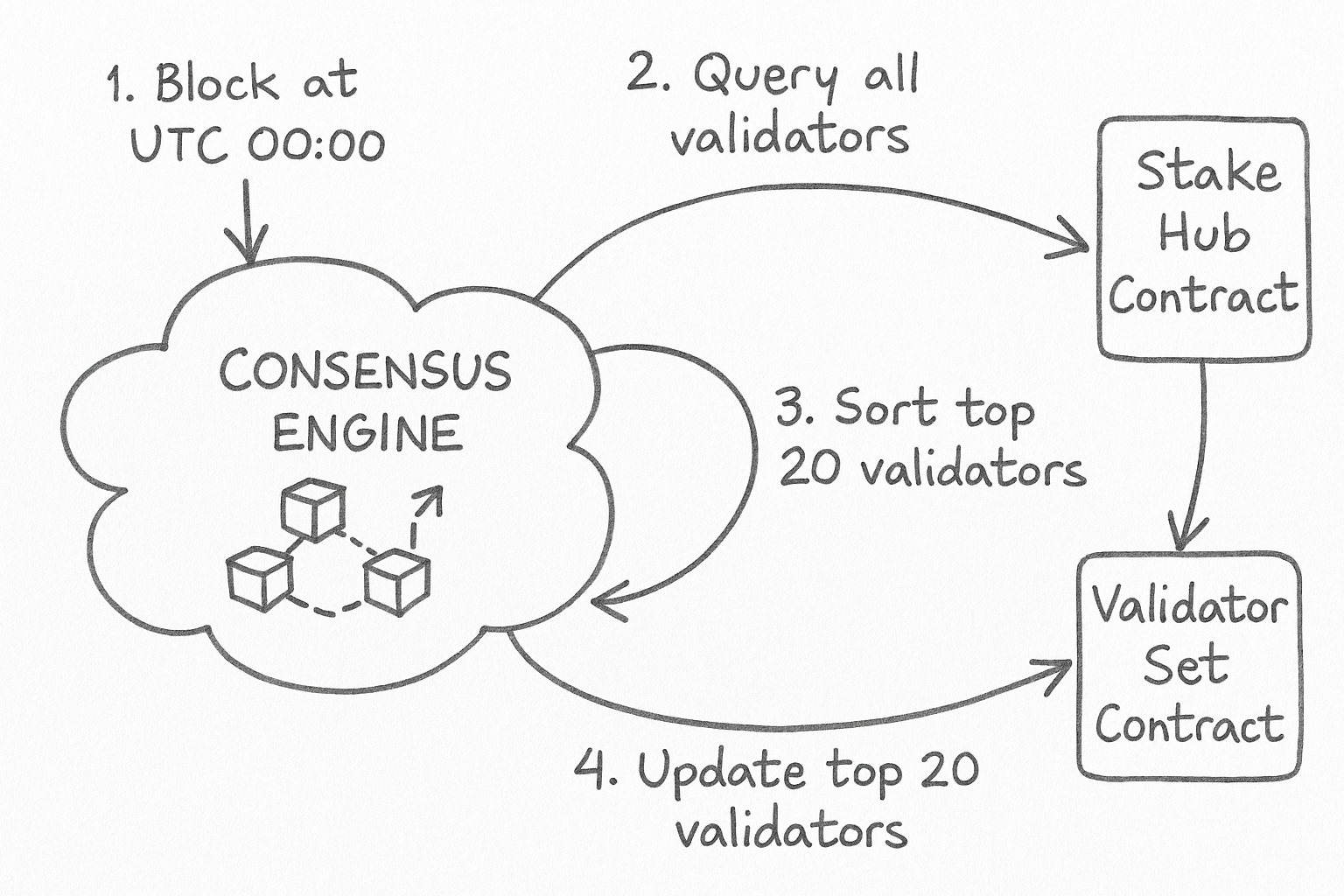
Validators are nodes running Adera Chain software, participating in the consensus process. They require a minimum ADR stake at their validator address and can receive delegations from other ADR holders. Validators earn rewards from transaction fees and share most of these rewards with their delegators.
There are different rols for validators:
- Council Forge: the top K [NumOfCandidates] (which is 20 currently) validators who get the most chance of producing blocks.
- Inactive: the reset validators who get no chance of producing blocks.
To determinate the roles of all validators, the validator set is updated every 24 hours, based on the latest staking information. At the first block after UTC 00:00, the consensus engine will sort all the validators and update the ADR validator set contract to save the ranking information.
Each validator has its own validator contract that manages staking credit and facilitates the exchange between credit and ADR. The token name of a staking credit is “stake {{validator moniker}} credit”, and the symbol is “st{{validator moniker}}”. The contract will be created by the Stake Hub Contract when a validator is created.
Whenever a user delegates ADR, an equivalent quantity of credit tokens are created. On the other hand, when a user withdraws their delegation, a corresponding amount of credit tokens are destroyed, thereby releasing the ADR.
Delegators are ADR holders who stake their ADR with a validator, sharing rewards. They can select any active or standby validator, switch between them, undelegate their ADR, and claim rewards anytime.
To delegate ADR to a validator, a ADR holder needs to send a Delegate transaction to the StakeHub contract, specifying the following information:
- Operator address: The address of the validator, which will receive the ADR from the delegator.
- Delegate Voting Power: The flag to indicate whether the delegator would like to delegate his/her voting power to the validator for governance.
The Delegate transaction will deduct the amount of ADR from the delegator address and issue the corresponding staking credit to the validator. The validator will then share the rewards with the delegator, according to the commission rate. The credit tokens (or share) a delgator will get is calculated as - delegation amount * total supply of credit token / total pooled ADR. The total pooled ADR includes the delegation ADR and unclaimed reaward ADR of of the vlidator. It means that a delegator will get credit tokens based on the ratio of his/her delegation ADR amount to the total staked and reward ADR. When the validator gets block reward the total pooled ADR amount will increase, which means that when unbonding the delegator will get his delegation, as well as reward ADR from the pool.
To undelegate ADR from a validator, a delegator needs to send an Undelegate transaction to the StakeHub contract, specifying the following information:
- Operator address: The address of the validator, which will send the ADR to the delegator.
- Amount: The amount of ADR that the delegator wants to unstake from the validator.
The Undelegate transaction will burn the amount of staking credit from the user and moves the ADR to a withdraw queue. The ADR gets locked for an unbonding period before the delegator can claim it. The unbonding period is currently set to 7 days, and it is designed to prevent delegators from quickly withdrawing their ADR in case of a validator misbehavior or a network attack.
To claim the unbond ADR and the rewards, a delegator should send a Claim transaction to the StakeHub contract, specifying the following information:
- Delegator address: The BEP20 address of the delegator, which will receive the rewards from the validator.
- Queued unbond number: The number of unbond requests to be claimed, and 0 means claim ADR and rewards from all the unbond requests.
The Claim transaction will return the delegated ADR and rewards to the delegator. Be noted, a delegator can only get the rewards after unbond. Before undelegation, the reward will be furthur staked to boost a delegator’s income.
The staking reward comes from transaction fee - when a block is produced, the majority of the block fee will be collected as reward for the validator who proposed the block. Every day, a portion of the rewards collected will be directly sent to the operator account of the validator as commission, while the remaining portion will be sent to the corresponding validator credit contract. And when a user undelegates and claims his
sudo nano /etc/systemd/system/adera-node.service[Unit]
Description=ADERA Node Validator
After=network.target
StartLimitIntervalSec=0
[Service]
Type=simple
Restart=always
RestartSec=1
User=root
ExecStart=/usr/local/bin/adera-go \
--config ~/adera-node/config.toml \
--datadir ~/adera-node/database \
--password ~/adera-node/blspassword.txt \
--blspassword ~/adera-node/blspassword.txt \
--nodekey ~/adera-node/geth/nodekey \
--unlock ${OPEATOR_ADDRESS} \
--miner.etherbase ${OPEATOR_ADDRESS} \
--rpc.allow-unprotected-txs \
--allow-insecure-unlock \
--ws.addr 127.0.0.1 \
--ws.port 8546 \
--http.addr 127.0.0.1 \
--http.port 8545 \
--enabletrustprotocol \
--http.corsdomain "*" \
--networkid 28058 \
--syncmode snap \
--gcmode full \
--cache 18000 \
--mine \
--vote \
--crypto.kzg "gokzg" \
--log.compress \
--log.file ~/adera-node/database/adera.log \
--log.format "terminal" \
--log.maxage 5 \
--log.maxsize 100 \
--log.rotate \
--monitor.maliciousvote
[Install]
WantedBy=multi-user.targetsudo systemctl daemon-reexec
sudo systemctl enable adera-node
sudo systemctl start adera-node
sudo journalctl -fu adera-node- Log File:
tail -f ~/adera-node/database/adera.log
| Issue | Solution |
|---|---|
| unauthorized validator | Wait after UTC 00:00 Node Will Update From updateValidatorSetV2 |
| Blocks not progressing | Ensure enough stake and you're in the top validators |
| rpc server error | Check if --http and --http.addr are enabled in config.toml |
| Slow sync speed | Use NVMe SSD + fast network connection |