Conversation


|
Build successful! 🎉 |
# Conflicts:
#	packages/@react-spectrum/list/test/ListView.test.js
|
Build successful! 🎉 |
|
Build successful! 🎉 |

 reidbarber
left a comment
reidbarber
left a comment
reidbarber
left a comment
There was a problem hiding this comment.
LGTM, issue is no longer present and the change to KeyboardDelegate seems reasonable
# Conflicts:
#	packages/@react-types/shared/src/collections.d.ts

|
Build successful! 🎉 |
# Conflicts:
#	packages/@react-spectrum/list/stories/ListView.stories.tsx
#	packages/@react-spectrum/list/test/ListView.test.js

| }); | ||
|
|
||
| // disabledKeys 1 means we actually start on item 2 and drag that, so everything is offset by 1 and it wraps one early | ||
| it.each` |
|
Build successful! 🎉 |

 LFDanLu
left a comment
LFDanLu
left a comment
LFDanLu
left a comment
There was a problem hiding this comment.
I can see these changes being legitimate + useful outside of useDroppableCollection but lemme know what you think about using collection instead. I haven't tried it myself so there maybe some issues with that approach
| let {keyboardDelegate} = localState.props; | ||
| let nextKey = target.type === 'item' | ||
| ? keyboardDelegate.getKeyBelow(target.key) | ||
| : keyboardDelegate.getFirstKey(); | ||
| ? keyboardDelegate.getKeyBelow(target.key, {allowsDisabled: true}) | ||
| : keyboardDelegate.getFirstKey(null, null, {allowsDisabled: true}); |
There was a problem hiding this comment.
Feels a bit gross needing all the unused options haha. Did you try using the state.collection instead? It should also have similar getFirstKey, getKeyBelow, etc and doesn't skip disabled keys by default.
I'm not sure if we need the other keyboard delegate getters like getPageUp/etc, but it seems like useDroppableCollection only uses above/below/first/last key getters.
There was a problem hiding this comment.
I had opted to use the keyboardDelegate first, because that's how we actually navigate, even though yeah, those empty null args feel gross
If I did it with state.collection, then I think i'd just be re-implementing keyboardDelegate
this is more obvious when you think about our grid layouts such as waterfall
There was a problem hiding this comment.
Ahhh, I forgot about CardView and how it will support drag and drop. Yeah, the collection route is a no go for that

|
Build successful! 🎉 |
|
Build successful! 🎉 |
|
Build successful! 🎉 |
| export interface KeyboardDelegateOptions { | ||
| allowsDisabled?: boolean | ||
| } | ||
|
|
| let layout = useListLayout( | ||
| state, | ||
| props.density || 'regular', | ||
| // !!0 is false, so we can cast size or undefined and they'll be falsy | ||
| state.selectionManager.disabledBehavior === 'selection' || !!dragState?.draggingKeys.size, | ||
| overflowMode); | ||
|
|
There was a problem hiding this comment.
Weird, I get double drop indicators when I start dragging via keyboard in the reorder story:
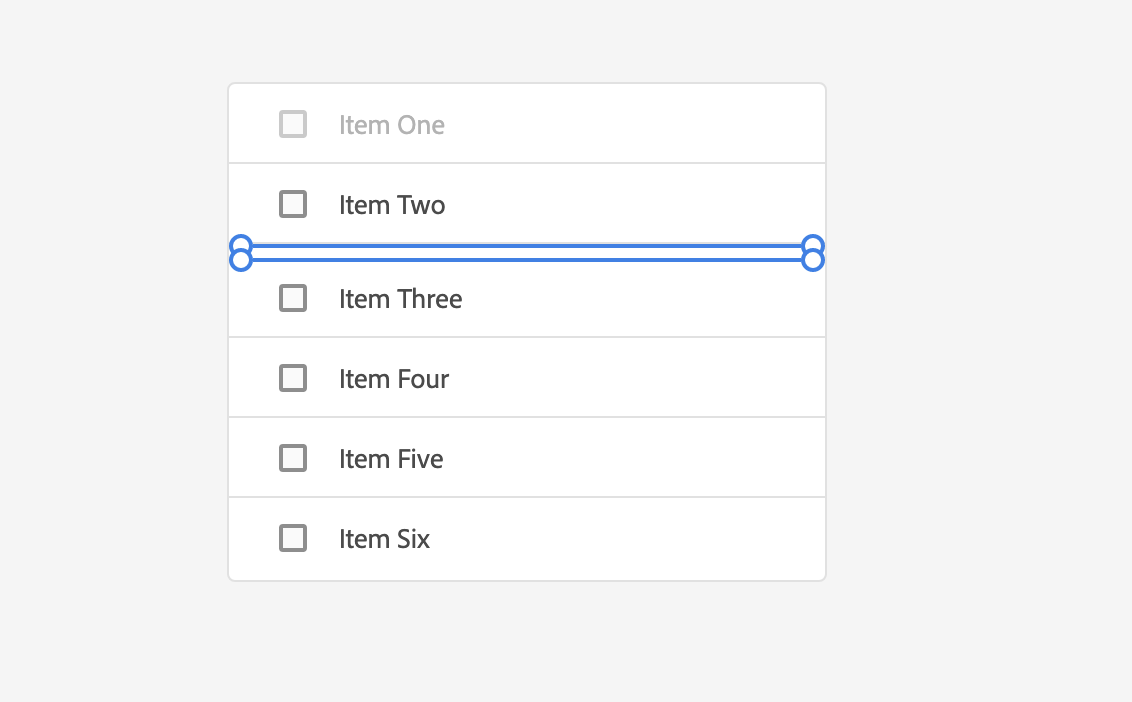
I think it is something with the ListLayout and it getting a new instance due to the drag state change, I noticed the Item 2 row is 47px vs 40px for the other rows
…-spectrum into dropping-skips-disabled-keys
|
Build successful! 🎉 |

|
Build successful! 🎉 |

5 participants


Closes
Two issues, one that we skipped two keys past a disabled item
second, that we didn't announce "Insert after last item"
Noticed while testing #3135
https://reactspectrum.blob.core.windows.net/reactspectrum/42d6771263b8dc5709e55c73b2b56538702fd957/storybook/index.html?path=/story/listview-drag-and-drop--drag-within-list-reorder
Use keyboard to enter drag mode on Item One. Press down arrow once, it'll jump to between Item Three and Item Four. I would expect it to go between Item Two and Item Three.
We're making use of the ListLayout keyboard delegate to move, we should either add an option to ignore the fact that Item Two is disabled, or we should use some other method.
✅ Pull Request Checklist:
📝 Test Instructions:
🧢 Your Project: