Script Sharing
skNetwork can keep .sk files on the proxy and send them to your game servers. Edit
one copy, run one command, and every server loads the new version.
It's off by default.
In the proxy's plugins/skNetwork/config.yml:
scripts:
  enabled: true
  groups:
    hubs:
      - lobby
      - lobby2
  max-file-kb: 512
  max-total-mb: 16
Restart the proxy. It creates plugins/skNetwork/scripts/ with a global folder and a
short README inside.
Every script lives in a folder, and the folder name decides which servers get it.
plugins/skNetwork/scripts/
    global/
        economy.sk      -> every connected server
        stats.sk        -> every connected server
    hubs/
        hub.sk          -> lobby and lobby2 only
global always means every server and can't be redefined. Every other folder name has
to appear under groups, or nothing inside it goes anywhere. The proxy warns you at
startup:
scripts/minigames/ has no matching group in config.yml,
so nothing in it will be pushed anywhere
A file dropped straight into scripts/ with no folder is skipped, and the console says
so.
Write a group name with a / on the end to include it in another:
  groups:
    hubs:
      - lobby
      - lobby2
    everything:
      - hubs/
      - survival
Now scripts/everything/ reaches lobby, lobby2, and survival without listing the
hubs twice.
A group that includes itself, directly or through a chain, is a mistake. The proxy finds it at startup and prints the chain instead of crashing later.
Put your files in place and run this on the proxy console:
/sknetproxy push
Each server writes the files to plugins/Skript/scripts/network/, loads them, and
reports back:
skNetwork: pushed to 3 server(s), results follow in the console.
  lobby: 15 script(s) loaded from manifest 97
  lobby2: 15 script(s) loaded from manifest 97
  survival: 14 script(s) loaded from manifest 97
Survival has one fewer because hubs/hub.sk doesn't reach it.
Only changed files are sent. skNetwork compares a hash of every file, so pushing again with no edits costs one small message per server.
If a script doesn't load, the proxy console tells you which server, which file, which line, and what Skript said:
lobby: 15 loaded, 5 error(s) from manifest 95
  -> global/wikitest.sk:63 Can't understand this expression: the atomic change succeeded
  -> global/wikitest.sk:66 Can't understand this expression: the atomic change succeeded
No need to open each server's console.
Style warnings are listed separately with a ~ in front, so a script that loaded fine
doesn't look like a failure.
plugins/Skript/scripts/network/ on each game server belongs to skNetwork. It writes a
README.txt in there saying the same thing.
Every push overwrites those files, and any file the proxy no longer has is deleted. Edit the copy on the proxy and push again.
- The proxy sends a list of every file that server should have, with a hash of each.
- The server compares that list to its disk and asks only for what it's missing.
- The proxy sends those files.
- The server writes them to a staging folder first.
- Once every file has arrived, it swaps them into place and reloads.
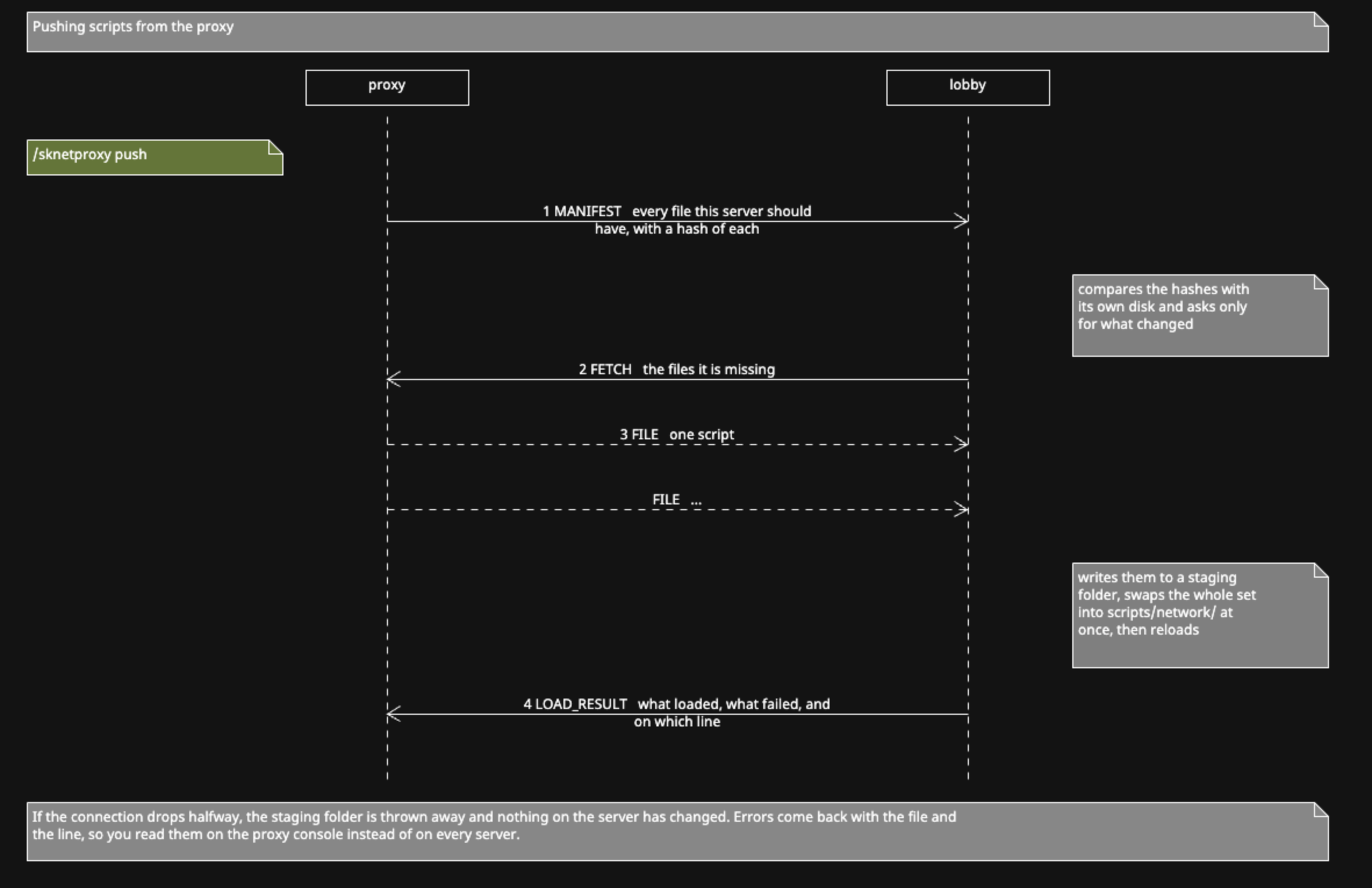
If the connection drops halfway, the staging folder is thrown away and nothing on the server has changed. Each file's hash is checked when it arrives, and a file that doesn't match kills the whole push rather than leaving it half applied.
Set enabled: false and the files already on the game servers stay and keep running.
skNetwork tells you they're there:
holding 15 script(s) pushed by the proxy, in plugins/Skript/scripts/network/.
They keep running even if the proxy stops pushing.
It won't delete them for you, because a small config mistake would wipe scripts from every server at once. Delete the folder yourself when you want them gone.
| Setting | Default | Meaning |
|---|---|---|
max-file-kb |
512 | A single file larger than this is skipped |
max-total-mb |
16 | The scan stops once the library reaches this size |
Both are in the proxy config. A skipped file is named in the console.
Anyone who can put a file in plugins/skNetwork/scripts/ can run code on every game
server. Treat write access to that folder as console access to the whole network.
skNetwork checks every path it receives before writing it, so a bad manifest can't
escape the scripts folder and overwrite server.properties. That protects the game
servers from a broken or hostile proxy. It doesn't protect you from someone you gave
folder access to.