Setup
skNetwork is one jar file. The same file goes on your proxy and on every game server. It works out where it's running and turns on the right half.
| Works with | Recommended | |
|---|---|---|
| Java | 25 | 25 |
| Minecraft | 1.21 to 26.2 | 26.1.2 |
| Skript | 2.16.0 or newer | 2.16.2 |
| Proxy | BungeeCord or Velocity | either |
The proxy doesn't need Skript. Only the game servers do.
Check your Java first. skNetwork needs Java 25 and won't load on Java 21 or older, whatever Minecraft version you run. On the wrong Java you get this:
UnsupportedClassVersionError: class file version 69.0, this version of the
Java Runtime only recognizes class file versions up to 65.0
Both rules apply together, so a 1.21 server also has to start on Java 25.
java -version
Cracked servers work. skNetwork never looks at who a player is, and it was tested with
online-mode=false on a live network. If you mix online mode and cracked servers, read
Limitations first.
Tested on Minecraft 1.21.11 and 26.1.2, Skript 2.16.2, BungeeCord 26.1 and Velocity 4.1.1. On an older Skript, skNetwork refuses to start and says so in the console.
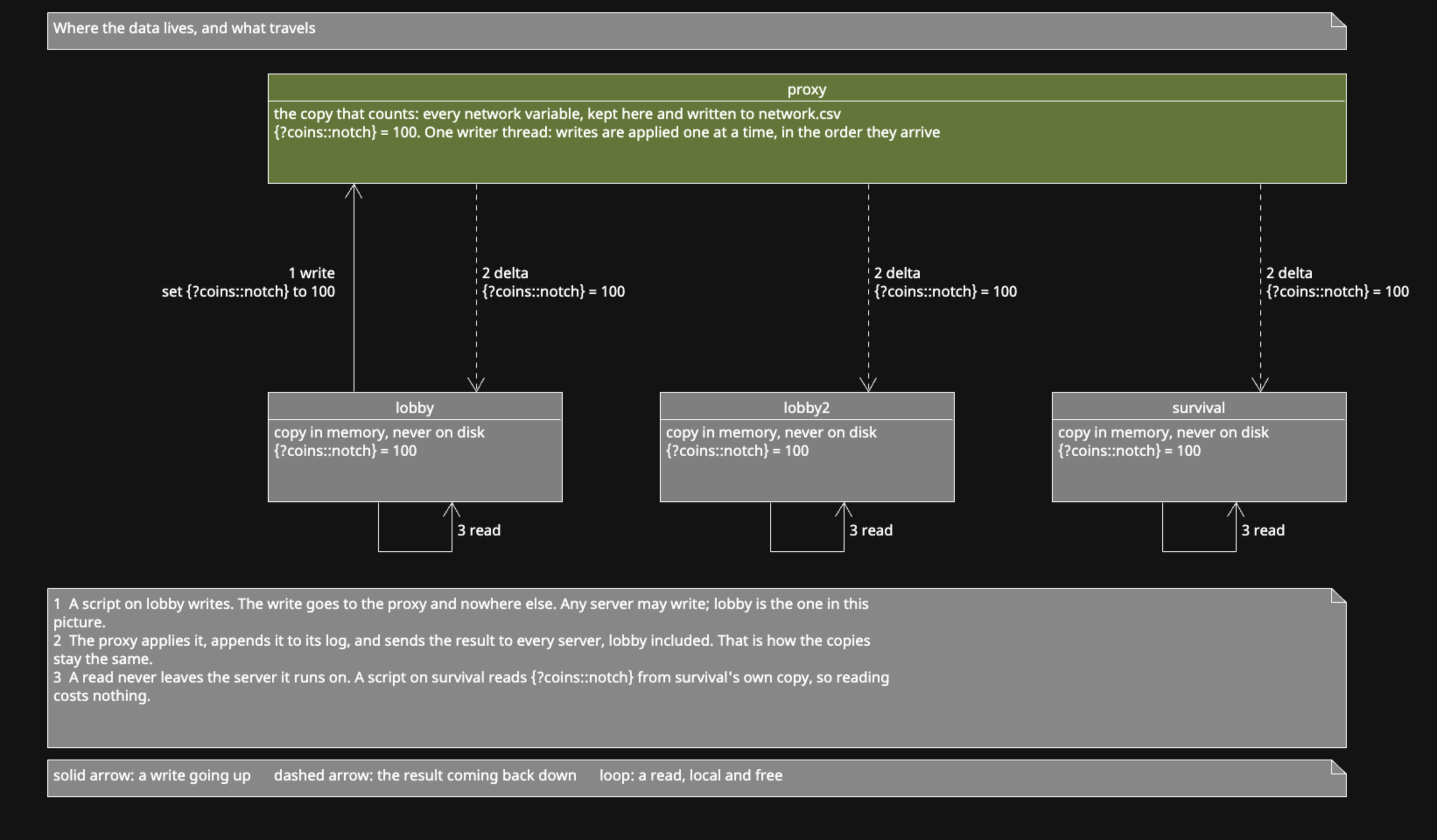
The proxy holds the real data. Every game server holds its own copy in memory.
When you read {?coins::%player%}, your server answers from that copy. Nothing goes
over the network, so reading is free.
When you write, your server sends the change to the proxy. The proxy decides the new value and tells every server. That's why two servers can't lose each other's changes.
Variables starting with ? are network variables. Everything else stays local.
Put skNetwork.jar into the plugins folder of your BungeeCord or Velocity proxy.
Start the proxy once, then stop it. This creates
plugins/skNetwork/config.yml.
Open plugins/skNetwork/config.yml on the proxy:
bind: 127.0.0.1
port: 25580
token: "change-me"
Change token to your own password. Any text works. Every game server has to use the
same one.
bind: 127.0.0.1 means only programs on the same machine can connect. Keep it that way
if your proxy and game servers share a machine. If they don't, read
Limitations first, because this connection has no encryption.
port: 25580 is the port skNetwork listens on. It can't be 25565, your Minecraft server
already uses that.
Put the same skNetwork.jar into the plugins folder of every game server. Skript has
to be there already, or skNetwork won't start.
Start each server once, then stop it. This creates plugins/skNetwork/config.yml on
that server.
Open plugins/skNetwork/config.yml on a game server:
server-name: "lobby"

proxy:
  host: 127.0.0.1
  port: 25580
  token: "change-me"

prefix: "?"
server-name is a short name for this server, like lobby or survival. Give every
server a different one. Your scripts can read it, so one script can behave differently
on each server.
token has to match the proxy's. If it doesn't, the proxy refuses the connection and
says so in the console.
Leave host and port alone if the proxy is on the same machine.
prefix decides which variables are shared. With ?, {?coins} is shared and
{coins} is not.
Do the same on your other game servers. Only server-name should differ.
Skript needs to know that ? variables belong to skNetwork. skNetwork writes this for
you when force-skript-config is true, which is the default.
It adds this to plugins/Skript/config.sk:
	network:
		type: skNetwork

		pattern: [?].*
The block has to sit above the default: block at the bottom of that file. Skript saves
a variable to the first database whose pattern matches, and nowhere else. Below
default:, every network variable also gets written to variables.csv on that server.
skNetwork places it correctly by itself.
On a brand new server, Skript hasn't created config.sk yet when skNetwork starts. It
writes the block after startup instead and tells you in the console. Restart the server
once and it works from then on.
Set force-skript-config: false to manage the block yourself. Open
plugins/Skript/config.sk, find databases:, and add this above the default: block:
	network:
		type: skNetwork

		pattern: [?].*
Match the tabs or spaces the rest of the file uses. If you changed prefix, change the
pattern too. For a prefix of $, the pattern is [$].*.
Start the game servers first, then the proxy. The order isn't strict, because game servers keep retrying until the proxy answers.
Type /sknetproxy in the proxy console:
skNetwork  │  0.2.0  ·  protocol 8
│
│ Backends   2 servers
│ Variables  0  seq 0
│ Scripts    off
│
│ /sknetproxy push          send scripts now
│ /sknetproxy dump <name>   look up a variable, '*' is a wildcard
│
Backends is how many game servers are connected. If it says 0, check the token and the
port.
Type /sknet on a game server:
skNetwork  │  0.2.0  ·  protocol 8
│
│ State      READY
│ Server     lobby
│ Proxy      127.0.0.1:25580  1ms
│ Storage    ?  routing [?].*
│ Mirror     0 variables  seq 0
│ Applied    0 inbound
│
│ /sknet resync      throw the copy away and pull everything
│ /sknet reconnect   drop the connection and resume
│
You want State to say READY in green and a Storage line saying routing. Red
NOT CONFIGURED means Skript didn't read the block from step 5.
Put this on one server:
command /setcoins <number>:
	trigger:
		set {?coins::%uuid of player%} to arg-1
		send "Set to %arg-1%"
And this on another:
command /getcoins:
	trigger:
		send "You have %{?coins::%uuid of player%} ? 0% coins"
Run /setcoins 100 on the first server, move to the other, and run /getcoins. It says
100.
Then try reaching across servers. On any server:
command /who:
	trigger:
		send "Servers: %all network servers%"
		send "Players: %all network players%"

command /shout <text>:
	trigger:
		broadcast "&e[%network server name%] %arg-1%" across the network
/who lists every connected server and everyone online on all of them. /shout reaches
every player on every server. Network players has the rest.
skNetwork can also send .sk files from the proxy to your game servers. It's off by
default. Turn it on in the proxy config:
scripts:
  enabled: true
  groups:
    hubs:
      - lobby
      - lobby2
Restart the proxy. It creates plugins/skNetwork/scripts/ with a global folder inside.
Files in scripts/global/ go to every server. Files in scripts/hubs/ go only to
lobby and lobby2. Put your files in place, run /sknetproxy push, and each server
loads them and reports back.
Script sharing covers groups, errors, and limits in full.
The two halves use different names so each one reaches the right place.
On a game server, /sknet:
/sknet             state, proxy, copy size, latency
/sknet resync      throw the copy away and pull everything again
/sknet reconnect   drop the connection and continue where it stopped
On the proxy, /sknetproxy:
/sknetproxy                 state, connected servers, variable count
/sknetproxy push            send scripts now
/sknetproxy dump <pattern>  look up variables, * matches anything
/sknetproxy dump uses the name without the prefix, so {?coins::123} is coins::123.
Use * for a whole group, like /sknetproxy dump coins::*.
Both have short aliases. /sknl and /sknetlocal reach the game server, /sknp and
/sknetp reach the proxy.
A proxy handles any command it recognises before the game server ever sees it. If both
halves answered to /sknet, a player in game would always reach the proxy and could
never check the server they're standing on.
Both commands need sknetwork.admin.
On a game server, operators have it already. /sknet works in game as soon as you're op.
The proxy is different. It has its own permission system and knows nothing about who is
op on a game server. So /sknetproxy in game needs the permission granted on the proxy
itself, or you get this:
You do not have permission to execute this command!
That message comes from the proxy, not your game server.
For BungeeCord, edit the proxy's own config.yml (not skNetwork's), add the permission
to a group, and put yourself in that group:
permissions:
  admin:
  - sknetwork.admin
  - bungeecord.command.alert

groups:
  YourPlayerName:
  - admin
Restart the proxy afterwards. A permissions plugin for BungeeCord or Velocity works too, and is easier once you have more than one admin.
The proxy console always works, with no setup.
| Problem | What to check |
|---|---|
backends: 0 on the proxy |
The token on both sides, and the port. The game server console prints the reason. |
storage: NOT CONFIGURED |
Step 5. Restart the server once if this is its first start. |
protocol mismatch in the console |
One machine has an older jar. Use the same jar everywhere. |
needs Skript 2.16.0 or newer in the console |
Update Skript on that server. Nothing network related runs until you do. |
Writes do nothing, console says not synced
|
The server hasn't finished its first sync. See Limitations. |
| A value is missing on one server only | That server can't read the type. See Limitations. |
Variables also appear in variables.csv
|
The block from step 5 is below default: instead of above it. |
Turn on debug: true in the proxy config to see every change it applies, with the
server that sent it.
Read Limitations before you write real scripts. It covers the rules you have to follow, and the mistakes that look fine until two servers act at once.