IDE Plugins
An IDE plugin can start aicage instead of starting an agent CLI directly. The plugin keeps its IDE interface while
aicage runs the agent in its container.
This page uses the JetBrains CC GUI (Claude or Codex) plugin as a working example. It supports Claude Code and Codex. Other IDEs and agents need a suitable plugin plus an equivalent shim script.
- Install
aicageand make sureaicage claudeoraicage codexworks from a terminal in the project. - Complete the normal first-run setup in that terminal.
- IDE plugins cannot display aicage's setup UI, so aicage automatically accepts defaults for their non-TTY launches.
- Configuration per project folder must be done in the terminal.
Note: Automated image pulls and building by aicage are silent and auto-confirmed in such plugins and may cause response delays when aicage detects remote updates of images or agent versions.
This occurs typically about once a week and the plugin seems to handle it fine.
Download the shim scripts to a folder of your choice and make them executable.
- Claude Code: aicage-claude.sh
- Codex: aicage-codex.sh
To download and setup, run:
# Define target folder (change to your liking)
export AICAGE_IDE_PLUGINS="$HOME/.aicage/ide-plugins/jetbrains/cc-ui"
# Create target folder
mkdir -p "$AICAGE_IDE_PLUGINS"
# Download script for Claude Code
curl -fsSLo "$AICAGE_IDE_PLUGINS/aicage-claude.sh" \
  https://raw.githubusercontent.com/wiki/aicage/aicage/ide-plugins/jetbrains/cc-ui/aicage-claude.sh
# Download script for Codex
curl -fsSLo "$AICAGE_IDE_PLUGINS/aicage-codex.sh" \
  https://raw.githubusercontent.com/wiki/aicage/aicage/ide-plugins/jetbrains/cc-ui/aicage-codex.sh
# Make scripts executable
chmod +x "$AICAGE_IDE_PLUGINS"/aicage-*.sh
Alternative: agent shim scripts with debug logging
These alternative scripts record the launch command and its arguments, and capture aicage stderr, in a log subfolder
next to the script.
- Claude Code: aicage-claude.debug.sh
- Codex: aicage-codex.debug.sh
Use them for debugging when you run into issues.
Codex path overrides in pending PR #1738.
Codex path overrides in pending PR #1738:
The Codex executable-path override is currently in a pending pull request #1738.
If the official plugin does not offer that setting yet, download idea-claude-code-gui-0.5.4.zip from the release v0.5.4-pr01 in the plugin repo fork, then install it using Settings → Plugins → gear menu → Install Plugin from Disk.
Install CC GUI (Claude or Codex).
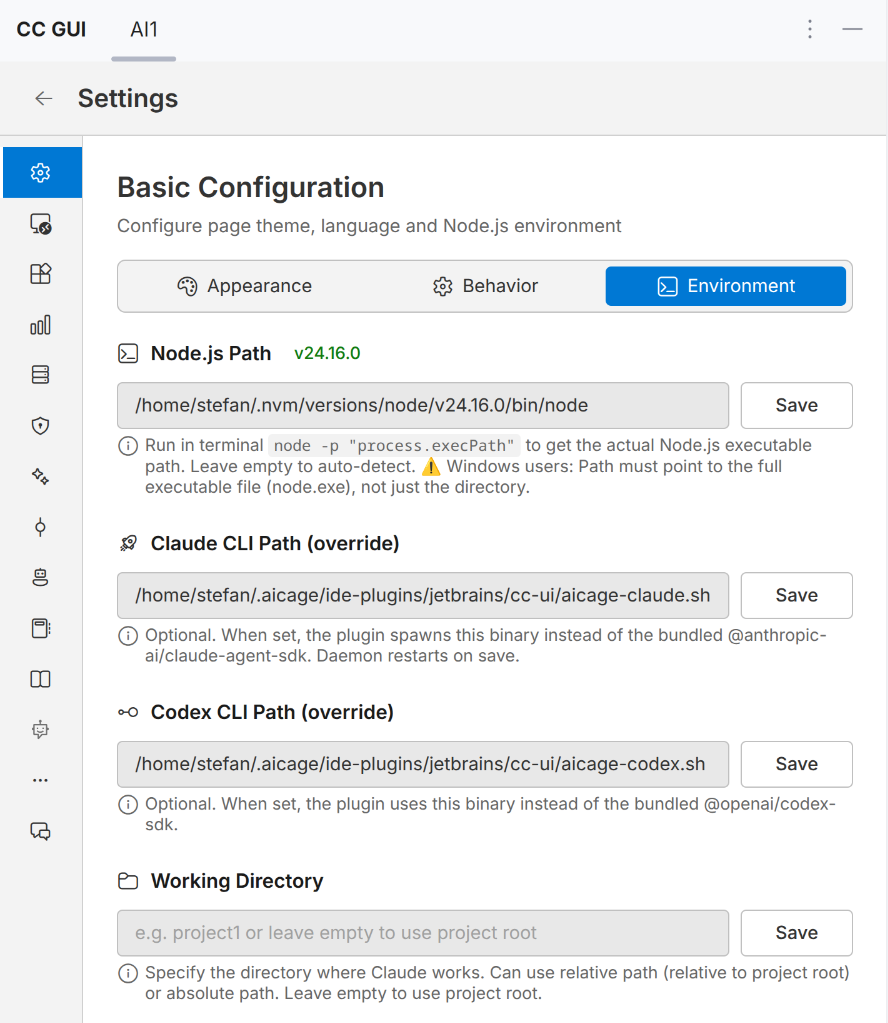
In the CC GUI settings, set the local executable-path override for the agents to the path of the shim scripts:
- Claude CLI Path (override)
- Codex CLI Path (override)
Screenshot of CC GUI settings for agent path overrides
Set CC GUI's Codex Sandbox Mode to danger-full-access.
Screenshot of CC GUI settings for Codex sandbox mode

This setting controls Codex's sandbox inside the aicage container without granting it full access to the host.
Alternative: keep Codex's sandbox enabled
This is usually unnecessary when using aicage, but you can keep Codex in workspace-write sandboxed mode.
Codex will then use Bubblewrap, which requires extra permissions from the outer Docker container.
Use aicage-codex.sandbox.sh as the Codex path override instead. It adds these
extra arguments to docker-run to make bubblewrap work:
--cap-add SYS_ADMIN
--security-opt seccomp=unconfined
--security-opt apparmor=unconfined
For debugging use aicage-codex.debug.sandbox.sh. It records the launch
command and its arguments, and captures aicage stderr, in a log subfolder next to the script.
The plugin must allow setting a path to the agents executable. Create a shim script per agent that runs
aicage <agent> "$@", make it executable, and select it as the plugin's executable path.
The shims on this page are specific to CC GUI, Claude Code, and Codex. They are examples rather than a universal IDE plugin integration.