config.json Format
The file config.json, stored in the resources directory describes to the Profile Manager, information about the Modpack API, as well as the modpack profile and a few other things.
Click here for a complete example.
Continue reading for detailed information about the config settings.
The API Endpoint is specified by a string, with key api_endpoint. The string points to your modpack's Profile Manager API URL. Information on configuring the API itself is available here.
Example:
"api_endpoint": "https://aitecraft.glitch.me/server/pm/api/index.json"These are configuration options that can be changed by the user, but you can set the default values for.
The value should be the directory you would expect most users to have Minecraft installed in. You can use <appdata>, which will be replaced by AutoIt's @AppDataDir.
Sets the default language for the Profile Manager. The value must be an id specified in resources/lang/languages.json.
The default heap size for the JVM, in Megabytes. The specified value is used to create the -Xmx....M and -Xms....M arguments for the JVM.
When set to true, files verification will ignore the ignore_hash_mismatch value in the Files API and consequently verify all files in your Files API. We recommend keeping this value at false.
All compatibility features of the profile manager can be toggled by the user. The values here are simply defaults.
This is used to enable/disable a workaround used by the Profile Manager to maintain compatibility with older versions of the Minecraft Launcher. In those older versions, the profile id and name must be the same value. When this value is set to true, the Profile Manager will create a profile with the specified ID in the config file (see above), and use the same ID for the name of the profile. When set to false, the Profile Manager will refer to the current language file to set the name as a translated value rather than a general ID.
Note: We tried to use the translated value as both the ID and Name. Unfortunately, when working with Unicode characters, the old launcher seems to have trouble using those values as an ID.
If set to true, this creates an empty version JAR during installation of Fabric. According to the Fabric devs, this helps the vanilla launcher properly setup Fabric. However, the empty JAR seems to cause issues for third-party launchers. Hence, this option.
Setting this value to false will also always delete the JAR file in case it exists during re-installation.
"defaults": {
    "mc_dir": "<appdata>\\.minecraft",
    "lang": "en",
    "jvm_heap_size": 2048,
    "strict_hash_check": false,

    "compatibility": {
        "profile_name_is_id": true,
        "create_empty_jar": false
    }
}Key: profile
These settings are used to customize your modpack's profile. The profile is accessible from a launcher.
The ID used for the modpack's launcher profile.
The profile root directory. This folder is where Minecraft will run, when your profile is selected. To keep the Minecraft install directory clean, we recommend setting this to a subdirectory within the root Minecraft directory. <mc_dir> and <appdata> in this string will be replaced by the Minecraft Directory Path and AutoIt's @AppDataDir, respectively.
We recommend using something like <mc_dir>\\my_modpack_id.
The arguments for the Java Virtual Machine (JVM). You do not need to include the -Xmx and -Xms arguments as those are handled separately (see above - jvm_heap_size).
Empty string recommended for 1.17 / Java 16.
Sets the minimum value for the JVM Heap Size slider. Unit is Megabytes.
The relative path to a file (from the "current directory") containing a Base-64 encoded image, to be used as the profile icon. Works with the new Minecraft Launcher.
null is accepted.
These are settings to enable/disable features of the Profile Manager that while not useful for every modpack, we thought would be great for ours. The settings are specified via a JSON Object, with key proprietary. This object has 2 keys, one of which is optional:
A boolean. Adds a "Open Schematics Folder" option to the "Open" dropdown menu. Opens (Modpack Directory)/schematics when clicked. Highly recommended if your modpack has Litematica.
An array of strings and objects to describe a custom drop-down menu to open links. The link URLs are fetched from the API. If this key is missing or is an empty array, the drop-down menu will not be created.
"links": [
    "change_skin",
    "website",
    {
        "key": "downloads",
        "content": [
            {
                "key": "java",
                "content": [
                    "java_win_x64",
                    "java_win_x86"
                ]
            },
            "launcher"
        ]
    }
]
The above JSON would get processed into a menu as shown below:
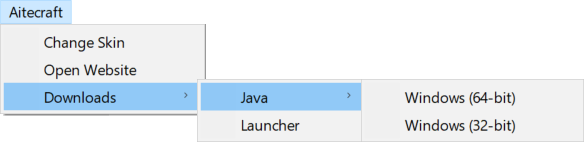
These settings can be used to disable/hide certain parts of the GUI. See the Complete Example below for the format.
{
    "api_endpoint": "https://aitecraft.glitch.me/server/pm/api/index.json",

    "defaults": {
        "mc_dir": "<appdata>\\.minecraft_server",
        "lang": "en",
        "jvm_heap_size": 2048,
        "strict_hash_check": false,

        "compatibility": {
            "profile_name_is_id": true,
            "create_empty_jar": false
        }
    },

    "profile": {
        "id": "My_Modpack",
        "dir": "<mc_dir>\\my_modpack",
        "jvm": {
            "minimum_heap_size": 2048,
            "args": ""
        },
        "misc": {
            "encoded_icon_file": null
        }
    },

    "proprietary": {
        "open_schematics_folder_option": true,
        "links": [
            "change_skin",
            "website",
            {
                "key": "downloads",
                "content": [
                    {
                        "key": "java",
                        "content": [
                            "java_win_x64",
                            "java_win_x86"
                        ]
                    },
                    "launcher"
                ]
            }
        ]
    },

    "gui": {
        "open_folders_menu": true,
        "optimizer_mod": true,
        "misc": {
            "reinstall_fabric": true,
            "verify_files": true
        },
        "profile_settings": true
    }
}As of version 0.7.0-beta, config.json can have comments & trailing commas in arrays and objects.