Admin Panel Manual
This document provides a comprehensive guide to using the Portfolio Admin Panel. The system allows you to manage content, configurations, and themes without writing code.
- Access & Authentication
- Command Center (Dashboard)
- Main Content Modules
- Component Modules
- System Configuration
URL: /admin
Login URL: /admin/login
The admin panel is protected by a secure authentication system.

- Rate Limiting: The system allows 5 attempts every 5 minutes per IP address to prevent brute-force attacks.
-
Security: Ensure
ADMIN_PASSWORDis set securely in your.envfile.
URL: /admin
The Command Center is the landing page after a successful login. It provides a visual grid of all available administration modules.
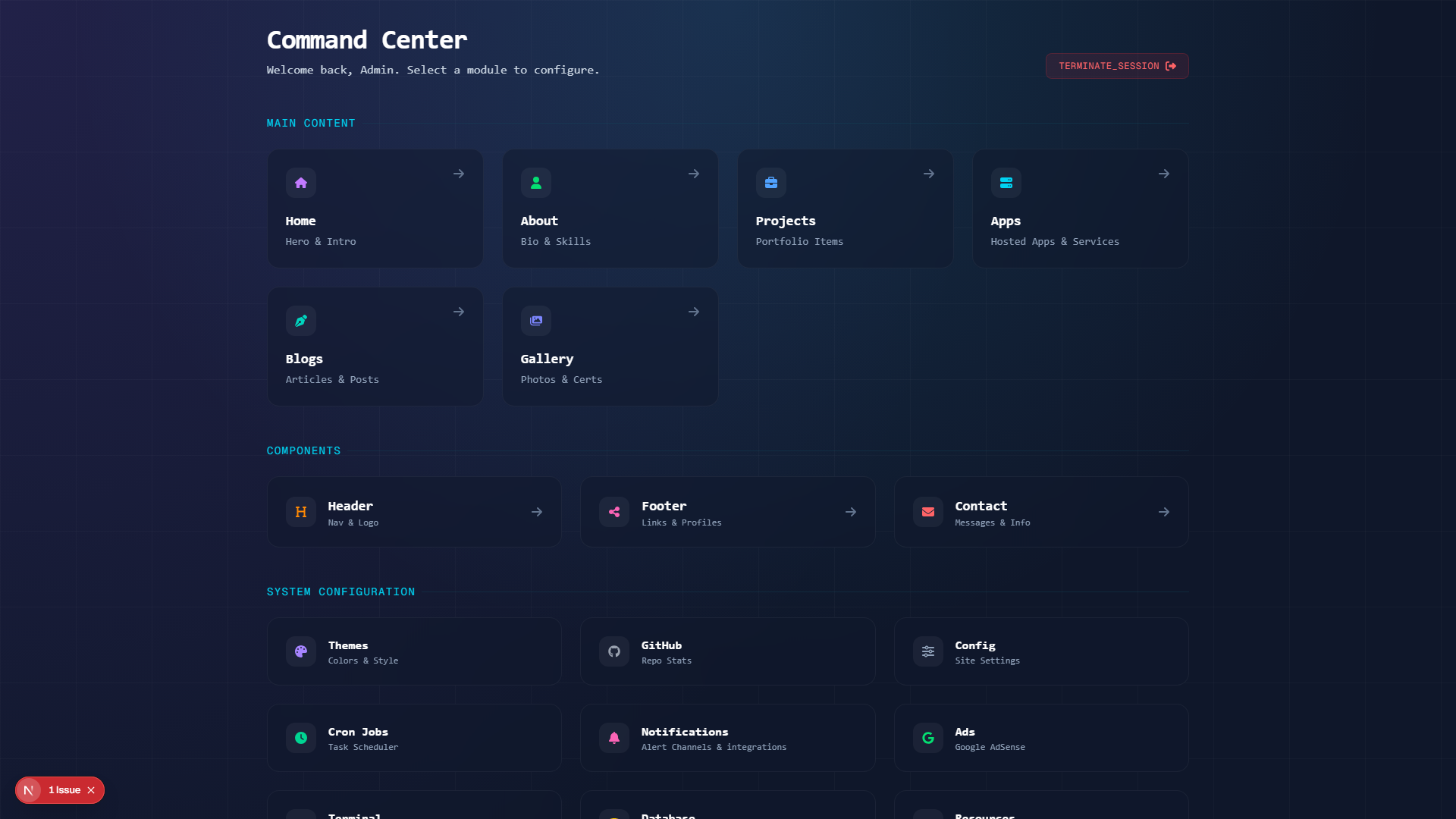
- Main Content: Primary pages visible to visitors.
- Components: Reusable sections like Header and Footer.
- System Configuration: Global settings, themes, and backups.
- Terminate Session: Use the logout button in the top right to securely exit.
URL: /admin/home

Manage the landing page visuals and text.
- Hero Section: Update the main headline ("I'm Ayaan...") and subtext.
- Availability: Toggle your "Open to Work" status.
URL: /admin/about

Manage your biography and skills.
- Bio: Markdown-supported text area for your introduction.
- Skills: Add or remove technologies (e.g., React, Node.js) displayed in the skills grid.
URL: /admin/projects

Manage your portfolio case studies.
- List View: See all active projects.
-
Editor:
- Slug: Automatic or custom URL slug.
- Images: Upload main project images.
- Tech Stack: Tag technologies used.
- Content: Full Markdown editor for case study details.
URL: /admin/blogs

Manage technical articles and thoughts.
- Editor: Markdown-based editor with preview.
- Tags: Categorize posts for easier filtering.
- Status: Save as Draft or Publish immediately.
URL: /admin/apps
Manage a directory of your hosted apps/services.
- List View: Drag to reorder; status badges (Live, Maintenance, Private, Archived).
- Editor: App name, type, description, hosting provider, environment, tech stack, hosted URL, and preview image. AI-assist toggle available for the description.
URL: /admin/gallery

Upload and manage certifications, photos, or awards.
- Upload: Drag-and-drop interface for images.
- Captions: Add context to each image.
URL: /admin/ai-page
Manage the public /ai showcase page.
- Content Tab: Skills (name, URL, rating, accent color, tags), Recommendations (with "free API key"/"no credit card" flags), Prompt Library, and Free Credits.
- Layout Tab: Reorder/toggle sections, edit hero and stats blocks.
- Seed Defaults: One-time backfill that only fills empty sections.
URL: /admin/resume
A full-screen LaTeX resume editor with a live PDF preview.
- Code / Visual Modes: Raw LaTeX in CodeMirror, or drag-and-drop section cards with plain form fields.
- Toolbar: Save, Compile (inline PDF preview + clickable error log), Publish (save → compile → upload in one click), download PDF, Save Version.
- Settings: Choose the LaTeX engine; toggle Auto-Save and Auto-Compile.
- Side Panel: Items (insert Projects/Apps/Experience/Education/Skills as LaTeX), Design (themes + starter templates), AI (refine, fix errors, tailor to a job description), Ideas board, Versions (named snapshots).
URL: /admin/header
Configure the main navigation bar.
- Logo Text: Change the name displayed in the top left.
- Nav Items: Enable/disable specific links in the menu.
URL: /admin/footer (formerly Socials)
Manage the website footer and external links.

-
Global Protocols:
- Copyright Signature: Custom text (e.g., "© 2025").
- System Version: Display a version tag (e.g., "v2.0").
- System Version Link: URL for the version tag (e.g., to GitHub release).
- Operational Status: Toggle "All Systems Nominal" verified badge.
- Active Uplinks: Manage social media links (GitHub, LinkedIn, etc.) with icon support.
URL: /admin/contact

View and manage incoming messages, and configure routing.
- Inbox: Read messages sent via the contact form in a chat-style interface.
- Webhook Dual Routing: Toggle n8n webhook routing and push notifications side-by-side. Forward entries to both services simultaneously.
- Message Details: Check sender metadata (timestamps, IP addresses, browser specs) to identify spam.
URL: /admin/themes

Control the visual appearance of the portfolio.
-
Preset Themes: Choose from 52 built-in themes, including:
- Dracula, Nord, Cyberpunk
- Gruvbox, Solarized, Catppuccin
- Copper Patina, Nebula Drift, Royal Sapphire, Ink & Vermilion, Acid Graphite, Firefly Grove
- Custom Theme: Create your own color palette using the color pickers.
- Live Preview: Instantly see changes before saving.
URL: /admin/version
Choose which redesign visitors land on by default.
-
Classic vs V2: Card selector sets
defaultSiteVersion, controlling what loads at the clean URLs (/,/about-me, etc.). -
Explicit Prefixes: The non-default version stays reachable at
/v1or/v2. - Changes propagate within ~30 seconds via the proxy cache.
URL: /admin/github
Configure the GitHub integration.
- Username: Set the GitHub username to fetch stats from.
- Token: (Optional) Personal Access Token for higher rate limits.
URL: /admin/config/crons
Visual control panel for automated background tasks.
- Maintenance Workflows: Control automatic unreferenced upload file cleaning and legacy image-to-WebP conversion.
- Visual Cron Builder: Simple UI allows choosing standard intervals, while real-time text translations display the exact meaning of the cron expression.
- Webhook Tasks: Add your own custom webhook tasks with full execution logs (timestamps, return responses, and success metrics).
URL: /admin/config/notification
Unified alert dispatcher to route critical site triggers to personal push apps.
-
Supported Channels:
- ntfy: Custom server, topics, and optional tokens.
- Telegram: Bot tokens and Chat IDs.
- Discord: Webhooks with full embed formatting.
- Connection Validation: Real-time validation tests to check routes instantly.
- Triggers: Hook alert dispatches to new contact form messages.
URL: /admin/config
General site-wide settings.
- SEO: Global meta tags and descriptions.
- AdSense Injector: Safely inject Google AdSense monetization tags into headers with dashboard script validation.
- Feature Flags: Enable/disable major sections of the site globally.
URL: /admin/database
Manage your data.
- Backup: One-click export of all data (Projects, Blogs, Config) to a JSON file.
- Restore: (Advanced) Restore data from a backup file.
URL: /admin/resources
Manage disk usage.
- Stat Cards: Total App Storage, Uploads On Disk, Database Content, Unreferenced Uploads.
- Cleanup: Bulk-delete orphaned upload files with a reclaimed-space report.
- WebP Conversion: Convert legacy PNG/JPG images to WebP and rewrite all database references.
URL: /admin/health
Monitor system resources and uptime.
- Resources Tab: Live CPU/memory/disk meters, event-loop lag, DB latency, heap/RSS, uptime.
- Uptime Tab: Tracks deployment URLs and custom endpoints with an up/down history strip.
- AI Analyzer Tab: Paste logs or a stack trace for an AI-generated troubleshooting summary.
URL: /admin/mcp
Configure the Model Context Protocol server that exposes your portfolio to AI clients.
- Tabs: Server, Transports, Capabilities, Tools, Resources, Prompts, Links, Security.
- Security: Separate enable switch plus a bearer token (generate/rotate/revoke) for write access.
-
Live Preview: See the published
server-card.jsonbefore saving.
URL: /admin/api-reference
A documentation-only reference page.
- Sections: API Token, Create Blog Post, Upload Image, System Prompt, AI Hub Sections, curl Examples, Notes.
URL: /admin/settings
Personalize the admin panel itself.
-
Section Stages: Pin a Stable/Beta/Alpha badge to any nav section; saved as
adminSectionStagesand shown live in the sidebar.
- Installation Guide - Setup instructions
- Configuration - Environment variables
- API Documentation - API endpoints
- Security Guide - Security best practices
Last Updated: July 2026 • Version: 4.7.6
See Also: Admin Panel | API Documentation
Portfolio Website Wiki • Made with ❤️ by Aiyu Ayaan
Quick Links: 🏠 Home • ⚡ Quick Start • 📖 Installation • ⚙️ Admin Panel • 🔧 API Docs • 🚀 Deploy • 🆘 Help


Need Help? Open an Issue • Join Discussions • Email: ayaan35200@gmail.com
© 2025 Aiyu Ayaan • Privacy Policy • Contributing Guidelines