macOS menu bar app that shows your Claude API usage.
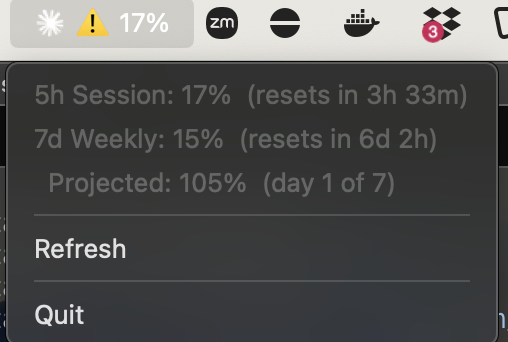
Sends a minimal request to api.anthropic.com/v1/messages and reads usage from the response headers (anthropic-ratelimit-unified-5h-utilization, anthropic-ratelimit-unified-7d-utilization). Authentication reuses the OAuth token that Claude Code stores in Keychain — no API key setup required.
- macOS
- Claude Code installed and authenticated
- uv
bash install.shRegisters a launchd agent that starts automatically on login. Logs are written to /tmp/claude-meter.log.
Quit from the menu bar icon to stop the app. It will not auto-restart until you log in again.
To start it again without rebooting:
launchctl unload ~/Library/LaunchAgents/com.github.aki77.claude-meter.plist
launchctl load ~/Library/LaunchAgents/com.github.aki77.claude-meter.plist
To uninstall:
bash uninstall.shuv run claude-meterThe menu bar shows Claude: N% (5-hour session usage). Click to see details:
5h Session: 4%  (resets in 4h 29m)
7d Weekly:  9%  (resets in 6d 2h)
  Projected: 63%  (day 1 of 7)

Refresh
Quit
The Projected line shows the estimated total usage at the end of the 7-day window if you continue at your current pace. It uses discrete day buckets (day 1 = the first 24 hours, day 2 = the next 24 hours, etc.), so the value is stable throughout each day and doesn't spike right after a reset. If the projection exceeds 100%, the
Usage is polled every 60 seconds. Click Refresh to update immediately.
The menu bar title is prefixed with