Repository navigation
v2.4.0


The volume HUD now looks like the system volume HUD
On macOS 26 and later, Volume Control's HUD now looks like the one macOS shows: the same Liquid Glass with its bright rim, the same slider with tick marks and speaker icons, and the same size, font and position on screen. This was a long-awaited feature 🎉 and it finally works: on macOS 27, the two HUDs match down to the pixel.
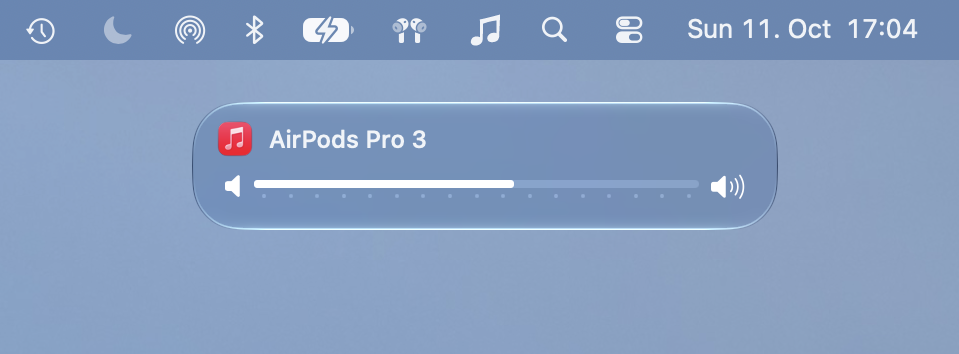
Volume Control still shows the icon of the player it controls next to the title.
The HUD is centred again when the menu bar hides automatically (macOS 27)
When the menu bar hides automatically, the HUD should appear centred at the top of the screen while the menu bar is hidden, and under Volume Control's icon while the menu bar is shown. On macOS 27 it appeared under the icon's position even while the menu bar was hidden. It is centred again.
Also new since v2.3.2
These fixes were first in the v2.3.3 and v2.3.4 pre-releases:
- Volume keys stop working: on some Macs the volume keys stopped working after a while, and only relaunching Volume Control brought them back; see #43. Waking the Mac from sleep, or unticking and re-ticking Enable, now brings them back.
- Command key: on some Macs, holding Command did not switch the volume keys between the music player and the system volume; see #56. It works now.
- Copy Diagnostics reports more: whether Command was held according to the volume key event and according to the keyboard, whether Volume Control is receiving the volume keys and since when, and the last volume key it received.
Changes since v2.3.2
- 4260830 Detect Command from the keyboard state when the key event lacks it
- 887f9f4 Create a new event tap when tapping is enabled, and on wake
- d87eacd Use the system volume banner's glass for the Tahoe HUD
- aa77d77 Center the HUD when the auto-hidden menu bar is hidden on macOS 27
- 0c63683 Draw the Tahoe HUD with an active window appearance
- 13516f0 Use a SwiftUI slider with the system volume HUD's icons and ticks
- 44db2ce Place the centered HUD at the system HUD's height
- 255d47f Leave room around the HUD glass and match the system HUD's width
- fe51aae Move the HUD title up 2.5 pt to the system HUD's position
- 4db95ab Use the system HUD's title font
- 1fb4c9b Build HUDVolumeSlider for macOS 13.5
Full diff: v2.3.2...v2.4.0