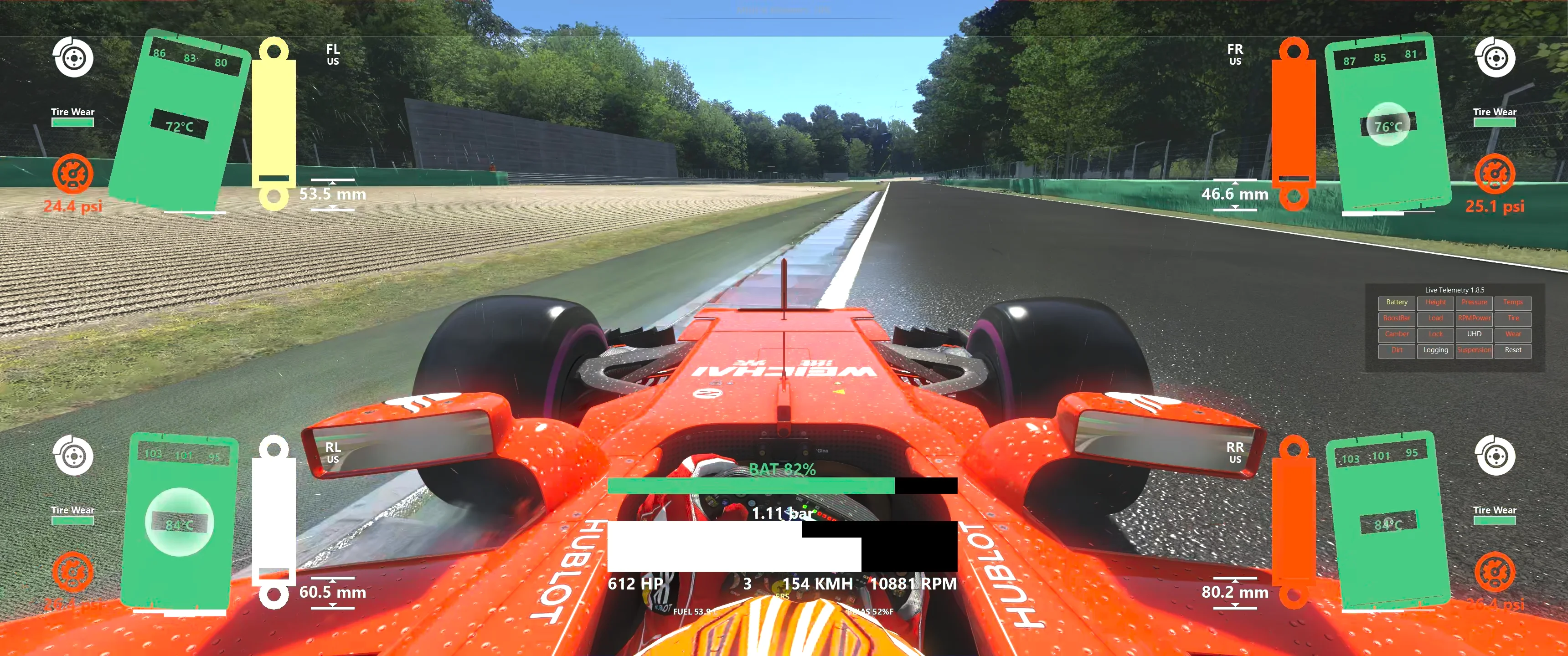
An Assetto Corsa in-game app (Python plugin) that renders real-time, per-frame telemetry for engine, suspension, and each tire individually. The goal is not to replace AC's built-in apps but to give a richer signal while iterating on car setups.
The app reads live data through AC's shared-memory ABI and Python API, and resolves per-car limits directly from the encrypted Kunos data.acd files (or the unpacked data/ folder for mods in development), so it works with no per-car configuration.
- Tech Stack
- Project Layout
- Architecture
- Configuration
- Telemetry Reference
- Resolutions
- CSV Log
- Installation
- Developer Guide
- Changelog
- Known Bugs
- Acknowledgements
| Concern | Choice |
|---|---|
| Runtime | AC's embedded Python 3.3 interpreter (32/64-bit dispatched at load time) |
| AC bridge | ac and acsys modules (provided by Assetto Corsa) |
| Telemetry source | AC Shared Memory via mmap + ctypes (lib/sim_info.py, AC SDK 1.14.3) |
| Car data | Custom decoder for Kunos data.acd files (lib/lt_acd.py) |
| UI | AC's immediate-mode app API (ac.newApp, ac.glQuad, ac.glColor4f, ac.addLabel, …) |
| Config | configparser against versioned cfg/conf.ini with defaults in cfg/settings_defaults.ini |
| Persistence | CSV files written to Documents/Assetto Corsa/logs/ |
| Lint | pylint with project-level .pylintrc |
| Packaging | 7z-maker.bat (7-Zip) producing live-telemetry-<version>.7z |
No external Python dependencies. Everything ships inside
apps/python/LiveTelemetry/. There is nopip installstep — AC loads the folder directly.
live-telemetry/
├── apps/python/LiveTelemetry/        # The AC plugin package
│   ├── LiveTelemetry.py              # Plugin entry point (acMain / acUpdate / acShutdown)
│   ├── a_ctypes_aux.py               # MUST load first — picks 32/64-bit _ctypes.pyd
│   ├── cfg/
│   │   └── settings_defaults.ini     # Documented defaults; conf.ini is generated next to it
│   ├── img/                          # Widget textures (PNG; PSD/SVG sources excluded from build)
│   ├── lib/
│   │   ├── sim_info.py               # AC Shared Memory reader (ctypes structs + mmap)
│   │   ├── lt_acd.py                 # data.acd decoder + data/ folder fallback
│   │   ├── lt_config.py              # ConfigParser-based settings, versioned
│   │   ├── lt_colors.py              # Palette (RGBA tuples)
│   │   ├── lt_interpolation.py       # Power / TirePsi / TireTemp curve math
│   │   ├── lt_components.py          # All renderable widgets (Box, BoostBar, RPMPower, Tire, …)
│   │   ├── lt_engine_info.py         # Engine window: data + components + lifecycle
│   │   ├── lt_wheel_info.py          # Per-wheel window: data + components + lifecycle
│   │   ├── lt_options_info.py        # Options window with toggle buttons
│   │   └── lt_util.py                # Logging, CSV export, Windows MyDocs lookup
│   ├── stdlib/   _ctypes.pyd         # 32-bit fallback runtime
│   └── stdlib64/ _ctypes.pyd         # 64-bit fallback runtime
├── content/gui/icons/                # App-bar icons (ON/OFF states for each window)
├── resources/                        # Screenshots used by this README only
├── 7z-maker.bat                      # Release packaging script
├── .pylintrc                         # Lint config (max-line-length=180, AC-friendly disables)
├── .env                              # Local PYTHONPATH for IDE auto-completion against AC's stubs
└── README.md
Assetto Corsa drives the app through three callbacks, all wired in LiveTelemetry.py:
acMain(ac_version)   → load configs, decrypt ACD, build windows, register listeners
acUpdate(delta_t)    → physics tick: each active info object pulls from sim_info
on_render_*(delta_t) → frame tick: each active info object draws its components
acShutdown()         → persist options/positions, flush CSV (or wipe if logging was off)
                    ┌──────────────────────────┐
                    │   LiveTelemetry.py       │ (entry point, AC callbacks, click handlers)
                    └──────────────┬───────────┘
                                   │
        ┌──────────────────┬───────┴────────┬───────────────────┐
        ▼                  ▼                ▼                   ▼
┌──────────────┐  ┌──────────────────┐ ┌──────────────────┐ ┌──────────────┐
│ EngineInfo   │  │ WheelInfo (×4)   │ │ OptionsInfo      │ │ Config       │
│  (engine     │  │  (FL/FR/RL/RR)   │ │  (toggle window) │ │  conf.ini    │
│  window)     │  │                  │ │                  │ │              │
└──────┬───────┘  └─────────┬────────┘ └────────┬─────────┘ └──────┬───────┘
       │                    │                   │                  │
       └────────────┬───────┴───────────────────┘                  │
                    ▼                                              │
            ┌───────────────┐    ┌──────────────────┐              │
            │ lt_components │◄───│ lt_interpolation │              │
            │ (renderables) │    │ (Power/Psi/Temp) │              │
            └───────┬───────┘    └─────────┬────────┘              │
                    │                      │                       │
                    ▼                      ▼                       ▼
              ┌──────────┐           ┌─────────┐           ┌──────────────┐
              │ Colors   │           │  ACD    │◄──────────│  lt_util     │
              └──────────┘           │ decoder │           │ (log, paths) │
                                     └─────────┘           └──────────────┘
                                          ▲
                                          │ reads engine.ini / tyres.ini / power.lut
                              ┌───────────┴────────────┐
                              │ content/cars/<car>/    │
                              │   data.acd  OR  data/  │
                              └────────────────────────┘
- AC physics tick invokes
acUpdate(delta_t). - Each active
EngineInfo/WheelInfocalls its innerData.update(info), copying the values it cares about out of the shared-memoryinfoproxy and (where shared memory is unreliable) the Python API — e.g.ac.getCarState(0, acsys.CS.SuspensionTravel)is used because some mods publish brokensuspensionTravelin shared memory (seelt_wheel_info.py). - If
Loggingis on, a deep copy of theDatasnapshot is appended to the per-window in-memory log. - AC render tick invokes
on_render_*(delta_t)which delegates toinfo.draw(delta_t), which iterates components and callscomponent.draw(self.__data, delta_t)for every option that is currently enabled. Disabled components getclear()instead, so labels don't ghost on screen. - On
acShutdown, options + window positions are written back tocfg/conf.ini, and the in-memory CSV buffers are flushed vialt_util.export_saved_log— or deleted (clear_logs) when nothing was captured.
lib/lt_acd.py — Kunos data decryption. Cars ship with their parameters packed into an encrypted data.acd. The decoder derives a per-car key from the car folder name, walks the file's (name, size, payload) records, and decrypts each payload in place. This is what lets the plugin compute power curves, tire pressure references, and suspension limits without per-car configuration. Unpacked data/ folders (used by mod authors) are auto-detected as a fallback.
a_ctypes_aux.py — runtime bootstrap. AC's embedded Python ships an incomplete stdlib; _ctypes in particular is missing on some installs. This module must be the first import in LiveTelemetry.py. It detects the architecture (platform.architecture()) and prepends stdlib64/ or stdlib/ to sys.path before any ctypes-using module (notably sim_info.py) is loaded. Removing or reordering this import will break the plugin on a fresh install — see the 1.4.1 changelog entry.
| File | Purpose |
|---|---|
apps/python/LiveTelemetry/cfg/settings_defaults.ini |
Read-only documented defaults shipped with the release. |
apps/python/LiveTelemetry/cfg/conf.ini |
User-mutated settings (toggles, window positions, scale). Created on first run, regenerated when the version field doesn't match. |
Documents/Assetto Corsa/cfg/video.ini |
Read once on first run to seed window positions for the current resolution. |
Versioning.
Config.__init__compares[About] versionagainstLT_VERSION. A mismatch triggers a full reset to defaults — the trade-off for being able to add or rename options without writing a migration each time. If you bumpLT_VERSIONinLiveTelemetry.py, also bump it incfg/settings_defaults.ini.
All toggleable from the in-game Options window (or via Content Manager):
BatteryBar, BoostBar, Camber, Dirt, Height, Load, Lock, Logging, Pressure, RPMPower, Size, Suspension, Temps, Tire, Wear.
Tire is a parent toggle that hides every tire-related widget at once. BatteryBar is the only tri-state toggle in the list — it cycles AUTO (detector decides, default), ON (force visible), OFF (always hidden). The button label stays on the static text "Battery" and the current mode is encoded in the font colour (yellow / red / white).
- Engine boost pressure (bar)
- Engine RPM and live HP (HP =
power(rpm) * (1 + boost) + kers_deploy_kw * 1.341— deploy term added only while the hybrid battery is draining) - Current gear (
R/N/1…N) and speed (km/h), sitting between the HP and RPM readouts on the engine bar - KERS battery state-of-charge —
BAT N%on hybrids where AC doesn't publish a battery capacity,BAT X / Y kJon cars where it does. Auto-hidden on pure-ICE cars. - Driver-aid chip strip (PIT, TC, ABS, DRS, ERS)
- Fuel (L) and brake-bias (%F) readouts
- Suspension height (mm) and travel (%)
- Tire pressure (psi)
- Tire core, inner, middle, outer temperatures (ºC) with per-zone numeric readouts on the IMO grid
- Tire dirt level
- Tire wear (self-calibrating, full = fresh)
- Contact-patch bars (camber × pressure × load distribution heuristic)
- Wheel load (N) drawn as a circle behind the tire
- Wheel lock / ABS indicator (blue ABS pulse at the car's
RATE_HZ, yellow 5 Hz lock blink) - Wheel ID + tyre compound abbreviation
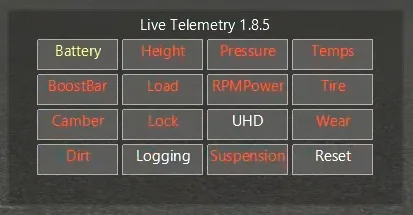
Toggles every overlay element, switches the global Size, and turns CSV logging on or off — logging only persists the elements that were actually drawn, disabled fields are not written. The Reset action button snaps every widget back to its default screen-edge anchor for the current resolution.
Window positions are stored in anchor-space: each widget pins to a specific corner of the screen — FL top-left, FR top-right, RL bottom-left, RR bottom-right, Engine bottom-centre, Options top-left — so cycling Size scales the widget around that anchor instead of growing it off-screen.
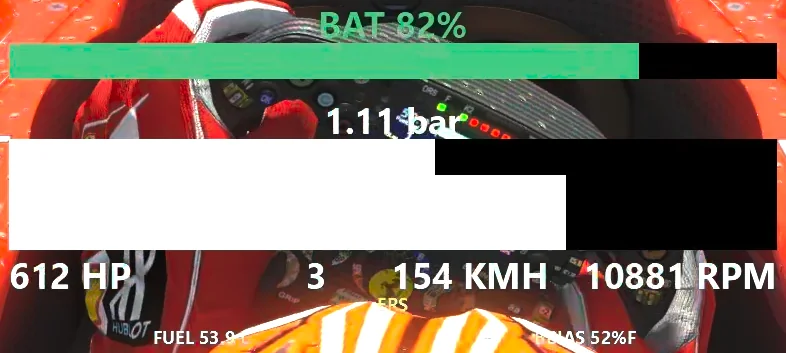
The RPM bar uses the power curve from engine.ini (POWER CURVE → power.lut) to colour the current RPM by how close it is to peak power:
- white — current power below 98.5% (rising side of the curve)
- blue — between 98.5% and 99.5% (rising side)
- red — past peak RPM but still above 99.5%
- green — at or above 99.5% (the shift hint, though sometimes you should hold)
Predicting the true optimal shift point would require knowing the next-gear RPM after the shift, which AC doesn't expose, so the heuristic targets the >99.5% / pre-redline window. power.lut is the engine's no-boost torque curve, so on turbo cars the rev-bar peak tracks the base peak — typically close to the on-boost peak by design, since engine builders align the two. The colour band uses that base peak; the HP figure below scales by (1 + boost) live, so the value you read is exact while the colour position may sit a few hundred RPM off the actual boosted peak.
The HP value displayed alongside is hp = power(rpm) * (1 + boost) + kers_deploy_kw * 1.341. The first term is the legacy ICE figure; the second is the live electric contribution — only added while kers_charge is actually falling (real energy leaving the battery, regardless of whether the driver pressed a KERS button or the MCU triggered the deploy itself). kers_deploy_kw is EMA-smoothed (α=0.3, ~30 ms half-life at AC's 100 Hz update) so the per-frame kers_charge quantisation step doesn't flicker the readout — at the cost of a short tail when deploy stops.
Between the HP (left) and RPM (right) readouts sit the current gear and speed (km/h), drawn in white so they read independently of the power-curve colour applied to HP / RPM. The gear glyph follows AC1's convention: R (reverse), N (neutral), then 1…N for forward gears. The layout matches live-telemetry-evo's engine bar (HP — gear — speed — RPM).
Boost bar:
- white — boost below 90% of session-max
- green — boost at or above 90%
Battery bar (KERS hybrids only — auto-hidden on pure-ICE cars, see the BatteryBar toggle in Available options). Stacks above the boost bar; the fill width tracks kers_charge and the label shows BAT X / Y kJ when AC publishes static.kersMaxJ, otherwise the SoC percentage:
- green — SoC above 50%
- yellow — SoC 20% – 50%
- red — SoC below 20%
Hybrid detection runs at runtime (in AUTO mode): AC1 spawns kers_charge = 1.0 on plenty of pure-ICE cars and many hybrid mods leave static.kersMaxJ at 0, so a static gate would either paint a stuck-full bar on every road car or miss real hybrids. Instead the bar starts hidden and latches visible the first frame it sees actual battery activity — kers_charge moving from its spawn value or the throughput counter (kers_current_kj) ticking. Pure-ICE cars never trigger either signal so the bar stays hidden permanently.
Driver-aid chip strip (sits below the RPM bar). Each chip only renders while its underlying condition is true, so the strip stays compact:
- PIT — pit-limiter on (
physics.pitLimiterOn) - TC — TC assist enabled (
physics.tc > 0) - ABS — ABS assist enabled (
physics.abs > 0) - DRS / DRS — white when DRS is available in the current zone, blue while it is actively deployed
- ERS — battery is recharging (
physics.ersIsCharging)
The bottom row of the engine widget shows two analog readouts — FUEL X.X L (current fuel litres) and BBIAS NN%F (brake bias, front-percentage). The other slots from the Phase-2 evo engine view (water/oil temp, oil/fuel pressure, exhaust temp, battery voltage) aren't published by AC1's shared memory, so they're omitted rather than rendered as fake zeros.
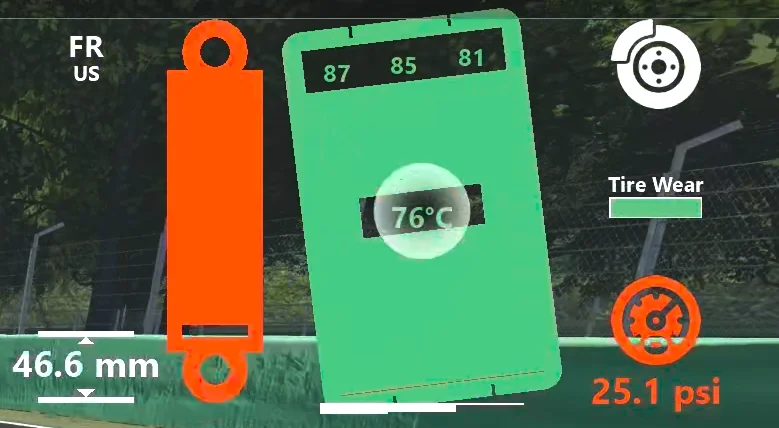
Every element is laid out around a central tire silhouette and mirrored on the left/right windows. Per-frame values are computed in lib/lt_wheel_info.py:Data.update and rendered by the matching subclass in lib/lt_components.py. Per-car limits (ideal pressure, thermal curves, suspension max, ABS slip target, …) come from the car's data.acd (or unpacked data/ folder) at construction time — no value is "hardcoded per car".
The tire, suspension and height widgets are drawn as GL primitives — no PNG textures. The tire silhouette, IMO temperature grid, dirt bar, contact-patch bars and per-zone temperature readouts share a common pivot and rotate together under camber.
-
Suspension height (mm). AC's shared memory only exposes one ride-height per axle (
physics.rideHeight[0]for front,[1]for rear), so per-wheel height is reconstructed by subtracting half the difference between this wheel's suspension travel and the opposite-side wheel's. Bars + arrows + readout flash red forWARNING_TIME_S = 0.5 swhenever the value drops below 0.02 mm — i.e. the chassis is scraping the surface. -
Suspension travel (%). Bar uses
acsys.CS.SuspensionTravel(the Python API value) instead ofphysics.suspensionTravel, because the shared-memory field is broken on several mods — the original 1.6.0 changelog and the comment inData.updatedocument a specific case where shared memory reported >100% travel while the API reported ~55%. When the car has nosuspensionMaxTravel(some mods, e.g. Kunos Alfa 155), the max is computed dynamically from the running observed maximum and the bar turns blue to indicate "max is an estimate". The displayed colour is the worst of the last 60 frames, so a single-frame compression spike won't make the indicator flicker — but the CSV log records every frame untouched.- white — 10%–90%
- blue — 10%–90% with dynamic max
- yellow — 5%–10% or 90%–95%
- red — below 5% or above 95%
-
Tire dirt. Vertical brown bar that rises with
physics.tyreDirtyLevel[i], scaled ×4 so the bar reaches full height around AC's typical dirty-level cap (~0.25). No colour states — height only — and no per-car configuration. -
Tire pressure (psi).
physics.wheelsPressure[i]interpolated against the per-compoundPRESSURE_IDEALfromtyres.ini. The compound section is resolved by scanningFRONT_<n>/REAR_<n>blocks for aSHORT_NAMEmatching the currentac.getCarTyreCompound(0), falling back to the[COMPOUND_DEFAULT] INDEXvalue. The colour interpolation thresholds live inlib/lt_interpolation.py:TirePsi.interpolate_color.- blue — below 95%
- blue→green — 95%–100%
- green→red — 100%–105%
- red — above 105%
-
Tire temps (ºC). Inner / middle / outer probes (
physics.tyreTempI/M/O[i]) plus the core (physics.tyreCoreTemperature[i]). Each segment is coloured independently against the compound'sTHERMAL_<section> → PERFORMANCE_CURVElookup fromtyres.ini, parsed once on plugin start and interpolated bylib/lt_interpolation.py:TireTemp. The "I/M/O" labelling is suspension-relative — the inner edge of the tire as the suspension geometry sees it, not the steering rack — so on a left-side wheel the rendered "Inner" probe is the chassis-side temperature.The IMO grid carries per-zone numeric readouts (inner / middle / outer / core). Text colour matches each zone's temperature colour and the label positions track the tire's camber rotation each frame, so the numbers stay attached to their bumps under tilt.
Separately, the
Tirewidget (the whole-tire silhouette) is tinted using a weighted average —0.75 × core + 0.25 × mean(I, M, O)— so the overall colour reflects bulk working temperature instead of just surface contact.TireandTempsare independently toggleable from the Options window.- blue — below 98%
- blue→green — 98%–100%
- green→red — 100%–102%
- red — above 102%
-
Tire wear.
physics.tyreWear[i] / 100. Horizontal "Tire Wear" bar in the brake column (between the lock and pressure icons); the coloured fill anchors to each tyre's inner edge so the left and right widgets read as mirror images — wear empties from the outer side on both, full = fresh. AC'styreWearis a grip / health signal, not a monotonic wear counter — fresh tires read ~0.995, the value climbs toward 1.0 during warm-up, and only then drifts back down as the tire actually wears. The bar therefore self-calibrates against the per-wheel peak observed in the session: it pins at 100% while warm-up is still pushing the peak up, and only starts retreating once the current reading falls below that peak (stretched across a 0.06-unit window, the legacy empirical wear range).- green — within the top 50% of the peak-grip window
- yellow — 20%–50%
- red — below 20%
-
Contact patch (camber × pressure × load). Three white bars sitting at the tire-ground line — inner / middle / outer — whose heights are a qualitative load-distribution heuristic combining camber (lateral bias), pressure norm vs. ideal (crown / bow), and wheel load (overall extent). Replaces the older "tilted asphalt quad" camber indicator. Toggled by the
Camberoption for backward compatibility with existing configs. -
Wheel ID + tyre compound. Two-line caption (
FL/FR/RL/RRover a 3-character compound abbreviation —SOF/MED/HAR/INT/WET) stacked at the top of the inboard column, lined up with the ride-height value below. Always on; not user-toggleable. -
Wheel load (N).
physics.wheelLoad[i], divided by5 × g(49.03) before being used as the diameter of the white circle drawn behind the tire. The conversion is purely visual scaling — there's no numeric readout. The widget is most useful as a relative indicator: comparing circle sizes across the four wheels makes weight transfer (braking, cornering, kerb hits) immediately obvious. -
Wheel lock / ABS. Multi-signal detector that combines
physics.brake,physics.wheelSlip[i],physics.wheelAngularSpeed[i], the player's ABS assist setting (physics.abs), and the car'sSLIP_RATIO_LIMITfromelectronics.ini.- blue — ABS active (pulses at the car's
RATE_HZ) - yellow, blinking at 5 Hz — wheel locked (typically cars without ABS, or ABS overwhelmed)
- white — neutral
How it is detected (and what it deliberately isn't). A common pitfall is to treat
info.physics.absas if it were a slip-ratio threshold — it isn't.physics.absis the player's ABS-assist level, normalised 0…1 (0 = off, 1 = max). The actual slip threshold lives per-car inelectronics.ini → [ABS] → SLIP_RATIO_LIMIT; the plugin reads it once at construction time (ACD.get_abs_slip_limit()), defaulting to0.2for cars that don't expose one or where parsing fails.Per frame, the detector evaluates two independent flags in
lib/lt_wheel_info.py:Data.update:Flag Condition lockbrake > 0ANDslip > 0AND (abs(wheelAngularSpeed) < 1.0rad/s ORslip > 0.5)abs_activephysics.abs > 0ANDbrake > 0ANDslip > SLIP_RATIO_LIMITAND notlockThe
ORbranch in the lock condition is what catches AC physics cases where a locked wheel keeps a small residual angular velocity (~0.05–0.5 rad/s) instead of going to exact zero — the previous strict== 0.0check missed those. Theslip > 0gate prevents false positives on stationary cars at idle. Lock takes precedence over ABS, so a fully locked wheel always reports as a lock, never as ABS pulsing.The blue ABS pulse rate is the car's actual
[ABS] → RATE_HZ(read byACD.get_abs_hz()and consumed inLock.draw). The yellow lock blink rate is fixed at 5 Hz viaLOCK_BLINK_PERIOD_S = 0.1inlib/lt_components.py. After the wheel re-grips, the lock indicator keeps blinking forWARNING_TIME_S = 0.5seconds so a brief lock is still visible at typical render rates. - blue — ABS active (pulses at the car's
Each window has a button that scales every component to a target resolution. Pick the one that matches your screen — or whichever you prefer aesthetically.
| Preset | Pixels | Multiplier |
|---|---|---|
| HD | 1280×720 | 0.50 |
| FHD | 1920×1080 | 0.75 |
| 1440p | 2560×1440 | 1.00 |
| UHD | 3840×2160 | 1.50 |
| 4K | 4096×2304 | 1.60 |
| 8K | 7680×4320 | 3.00 |
(Multipliers are defined in BoxComponent.resolution_map.)
When Logging is enabled, every drawn frame is appended to in-memory buffers and flushed to Documents/Assetto Corsa/logs/ on session shutdown:
LiveTelemetry_EN.csv— engineLiveTelemetry_FL.csv,LiveTelemetry_FR.csv,LiveTelemetry_RL.csv,LiveTelemetry_RR.csv— per wheel
CSV uses ; as separator, UTF-8 encoding, and one column per attribute of the per-window Data class. If Logging was off through the whole session, any pre-existing CSVs from previous runs are deleted on shutdown to avoid stale files.
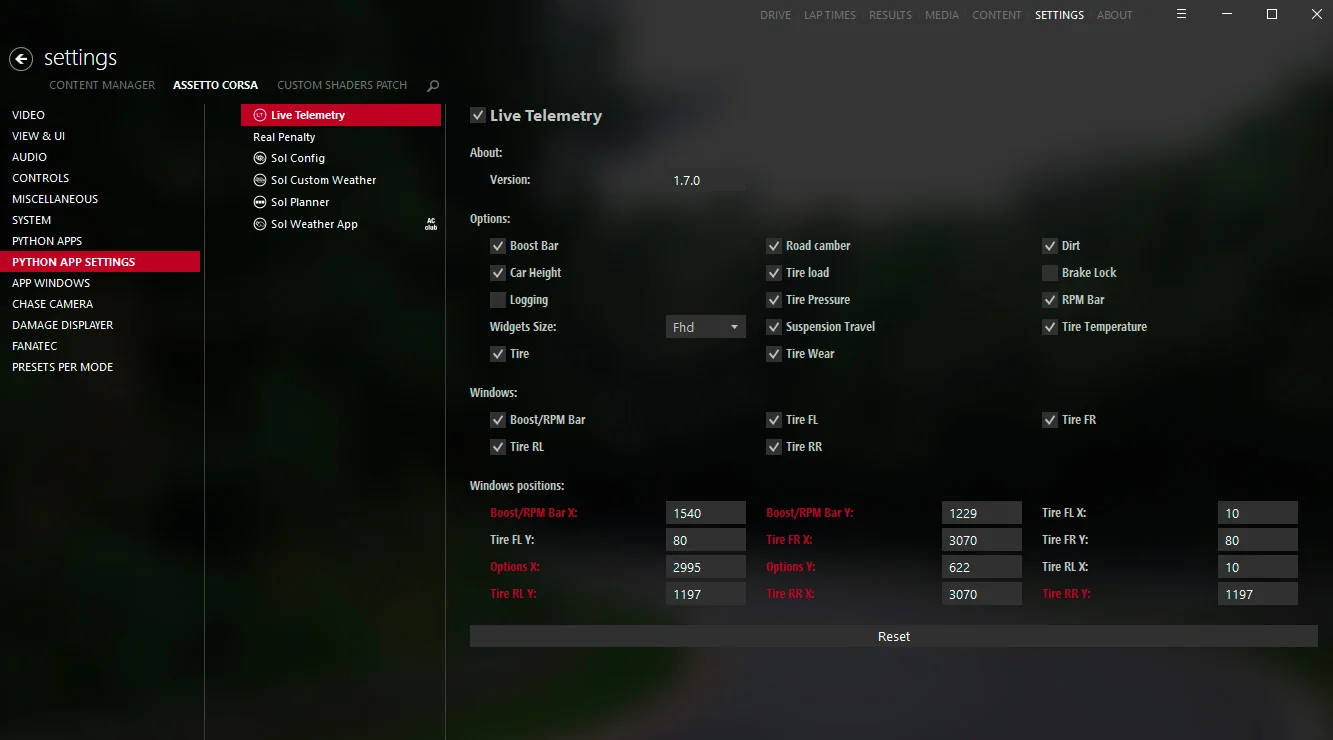
Drag the release .7z onto Content Manager and accept the install/update prompt. Settings are then editable from Content Manager → Settings → Live Telemetry:
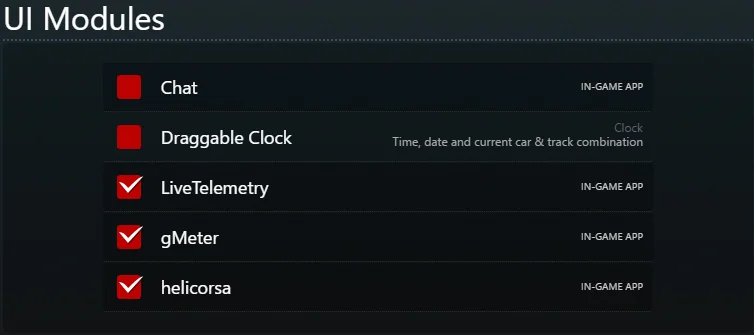
Extract the .7z directly into your Assetto Corsa root (typically C:/Program Files (x86)/steam/steamapps/common/assettocorsa). In-game, enable the app under Options → General → UI Modules → Live Telemetry:
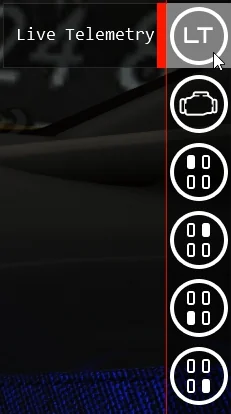
Then enter any session and pick the desired window from the right-hand app bar:
For 1.4.1+ just extract the new .7z over the AC folder. For older versions, delete apps/python/LiveTelemetry/ first to avoid orphaned files.
- Assetto Corsa installed (the embedded Python 3.3 is the runtime — there is no local Python required to run the plugin).
- Optional: a regular Python 3 install + IDE (VS Code, PyCharm) for editing with autocomplete. AC's
ac/acsysare stub-importable from<AC>/apps/python/system/. - 7-Zip at
C:\Program Files\7-Zip\7z.exe(used by7z-maker.bat).
.env ships a PYTHONPATH pointing at the plugin folder and AC's stub system folder so editors can resolve import ac / import acsys. Adjust the AC path to match your install:
PYTHONPATH = D:/projects/live-telemetry/apps/python/LiveTelemetry;C:\Program Files (x86)\Steam\steamapps\common\assettocorsa\apps\python\system
- Edit code under
apps/python/LiveTelemetry/. - Symlink or copy the folder into
<AC>/apps/python/LiveTelemetry(a junction works; AC reads the directory directly). - Restart the AC session — the plugin is loaded once per session.
- Watch logs with
ac.consoleoutput in-game andac.loglines inDocuments/Assetto Corsa/logs/log.txt. Both flow throughlt_util.log.
pylint apps/python/LiveTelemetry.pylintrc keeps max-line-length=180 and disables a handful of rules that don't fit the AC plugin model (the ac/acsys imports trigger import-error, the entry-point uses module-level globals, __init__ legitimately stores many attributes, etc.).
7z-maker.bat 1.8.5Produces live-telemetry-1.8.5.7z containing apps/ and content/, excluding *.psd and *.svg source assets. The archive is the artefact you ship to Content Manager / RaceDepartment / GitHub Releases. Running 7z-maker.bat with no argument defaults to the current 1.8.5 version.
- Add the default to
cfg/settings_defaults.iniand to theset_optionblock inConfig.__init__(lt_config.py). - Add an entry to the
__optionsdicts in whichever info classes the option affects (lt_engine_info.py,lt_wheel_info.py,lt_options_info.py). - If the option toggles a widget, add the matching
Componentsubclass inlt_components.pyand append it to the__componentslist in the relevant info class — itsdrawis gated automatically because the dispatcher keys ontype(component).__name__. - Add an
on_click_<name>handler inLiveTelemetry.pyand wire it withac.addOnClickedListenerinsideacMain. - Mirror the option in
acShutdownso it survives session restarts. - Bump
LT_VERSIONinLiveTelemetry.pyandcfg/settings_defaults.iniso existing configs are reset rather than read with missing keys.
master is the released line and matches the latest tag. develop and release/x.y.z track the in-flight version. feature/* and hotfix/* branches follow the gitflow naming convention.
See CHANGELOG.md for the full release history.
Tracked on the GitHub issues page: https://github.com/albertowd/live-telemetry/issues.
- aluigi @ ZenHax — for patiently explaining how to open
.acdfiles. Please Stop This(RaceDepartment) — for code contributions and review.Jens Roos(proTyres) — for reporting and helping fix integration issues.giodelmare— for testing suspension behaviour while my PC was dead.