
Conceptual diagram
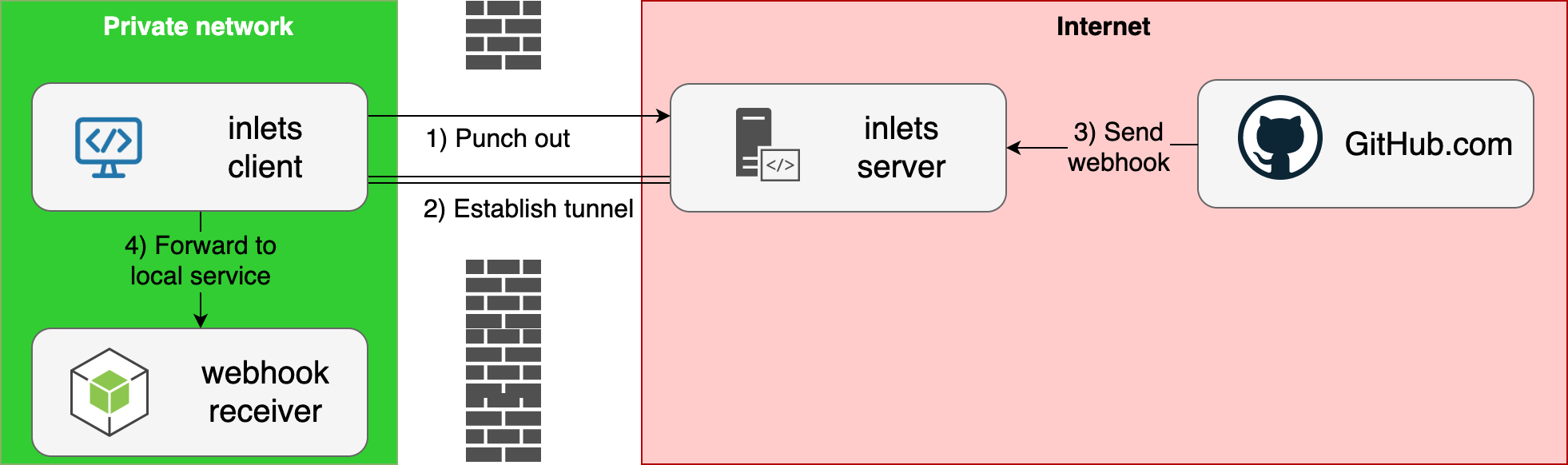
Case-study with receiving webhooks from https://blog.alexellis.io/webhooks-are-great-when-you-can-get-them/
Use-cases:
- Setup L7 HTTP and L4 TCP tunnels for your local services using inlets with
inletsctl create - Port-forward services your local Kubernetes cluster using
inletsctl kfwd

In the demo we:
- Create a cloud host on DigitalOcean with a single command
- Run a local Python HTTP server
- Connect our
inlets client - Access the Python HTTP server via the DigitalOcean Public IP
- Use the CLI to delete the host
inletsctl is the quickest and easiest way to automate both inlets and inlets-pro, whilst retaining complete control.
Completed:
- Provisioner: DigitalOcean
- Provisioner: Scaleway
- Provisioner: Civo.com support
- Provisioner: Google Cloud
- Provisioner: Packet.com
-
inletsctl deletecommand - Add poll interval
--poll 5sfor use with Civo that applies rate-limiting
Pending:
- Provisioner: AWS EC2
- Enable
inletsctl deletevia--ipvs. instance ID #2 - Install
inlets/inlets-proviainletsctl download#12 - Enable
inlets-proand TCP withinletsctl kfwd#13
Inlets is listed on the Cloud Native Landscape as a Service Proxy
- inlets - open-source L7 HTTP tunnel and reverse proxy
- inlets-pro - L4 TCP load-balancer
- inlets-operator - deep integration for inlets in Kubernetes, expose Service type LoadBalancer
- inletsctl - CLI tool to provision exit-nodes for use with inlets or inlets-pro
curl -sLSf https://raw.githubusercontent.com/inlets/inletsctl/master/get.sh | sudo shOr
curl -sLSf https://inletsctl.inlets.dev | sudo shWindows users are encouraged to use git bash to install the inletsctl binary.
See notes for inlets-operator
Examples on how to run inletsctl to create an exit node.
Pre-reqs:
- You will need inlets on your client
Workflow:
-
After running
inletsctl create, the IP address of your exit-node will be returned along with a sampleinlets clientcommand, for instance:Inlets OSS exit-node summary: IP: 209.97.131.180 Auth-token: qFyFzKYQvFSgtl7TM76p5SwWpmHaQGMT405HajiMzIYmwYVgJt1lvAMXfV4S3KlS Command: export UPSTREAM=http://127.0.0.1:8000 inlets client --remote "ws://209.97.131.180:8080" \ --token "qFyFzKYQvFSgtl7TM76p5SwWpmHaQGMT405HajiMzIYmwYVgJt1lvAMXfV4S3KlS" \ --upstream $UPSTREAM
-
You can delete your exit node using the
idgiven by your cloud providerinletsctl delete --access-token-file ~/Downloads/do-access-token --id 164857028
inletsctl create --access-token-file $HOME/Downloads/do-access-token \
--region="nyc1"Let's say we want to forward TCP connections to the IP 192.168.0.26 within our client's network, using inlets-pro, we'd run this using the --remote-tcp flag.
inletsctl create digitalocean --access-token-file ~/Downloads/do-access-token \
--remote-tcp 192.168.0.26# Obtain from your Scaleway dashboard:
export TOKEN=""
export SECRET_KEY=""
export ORG_ID=""
inletsctl create --provider scaleway \
--access-token $TOKEN
--secret-key $SECRET_KEY --organisation-id $ORG_IDThe region is hard-coded to France / Paris 1.
The inletsctl kfwd command can port-forward services from within your local Kubernetes cluster to your local network or computer.
Example usage:
inletsctl kfwd --if 192.168.0.14 --from openfaas-figlet:8080Then access the service via http://127.0.0.1:8080.
Add a provisioner by sending a PR to the inlets-operator's provision package, once released, you can vendor the package here and add any flags that are required.
Note: only clouds that support cloud-init can be added
MIT