Releases: alexpfau/calendar-card-pro
Release list
v4.0.0

Calendar Card Pro v4.0.0
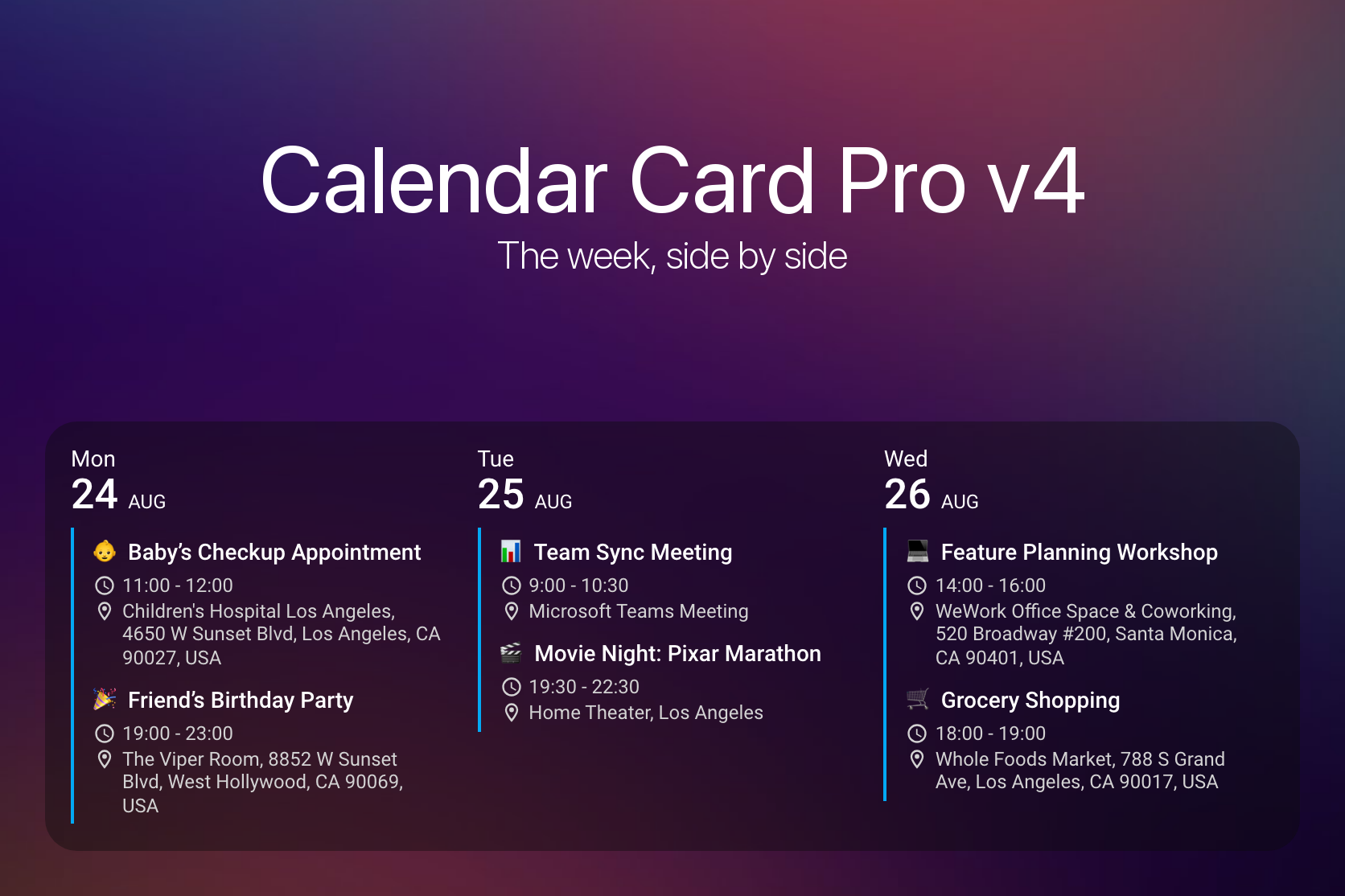
This is a big one. 🎉
Two days after this card's first public release, someone opened #14 and asked whether the days could sit side by side instead of stacked on top of each other. That was March 2025. It was asked again in June, again in July, and again in November — the most-requested thing in this project's history, and the one I never had a good answer for. Last year did not leave me the time this card deserved, and some of you waited a lot longer than you should have for it.
So I gave this release the time instead: 560 commits, and the kind of polish I would want if I were the one installing it. 🗓️ Column view is here — the same agenda you already have, rotated, with your events and colors carrying over exactly as they are. And because a layout with its own defaults, its own per-view overrides and its own density rules needs an editor that can actually express them, ⚙️ the visual editor is rebuilt from the ground up: nine panels, a search box that reaches any of 119 settings in a keystroke, and a filter that hides everything you have never touched.
Here is the part I am proudest of, though. Both of those are opt-in — most cards will never set view or open a form — so this could easily have been a big release for a few people and nothing much for everyone else. It is not. ⚡ Moving the editor into a file that loads only when you open it leaves a card file 41% smaller to download on every single dashboard, whether or not you ever touch either feature. 🐛 And behind that sit twenty-three fixes that reach further than any feature does: week numbers wrong for one date in seven outside UTC, a twelve-hour clock handed to 33 of the 64 languages Home Assistant ships, and a first_day_of_week: system that quietly answered Monday to every user on earth.
A card that does not set view keeps the list it has always had. But a few things change whichever layout you use, so they come first. 👇
⚠️ Breaking Changes
- Manual Installation Now Copies Two Files - The card is no longer a single file. A release ships
calendar-card-pro.jsandeditor.js, and the card fetches the editor by URL the first time someone opens it. HACS handles this and needs nothing from you. If you install by copying files intowww/, download both and put them in a folder of their own, such aswww/calendar-card-pro/— copying onlycalendar-card-pro.jsleaves a card that renders normally but reports a missing file when you open the visual editor, and/config/www/itself is shared with every other hand-installed card, where a secondeditor.jscan take the name. Onlycalendar-card-pro.jsis registered as a Lovelace resource; see Manual Installation event_icon_vertical_alignmentNow Defaults totop- It previously defaulted tomiddle. The option is invisible until a row wraps, andmiddlethen centers the icon against the whole wrapped block — a clock or map-marker floating level with neither line of a two-line address. Column view wraps routinely, and the list view wraps on a long location or description, so the default moved to the alignment that reads correctly in both. Setevent_icon_vertical_alignment: middleto keep the old behavior; see Spacing & Alignmentfirst_day_of_week: systemNow Follows Home Assistant -systemis the default, and the editor labels it Follow Home Assistant, but it returned Monday for every user on earth. Two faults produced it: the branch never read the First day of week setting in the Home Assistant user profile at all, and its language fallback tested foren-US,en-CAores-USin a string that has always been lowercased before it arrives, so it could not match anything. The setting is now resolved the way Home Assistant resolves it — an explicit weekday in the profile wins, and only when that is left at Auto does the language decide. Upgrading therefore shifts week numbers, week separators and thestart_date: start_of_weekanchor for anyone whose profile or language implies a week that does not begin on Monday — nineteen of the 64 languages Home Assistant ships, seventeen starting on Sunday and Arabic and Persian on Saturday. Setfirst_day_of_week: mondayto keep the old behavior; see Week Numbers & Visual Separators- Weather Badges Are Styled Through Custom Properties - The weather icon and text carried their font size and color as inline
styleattributes, which no theme could override. Those attributes are gone, and the six--calendar-card-weather-*properties the card was already emitting are now read by the stylesheet instead, making them a real override surface. Two things follow. Card-mod rules that targeted the inline-styled elements need updating — the properties are listed under Weather Custom Properties. Andweather.date.color/weather.event.colorno longer carry a default. They did in 3.x, but it never reached a card that showed weather:setConfigmerged only the top level, so anyweather:block replaced the whole default sub-tree. The rendered color came from a fallback in the renderer either way — primary for the day header, secondary for the per-event badge — and both fallbacks now live in the stylesheet with the same values, so the badge looks as it did
🎉 New Features
🗓️ Column View
See the week at a glance instead of scrolling through it. view: column lays the days out side by side, one column each, instead of stacking them — the same agenda the list layout already shows, rotated. Your events, labels and colors carry over exactly as they are; only the date moves, from the left of each row to the top of each column. The default is still list, so nothing changes until you ask for it (#377, #14, #263, #253)
- It Falls Back on a Phone - Columns need width, so a card too narrow to give every day a readable one —
column.min_day_width, 140 pixels — simply renders as a list instead. The same card can be columns on a desktop dashboard and a list on a phone, with no second card and no conditional wrapper. That is also why the editor annotates list-only options rather than hiding them: hiding a control would remove it for the layout that same card uses on a phone - Or Sheds a Day Instead - If you would rather keep the columns,
column.min_days_to_showlets a narrowing card drop trailing days one at a time before it gives up on the layout. It defaults todays_to_show, which leaves the behavior off, because a card quietly showing four of seven days looks exactly like a card configured for four.column.min_days_fallback: crampkeeps every day and lets the columns go narrower still - Different Values in Columns Than in the List - A size tuned for a full-width row is usually wrong in a 140px track, so a nested
column:block holds the values that apply only when the card renders as columns; anything it does not mention keeps its top-level value. It works in both directions, so an option switched off at the top level can be switched back on for columns. Only presentation options may go there — anything deciding which events are loaded has to hold one value in both layouts, since the card switches between them as the dashboard resizes (see Overriding Options in Column View) - Two Options Start From a Different Default -
show_empty_daysandsplit_multiday_eventsboth default totruein column view and do not inherit the top-level value. A list reads perfectly well with the blank days left out; a row of columns does not, because dropping the empty ones stops the columns corresponding to consecutive days. The same reasoning covers a multi-day event — a column is a day, so an event spanning three of them belongs in all three (see Options That Start From a Different Default) - Separators Rotate into the Gutter - Day, week and month separators keep their existing options and become full-height vertical rules between the columns, with month taking precedence over week and week over day. A column-only rule can also run under each day header —
column.day_header_separator_widthand_color— off by default like every other separator in the card. Switching it on centers it inside the spacecolumn.day_header_gapalready reserves, rather than shifting the layout - A Header Per Column - Week numbers move into each column's header instead of taking a full-width row, and the today indicator becomes a leading marker on the weekday row so it stays unambiguous at any column width — the default
15% 50%position is calibrated for the list view's narrow date cell and would land inside the day number on a full-width column header - Room for the Progress Bar - A countdown and a progress bar never appear on the same event, so each now gets the treatment it needs instead of one compromise suiting neither. The countdown stays on the time row as trailing text after a middot, breaking at an ordinary word boundary when the column is too narrow; the bar moves to a row of its own under the title, spanning 80% of the column
- One Click From the Card Picker - Adding a card by entity and picking a
calendar.*entity now offers two starting points under Community: _Calendar Card...
Contributors


Assets 4
v3.6.0
Calendar Card Pro v3.6.0
A documentation site of its own, and six fixes for defects that made the card look broken rather than merely wrong. Everything that used to be buried in a very long README now lives at calendar-card-pro.alexpfau.com, with a page per feature and a complete configuration reference. Alongside it: a card that no longer disappears behind a red error box because of one stray line of YAML, per-calendar settings that take effect when you change them instead of whenever a cache happens to expire, and text that stops vanishing mid-word.
🎉 New Features
📚 A Documentation Site
- calendar-card-pro.alexpfau.com - The full manual is now a searchable site rather than a README you scroll through: a page per feature, a complete configuration reference listing every option with its type and default, a usage guide that starts from a working card, and ready-made examples. The README is now a landing page that points at it, so installation and a first working card are the first things you see
🐛 Bug Fixes
Reliability
- One Stray Line of YAML Took Down the Whole Card - A bare
-in theentities:list, left behind while editing or written asentities: [~], parses to null. The config normalizer accepted it and then read a property off it, throwing before the card rendered — so Home Assistant replaced the entire calendar with a red error box. Malformed entries are now discarded, which is what the surrounding code always intended (#389) - Per-Calendar Settings Ignored Until the Cache Expired - Events were cached after processing, but the cache key described only what had been fetched — the calendars and the time window. Every other option the processing step reads was invisible to it, so editing a per-calendar label, colour or toggle appeared to do nothing until the entry aged out. The cache now stores the raw calendar payload and reprocesses it on every read, so edits apply immediately; per-calendar event limits were also silently degrading on a cache hit and no longer do
Appearance
- Titles Ellipsised When Nothing Had Been Truncated - Event titles showed a trailing
…at certain card widths even though no characters had been dropped, and at slightly narrower widths the ellipsis ate one or two real characters before the title finally wrapped. The card offers no title-truncation option, so that ellipsis could only ever announce a truncation that had not happened - Words Disappeared Mid-Character in Descriptions and Locations - The description, location and time rows could shrink below the width of their own longest word and clip it mid-glyph, with no ellipsis to indicate anything was missing — measured on a 300px card, a 179px word in a 167px box painted 12 pixels of its last character and dropped the rest. Long words now wrap instead of being cut off
Countdown
- Multi-Day Countdowns Disagreed From Row to Row - With
split_multiday_eventsenabled a multi-day event renders one row per day, and each row was counted differently: the first measured wall-clock time and lost a day after midday, the middle rows counted calendar days, and the last counted to a midnight that exists only because of the split. A holiday four days out readin 3 days / in 5 days / in 6 days / in 6 days. Every row now counts whole calendar days to its own date, so the sequence reads consecutively; this also fixes countdowns vanishing from just the middle rows whenshow_countdown_alldaywas off (Thanks @Scooshie and @BalooDK, #344)
Configuration
- Options Removed in v3.0.0 Were Ignored in Silence - Five options dropped in the v3.0.0 cleanup —
max_events_to_show,vertical_line_color,horizontal_line_width,horizontal_line_colorandrow_spacing— were discarded without comment for anyone configuring the card in YAML: the value vanished, its replacement took the default, and nothing anywhere said so, which reads as "the update changed my styling". Each removed option is now reported in the browser console together with the option that replaces it. The visual editor already offered a one-click upgrade; this closes the gap for everyone who never opens it
🔧 Under the Hood
The renderer's leaf elements and the event presentation model moved into modules of their own, and whether an all-day event shows a time row is now decided by the formatter instead of by substring-matching the string it had just produced — a test that had no margin in the eight languages whose "until" translation is two characters long. The list view's rendered DOM is byte-identical throughout, now pinned by a test suite so that stays true.
Related Issues
Full Changelog: v3.5.0...v3.6.0
Contributors


Assets 3
v3.5.0
Calendar Card Pro v3.5.0
Cards that hide themselves when there is nothing to show, start dates that follow the week, titles rendered from Home Assistant templates — and a fix that restores the card title to its intended size. This release is mostly about fitting the card to the dashboard around it: disappearing when it is empty, saying something useful when a day has no events, anchoring to next Monday instead of a date you keep updating, and driving the title from Home Assistant itself. The card is also easier to find in the first place, now that Home Assistant offers it directly when you add a calendar entity.
🎉 New Features
🫥 Empty State Control
hide_when_emptyOption - Removes the entire card from the dashboard when there are no upcoming events, so the cards around it close the gap instead of leaving a "No upcoming events" placeholder behind. A conditional card cannot do this, because this card is not backed by an entity of its own. Defaults tofalse, so existing cards are unchanged (#286)empty_day_textOption - Replaces the text shown on a day that has no events, so a meal-plan calendar can read "Leftovers" instead of "No upcoming events". The✓prefix is dropped for custom text and kept for the default, and clearing the field restores both (#279, #197)
The card deliberately never hides while you are editing the dashboard, never hides an error state, and never hides because a compact limit collapsed it — emptiness is measured against the fully expanded event set.
📅 Flexible Start Dates
start_date now accepts an anchor plus offsets, so a card can follow the calendar rather than a date you have to keep editing:
- Week Anchor -
start_of_weekresolves to Monday or Sunday according to the card'sfirst_day_of_weeksetting - Weekday Anchors -
saturday, or the short formsat, resolves to the next Saturday, counting today if today is already Saturday - Composable Offsets -
+N/-Ndays,+Nw/-Nwweeks and+<weekday>/-<weekday>jumps combine on any anchor:start_of_week+7,today+sat+7,monday+1w
Parsing is case-insensitive and ignores whitespace, and existing values such as a fixed 2025-07-01, today+7 and +3 behave exactly as before. The README has worked examples of every anchor and offset combination — see Start Date Configuration (#296, #276, #193)
🏷️ Templated Titles
- Home Assistant Templates in
title- A title containing{{ ... }}or{% ... %}is rendered by Home Assistant and updates live, so a card can show{{ now().strftime('%-d %B %Y') }}or pull a value straight from a sensor. There is no new option to switch on — a title without template syntax is passed through untouched. Template errors are reported under the Title field in the visual editor, and a template that starts failing keeps the last good title on screen rather than blanking the card (#303)
🔎 Easier to Find
- Suggested in the Card Picker - Home Assistant 2026.6 and newer show Calendar Card Pro under Community when you add a card by entity and pick a
calendar.*entity, pre-filled with that calendar and previewed with its real events. Until now the card only appeared in the full card list, so finding it meant already knowing it existed. There is nothing to configure, and older Home Assistant versions are unaffected (#373)
🐛 Bug Fixes
Appearance
- Card Title Rendered as Body Text - The card header was styled entirely through Polymer
--paper-font-headline_-_*variables that Home Assistant no longer defines. With no fallback values every declaration became invalid, so the title inherited body text and a titled card had no visual hierarchy at all — the card title looked identical to an event title beneath it. Titles now render at their intended size, weight and opacity. Titled cards become roughly 10px taller and their titles noticeably larger, which is how they were always meant to look; settitle_font_sizeexplicitly if you preferred the smaller text (#369)
Reliability
- A Calendar That Failed to Load Looked Like an Empty Calendar - A calendar the card could not read returned zero events, which was indistinguishable from a calendar with nothing in it. The card stated there were no upcoming events, and with
hide_when_emptyenabled it removed itself from the dashboard entirely — an unreachable integration could quietly erase a card, leaving nothing on screen to explain why. Failed fetches are now tracked separately, so the card stays visible and shows its error state instead of asserting that the calendar is empty - A Failed Refresh Blanked Events Already on Screen - Each fetch replaced the event list wholesale, so a single failed poll emptied a populated card until the next successful one. Events already on screen now survive a failed refresh, scoped to the current configuration so that pointing a card at a mistyped entity still clears the previous calendar's events rather than showing them indefinitely
- Empty Results Cached During an Outage - An empty result was cached even when an entity had failed, so a transient outage could persist emptiness and keep serving it after the calendar had recovered. Empty results are no longer cached when any entity failed
Configuration
- Card With No Entities Stuck on "Loading calendar events..." - A card with an empty
entitieslist never finished its initial load, so it showed the loading message indefinitely and its error state was unreachable. It now reports the misconfiguration instead
Visual Editor
- Blank Date Picker for Relative Start Dates - The editor treated anything that was not a bare number as a fixed date, so documented values such as
today+7— and the ISO dates Home Assistant itself writes — opened an empty date picker that was one click away from overwriting the configured value. Relative expressions now route to the relative field and keep their value, and ISO dates hand their date portion to the picker (#365)
Related Issues
- #193 - Weekday Support for Calendar Cards by @goegsig
- #197 - Empty day custom text by @schnipzel35
- #276 - Relative Offset with Weekdays by @jkadw
- #279 - Custom text on empty event days by @DJKatastrof
- #286 - Hide when "No Upcoming Events" by @catdogmaus
- #296 - Add "start_of_week" keyword for start_date to allow for clean weekly offsets by @matthiasnielsen1
- #303 - Support template in title by @EvertJob
- #365 - Visual editor blanks the date picker for relative and ISO
start_datevalues by @alexpfau - #369 - Card title renders as body text by @alexpfau
- #373 - Suggest Calendar Card Pro in the card picker for calendar entities by @alexpfau
Full Changelog: v3.4.0...v3.5.0
Contributors


Assets 3
v3.4.0
Calendar Card Pro v3.4.0
Weather across the full day range, correct all-day countdowns, and a card that no longer empties itself when a number field is cleared. This release closes a set of gaps where the card silently rendered less than it should, and adds editor guidance so the configurations that quietly do nothing become visible while you are creating them.
🎉 New Features
⏳ Countdown Control
show_countdown_alldayOption - Hide the countdown on all-day events while keeping it on timed ones. Defaults totrue, so existing cards are unchanged (#323)
🧭 Compact Mode Guidance
Two configurations look perfectly reasonable but produce a card that is identical before and after an expand action. Both now surface a warning in the visual editor:
- Missing Compact Limits - Shown when an
expandaction is configured but no compact limit is set anywhere, including per-entitycompact_events_to_showoverrides - Inert
compact_days_to_show- Shown whencompact_days_to_showis not lower thandays_to_show, in which case it is silently clamped and has no effect - Helper Text for
compact_events_to_show- A note explaining that the limit only takes effect once the selected day range actually contains more events than the limit
The warnings are advisory only — nothing is blocked and no runtime behavior changes.
🐛 Bug Fixes
Countdown
- All-Day Countdowns Off By One - All-day countdowns were measured from the current instant rather than the calendar day, so they showed the wrong number for roughly half of every day, flipping at midday. An all-day event on the following day also counted down in hours, which is meaningless for an event with no time of day. All-day countdowns now measure whole calendar days from the start of today; timed events are unchanged (#344)
Weather
- Missing Weather on Timed Events - Home Assistant's hourly forecast only spans about two days, and with
weather.position: eventany timed event beyond that horizon silently showed nothing, even though the daily forecast for that same date was already loaded. Timed events now fall back to their day's forecast, so weather appears across the full range instead of only the first day or two. The newweather.event.daily_forecast_fallbackoption (defaulttrue) turns the fallback off for anyone who would rather see nothing than a daily high next to a 09:00 event (#336)
Configuration
- Cleared Number Fields Could Blank the Card - Clearing a numeric field in the visual editor saved an empty string instead of removing the option. Empty strings slipped past the card's existing guards and then coerced to zero, which dropped every event from a single calendar or, in the case of
days_to_showand the globalcompact_events_to_show, rendered the entire card empty. Empty and invalid numbers are now ignored throughout, and configurations already saved in this state repair themselves on load (#327)
Compact Mode
- Expand Blocked by Valid Limits -
tap_action: expanddid nothing when the only compact limit in play wascompact_events_to_show: 0or a per-entity override. The first case left a card that rendered empty with no way to get back, because zero was treated as "no limit set". Both configurations now expand and collapse correctly (#335)
Translations
- Raw Key Names in the Visual Editor - The description toggle and its helper text rendered as the literal strings
show_descriptionandentity_show_description_notein Estonian, Lithuanian, Norwegian Bokmål, Polish, Slovak and Swedish. All eleven editor languages are now complete against the English reference
Console
- Source Map 404 on Every Page Load - Every build appended a
sourceMappingURLcomment referencing a.mapfile that is never published through HACS, so anyone with browser devtools open saw a 404 on each load. Sourcemaps are no longer emitted, and CI now fails if the reference ever returns (#358)
⚡ Performance
- Memoized Color Conversion - Resolving a color to RGBA created a temporary element, appended it to the document and read back its computed style — a forced synchronous layout that ran once per rendered event, on every render. Results are now cached, removing hundreds of forced layouts per refresh on large calendars. Theme-dependent
var(...)colors are unaffected and still repaint correctly on a theme change
🔧 Technical Changes
- Documented two previously unstated aspects of
filter_duplicatesin the README: the first-listed calendar wins a duplicate and takes its styling with it, and matching ignores the source calendar entirely, so identically named concurrent events merge even within a single calendar - Added a CI guard that fails the build if a
sourceMappingURLcomment or adist/*.mapfile ever reappears
Related Issues
- #304 - 2 different calendars have an event at the same time and only 1 event shows in the calendar by @nytram-md
- #323 - Add option to disable countdown to all-day events by @doctorkb
- #327 - Standard view doesn't show all day events in initial view by @FS1961
- #335 - 'action: expand' does not work by @fredokl
- #336 - Weather icons missing on days containing timed events by @harryvandervossen
- #344 - Countdown display appears one day short for all-day calendar events by @Scooshie
- #358 - Source map error by @tomlut
Full Changelog: v3.3.0...v3.4.0
Contributors


Assets 3
v3.3.0
Calendar Card Pro v3.3.0
Home Assistant 2026.5+ visual editor compatibility, two new languages, and important color and relative-time fixes. This release restores the visual editor on recent Home Assistant versions, brings the card to 35 languages, and resolves several long-standing color and translation issues.
🎉 New Features
🌐 New Language Additions
Two new languages bring the total to 35:
- British English (
en-GB) - Complete interface and editor translation (Thanks @martinconroy, #334) - Latvian (
lv) - Complete interface and editor translation (Thanks @djadjuks, #340)
🌐 Expanded Editor Language Support
Three new editor translations bring the visual editor to 11 languages total (English, British English, German, Norwegian Bokmål, Swedish, Slovak, Polish, Estonian, Lithuanian, Italian, Latvian):
- Italian Editor Translation - Complete translation for the visual configuration editor, along with refinements to existing Italian interface strings (Thanks @papperone, #333)
- British English Editor Translation - Complete translation for the visual configuration editor
- Latvian Editor Translation - Complete translation for the visual configuration editor
🐛 Bug Fixes
Compatibility
- Home Assistant 2026.5+ Visual Editor - Restored the text input fields in the visual editor, which disappeared entirely on Home Assistant 2026.5 and later after the
ha-textfieldcomponent was removed. The editor now detectsha-inputwhere available and falls back toha-textfieldon older versions, so a single build keeps working across both (#338)
Event Colors
event_colorNow Applied Correctly - Fixedevent_colorbeing ignored whenever no per-entity color was configured, which caused affected events to always fall back to the default accent color (Thanks @astraios-de, #341)
Translations
- Catalan and Romanian Relative Times - Fixed relative time strings such as "in 2 days" silently falling back to English for Catalan and Romanian, both of which were missing their Day.js locale registration
- Latvian Locale Registration - Completed the Latvian registration so its relative times resolve correctly rather than falling back to English
🔧 Technical Changes
- Added
AGENTS.mddocumenting repository conventions, the branch model, and the translation checklist for AI coding agents - Corrected contributor guidance in
CONTRIBUTING.md, which previously directed pull requests at the wrong base branch - Added TypeScript type checking (
tsc --noEmit) to the CI pipeline - The release workflow now publishes the curated notes from
docs/RELEASE_NOTES.mdinstead of auto-generating a commit list
Related Issues
- #284 - event_color doesn't work by @ZakOyten
- #338 - Missing ha-textfield options in visual editor by @EMERALD0874
Full Changelog: v3.2.0...v3.3.0
Contributors


Assets 3
v3.2.0
Calendar Card Pro v3.2.0
Event descriptions, weather UV index, RTL support, and Home Assistant 2026.3 compatibility. This release introduces major new display features alongside critical compatibility updates and significant bug fixes.
🎉 New Features
📝 Event Description Display
Calendar Card Pro now supports displaying event descriptions directly below event titles, giving users more context at a glance without opening the event details:
show_descriptionOption - Toggle display of event descriptions globally or per entity (Thanks @IT-BAER, #277)description_max_linesOption - Limit displayed lines with CSS line-clamp and...truncation (0 = unlimited)- Automatic HTML Processing - HTML tags are stripped and HTML entities are decoded for clean, readable text
- Full Styling Control - Configurable
description_font_size,description_color, anddescription_icon_size
🌤️ UV Index Display
Weather forecasts now support UV index information, displayable in both date column and event positions:
show_uv_indexOption - Show UV index in weather forecasts for both date and event positions (Thanks @jandechent, #273)uv_index_thresholdOption - Only display the UV index when it exceeds a configurable threshold value (e.g., set to 3 to hide low UV readings)
🎨 Enhanced Customization
- Event Icon Vertical Alignment - New
event_icon_vertical_alignmentoption (top,middle,bottom) to control vertical positioning of time, location, and description icons relative to their text - Label Icon Color - New per-entity
label_icon_coloroption to customize the color ofmdi:and other icon-type labels independently from event text color, with full visual editor support (Thanks @aw1604, #302) - Two-Digit Hours - New
time_two_digit_hoursoption to pad single-digit hours with a leading zero (e.g.,09:00instead of9:00)
🔄 Improved Loading UX
- Events now remain visible during background data refresh instead of being replaced by a loading spinner
- A subtle, non-intrusive spinner appears in the top-right corner during refresh
- Added
aria-busyattribute on the card for improved accessibility - Distinguished initial load (full spinner) from background refresh (subtle indicator)
↔️ RTL Language Support
- Added right-to-left (RTL) support for event borders and accent lines using CSS logical properties, enabling proper display for RTL languages such as Hebrew and Arabic (Thanks @baruchiro, #275)
🌐 New Language Additions
Three new languages bring the total to 33:
- Estonian (
et) - Complete interface and editor translation - Lithuanian (
lt) - Complete interface and editor translation - Turkish (
tr) - Complete interface translation (Thanks @ofilis, #268)
🌐 Expanded Editor Language Support
Three new editor translations bring the visual editor to 8 languages total (English, German, Norwegian Bokmål, Swedish, Slovak, Polish, Estonian, Lithuanian):
- Polish Editor Translation - Complete translation for the visual configuration editor interface
- Estonian Editor Translation - Complete translation for the visual configuration editor interface
- Lithuanian Editor Translation - Complete translation for the visual configuration editor interface
🐛 Bug Fixes
Compatibility
- Home Assistant 2026.3+ Compatibility - Migrated
ha-selectdropdowns to the new WebAwesome API introduced in HA 2026.3, preventing visual editor rendering failures - Browser_mod Compatibility - Delegated tap/hold actions to Home Assistant's native action handler, restoring compatibility with browser_mod and similar custom integrations
Weather & Performance
- Weather WebSocket Subscription Leak - Fixed a memory leak caused by weather forecast WebSocket subscriptions accumulating over time without proper cleanup (#291)
- Enhanced Refreshing and Caching Logic - Improved data refresh reliability with better cache invalidation and smarter refresh triggers (#297)
Location & Description Processing
- Location Display Corruption Fix - Removed redundant location/description processing in the renderer that could corrupt location strings when using a custom
remove_location_countryregex pattern—e.g., a regex likeNew York|USAcould inadvertently blank the location after double-processing (Thanks @sevorl, #331)
Visual Editor
- Date Picker Fix - Replaced the broken date picker component with a native date input for reliable start date selection
- Start Date Offset Field - Fixed the start_date relative offset field (
today+N) vanishing during editing - Label Icon Color Editor - Added
label_icon_colorto the visual editor entity configuration panels
Display & Rendering
- Non-MDI Icon Prefix Support - Fixed rendering of non-
mdi:icon prefixes (e.g.,fas:,hass:) in labels and today indicators - Loading Spinner Positioning - Adjusted the loading spinner position to respect the card's border radius
Translation Fixes
- Norwegian - Corrected day and month name capitalization and preposition usage
- Slovak - Fixed a typo in the Slovak translation
- Estonian - Corrected the Estonian language mapping in localize.ts
Build & Infrastructure
- Production Build Fixes - Resolved production build issues by removing development mode warnings and optimizing build configurations
- Dependency Updates - Updated project dependencies
Related Issues
- #259 - RTL Language event alignment by @dmatik
- #261 - Relative date goes back to fixed date when entering +1 by @iAmRenzo
- #267 - Multiple lit warnings in browser console by @Hitman247m
- #268 - Turkish Translation by @ofilis
- #273 - UV index display by @jandechent
- #275 - RTL support for event borders and accent lines by @baruchiro
- #277 - Event description display by @IT-BAER
- #280 - fire-dom-event not correctly implemented by @johnmph
- #291 - Weather integration does not unsubscribe from websocket forecast events by @PaulVanSchayck
- #297 - Calendar not updated by @L0bit0
- #302 - Label icon color support by @aw1604
- #307 - Icon labels prefix causes custom icons to be blank by @Xalvas
- #312 - Estonian translation by @taims11
- #326 - Reload UI Error and Constant erroring by @buckswheats14
- #328 - Start date dropdown doesn't work by @Hepatic
- #331 - Remove redundant double formatLocation call by @sevorl
Full Changelog: v3.1.0...v3.2.0
Contributors


Assets 3
v3.1.0
Calendar Card Pro v3.1.0
Enhanced internationalization and improved customization. This release significantly expands language support for the visual configuration editor while adding powerful new customization options and fixing important display issues.
🎉 New Features
🌐 Expanded Editor Language Support
Calendar Card Pro's visual configuration editor now supports three additional languages, making configuration accessible to even more users:
- Norwegian Bokmål Editor Translation - Complete translation for the visual configuration editor interface (Thanks @mathiasbk, #235)
- German Editor Translation - Complete translation for the visual configuration editor interface (Thanks @NetSecond, #237)
- Swedish Editor Translation - Complete translation for the visual configuration editor interface (Thanks @JonasHedberg, #238)
The visual editor now supports 5 languages total: English, Slovak, Norwegian, German, and Swedish.
🆕 New Language Addition
- Bulgarian Language Support - Added complete Bulgarian translation for the calendar card interface, bringing the total number of supported languages to 30! (Thanks @kyutov, #246)
🎨 Enhanced Styling Capabilities
- Tomorrow CSS Class - Added new HTML
tomorrowCSS class to tomorrow's events, enabling users to use card-mod to apply specific styling to tomorrow's events that's distinct from other future events. See the ReadMe for an example. (Thanks @Squazel, #249)
🐛 Bug Fixes
Weather Display Improvements
- Zero Temperature Display Fix - Fixed an issue where minimum temperature values of exactly 0° would not be displayed in the date column when
show_low_temp: truewas configured. The condition now properly handles zero values by checking forundefinedinstead of using truthy evaluation. (Thanks @DaveOzzie, #252)
Layout and Container Issues
- Grid Container Overflow Fix - Resolved an issue where the calendar card would exceed its container boundaries and overlay other sections when
grid_options.rowswas configured. The card now properly respects container boundaries in all grid configurations. (Thanks @Deltids, #233)
Related Issues
- #235 - Added editor values to Norwegian bokmål language by @mathiasbk
- #237 - Update de.json (complete) by @NetSecond
- #238 - Swedish Translation by @JonasHedberg
- #246 - Add support for Bulgarian language by @kyutov
- #248 - [Feature]: Include HTML class to indicate "tomorrow" by @Squazel
- #249 - feat(tomorrow): Added new HTML class 'tomorrow' by @Squazel
- #252 - [Bug]: Weather minimum temperature not displayed if it's zero degrees by @DaveOzzie
- #233 - [Bug]: Calendar card exceeds container when grid_options.rows is set by @Deltids
Full Changelog: v3.0.6...v3.1.0
Contributors


Assets 3
v3.0.6
Calendar Card Pro v3.0.6
🎉 New Features
- Slovak Editor Translation - Added complete Slovak translation for the visual configuration editor, making Slovak the second fully supported editor language after English. (Thanks @jose1711, #230)
🐛 Bug Fixes
- Event Background Color Fix - Fixed an issue where the event background color did not correctly use the global
accent_colorsetting when no entity-specificaccent_colorwas defined. The event background now properly matches the global accent color setting. - Slovak Translation Typo Fix - Fixed a small typo in the Slovak translation for the calendar card interface. (Thanks @jose1711, #230)
Related Issues
- #230 - Update Slovak translation by @jose1711
- #232 - Update FUNDING.yml by @benjamin-dcs
Full Changelog: v3.0.5...v3.0.6
Contributors


Assets 3
v3.0.5
Calendar Card Pro v3.0.5
🐛 Bug Fixes
- Allowlist/Blocklist Filtering Fix - Fixed incorrect behavior when using multiple configurations for the same calendar entity with different allowlist/blocklist filters. Each entity configuration is now processed independently, correctly applying filters and event limits.
- Empty Space Removal - Resolved an issue causing excessive empty space when
compact_events_to_showwas set only at the entity level without a global limit. Days without visible events are now properly filtered out, eliminating unnecessary empty space. - Ukrainian Translation Fix - Corrected incorrect Ukrainian translations for calendar elements.
Related Issues
- #228 - Calendar event filtering applies incorrectly to multiple instances of the same calendar entity by @Zerosignal84
- #223 - Incorrect Ukrainian translation by @merlin-zaraza
- #224 - Fix Ukrainian translation by @merlin-zaraza
Full Changelog: v3.0.4...v3.0.5
Contributors


Assets 3
v3.0.4
Calendar Card Pro v3.0.4
🐛 Bug Fixes
- Fixed accent color backgrounds - Resolved an issue where event background colors wouldn't display properly when using named colors like "blue" in the accent_color setting (RGB and hex values were unaffected)
Related Issues
Full Changelog: v3.0.3...v3.0.4
Calendar Card Pro v3.0.0
Visual configuration meets weather integration. This major release transforms how you interact with and view calendar information, combining intuitive visual configuration with powerful weather forecasts—making your calendar both easier to set up and more contextually informative than ever before.
🎉 New Features
⚙️ Visual Configuration Editor
Calendar Card Pro now includes a comprehensive visual editor that makes configuration simple and intuitive! This highly-requested feature provides a rich, guided interface for customizing every aspect of your calendar card.
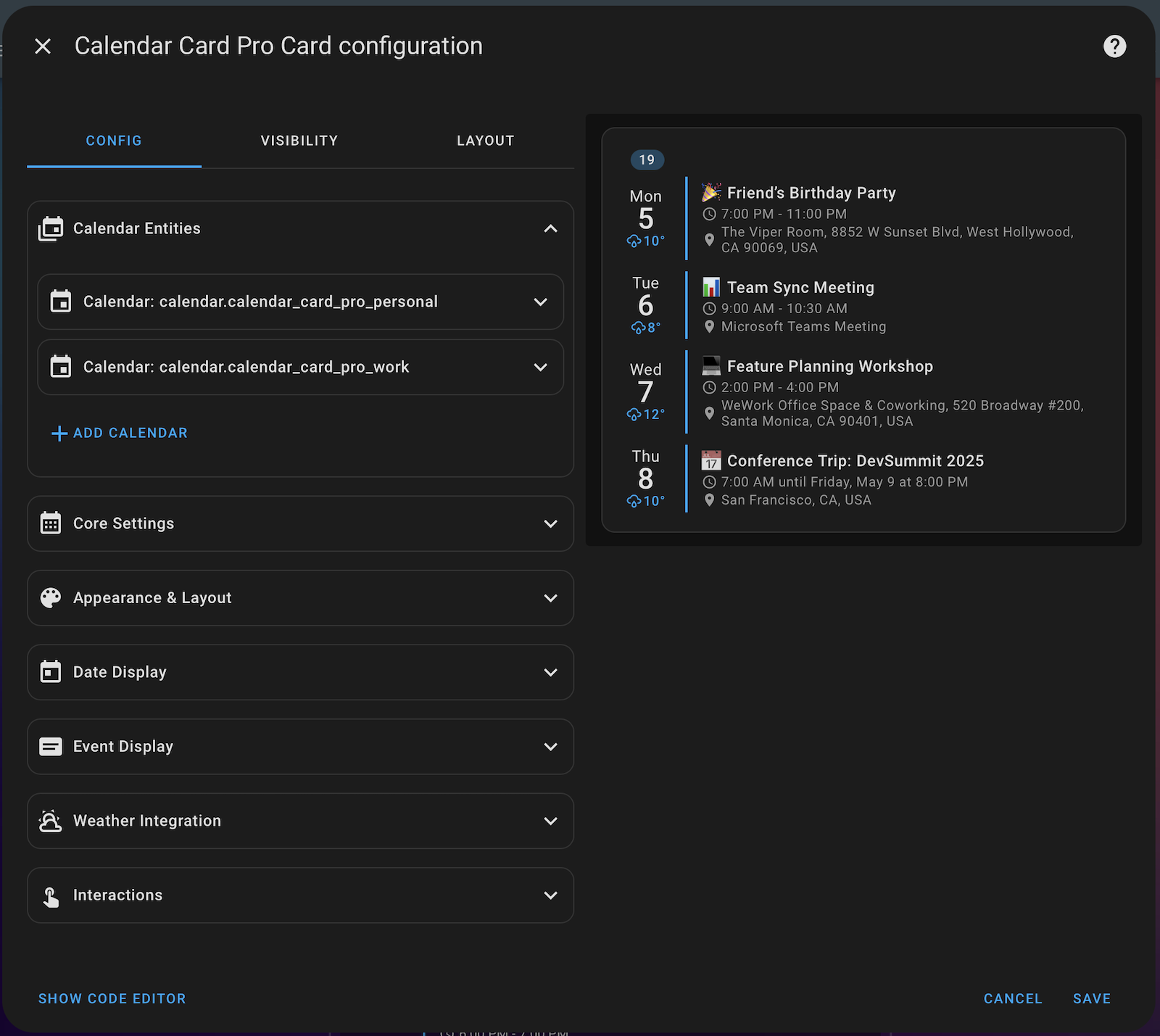
- Native Home Assistant Design - Built with the same UI components as Home Assistant for perfect visual integration and consistent theming
- Smart, Context-Aware Interface - Options only appear when relevant, reducing clutter and simplifying configuration
- Organized Configuration Sections - Settings are grouped into logical, collapsible panels for easy navigation
- Automatic Config Upgrader - ✨ Detects deprecated settings and updates your configuration with one click
- Specialized Input Helpers - Advanced pickers for entities, icons, colors and other complex options
- Mobile-Friendly Design - Fully responsive interface that works on any device
Upgrading from previous versions? When you first open the editor after updating, any deprecated parameters in your configuration will be automatically detected. Simply click the "Update config..." button that appears to instantly migrate to the latest parameter names!
Note: The visual configuration editor is currently only available in English. The configured calendar card will still display in your selected language, but the editor interface itself is English-only at this time.
Editor Feature Details
- Logical Organization - Edit configuration in intuitive sections including Calendar Entities, Core Settings, Appearance & Layout, Date Display, Event Display, Weather Integration, and Interactions
- Dynamic Fields - Options for styling and advanced features only appear when their parent features are enabled
- Smart Validation - Type-specific input fields with validation ensure your configuration is always correct
- Visual Helpers - Specialized selectors for today indicators, calendar labels, and other visual elements
- Enhanced Accessibility - Inclusive design principles ensure the editor is usable by everyone
🌦️ Weather Integration
Calendar Card Pro now supports displaying weather forecasts directly alongside your calendar events! This powerful new integration allows you to see the expected weather conditions for each day or for specific events.
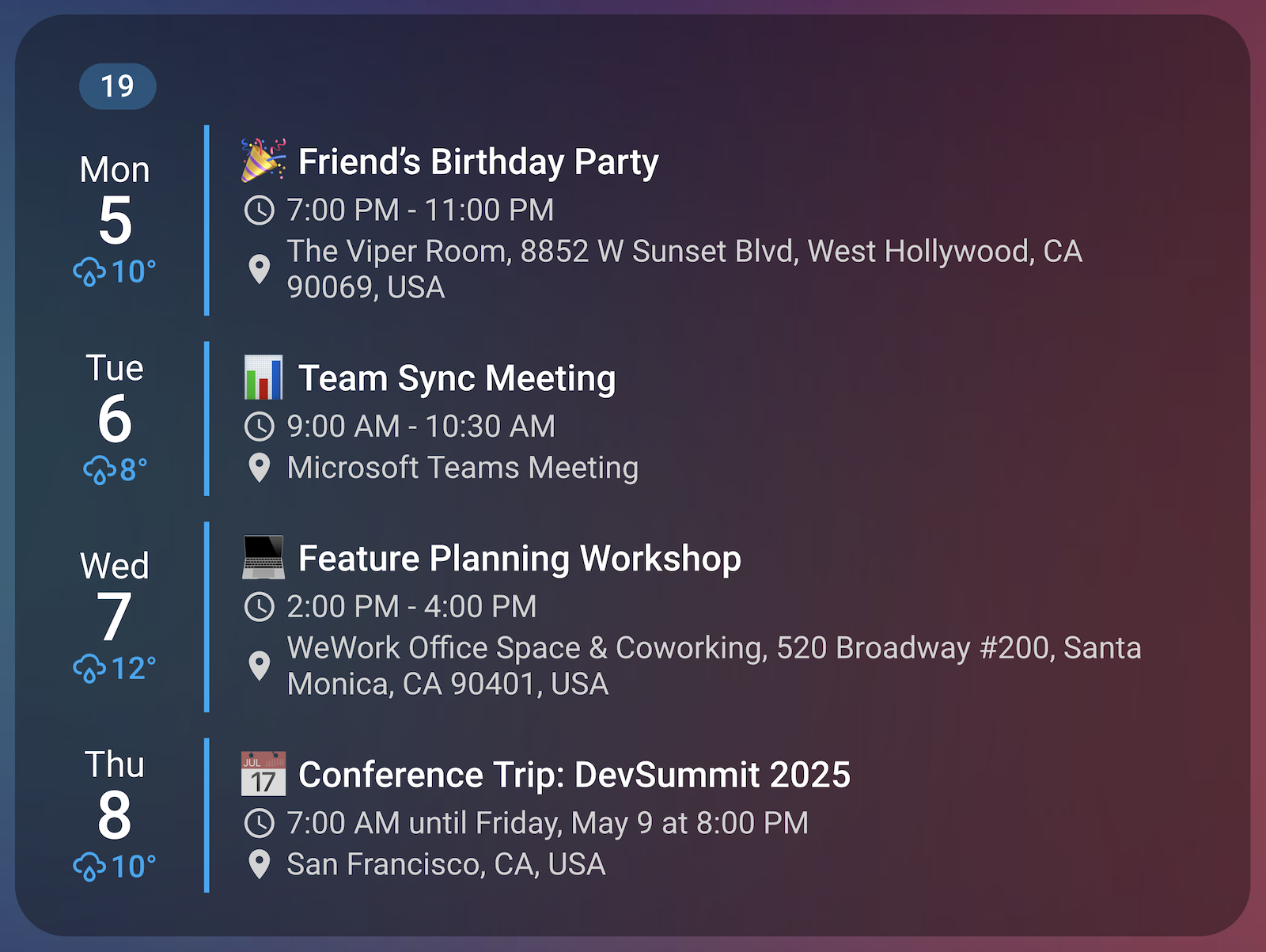
- Dual Display Positions: Show weather in the date column, event column, or both
- Customizable Information: Choose what weather data to display independently for each position
- Per-Position Styling: Control the appearance and content of weather data independently in each position
- Automatic Forecast Matching: Weather data automatically matches the correct day or event time
- Home Assistant Integration: Uses your existing weather entities and requires no additional setup
Pro Tip: The new visual editor makes configuring weather integration simple! Just select your weather entity and customize display options through the intuitive Weather Integration panel.
Manual YAML Configuration Details
type: custom:calendar-card-pro
# Basic weather configuration
weather:
  entity: weather.your_weather_entity
  position: date # Options: 'date', 'event', or 'both'
  date:
    show_conditions: true
    show_high_temp: true
    show_low_temp: false
  event:
    show_conditions: true
    show_temp: true
For full parameter documentation including styling options, see our GitHub README.
🕒 Improved Time Format Detection
Calendar Card Pro now correctly integrates with all Home Assistant time format settings:
- Complete HA Integration - Properly detects and respects all four Home Assistant time format options: 12-hour, 24-hour, language-based, and system-based settings
- Smart Language Detection - When HA is set to use language-based time format, the card intelligently determines the appropriate format based on the language
- System Settings Support - Properly detects system/browser time format preferences when HA is configured to use them
- Override Capability - Still allows explicit time format configuration via the card's
time_24hsetting, independent of Home Assistant settings
New Languages
Extended language support to further regions, so that 29 languages are now supported:
- Croatian Language - Added complete Croatian translations for all calendar elements
Parameter Updates
The following parameters have been renamed or removed in v3.0.0 (the editor will automatically detect and update these for you):
max_events_to_show→compact_events_to_show(both global and entity-level)vertical_line_color→accent_colorhorizontal_line_width→day_separator_widthhorizontal_line_color→day_separator_color
🐛 Bug Fixes
Today Indicator Emoji Detection
- Improved Emoji Support – Today indicator now reliably detects and displays all emoji characters, including complex and multi-codepoint emojis, by using Unicode property escapes for robust emoji detection.
Entity-level Settings Consistency
- Fixed Entity-level Location Display - Entity-specific
show_location: truenow correctly overrides the globalshow_location: falsesetting, ensuring consistent behavior with other entity-level settings likeshow_time.
Related Issues
This release addresses community-reported issues:
- #107 - Weather Forecast Integration by @rothomas
- #196 - Auto-detect 12/24h time format from HA by @tomofdarkness
- #199 - Added Croatian language translation by @adamivangrgic
Full Changelog: v2.4.5...v3.0.0


