Repository navigation
AlienGamer Mode 1.8.0 - Local HTTPS and shared timer / HTTPS local y temporizador

AlienGamer Mode 1.8.0 — HTTPS local y temporizador único / Local HTTPS and shared timer
Cambios desde 1.7.0 / Changes since 1.7.0 — 2026-10-10.
Español
- HTTPS local opcional para el panel de celular/tablet. El asistente guía permiso, preparación, instalación del certificado y conexión. Tras configurarlo, HTTPS activo · Ver conexión abre el resumen y QR, sin repetir los pasos. HTTP sigue disponible como alternativa de sólo lectura.
- Mantener pantalla encendida usa Screen Wake Lock nativo en HTTPS confiable y navegadores compatibles. Sólo indica activo tras recibir el permiso; no usa vídeos falsos ni evita el bloqueo manual.
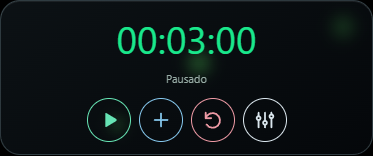
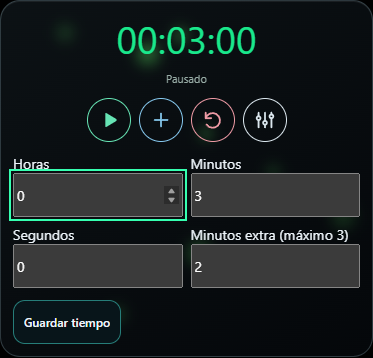
- Temporizador único para monitores de PC y vista móvil. Configurar, iniciar/pausar, añadir minutos o restablecer actualiza la misma sesión. Control desde el teléfono desactivado por defecto: requiere HTTPS y autorización explícita en la PC. Revocable sin detener sensores.
- Controles móviles flat SVG con iconos de reproducción/pausa, extra, reinicio y configuración, nombres accesibles y área táctil de 44 px. Se retiraron títulos y leyendas repetitivas de sincronización.
- Colores iguales en PC y móvil: verde antes del 70% consumido, ámbar desde 70%, rojo desde 85% y GAME OVER rojo fijo al finalizar, con transición de color de 0,3 s.
- Corregida la consola vacía persistente de PowerShell, incluidos accesos antiguos. Confirmado por el usuario; se conservan diagnósticos de procesos.
- Corregidos errores del asistente HTTPS anidado, preferencias móviles sobrescritas por una copia antigua del editor y QR/servicio vacío por rutas/contextos de ejecución distintos.
- Corregido el arranque móvil bloqueado en Conectando… tras habilitar control del temporizador. Los eventos se enlazan con las tarjetas ya insertadas en el documento.
- La actualización conserva
mobileViewy la identidad HTTPS de la misma cuenta. Reiniciar, desactivar/reactivar o renovar el QR no obliga a reinstalar la CA. El certificado servidor puede renovarse por IP/vencimiento conservando la misma CA. Una autoridad nueva, otro equipo/cuenta o eliminarla del teléfono sí exige instalar y verificar nuevamente.
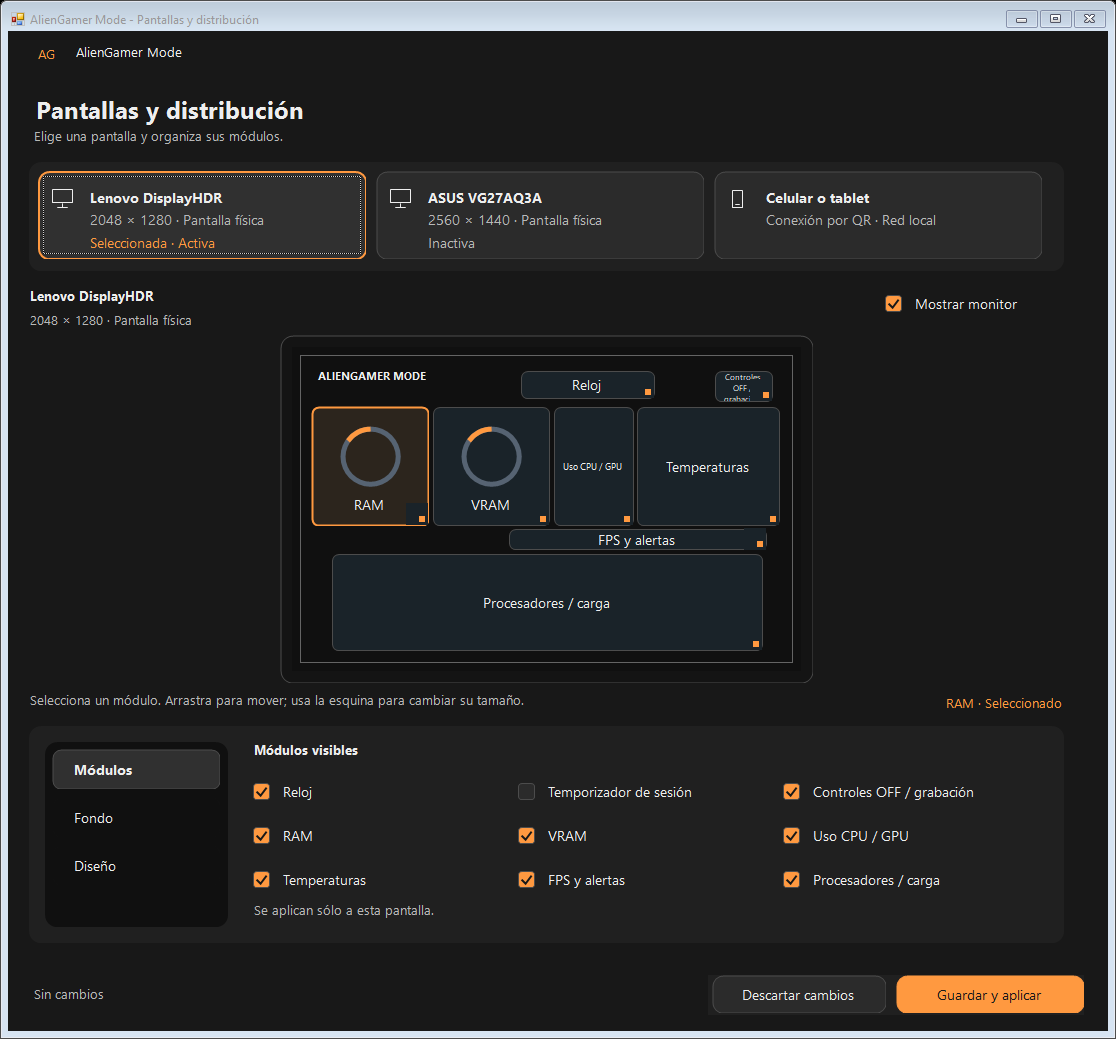
Se conserva el diseño oscuro/naranja de escritorio y el panel móvil responsive de 1.7.0: tarjetas de vidrio, masonry, reordenación, visibilidad, tamaños Mínimo/Normal/Extendido y color de luciérnagas. FPS/tiempo de cuadro juntos; alertas independientes.
Instalación y conexión segura
Descarga AlienGamerMode-Setup-1.8.0.exe. Rainmeter y HWiNFO se instalan por separado. La instalación completa respalda y reinicia el diseño visual/temporizadores; conserva grabaciones, reportes y configuración móvil existente. No es una actualización silenciosa.
PC y móvil deben usar el mismo router (Ethernet + Wi-Fi funciona). No abras puertos a Internet. Sigue la guía bilingüe: compara SHA-256, instala el certificado como CA, no Wi-Fi, activa HTTPS en PC y verifica La conexión es segura. Un aviso rojo o ERR_CERT_AUTHORITY_INVALID indica confianza incompleta; no lo ignores. El certificado público no contiene la clave privada, que permanece en Windows.
La CA local implica confianza en la autoridad de esta instalación; instálala sólo tras verificarla y quítala cuando ya no la necesites. CA de 3 años; servidor de hasta 90 días, renovable con la misma autoridad. Navegador/SO, batería y permisos pueden limitar pantalla encendida. Validado por el usuario en Samsung S26 Ultra / One UI 9 / Chrome; tablet/iOS físicos siguen pendientes. El módulo de ventiladores sigue planificado, no incluido.
English
- Optional local HTTPS for phone/tablet dashboards, with guided consent, certificate preparation, installation and connection. HTTPS active · View connection reopens its summary and QR rather than repeating setup. HTTP remains a read-only alternative.
- Keep screen awake uses native Screen Wake Lock on trusted HTTPS where supported. Active means a real grant; no fake video workaround or manual-lock prevention.
- One shared timer across PC displays and mobile: configure, start/pause, extra minutes and reset affect the same session. Mobile controls are off by default and require HTTPS plus explicit PC permission, revocable independently of sensor monitoring.
- Flat SVG timer controls, accessible names and 44px touch targets. Removed repetitive shared/synchronized headings and notices.
- Matching colors: green below 70% elapsed, amber from 70%, red from 85%, fixed red GAME OVER, with 0.3-second color transitions.
- Fixed the lingering empty PowerShell window, including legacy shortcuts; user confirmed console-free startup, with process diagnostics retained.
- Fixed nested HTTPS setup errors, stale editor snapshots overwriting mobile preferences, and QR/service availability problems caused by inconsistent paths/process context.
- Fixed mobile startup stuck on Connecting… after enabling timer controls by binding events after inserting the cards.
- Updates preserve existing
mobileViewand same-account HTTPS identity. Restarts, enable/disable and QR rotation do not require reinstalling the CA. Server renewal for a new IP/expiry reuses the authority. A replacement authority, new PC/account or removed phone trust requires reinstalling and verifying it.
Retains 1.7.0's dark/orange desktop editor and responsive mobile glass/masonry cards, ordering, visibility, Minimum/Normal/Extended sizes and selectable decorative fireflies. FPS/frame time share a module; alerts remain separate.
Setup, security and limitations
Run AlienGamerMode-Setup-1.8.0.exe; Rainmeter and HWiNFO are separate prerequisites. Full setup backs up/resets desktop visual and timer settings while preserving recordings, reports and existing mobile configuration; it is not a silent in-place UI patch.
Use the same router (Ethernet + Wi-Fi works), with no Internet port forwarding. Follow the bilingual guide: compare SHA-256, install as a CA, not Wi-Fi, enable HTTPS on the PC and verify Connection is secure. Do not bypass red certificate warnings. The public certificate contains no private key; private keys remain in Windows. Installing the CA trusts this installation's authority: verify it first and remove it when no longer needed.
CA validity is 3 years; the server certificate lasts up to 90 days and renews under the same authority. Wake lock depends on browser/OS, power policy and permissions, not universal compatibility. User validation: Samsung S26 Ultra / One UI 9 / Chrome; physical tablet/iOS testing remains pending. Fan RPM visualization remains planned, not included.
Capturas / Screenshots
Timer images use simulated test readings. Editor image uses a test topology. Certificate examples in the local setup guide were reviewed: no QR token, password or private key; the shown LAN address is illustrative, not the user's public Internet address.
Verification
Regression checks cover shared countdown/state migration, conflicts/concurrent writers, permission/TLS/origin boundaries, certificate stability and renewal, shortcut migration, stale preference preservation, mobile startup/controls/colors and responsive browser layouts. These are functional tests, not a new performance benchmark or validation on every physical device.