
A fast, composable, keyboard-first command palette for Flutter desktop and web — a faithful port of the React kbar package.
Live demo and step-by-step setup guide
Press ⌘K, type, hit ↵.
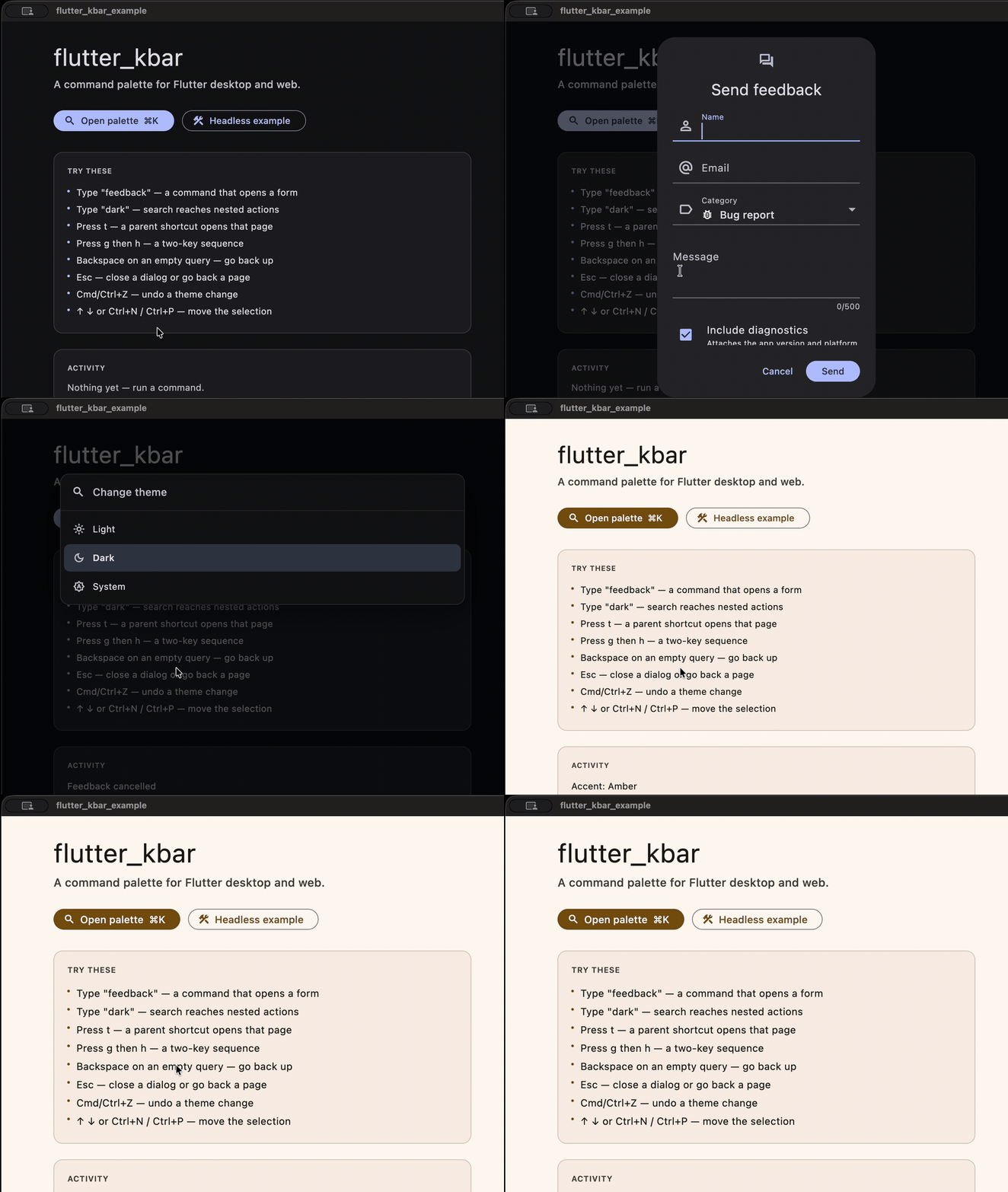
- Nested actions — actions form a tree; selecting a parent descends into its children, Backspace goes back up.
- Fuzzy search with sections — priority-ranked, grouped, and ordered exactly the way kbar orders things.
- Multi-key shortcuts —
⌘Kto toggle, and sequences like g h for individual actions. - Undo/redo — opt-in history for actions that register how to reverse themselves.
- Headless or batteries-included — drop in
KBarPalette, restyle it with aThemeExtension, override a single row, or compose your own from the same primitives. - Zero runtime dependencies, wasm-ready.
dependencies:
flutter_kbar: ^1.0.0import 'package:flutter_kbar/flutter_kbar.dart';
KBarProvider(
actions: [
KBarAction(
id: 'save',
name: 'Save file',
subtitle: 'Write the current file to disk',
icon: const Icon(Icons.save_outlined),
section: const KBarSection('File'),
shortcut: const [r'$mod+s'],
perform: (_) => save(),
),
],
child: MaterialApp(
// Placing the palette here keeps it above every route.
builder: (context, child) => KBarPalette(child: child),
home: const HomePage(),
),
)That's the whole setup. ⌘K (or Ctrl+K off Apple platforms) now opens the palette.
KBarAction(
  id: 'theme.dark',           // unique; re-registering the same id replaces it
  name: 'Dark',               // primary label, and the main search field
  keywords: 'night,dim',      // extra search terms, comma-separated
  subtitle: 'Always dark',    // secondary line, also searched
  icon: const Icon(Icons.dark_mode),
  section: const KBarSection('Appearance', priority: KBarPriority.high),
  parent: 'theme',            // makes this a child of the "theme" action
  shortcut: const ['t', 'd'], // press t, then d
  priority: KBarPriority.normal,
  perform: (context) { ... },
)
shortcut is one sequence, not a list of alternatives. ['g', 'h'] means "press g, then
h". A single binding is a one-element list: [r'$mod+k']. $mod is Command on Apple
platforms and Control everywhere else.
An action with children but no perform is a page: selecting it descends into its
children rather than running anything.
KBarRegisterActions(
  actions: [KBarAction(id: 'page.refresh', name: 'Refresh', perform: (_) => refresh())],
  child: MyPage(),
)
They appear on mount and disappear on unmount. There is also a KBarActionsMixin for pages
that already have a State, and controller.registerActions() for imperative use.
Opt in with enableHistory, then register the undo from inside perform, where the previous
state is still in scope:
KBarProvider(
  options: const KBarOptions(enableHistory: true),
  actions: [
    KBarAction(
      id: 'theme.dark',
      name: 'Dark mode',
      perform: (context) {
        final previous = themeMode;
        setThemeMode(ThemeMode.dark);
        context.undoWith(() => setThemeMode(previous));
      },
    ),
  ],
)
⌘Z / ⇧⌘Z then undo and redo.
| Binding | Does |
|---|---|
⌘K / Ctrl+K |
toggle the palette (configurable) |
↑ ↓, Ctrl+P / Ctrl+N |
move the selection, skipping section headings |
| ↵ | run the selected action |
| Esc | close |
| Backspace | with an empty query inside a nested action, go back up |
⌘Z / ⇧⌘Z |
undo / redo, when history is enabled |
Action shortcuts fire only while the palette is closed, and are suppressed while a text
field has focus — so typing g in a form does not fire the g shortcut. The toggle binding
is exempt and works from anywhere.
KBarThemeData is a ThemeExtension, so it lerps across light/dark transitions:
MaterialApp(
  theme: ThemeData(
    extensions: const [
      KBarThemeData(borderRadius: BorderRadius.all(Radius.circular(20))),
    ],
  ),
)
Every field is optional. Anything you leave out is derived from the ambient ColorScheme and
TextTheme, so with no configuration at all the palette already matches your app. Overrides
resolve in this order, each merging over the one below:
KBarPalette(style: ...)— this widget only- the nearest
KBarTheme— a subtree Theme.of(context).extension<KBarThemeData>()— app-wideKBarThemeData.fromTheme(...)— derived defaults
KBarPalette is assembled entirely from public primitives, so there is no cliff between
using it and replacing it:
KBarPortal(
  child: KBarPositioner(
    child: KBarAnimator(
      child: Material(
        child: Column(
          mainAxisSize: MainAxisSize.min,
          children: [
            const KBarSearchField(),
            KBarResults(
              itemBuilder: (context, item, index, isActive) => switch (item) {
                KBarSectionHeader(:final title) => MyHeader(title),
                KBarActionResult(:final action) => MyRow(action, isActive),
              },
            ),
          ],
        ),
      ),
    ),
  ),
)
Read state with KBarSelector, which rebuilds only when its own slice changes:
KBarSelector<String>(
  selector: (state) => state.searchQuery,
  builder: (context, query, kbar, child) => Text(query),
)
Use context.kbar for one-off reads and commands (open(), close(), setSearch()) without
subscribing to anything.
The default KBarFuseMatcher is a port of fuse.js configured exactly as kbar configures it,
verified against a fixture captured from real fuse.js — see tool/fuse_oracle/.
For palettes with short, command-like names, KBarCommandScoreMatcher (a port of cmdk's
command-score) is usually better: typing gs ranks "Git status" first, where fuse barely
matches it at all.
KBarOptions(matcher: KBarCommandScoreMatcher())Both report which characters matched, which is what KBarHighlightedText renders. kbar asks
fuse for that information and then discards it.
You can also implement KBarMatcher yourself.
| kbar | flutter_kbar |
|---|---|
KBarProvider |
KBarProvider |
KBarPortal / KBarPositioner / KBarAnimator |
same names |
KBarSearch |
KBarSearchField |
KBarResults |
KBarResults |
useKBar(collector) |
KBarSelector<T> widget, or context.kbar |
useMatches() |
KBarMatchesBuilder, or controller.matches |
useRegisterActions(a, deps) |
KBarRegisterActions, or KBarActionsMixin |
Action |
KBarAction — Action is taken by flutter/widgets |
Priority |
KBarPriority — Priority is taken by flutter/scheduler |
ActionImpl |
KBarActionNode |
(string | ActionImpl)[] |
sealed class KBarResultItem |
NO_GROUP |
KBarSection.none |
Intentional differences:
performregisters undo explicitly viacontext.undoWith(...)rather than returning the undo function. Returning it is undiscoverable, and in Dart it would force every ordinary command to end inreturn nullto satisfy the analyzer.performmay also beasync, which kbar cannot express.- Options are live. kbar freezes them on first render; changing them here takes effect immediately.
- The search field is genuinely two-way. kbar keeps its input's text in local state, so
programmatic
setSearchsilently fails there. toggleShortcutsis a list, so you can register a fallback (see below).disableDocumentLock/disableScrollbarManagementare omitted — they are DOM concepts with no Flutter equivalent, and shipping them as no-ops would imply behaviour that does not exist.useMatchescomputes once, not once per call site.
⌘K is not reserved in Chrome or Safari on macOS. Firefox binds Ctrl/Cmd+K to its own
search bar and has historically ignored preventDefault for it, so register a fallback:
KBarOptions(toggleShortcuts: [r'$mod+k', r'$mod+shift+p'])The app must also hold DOM focus for key events to arrive — if the user's last click was on browser chrome, nothing reaches Flutter until they click back into the page.
Set KBarAnimations.none and a zero search throttle to make palette tests deterministic:
const KBarOptions(
  animations: KBarAnimations.none,
  searchThrottle: Duration.zero,
)
Otherwise remember to pump past the 100 ms throttle window after typing.
example/ is a runnable demo for macOS, Windows, Linux and web, covering nested actions,
sequence shortcuts, sections, undo, live theming, and a page that registers its own commands.
cd example && flutter run -d macos # or -d chrome
MIT