A spigot library supporting various features from 1.8 to 1.19.3


Features •
Usage •
Download
- Compatible with versions from
1.8to1.19.3 - Title with fade and stay settings at
1.8 - Action bar at
1.8 - Particles at
1.8 - Conveniently classified (Java and Kotlin)
The latest version 
<!-- Repository -->
<repository>
  <id>jitpack.io</id>
  <url>https://jitpack.io</url>
</repository>
<!-- Dependency -->
<dependency>
<groupId>com.github.Hideko-Dev</groupId>
<artifactId>VSeries</artifactId>
<version>VERSION</version>
</dependency>// Repository
repositories {
mavenCentral()
maven { url 'https://jitpack.io' }
}// Dependency
dependencies {
implementation 'com.github.Hideko-Dev:VSeries:-SNAPSHOT'
}Note
VSeries is available on Jitpack. If you want to use the development version, use the dev branch.
Class: VParticle, VParticleList, VParticleType
This simply makes particles appear at a specified location.
The Type at this time is VParticleType.DOT
VParticle(location)
  .setType(VParticleType.DOT)
  .setParticle(VParticleList.CLOUD)
.use()This allows you to specify the amount of particles to appear and the time after they appear.
Amount
VParticle(location)
  .setType(VParticleType.DOT)
  .setAmount(100) // Default is 10
  .setParticle(VParticleList.CRIT)
  .use()
Speed
VParticle(location)
  .setType(VParticleType.DOT)
  .setSpeed(0.5) // Default is 1.0
  .setParticle(VParticleList.CRIT)
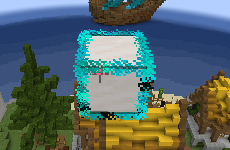
.use()This allows particles in the shape of blocks to appear.
The Type at this time is VParticleType.BLOCK_OUTLINE
VParticle(location)
  .setType(VParticleType.BLOCK_OUTLINE)
  .setParticle(VParticleList.REDSTONE)
  .setColor(Color.CYAN)
  .use()
If you use the above code, your particles will look like this
This causes colored redstone dust particles to appear.
Color is specified using java.awt
VParticle(location)
  .setParticle(VParticleList.REDSTONE)
  .setColor(Color.RED)
.use()These are particles that can appear as textures on blocks and items.
ItemCrack, FallingDust can be used.
Block Texture
VParticle(location)
    .setParticle(VParticleList.BLOCK_FALLING)
    .setParticleData(BlockTexture(Material.STONE))
    .display()
Item Texture
val item = ItemStack(Material.DIAMOND_AXE)
VParticle(location)
    .setParticle(VParticleList.ITEM_CRACK)
    .setParticleData(ItemTexture(item))
.display()Class: VActionBar
With the following simple code, you can easily send an action bar to a specified player.
VActionBar.send(player, "Hello World")VActionBar.clear(player)Class: VTitle
With the following simple code, you can easily send titles with fade-in, fade-out, and stay to your players.
The following code is a 30-tick fade-in, 10-tick stay, and 30-tick fade-out court
VTitle.send(player, 30, 10, 30, "", "")VTitle.send(player, "Hello World")Class: VBase
This is a simplified version of registerEvents() in PluginManager of org.bukkit.JavaPlugin
and getCommand() of org.bukkit.Server It can be as simple as the following code.
class TestPlugin : JavaPlugin() {
    override fun onEnable() {

        VBase()
            .newEvents(this, listOf(
                TestListener()
            ))
            .newCommands(this, listOf(
                "testCommand" to TestCommandExecutor()
            ))

    }
}Class: VClass
This is for advanced users.
This code forces the class of net.minecraft.server to be retrieved.
VClass.getNMSClass("PacketPlayOutTitle")This code sends packets to the specified player.
VClass.sendPacket(player, Packet)Tip
The "V" in VSeries is inspired by the "V" in "Version," which stands for more than one version.
This VSeries was created by Hideko.
Part of the ParticleLib by ByteZ1137 code is used in VParticle.