Describe the bug
Allure @Step annotation is not compatible with com.browserstack->automate-testassist dependency. The steps will be shown in the report if this is added to the project.
To Reproduce
Steps to reproduce the behavior:
- Create a new maven project with pom.xml below:
<?xml version="1.0" encoding="UTF-8"?>
<project xmlns="http://maven.apache.org/POM/4.0.0"
         xmlns:xsi="http://www.w3.org/2001/XMLSchema-instance"
         xsi:schemaLocation="http://maven.apache.org/POM/4.0.0 http://maven.apache.org/xsd/maven-4.0.0.xsd">
    <modelVersion>4.0.0</modelVersion>

    <groupId>io.qameta.allure.examples</groupId>
    <artifactId>allure-testng-maven</artifactId>
    <version>1.3</version>

    <properties>
        <!-- this allows to deploy PR and push them to artifactory -->
        <project-version>93.0-SNAPSHOT</project-version>
        <aspectj.version>1.9.1</aspectj.version>
        <allure.version>2.13.6</allure.version>

    </properties>
    <dependencies>

        <dependency>
            <groupId>com.browserstack</groupId>
            <artifactId>automate-testassist</artifactId>
            <version>1.1.1</version>
        </dependency>
        <dependency>
            <groupId>io.qameta.allure</groupId>
            <artifactId>allure-testng</artifactId>
            <version>2.13.6</version>
        </dependency>
        <dependency>
            <groupId>org.slf4j</groupId>
            <artifactId>slf4j-simple</artifactId>
            <version>1.7.30</version>
        </dependency>
    </dependencies>


    <build>
        <plugins>

            <plugin>
                <groupId>org.apache.maven.plugins</groupId>
                <artifactId>maven-surefire-plugin</artifactId>
                <version>2.22.2</version>
                <configuration>
                    <testFailureIgnore>false</testFailureIgnore>
                    <argLine>
                        -Dfile.encoding=UTF-8
                        -javaagent:"${settings.localRepository}/org/aspectj/aspectjweaver/${aspectj.version}/aspectjweaver-${aspectj.version}.jar"
                    </argLine>
                    <systemPropertyVariables>
                        <allure.results.directory>${project.build.directory}/allure-results</allure.results.directory>
                    </systemPropertyVariables>
                </configuration>
                <dependencies>
                    <dependency>
                        <groupId>org.aspectj</groupId>
                        <artifactId>aspectjweaver</artifactId>
                        <version>${aspectj.version}</version>
                    </dependency>
                </dependencies>
            </plugin>

            <plugin>
                <groupId>io.qameta.allure</groupId>
                <artifactId>allure-maven</artifactId>
                <version>2.10.0</version>
                <configuration>
                    <reportVersion>${allure.version}</reportVersion>
                    <resultsDirectory>${project.build.directory}/allure-results</resultsDirectory>
                </configuration>
            </plugin>

            <plugin>
                <groupId>org.apache.maven.plugins</groupId>
                <artifactId>maven-compiler-plugin</artifactId>
                <version>3.1</version>
                <configuration>
                    <source>1.8</source>
                    <target>1.8</target>
                </configuration>
            </plugin>

        </plugins>
    </build>

</project>
- Create a few dummy test cases using allure
@Step annotation:
import io.qameta.allure.Feature;
import io.qameta.allure.Step;
import io.qameta.allure.Story;
import org.testng.Assert;
import org.testng.annotations.Test;

@Feature("Some-Feature")
@Story("Some-Story")
public class TestSomething {

    @Step("This is a great step")
    public static String helloStep(){
        System.out.println("Some message");
        return "some string";
    }

    @Step("This is a failed step")
    public static String horribleStep() throws Exception {
        throw new Exception("Horrible");
    }

    @Test
    public static void testSomehting() throws Exception {
        helloStep();
        horribleStep();
        Assert.assertTrue(true);
    }

}
- Execute the test using
clean -Dtest=TestSomething test maven config
- Generate a report in the root of the project using
allure serve target/allure-results command
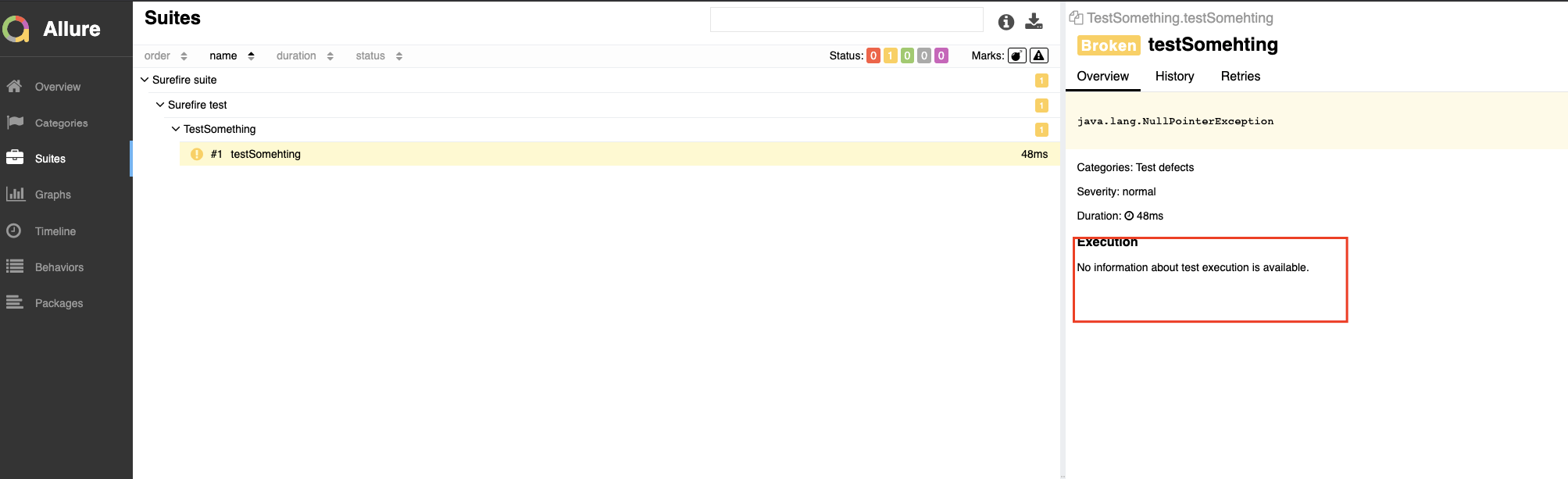
- Open a report and check the test case details. No steps will be shown at all:
Expected behavior
Steps should be present in the report. After you comment on that dependency and repeat all steps above, all Allure steps will be shown in the report:

Screenshots
Added above
Desktop (please complete the following information):
- OS: macOS
- Browser Chrome
- Version latest

Describe the bug
Allure
@Stepannotation is not compatible with com.browserstack->automate-testassist dependency. The steps will be shown in the report if this is added to the project.To Reproduce
Steps to reproduce the behavior:
@Stepannotation:clean -Dtest=TestSomething testmaven configallure serve target/allure-resultscommandExpected behavior

Steps should be present in the report. After you comment on that dependency and repeat all steps above, all Allure steps will be shown in the report:
Screenshots
Added above
Desktop (please complete the following information):