Repository navigation
Releases: aloofbit/comfyatmosphere
Release list
v0.17.1-alpha: the Undercity counts as indoors

Bugs, questions and screenshots. Ty for testing!: join our Discord.

The Undercity counts as indoors, its high rooms too. Copy the DLL: the addon and comfyatmos.ini did not change.
What changed
Fog and light
- The floor under you decides whether you are indoors. Fixed: the Undercity's Trade Quarter counted as outdoors, because its ceiling is more than 40 yards up.
- Indoors, the sun shadows are off, Night Darkness does not apply, and the lamps use Indoor Lamps.
Update from v0.17.0-alpha
- Close the game.
- Copy
comfyatmos.dllto the client folder, next toWoW.exe.

v0.17.0-alpha: a minimap button, steady ship sails, zone fog colour
Bugs, questions and screenshots. Ty for testing!: join our Discord.
The addon has a minimap button that opens the settings. A moving ship's sails are steady, and the fog takes its colour from the zone. Copy the DLL and the addon folder.
What changed
Addon

- A minimap button. Click it to open the settings window. Right-click it for Options, Debug, Stats and Probe. Drag it to move it round the minimap.
Fog and light
- The fog's colour comes from the zone's light tables, for your place and the hour. It stays the same when you turn the camera.
- The Deeprun Tram counts as indoors.
- Fixed: a pole or a tree trunk across the sun faded the sun rays.
Lamps
- Candles that the server places, such as the Hallow's End candles, give no light.
- Fixed: where many lamps were in view, their light ended in straight lines (boxes of light).
- Fixed: a glow floated under a building's roof where no lamp stands.
Shadows
- Fixed: a moving ship's sails flickered.
- Fixed: a flying bird left a row of copies of its shadow behind it.
- Fixed: your corpse and your ghost cast a shadow.
Grass
- Fixed: walls in Dire Maul lit up, because they were taken for grass.
Loading
- Fixed: after a login in a crowd, such as at Stormwind's fountain, the lamps' light came back only after one or two minutes.
Known issues
- Water lowers the frame rate, most of all near ships.
Update from v0.16.1-alpha
- Close the game.
- Copy
comfyatmos.dllto the client folder, next toWoW.exe. - Copy
Interface\AddOns\ComfyAtmosphereover the old folder.
Your comfyatmos.ini can stay. The new settings take their defaults when the file does not have them.

v0.16.1-alpha: the water's colour from the game's light tables
Bugs, questions and screenshots. Ty for testing!: join our Discord.
The water takes its colour from the game's own light tables for the zone and the hour. The bands over the sea on AMD cards (#11) are fixed, and the sea no longer opens in triangles with the swell. This replaces v0.16.0-alpha, whose water shader did not compile: use this one.
What changed
Water
- The water's colour comes from the sky colours in the game's light tables, for your place and the hour. The Zone Colour, Zone Hue and Water Colour settings are gone.
- Water Saturation (default 145) replaces Zone Saturation.
- The water is never greener than it is blue.
- At dusk the water takes the sunset's colour in its reflection only. Sunset Water now goes from 0 to 100%.
- The water's fog is the one the game sets for its water. A small turn of the camera no longer makes the Stormwind canal lighter.
- Fixed: bands of the sand's colour over the sea on AMD cards (#11). Confirmed on an RX 7600 XT.
- Fixed: triangles of the sea floor showed through the sea at the same place in every chunk, opening and closing with the swell.
Shadows
- Highest Sun is 65 by default (80 before).
- Fixed: a lit strip flickered along the foot of a wall that faces away from the sun.
- Fixed: the back of a ship's sail was lit in patches and stripes that flickered.
Spells, glow and grass
- The game draws spells and glows in its own order again. Drawn over the shadows and the fog, Stormwind's fountain blinked white.
- Game Glow is 15 by default (80 before).
- Fixed: yellow squares round the lamp flames at a Game Glow under 100.
- Fixed: Stormwind's fountain water was taken for grass and swayed.
Effects
- Fixed: the whole screen went darker or lighter when you looked at the sky with little else in view.
Update from v0.15.0-alpha
- Close the game.
- Copy
comfyatmos.dllto the client folder, next toWoW.exe. - Copy
Interface\AddOns\ComfyAtmosphereover the old folder. - Copy
comfyatmos.iniover the old one too. The old file holds the old Game Glow (80), Highest Sun (80) and Zone Saturation (165), and those win over the new defaults.

v0.16.0-alpha: broken water shader, use v0.16.1-alpha
Do not use this release. Its water shader does not compile, so the game's own water is drawn. Use v0.16.1-alpha.
Bugs, questions and screenshots. Ty for testing!: join our Discord.
The water takes its colour from the game's own light tables for the zone and the hour. The bands over the sea on AMD cards (#11) are fixed, and the sea no longer opens in triangles with the swell.
What changed
Water
- The water's colour comes from the sky colours in the game's light tables, for your place and the hour. The Zone Colour, Zone Hue and Water Colour settings are gone.
- Water Saturation (default 145) replaces Zone Saturation.
- The water is never greener than it is blue.
- At dusk the water takes the sunset's colour in its reflection only. Sunset Water now goes from 0 to 100%.
- The water's fog is the one the game sets for its water. A small turn of the camera no longer makes the Stormwind canal lighter.
- Fixed: bands of the sand's colour over the sea on AMD cards (#11). Confirmed on an RX 7600 XT.
- Fixed: triangles of the sea floor showed through the sea at the same place in every chunk, opening and closing with the swell.
Shadows
- Highest Sun is 65 by default (80 before).
- Fixed: a lit strip flickered along the foot of a wall that faces away from the sun.
Spells, glow and grass
- The game draws spells and glows in its own order again. Drawn over the shadows and the fog, Stormwind's fountain blinked white.
- Game Glow is 15 by default (80 before).
- Fixed: yellow squares round the lamp flames at a Game Glow under 100.
- Fixed: Stormwind's fountain water was taken for grass and swayed.
Effects
- Fixed: the whole screen went darker or lighter when you looked at the sky with little else in view.
Update from v0.15.0-alpha
- Close the game.
- Copy
comfyatmos.dllto the client folder, next toWoW.exe. - Copy
Interface\AddOns\ComfyAtmosphereover the old folder. - Copy
comfyatmos.iniover the old one too. The old file holds the old Game Glow (80), Highest Sun (80) and Zone Saturation (165), and those win over the new defaults.

v0.15.0-alpha: the sun from the game clock, Game Glow and the zone's water colour
Bugs, questions and screenshots. Ty for testing!: join our Discord.
The sun and its shadows now follow the game clock, so they no longer turn when you turn the camera. New sliders: Game Glow, Highest Sun, Low Sun From, Zone Saturation, Zone Hue and Wet Sand Distance.
What changed
Sun and shadows
- The sun and the moons come from the game clock. Before, with the sun out of view, a moon was taken for the sun, and the shadows turned with the camera.
- After a jump from one night hour to another, the shadows follow the new moon. Before, they could keep the old moon's direction.
- Highest Sun (Shadows, default 80): the shadows' light never stands higher than this. At noon the sun reaches 85, and your shadow was a dot under your feet.
- Low Sun From (Shadows, default 3): with the sun or moon lower than this, the shadows' light climbs back up to Highest Sun, so the shadows stay short at dawn and dusk.
- The shadows of things near you no longer step as they move at a low Shadow Resolution. The near shadow maps are always at least 2048.
- Your shadow down a slope that faces away from the sun is whole and smooth. Before, it ended at the edge of a ground triangle.
- A druid's change of form no longer makes the light flash.
Spells and lamps
- Spells and glows are drawn over the shadows and the fog. A Mana Shield in a cave or in shade is no longer dim.
- A spell on a character is never taken for a lamp. Mana Shield no longer lights the ground yellow.
Water
- Zone Saturation (default 165) and Zone Hue (default 20) set the colour of the zone's water. The Stormwind canal is less green.
- The colour of the water no longer changes when the camera tilts.
- Wet Sand Distance (default 250 yards): the wet sand fades out with the distance. Before, it stopped in a line.
- The water reads its masks exactly on every graphics card. This can fix #11, bands of the sand's colour over the sea on an AMD RX 9060 XT. It is not confirmed on that card.
Colour
- Game Glow (Color, default 80): the game's Full Screen Glow, from 0 to 200% of its own. It needs Full Screen Glow on in the game's Video options.
Settings
/atmosalone opens the settings window./atmos helplists the commands.- New defaults: Fog Density 15, Fog Brightness 45, Fog Sunlight 15, Fog Toward the Sun 40, Light Strength 20, Light Density 12, Wet Sand 45.
Update from v0.14.0-alpha
- Close the game.
- Copy
comfyatmos.dllto the client folder, next toWoW.exe. - Copy
Interface\AddOns\ComfyAtmosphereover the old folder.
You can keep your comfyatmos.ini. A new setting takes its built-in value until you set it.

v0.14.0-alpha: choose the time of day
Bugs, questions and screenshots. Ty for testing!: join our Discord.
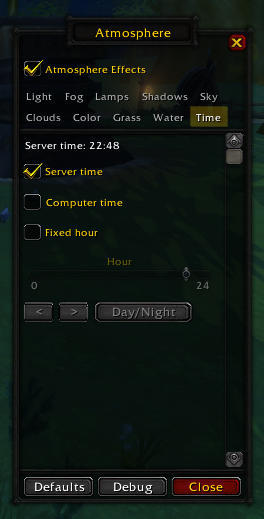
Choose the time of day in the new Time section of /atmos options: the server's time, your computer's clock, or a fixed hour. Computer time is from nummy (#10). Thank you!
What changed
- Time section, the last in
/atmos options: Server time, Computer time and Fixed hour. The slider,<,>and Day/Night set the fixed hour. The debug panel no longer has the time controls. - Computer time follows your computer's clock, with its timezone and daylight saving. Only your client shows it.
- Server time now shows the server's time at once. Before, the sky kept the last fixed hour until a relog.
- Known fault: after a jump from one night hour to another, the shadows can keep the old moon's direction.
Update from v0.13.1-alpha
- Close the game.
- Copy
comfyatmos.dllto the client folder, next toWoW.exe. - Copy
Interface\AddOns\ComfyAtmosphereover the old folder.
You can keep your comfyatmos.ini. The DLL adds the new localTime line when you first choose Computer time.

v0.13.1-alpha: water inside buildings at full frame rate
Bugs, questions and screenshots. Ty for testing!: join our Discord.
Water inside a building no longer slows the game. At a lake in Grand Moo Canyon the frame rate with the water on went from 16 to 175.
Before and after
Frames a second at the edge of the lake in Grand Moo Canyon:
| v0.13.0-alpha | v0.13.1-alpha | |
|---|---|---|
| Water on | 16 | 175 |
| Water off | 187 | 182 |
Three rounds of each, at 1152x864 on an RTX 2080 Super Max-Q.
What changed
- Water inside buildings (a dungeon's lake, Stormwind's canals). The ripples and wakes take the water's height from the game files. The game's water buffers are no longer read in each frame.
- Stormwind's canals are no longer red after a visit to Grand Moo Canyon.
- Water inside a building gets ripples and wakes only when the building has loaded from the files. In Stormwind this can take up to a minute after you arrive. With the sun shadows off, it gets none.
Update from v0.13.0-alpha
- Close the game.
- Copy
comfyatmos.dllto the client folder, next toWoW.exe.
The addon and comfyatmos.ini did not change.

v0.13.0-alpha: soft clouds, and the water at one and a half times the frame rate
Bugs, questions and screenshots. Ty for testing!: join our Discord.
Our own soft clouds replace the game's cloud layer. The water draws at about one and a half times the frame rate, and a river that climbs is drawn up to its far end.
Clouds
The sky over Lakeshire in Redridge:
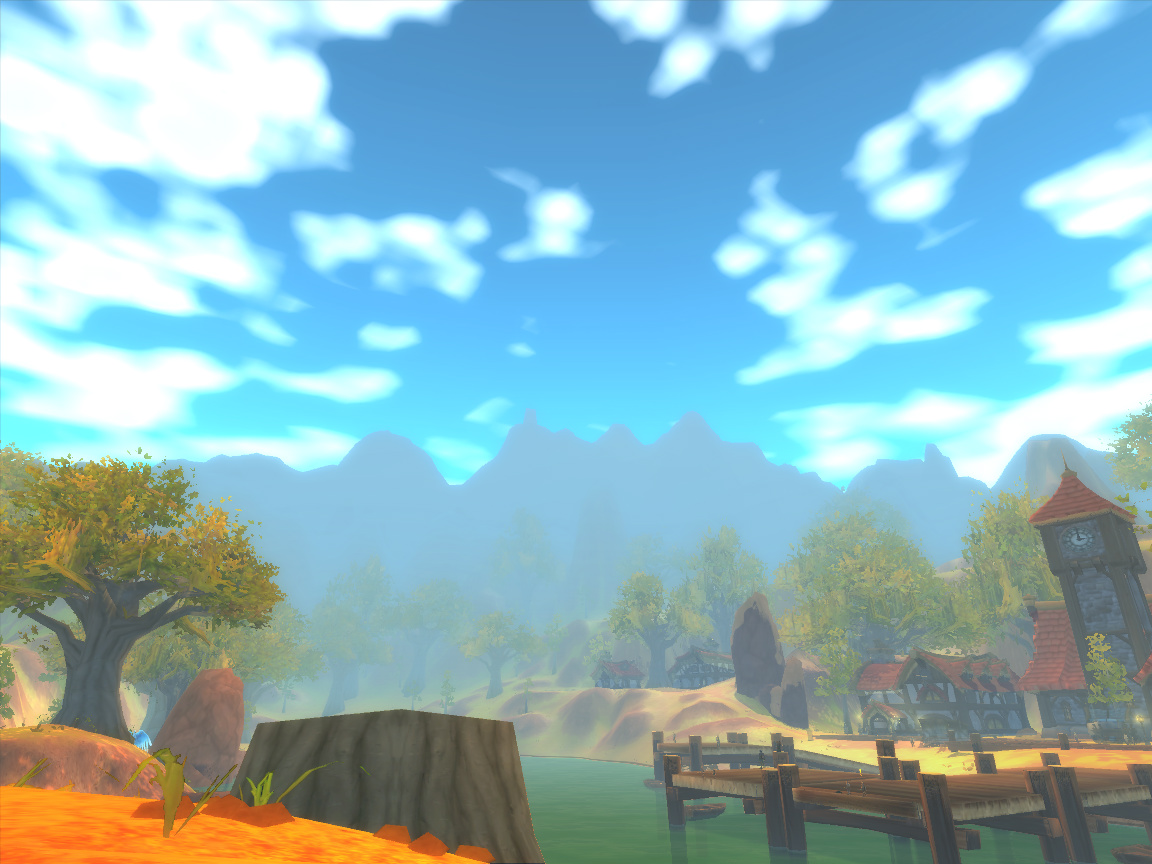
included secret feature :)
Before and after
Swimming down a river in Ashenvale, looking upstream:
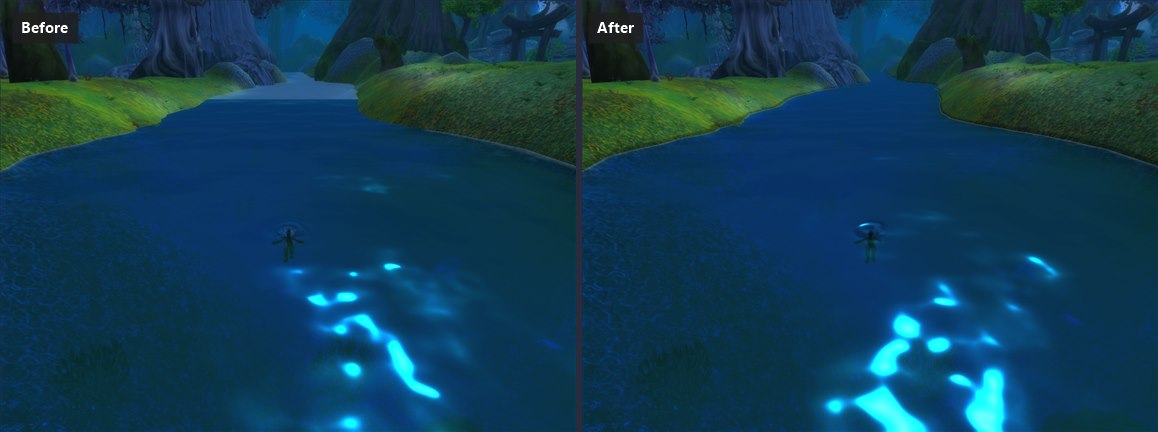
Frames a second on the beach at Auberdine, looking out to sea:
| v0.12.0-alpha | v0.13.0-alpha | |
|---|---|---|
| Standing | 74 | 119 |
| Turning | 58 | 90 |
The mean of two rounds of each, taken in turn, at 1152x864 on an RTX 2080 Super Max-Q. At 2560x1440 the water took the frame rate down to about 40. It now gives 85 to 90 standing and 70 to 75 turning.
What changed
- Clouds. A soft cumulus layer drifts with the wind. Every player at one place sees the same sky. The controls are on the Atmosphere page.
- Rain. The clouds gather and darken when the weather turns. The game's grey rain mist and the rain splashes under the water are left out.
- Frame rate. While turning, the water takes about 2 ms of each frame, down from about 6 ms. The game does not stutter as you turn.
- A river that climbs is drawn up to its far end, with the depth from the map files.
- A ring on the water where someone lands from a jump or a fall. Jump Ripple sets how deep it is.
- Softer foam. No pyramid shapes near the shore. The foam round a log stays in place as the camera turns. No foam outline round a character standing in the water.
- No pale flashes on the water.
- The game's own wake, ring and splash are hidden from the first frame. Other particles over the water stay.
- Defaults: Foam 25 (was 35), Foam Reach 15 (was 30), Wake Foam 25 (was 50), Water Clarity 50 (was 100).
Update from v0.12.0-alpha
- Close the game.
- Copy
comfyatmos.dllto the client folder, next toWoW.exe. - Copy
Interface\AddOns\ComfyAtmosphereover the old folder. It has a newcloudsfolder.
Your comfyatmos.ini can stay. It keeps the clouds off: tick Clouds on the Atmosphere page. It also keeps the old foam and Water Clarity.

v0.12.0-alpha: the time of day, sunsets and your stealth shadow
Bugs, questions and screenshots. Ty for testing!: join our Discord.
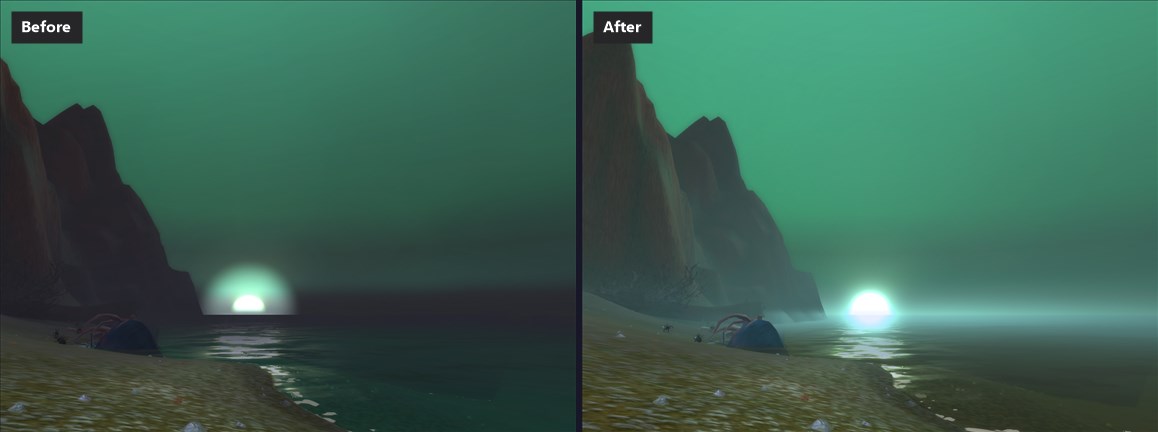
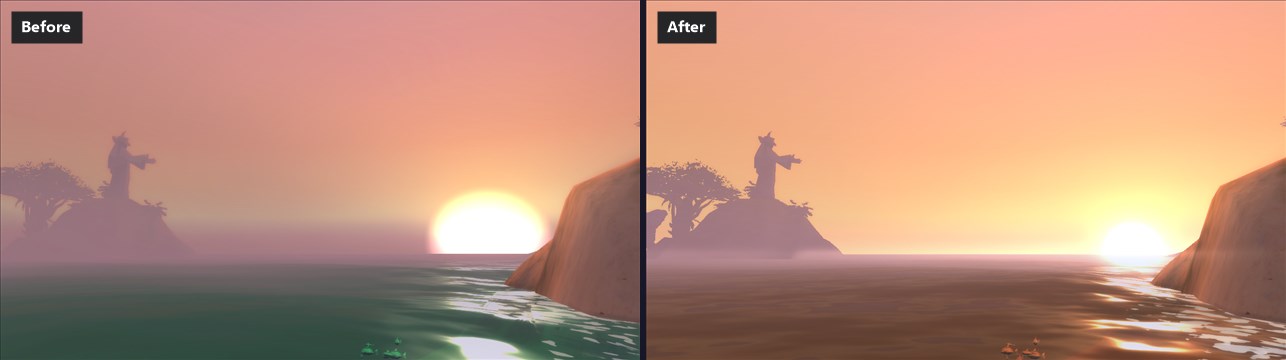
comfytime is now part of comfyatmosphere. The water and the fog take the zone's colours and glow at sunset, and your own character in stealth casts no shadow.
Before and after
The sun setting over the sea off Tirisfal Glades:
The mouth of Booty Bay at sunset:
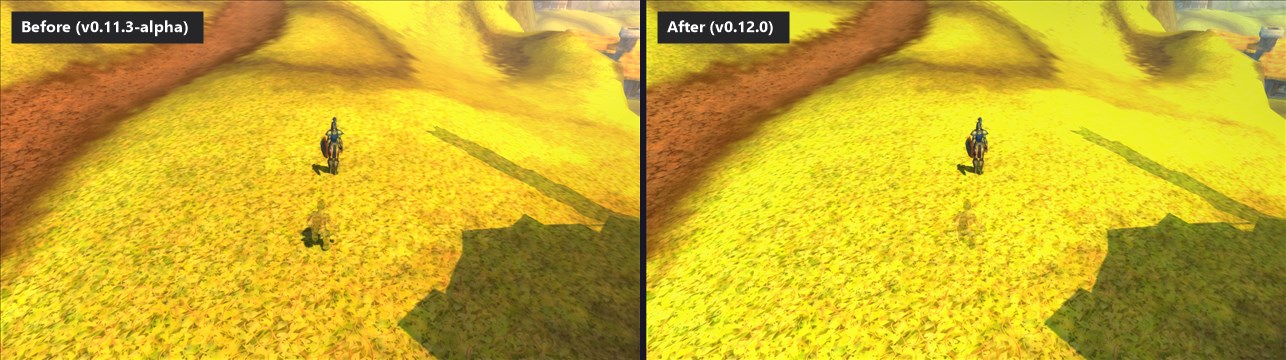
Your own character in stealth:
What changed
- The time of day is in comfyatmos.dll. comfytime.dll is not needed. Set the hour in the debug panel (
/atmos debug): a slider, Day/Night and Lock time. The time shows on your screen only. - Key Bindings > ComfyAtmosphere has every action, with no key bound at first. The old keys (F11, F12, Ctrl+PageUp and the rest) are off. Tick Developer keys in the debug panel to turn them on.
- The water takes the zone's colours. It reflects the game's own sky. Zone Colour (on by default) gives deep water the game's water colour for the zone and the hour. Sunset Water turns the sea toward the sky's glow with the sun low.
- The fog at sunset. Two new sliders on the Fog page: Fog Toward the Sun and Fog Horizon Glow. The fog under a low sun continues the game's glow, with no hole round the sun and no dark strip at the horizon.
- Your own character in stealth casts no shadow.
- Grass and ferns are dark under cover or lit as a whole, with no stripes that crawl as they sway. Four new sliders on the Shadows page.
- Wet sand follows a river's waterline, with no hard dark line far off. Wet Sand defaults to 20 (was 45).
- No pale dashes or white dots on the sea.
- A windmill no longer keeps a frozen shadow from login.
Update from v0.11.3-alpha
- Close the game.
- Remove the line
comfytime.dllfromdlls.txt. Deletecomfytime.dllanddlls.txt.cache. - Copy
comfyatmos.dllto the client folder, next toWoW.exe. - Copy
Interface\AddOns\ComfyAtmosphereover the old folder.
Your comfyatmos.ini can stay. It keeps Wet Sand at 45.
comfytime.ini is not read. Copy its values into the [time] section of comfyatmos.ini, with the same names.

v0.11.3-alpha: creatures under the water
Bugs, questions and screenshots. Ty for testing!: join our Discord.
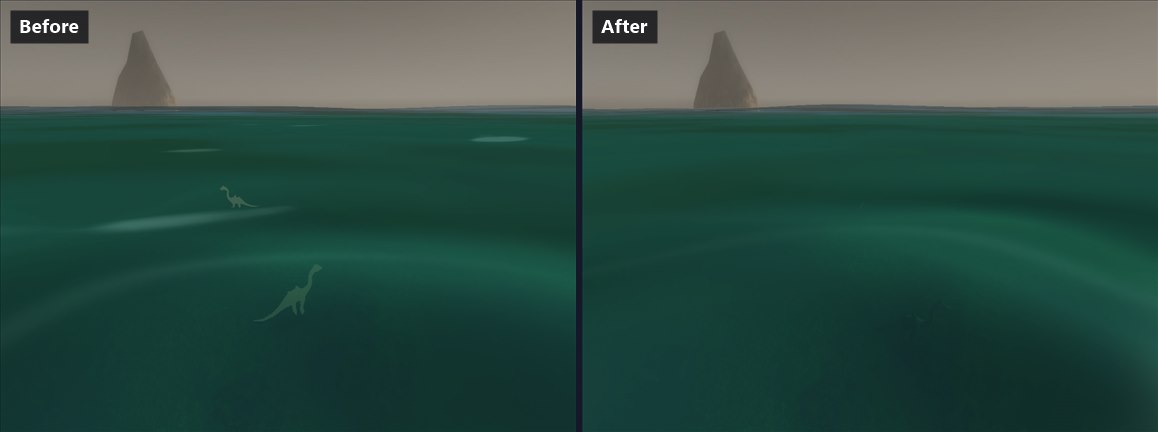
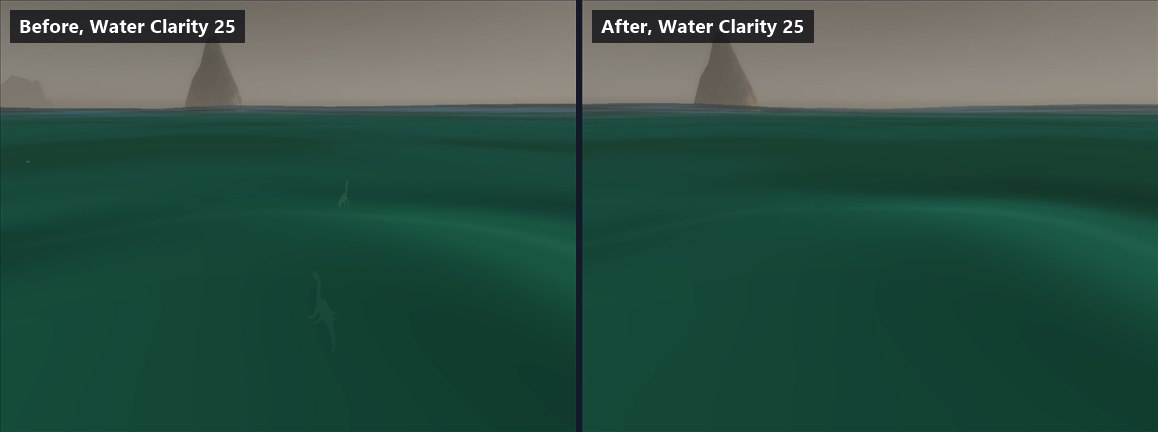
Creatures and objects under the water no longer show as flat, pale shapes. The fog, the volumetric light and the sun shadows now stop at the water's surface, so a creature under the sea takes the water's colour and fades with the water in front of it.
Before and after
Creatures under the sea off the Darkshore coast:
The same place at Water Clarity 25:
Update from v0.11.2-alpha
- Close the game.
- Copy
comfyatmos.dllto the client folder, next toWoW.exe. - Copy
Interface\AddOns\ComfyAtmosphereover the old folder.
Your comfyatmos.ini can stay.