Releases: alpcanaydin/tusk
Release list
Tusk 0.2.1

A small follow-up to 0.2.0.
Fixes
- Fold the connected connection in the sidebar. In the connections tree (Settings ▸ Interface ▸ Sidebar Layout ▸ "Connections tree"), clicking the connection you're connected to now folds and unfolds its tables, just like a folder. Clicking any other connection still switches to it.
- A roomier connection search at the top of the connections tree.
- The app icon is back. The first 0.2.0 downloads showed a blank placeholder icon on macOS and a generic program icon on Windows. If you got one of those, this update puts the Tusk elephant back.
Install
macOS (14 Sonoma or later, Apple Silicon): Tusk updates itself. Or download Tusk-0.2.1-arm64.dmg below, or run brew upgrade tusk.
Windows (x64 or ARM64): download the zip for your machine, unzip it, and run Tusk.exe. SmartScreen may warn the first time because the build isn't code-signed yet: click More info ▸ Run anyway.
Linux (x86_64): .deb for Ubuntu, .rpm for Fedora, .pkg.tar.zst for Arch, all below.
See 0.2.0 for everything that came with Windows and Linux support.
Tusk 0.2.0
6a1ae60  alpcanaydin
Alpcan Aydın
alpcanaydin
Alpcan Aydın
Tusk now runs on Windows and Linux, not just macOS. This release also brings a connections sidebar, Omarchy theme support, and a long list of fixes from the first round of your feedback. Thank you to everyone who tried 0.1 and reported what broke.
New platforms
- Linux. Native Wayland, with an Xwayland fallback. Packages for Ubuntu (
.deb), Fedora (.rpm) and Arch (.pkg.tar.zst). Passwords go to your Secret Service keyring (GNOME Keyring, KWallet…). Huge thanks to Tajeddine Bourhim (@scorpionTaj), who built the whole Linux port and its packaging in #9. - Windows. A portable build for x64 and ARM64. Passwords go to Windows Credential Manager, shortcuts use Ctrl, and the window buttons are native, Snap Layouts included.
- Omarchy. Tusk now follows your Omarchy theme and recolors itself as soon as you switch themes. No restart needed.
What's new
- Connections sidebar. Turn it on in Settings ▸ Interface ▸ Sidebar Layout ▸ "Connections tree". All your connections sit in a sidebar, grouped in folders, and you switch between them with one click. The classic sidebar stays the default.
- Select a range of cells. Shift + arrows, Shift + click or drag selects a block of cells. ⌘A selects everything. ⌘C copies the block as tab-separated text, and ⌘V pastes a block back.
- Undo in the data grid. ⌘Z and ⇧⌘Z undo and redo cell edits and new rows before you save.
- Reorder columns. Drag a column header to move it. Only the view changes, never the table.
- Safe mode for writes. With Settings ▸ Safe Mode ▸ "Confirm Before Saving" on, Tusk asks before saving grid edits and before any query that writes, such as
INSERT,UPDATE,DELETEorCREATE. It's off by default. - What's new after an update. A small card links to these notes the first time you open a new version. You can also open them any time from Tusk ▸ Release Notes.
- Right-click on Structure rows. Copy a column name, add a column, or delete one.
- Window and Help menus. Minimize (⌘M), Zoom, Full Screen (⌃⌘F), Bring All to Front, plus links to GitHub and the issue tracker.
- Friendlier details:
- Timestamps read as
2026-09-11 21:56:05+00. - File databases show their file name instead of
127.0.0.1:0. - Row counts use proper plurals.
- A connection imported from a URL gets a name suggested automatically.
- Timestamps read as
Fixes
- Connections you connect to are saved now. Before, pressing Connect on a new connection never saved it, so it disappeared after a restart. Saving is also crash-safe now: an unreadable
connections.jsonis backed up instead of being overwritten. - Autocomplete no longer wipes the line. Accepting a suggestion with Enter or Tab replaces only the word you're typing. Suggestions with placeholders insert clean text.
- macOS 14 crash fixed. Tusk could quit unexpectedly on Sonoma when a window closed, for example right after connecting to a SQLite file.
- Switching connections is safe. The old workspace stays until the new connection succeeds. If a password is missing, Tusk asks for it. If unsaved queries or changes would be lost, Tusk asks before switching or disconnecting.
- Backup and Restore:
- They use the password you connected with, or ask for one.
- They list only Postgres connections.
- Return in the confirmation dialog really starts the restore.
- You can name the new database the backup restores into.
- Export:
- JSON writes
nullfor NULL values. - Several tables can be picked at once again.
- Rows come out in primary-key order.
- JSON writes
- Readability. Clearer text contrast, larger small text, and
--no longer turns into a dash—. Primary buttons stand out, destructive menu items are red, and Esc, ⌘W and Return work in every dialog. - Safer prompts. Return no longer triggers destructive actions such as Discard, Drop or Delete: Esc cancels, and you confirm them on purpose.
- Data checks. Text typed into a number column is rejected right away with a clear message, not when you save.
- Keyboard focus. It no longer gets lost after closing a menu or a dropdown.
- Plus 60+ smaller fixes found by clicking through every screen on macOS, Windows and Linux.
Install
macOS (14 Sonoma or later, Apple Silicon)
- Download
Tusk-0.2.0-arm64.dmgbelow, open it, and drag Tusk into Applications. It's signed and notarized by Apple. - Or use Homebrew:
brew install alpcanaydin/tusk/tusk. Update later withbrew upgrade tusk. - If you're already on 0.1, Tusk updates itself.
Windows (10/11, x64 or ARM64)
- Download
Tusk-0.2.0-windows-x64.zip, or thearm64zip, unzip it anywhere, and runTusk.exe. - The build isn't code-signed yet, so SmartScreen may warn the first time. Click More info ▸ Run anyway.
- An installer and automatic updates are coming.
Linux (x86_64)
- Ubuntu 24.04:
sudo apt install ./Tusk-0.2.0-ubuntu-amd64.deb - Fedora:
sudo dnf install ./Tusk-0.2.0-fedora-x86_64.rpm - Arch:
sudo pacman -U ./Tusk-0.2.0-arch-x86_64.pkg.tar.zst - For Backup and Restore, install your distribution's PostgreSQL client tools.
Found a bug or missing something? Open an issue. Most of this release came from those reports.
Tusk 0.1.1
What's new
- Tusk updates itself. Tusk checks for new versions and downloads them in the background. When one is ready, a Restart to Update button appears at the top right of the window. If you don't click it, the update installs the next time you quit. You can also check right away with Tusk ▸ Check for Updates….
- About Tusk. A new item under Tusk ▸ About Tusk (also in the command palette) shows which version you're running.
Install
- Download
Tusk-0.1.1-arm64.dmgbelow, open it, and drag Tusk into Applications. It's signed and notarized by Apple. - Or with Homebrew:
brew install alpcanaydin/tusk/tusk(update withbrew upgrade tusk)
macOS 14 (Sonoma) or later, Apple Silicon.
Full Changelog: v0.1.0...v0.1.1
Tusk 0.1.0
The first public release of Tusk: a fast, native, keyboard-driven database client for macOS. Free and open source (MIT).
Install
- Download
Tusk-0.1.0-arm64.dmgbelow, open it, and drag Tusk into Applications. It's signed and notarized by Apple. - Or with Homebrew:
brew install alpcanaydin/tusk/tusk
It needs macOS 14 (Sonoma) or later on Apple Silicon. From this version on, Tusk updates itself: new versions download in the background, and a Restart to Update button appears in the top bar.
What's in it
- 20 databases. PostgreSQL, MySQL, MariaDB, SQLite, SQL Server, Oracle, ClickHouse, DuckDB, Snowflake, BigQuery, Redis, MongoDB, Cassandra, DynamoDB, CockroachDB, Redshift and more, with SSH tunnels and SSL.
- A GPU-rendered data grid. Millions of rows scroll smoothly. You can edit cells in place, and pending edits are saved in one transaction with ⌘S. Undo and redo work.
- Structure and indexes. Edit them in place. Tusk writes each engine's own DDL and tells you up front when an engine can't make a change.
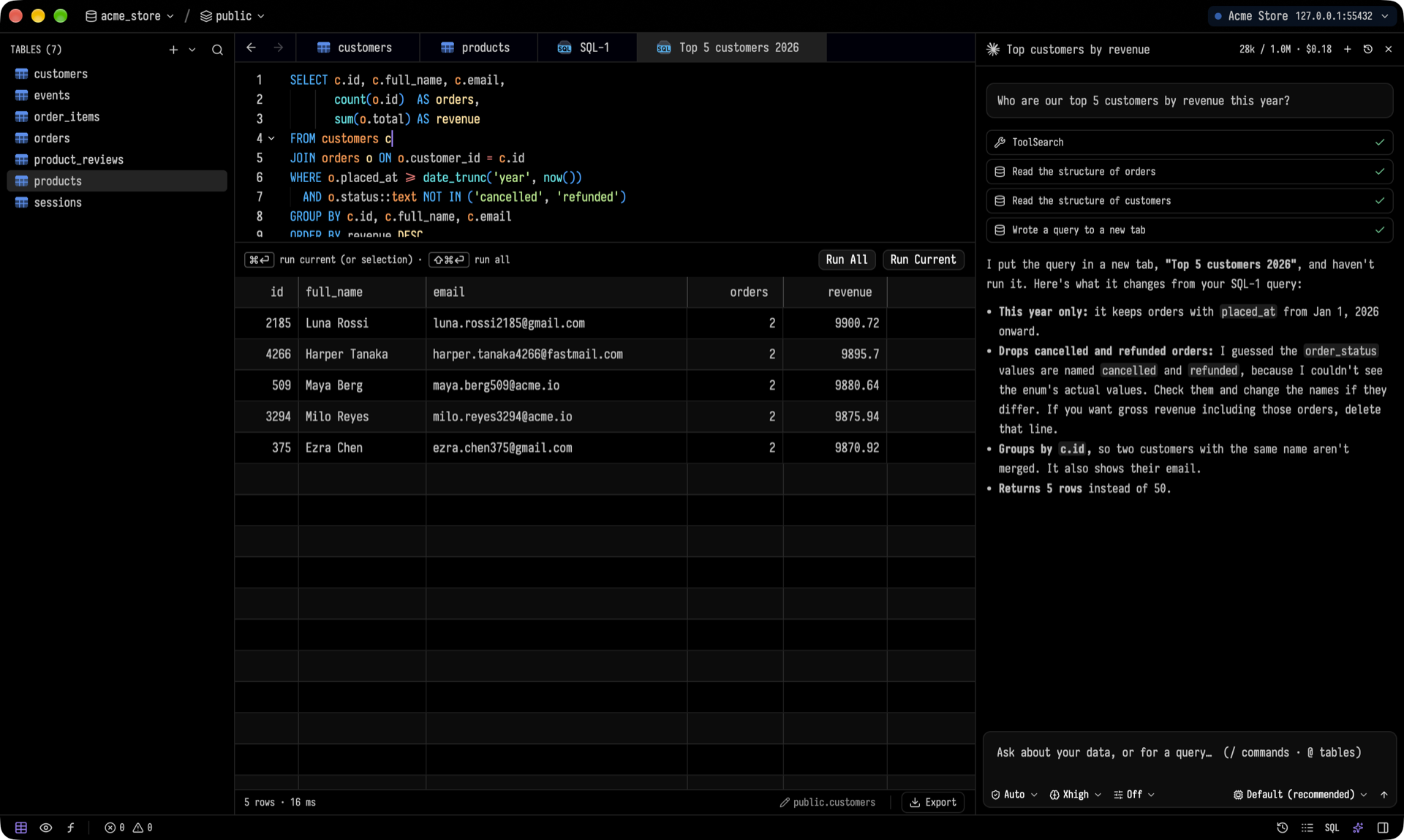
- SQL editor. Completions come from a real language server. ⌘↵ runs the statement under the cursor, and each SELECT gets its own result tab.
- AI assistant (⌘L). Ask in plain English. The agent reads your schema and writes a query into a new tab, and you decide when it runs. It works with Claude, Codex or Gemini CLI.
- Keyboard first. Every action is in the command palette (⌘⇧P). There are 30+ themes.
- Also: backup and restore with bundled
pg_dump,pg_restoreandpsql, CSV / JSON / SQL export and import, and a process list.
Your passwords stay in the macOS Keychain. There's no account and no telemetry.
Found a bug? Open an issue. Questions and ideas go in Discussions.