Repository navigation
File upload #6083

Replies: 59 comments

|
The HO has a version of this Home Office Design System: Add file and HMRC has this HMRC Design System: File upload |

|
Here’s an example from GOV.UK Notify:
|


|
Hidden quotation marks in CSV files causing uploads to fail We used the standard file upload component on Look up residency status for relief at source. We found a particular problem in private beta that we didn’t anticipate. We wanted to share our findings on this, in case other teams want to use the component and come up against the same problem. When people used Microsoft Excel to create CSVs, this sometimes caused hidden quotation marks to be added to their data. This caused a problem on our back end, because quotation marks are unacceptable characters. This caused the file upload to fail. A user can resolve this by opening the CSV in a text editor, removing the quotation marks, and re-saving. We found that once we’d explained this to people, they were able to easily recover from this mistake, and didn’t go on to repeat it. But new users didn’t know what to do. We added some code to check the files for quotation marks before they’re uploaded, and added a validation message to let them know what the problem is and how to solve it. We also added extra information to a specialist guidance page about uploading CSVs to our service. We tested a couple of different versions over a couple of sprints, but nothing we tried helped all our users. To resolve this, we put in some code to programmatically remove the quotation marks. This means that users will never encounter this error again. |

|
I think there is an opportunity to increase the target size of this component to satisfy WCAG 2.1 Level AAA https://www.w3.org/TR/WCAG21/#target-size If we were to style it with custom styles it would help this. |

|
@gavinwye commented on 31 Jan 2017 #Drag and drop file upload# Select file - file upload Other linksGOV.UK elements: http://govuk-elements.herokuapp.com/form-elements/#form-file-upload @elizabethbartram commented on 3 Feb 2017
@gavinwye commented on 4 May 2017
@jennifer-hodgson commented on 29 Jan 2018 @adamliptrot-oc commented on 29 Jan 2018 @jennifer-hodgson commented on 29 Jan 2018 @JamesPBoyle commented on 29 Jan 2018 @adamliptrot-oc commented on 29 Jan 2018 @jennifer-hodgson commented on 29 Jan 2018 And thanks for your comments also, @adamliptrot-oc. I think you raise an interesting issue about the relationships between components, design patterns and service patterns, and how to organise and display them within the design system in such a way that everyone who needs a certain thing can find it. Perhaps we could discuss this broader issue at the next working group, @stevenaproctor? @stevenaproctor commented on 29 Jan 2018 @lfritzsche commented on 8 Feb Large file upload with drag and drop and progress bar
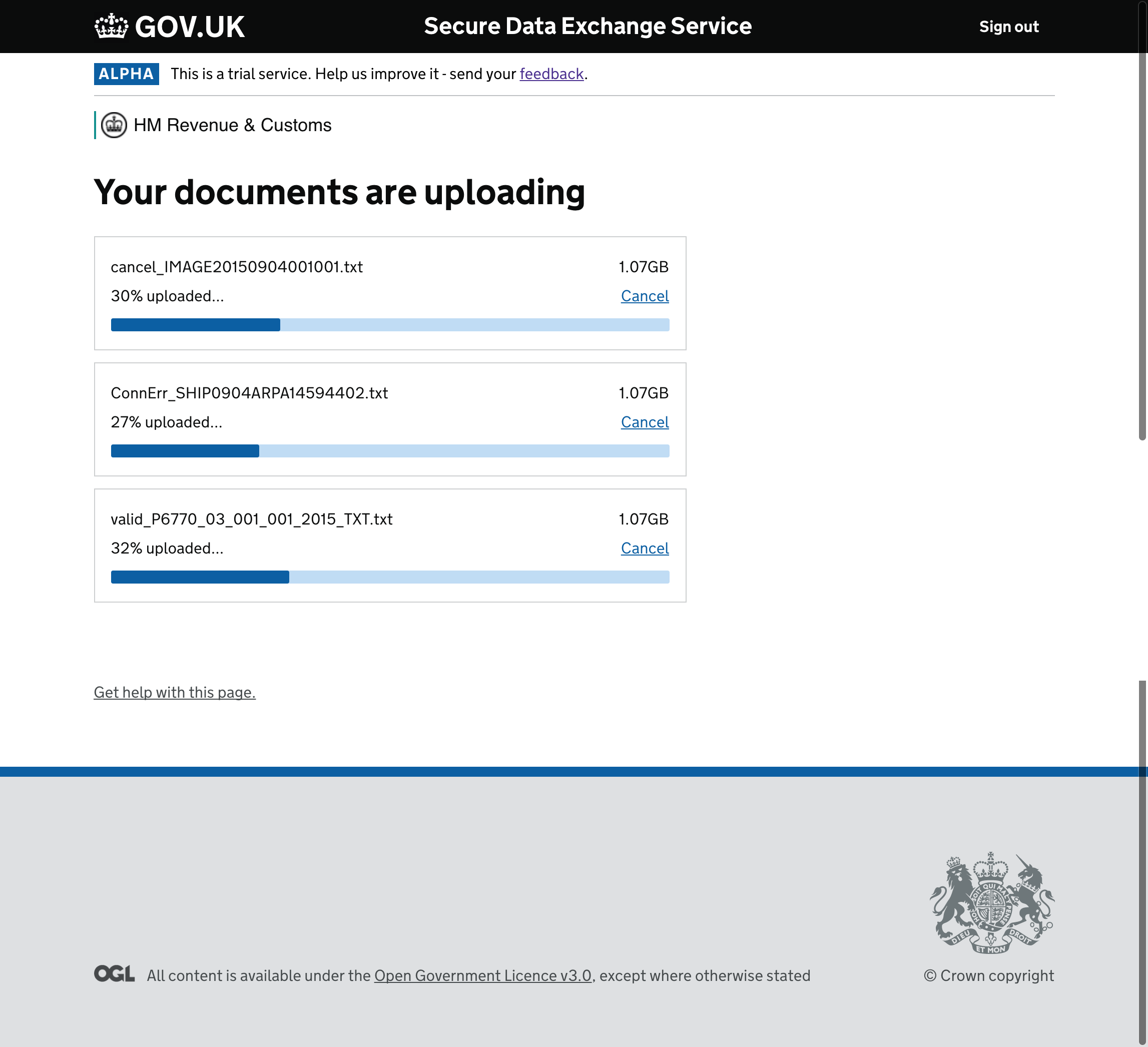
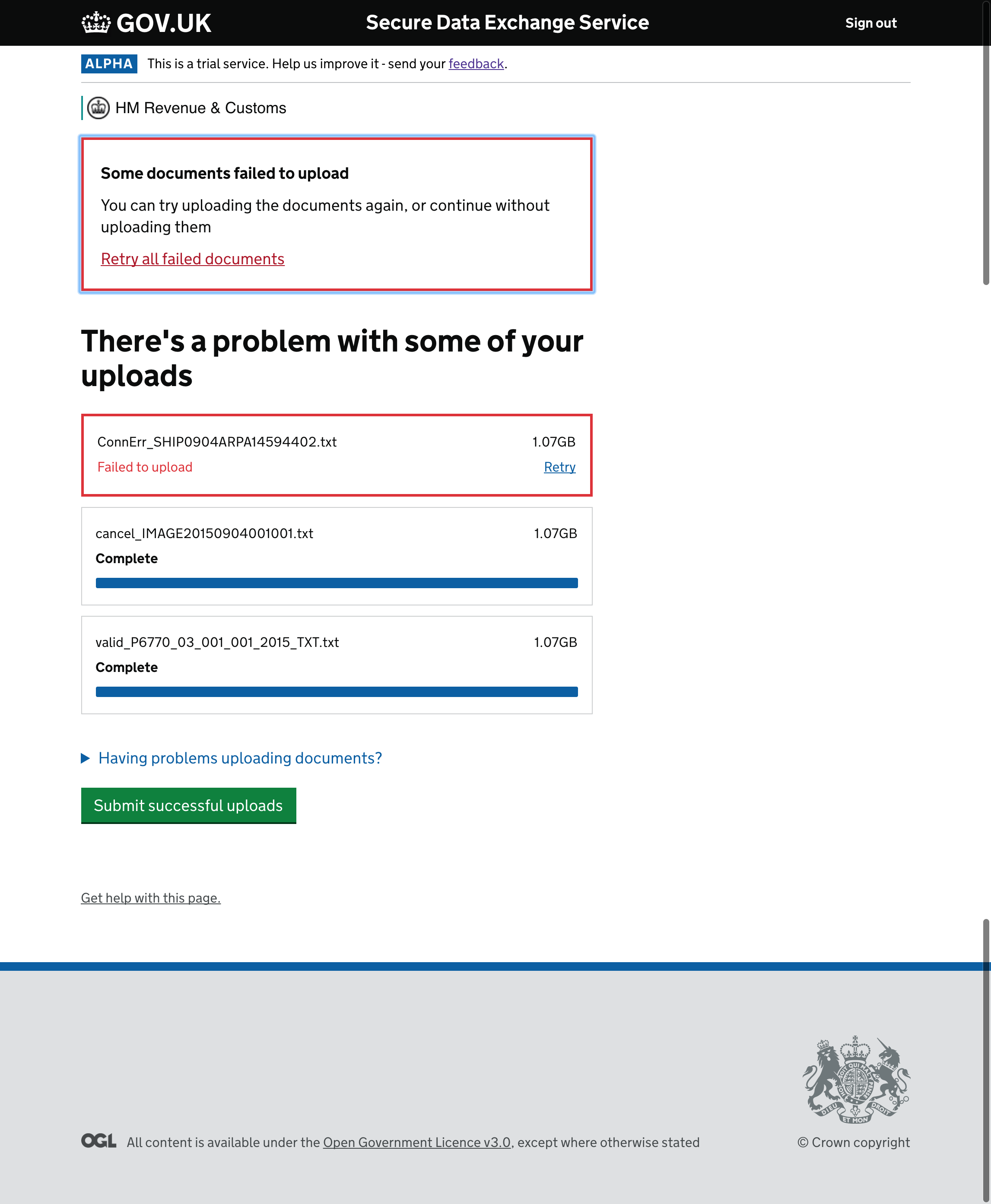
@lfritzsche commented on 8 Feb 2018 Description Describe when to use this pattern/component @lfritzsche commented on 8 Feb 2018 Users can send individual files up to the size of 10GB and any format, excluding executable files (.exe). The pattern allows users to select either individual or multiple files at a time via the main CTA or drag and drop. Once the user has selected the files they wish to upload, there is the opportunity for them to remove (if any have been selected in error) or add new files. Basic checks to ensure selected files are not over 10GB individually or .exe format are done in the backend first so that we can provide appropriate erroring. This allows users to correct any issues with file size and also to mitigate files sent in error. Errors have been dealt with in a unique way and require further testing from an accessibility and usability perspective within Private Beta. Users must fix the issue before they can proceed to upload by removing the file selected with the issue. This allows users to record the file with the issue in case they need to investigate further. The error box at the top of the screen allows users to remove all files with problems, however this may cause usability issues for users with screen readers as they are unable to link to the individual files. They can then continue to upload, which will then launch the uploading functionality. Uploads in progress is a new component which uses a progress bar in addition to a percentage indicator with the opportunity to cancel any in flight uploads. If users send files that are larger than average, we found that it was important to give the user more visual feedback for the stats of that upload. A similar erroring pattern is used for files with connection errors as previously described. If any errors occur, the user is still able to proceed with the successful files. Coded examples Why it works @lfritzsche commented on 8 Feb 2018 Research on this pattern SDES has just moved into Private Beta from January 29th 2018. Further research is required to understand how users deal with the transfer of large files (2GB and upwards) All Alpha research is available in confluence. Feature specific research summary: User control before and during upload - This tested well in alpha, although users didn’t have actual reasons to cancel and retry as they were using dummy files with the prototype. More extensive contextual research is required in Private Beta. Multi file uploads - Most of our users selected single files to upload. Multi file uploads were useful for those uploading on behalf of their organisation, however within that group only those with a higher technical proficiency used the drag and drop functionality. This is why the design reflects drag and drop as a secondary action. 10GB per individual files - this needs to be extensively tested via contextual enquiry within Private beta. The prototype and the machines we tested on were super efficient and potentially don’t give an accurate reflection of the time it actually takes to upload files. Best practice stipulates around 1GB per file for efficient browser uploading. |




Dropbox Paper auditThe research below was taken from a Dropbox Paper document, which was reviewed and archived on 8 Jan 2019 by the Design System team. The aim was to reduce the number of places containing guidance and code by:
Research and examplesReport landfill dataLandfill operators have a requirement to report daily, monthly and yearly environmental data. This service allows operators to upload CSV files using either the file browser or drag and drop. The CSV is subject to a 2-step validation process. The service checks for:
Formatting errors are identified and grouped and contextual guidance is given which explains how to correct them. The user can delve deeper to identify errors in individual rows and is prompted to fix the errors in their CSV before uploading again. The pattern has tested well with users of the beta private (9 operators with users of medium to high levels of digital proficiency) and will have more thorough testing in beta live (June’17)
GOV.UK Notify |


|
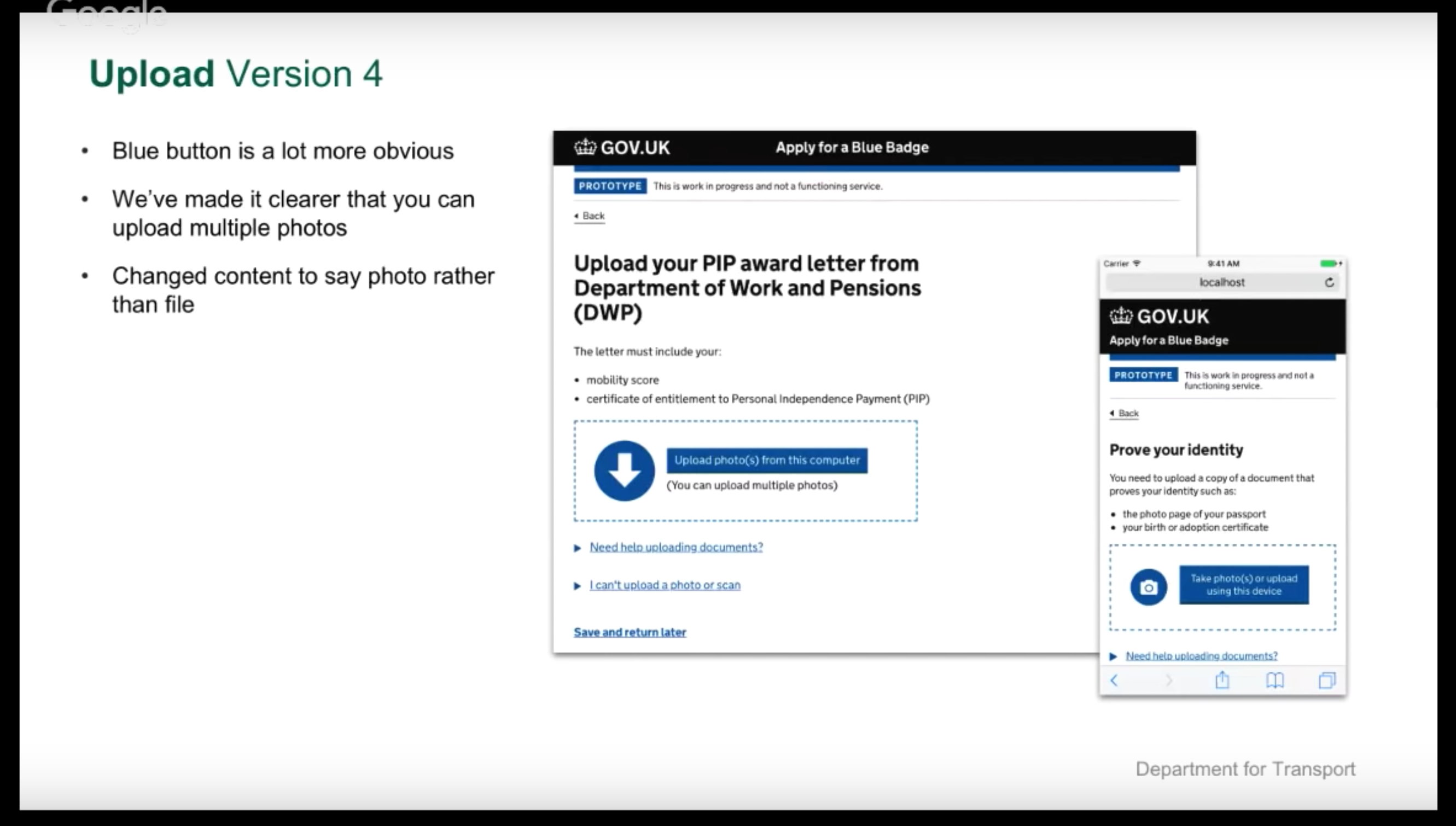
Not sure if it's worth having a separate issue for Upload a photo of a paper document, but that's what the Blue Badge service has |

|
Wondering if there's been any progress on having a styled upload button. We used to have one in Elements, but found an accessibility issue with it so removed it with the intention of revisiting when we could look at the accessibility issue. I find the default button rather easy to miss and not in keeping with our other styles. It would be great if it could be more obvious / possibly adopt the secondary button styles (whatever they become). |
|
@edwardhorsford Are you able to expand on the accessibility issue for the sake of the thread? |
|
@sanjaypoyzer I think it's covered in this pr to Elements. Skimming the issues noted, I think we could probably do a custom uploader that met the requirements without too much work - this is what passports has. |

|
We've recently created a pattern and additional file upload component to the MOJ Design System:
Thanks to @amyhupe for helping me write the guidance for this. |

|
I have a couple of issues regarding the File upload component in the design system: 400% zoom field width Filename not readout by screen readers
How do we address this? |


|
@shabana-ali Thanks for flagging these. Looking at the two issues in turn:
I don't think we'd want to make the file-upload full width, but we might be able to constrain it using Would you mind raising a separate issue in the govuk-frontend repo and we can take a look at this for you?
Great investigation work digging into the shadow DOM! However, this isn't caused by anything that GOV.UK Frontend is doing, and appears to be an issue with any file upload control in Chrome. Looking at the source code for file input controls in Blink (the rendering engine for Chrome), it looks like the status text is 'hidden from AX trees for a historical reason' but I can't see any context as to what that reason might be! Given it's a problem with the rendering engine, I don't think there's anything we can do to fix it in GOV.UK Frontend. I'd suggest 2 options:
|

Really interesting...
I started to wonder if you can target the Shadow DOM to override in some way or even lift / change the content out of the Shadow DOM 🤔 |
|
@36degrees Thanks for your response.
Apologies, I was supposed to reference the text input example as that is where
I'll raise an issue against 'Blink' explaining the problem. |

|
We are preparing for our Beta assessment. You can find our documentation and current and future screen design here |


|
Best of luck to all! |

File.upload.screen.recording.mov |

|
@Jonathon-Marc your component looks working for the requirements that you mentioned above. I was unable to find any component as Choose files for uploading documents in gov-uk design system. Is it possible to share the github repository for it. By the way, @querkmachine Is it okey to use @Jonathon-Marc' s upload files component? Thanks..... |

|
I have been having problems using the latest version of the component in a Svelte/TypeScript environment The DefinitivelyTyped Fails to work. |

Hi @Jonathon-Marc , Also, is the specific code that needs implemented on the frontend for this available anywhere? Any guidance would be massively appreciated. |

|
Regarding this part of your comment:
It's unlikely that we can include this functionality in the Design System. This is because it's dependent upon server-side code to asyncronously upload and validate each file. Client-side code, by itself, isn't able to do this. Client-side code isn't able are they able to manage multiple files, as native file inputs can only hold a single value at a time (even if that 'single' value is actually multiple files) and browser security settings don't allow websites to manipulate that value. This again requires a server-side element to work properly, so isn't something that can be delivered wholly by the Design System. |

|
Hi there, on the NHS design system we're working on porting over the File upload component. We've noticed a few things we think are worth sharing back. Dragon usageIn our testing we've found the following to be not quite accurate:
We've found that Dragon users can interact with the (enhanced) file upload via voice commands, however, they first have to interact with the page, which seems to align with your link explaining user activation. They then need do so again for subsequent interactions with the file upload, as you mention. We're thinking of using the following explanation:
Safari bugI've found that in Safari (26.1), the chosen filename is not announced by VoiceOver, instead it says "no file chosen". Disabled styling bugWhen Design of statesWe've simplified these slightly by removing the background hover change when a file is present (hover is still communicated via the button state). |


|
The pattern doesn't currently include guidance or HTML/Nunjucks code for handling multiple file uploads, removing uploaded files, and a progress indicator for files as they upload. I've been given some examples from the HMRC and MoJ design systems which are useful for this (thanks James Gordon and Oscar Duignan for the pointers): |

|
In version 6.0 of GOV.UK Frontend we updated the colours of the file upload component to align with the updated GOV.UK colour palette. The new palette is updated on the GOV.UK Design System website (styles > colour) |
|
Hi folks, for the next few weeks we're reviewing the improved version of the File upload component in the GOV.UK Design System. Get in touch if you're using it, and if you want to suggest any improvements or findings from user research 🙏. |

|
Does anyone have examples of adapting this component to include a file preview beyond a link? I'm working on improvements to the "Upload your signature" journey on the Apply for a Postal or Proxy Vote sites. Because of the nature of the upload, it's important for users to be able to view the image and make sure it is suitable before they continue and have the image digitised for approval. We currently use a custom file upload component, but in user research have found that the arrow usage is slightly confusing. We are looking to update to something closer to the new GDS component, but are looking at how we might be able to preview the image. |

|
Hello, I'm hoping this is the correct place to report bugs with the latest file upload component found here I am working on the Cryptoasset Reporting Framework, where I am currently implementing the new version of the file upload component. During PR testing, a bug has been found with the component. The steps to recreate the bug are as follows:
Here is a video showcasing the steps listed above: Manual checks with logging has helped to identify that the file used to move on to the next page in steps 1 and 2 is still present in the component after the user goes back in step 3. This issue is not currently present in Firefox from what can be seen (the component does infact empty of the file when going back and the error checking works as expected). Please feel free to contact myself on slack if you need any further info or if this is the wrong place for this. Kind Regards, May Kenworthy |

Multi-file uploader: design rationaleWhy is it useful?While it is possible to upload multiple files using the government design kit's upload component, there is no feedback around the progress of file uploads and no error messages highlighting which files cause errors. Uploading multiple files is an essential part of our service at the planning inspectorate. The Ministry of Justice and HMRC have both created patterns for multi-file upload. Those patterns are less accessible than the pattern we've developed at the Planning Inspectorate. The table below explains where we have departed from the MOJ & HMRC components and why. The multi file uploader in actionMulti.file.upload.component.in.action.movMoving the select files button before the drag and drop makes the order of actions clearer - while the redundant 'no file selected' error message is removed on initial page load. The file type hint text prevents errors seen in testing
File upload progress creates clarity for users uploading many files. Text upload progress rather than icons or progress bars offers more explicit meaning
A summary table showing uploaded files offers an opportunity for in-line error messaging.
Error messaging shows when files error but no action is needed for the user to remove the error file and continue
Design changes (vs MOJ and HMRC components)
Feedback and research inputsFeedback on the previous version of the multi-file uploader in the live service
Usability testing findings
|
|
@Flora-Plan thanks for sharing! Do you have a link to your component guidance page and the source code? It might be useful in the future. |


 and others
Uh oh!
There was an error while loading. Please reload this page.
Uh oh!
There was an error while loading. Please reload this page.
Description
Help users select and upload a file.
Use this issue to discuss this component in the GOV.UK Design System.
Related link
All reactions