1.4.10
Content can be presented without loss of information or functionality, and without requiring scrolling in two dimensions for:
- Vertical scrolling content at a width equivalent to 320 CSS pixels;
- Horizontal scrolling content at a height equivalent to 256 CSS pixels.
Except for parts of the content which require two-dimensional layout for usage or meaning.
When the user agent supports zoom or mobile view.
Resize the window to 1280x1024 by using the Web Developer extension, go to 'Resize > 1280x1024' (use 'Edit Resize Dimensions' to set it up the first time) and zoom in 400%.
Check:
- if a page generally needs to be scrolled vertically, you don't need to scroll horizontally to read any of the content
- if a page generally needs to be scrolled horizontally, you don't need to scroll vertically
If both a vertical and a horizontal scrollbar appear for the main window, but the content can still be read by scrolling in one direction, then it still passes (even if you have to scroll initially to get to the right position). For example, if the two-dimensional scrolling is caused by additional padding or whitespace outside of the viewport.
It's okay if the following content requires two-dimensional scrolling:
- images
- maps
- diagrams
- video
- games
- presentations
- data tables (but not single table cells)
- interfaces where it's necessary to keep toolbars in view while manipulating content
However, the exempt content must not cause the non-exempt content to also require two-dimensional scrolling. For example, a data table extending off the right hand side of the screen is fine as long as the rest of the content fits to the viewport.
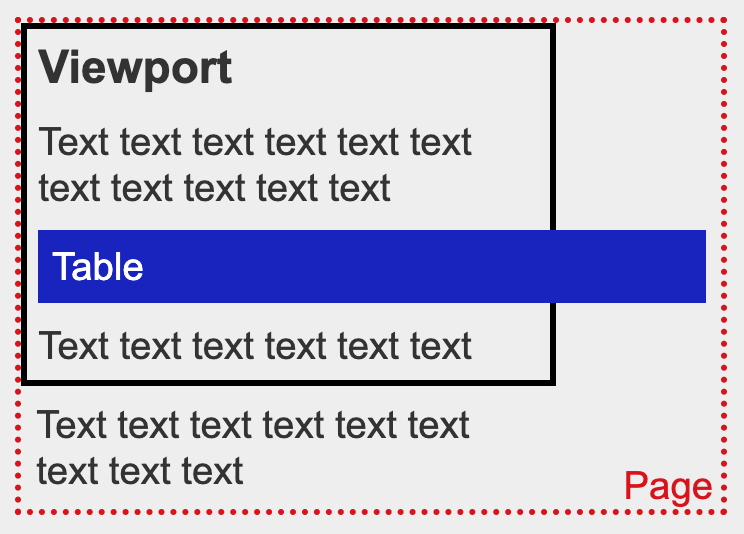
Follow the checks for "Check zooming in and resizing text" within 1.4.4 Resize Text.
It's better if everything works even when you don't reload the page first.
Change view to 320 x 256px dimensions (use device view in browser) and reload the page.
Use a mobile phone with a small display.
Reflow can only be tested when a device allows a screen width of 320 pixels. This may be possible on devices which allow for split-screen multitasking of apps.