Isolating notify from the internet
This page is part of an on-going piece of work. Further content will be added over time, for more nuanced methods to isolate Notify from the internet.
-
Get a cyber thumb to log into the production account as admin. Pause the start-deploy pipeline in the
productionConcourse team. -
Log into production account as admin
gds aws notify-prod-admin -l. -
Go to ECS >
notifycluster. The next steps are the same for all ECS tasks, but you should start withapi-web,admin. All ECS tasks must be scaled to 0. -
Click on the service name >
Service auto scalingtab > clickSuspentd/Unsuspend scaling> tickSuspend all scheduled actions>Save.

- In the same tab under
Task countclickEdit, set theTask countto 0 and 0 under theMinimumandMaximumheading.
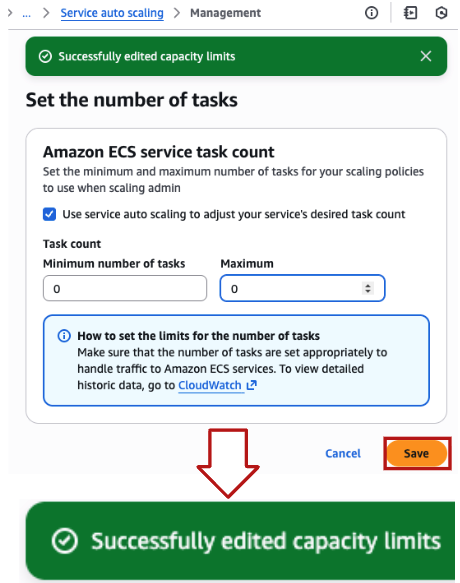
- (Optional) Step 5 will gracefully deactivate the task. You likely want to immediately stop the task. Go to the
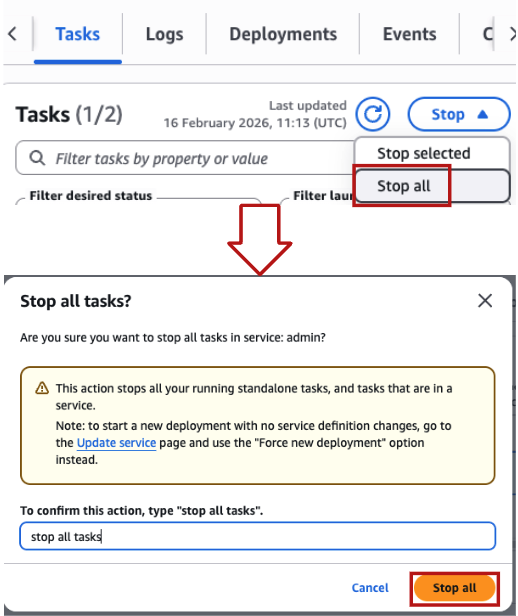
Taskstab, on theStopdrop down, selectStop all> type in the confirmation > clickStop all.