Web interface
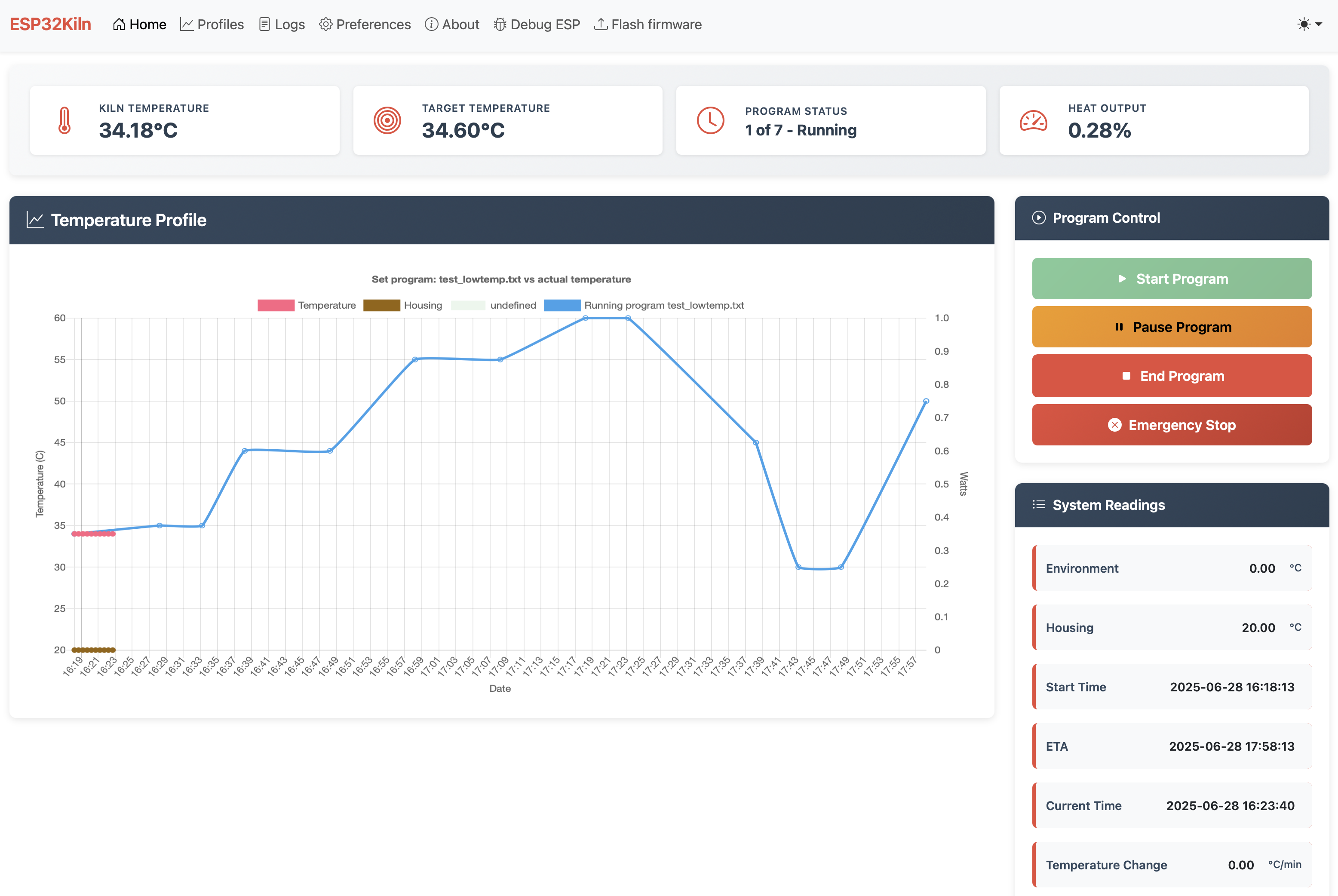
The web interface is protected by basic HTTP authentication. Default credentials are:
-
Username:
admin -
Password:
hotashell
These can be changed in the preferences file (Auth_Username / Auth_Password) or through the Preferences page in the web UI.
- Home - basic parameters of the running program, all temperatures, times, steps and progress. Large graph with the loaded program and current temperature progress (kiln and housing). Program control buttons at the bottom depending on program status.
- Profiles - add, delete, show and load firing programs.
-
Logs - list of all program logs. Logs come in pairs:
.csvfiles with all recorded temperatures, and.logfiles with basic program parameters. - Preferences - view and edit all ESP32Kiln preferences, save them to memory (until reboot) or to disk. All values take effect immediately - even if a program is running - so you can change PID parameters online.
- About - basic information about the firmware version and build.
- Debug ESP - physical information about the ESP32 board: chip details, memory, SPIFFS usage, etc.
-
Flash firmware - upload a compiled
.binfirmware image or SPIFFS image directly through the browser. See OTA Installation for details.