Repository navigation
Releases: amit-y11/totpy
Releases · amit-y11/totpy
Release list
Totpy v1.0.1

Full Changelog: v1.0.0...v1.0.1
Totpy v1.0.0
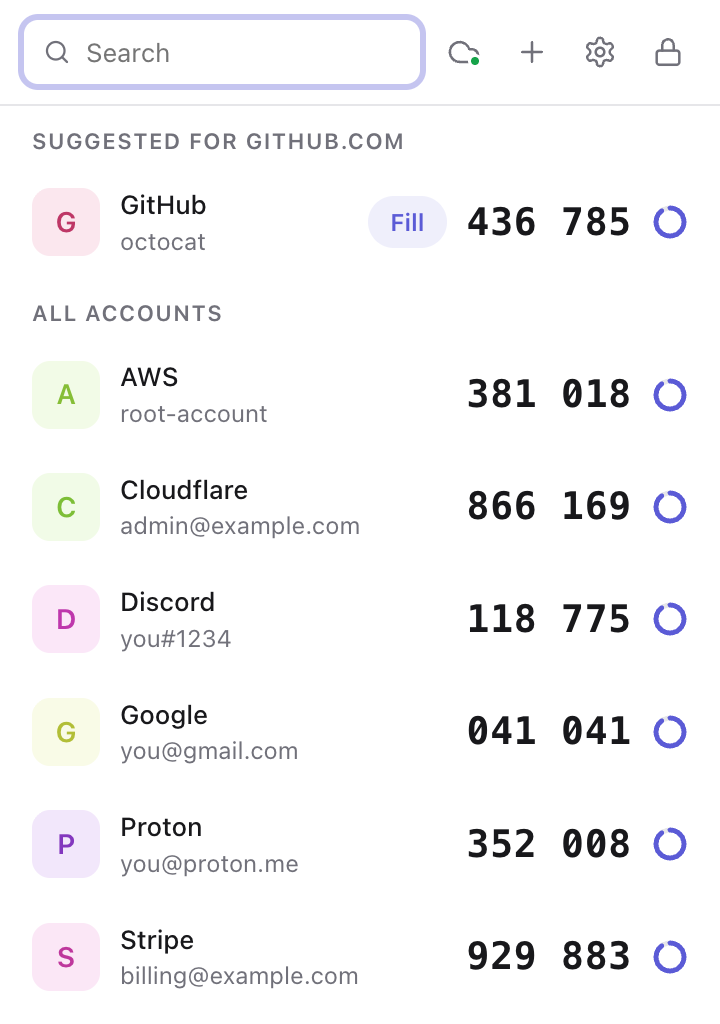
The first public release of Totpy: open-source 2FA codes in your browser, with end-to-end encrypted sync, one-click fill and no account to create.
Install
- Download
totpy-1.0.0.zipbelow and unzip it. - Open
chrome://extensions, turn on Developer mode and click Load unpacked. - Select the unzipped folder and pin Totpy to your toolbar.
The Chrome Web Store listing is coming soon.
Highlights
- Codes: 6, 7 and 8-digit TOTP codes (SHA-1, SHA-256, SHA-512) with copy, search and a countdown
- Fill: fill codes into pages from the popup, or right-click any field → Insert 2FA code, with suggested accounts for the current site
- Add accounts: scan a QR code on the page, upload a QR image, paste an
otpauth://link or type the setup key - Import: from Google Authenticator exports and lists of
otpauth://links - Security: master-password encryption (AES-256-GCM, PBKDF2-SHA-256) with a recovery code, auto-lock and locking when Chrome closes
- Sync: end-to-end encrypted sync through Chrome sync (no setup) and Google Drive (setup guide)
- Backups: automatic daily encrypted copies kept for 7 days, encrypted backup files and plain
otpauth://export - Extras: a clock-drift warning, and light and dark themes
See the security design and the full changelog.
Important
Save your recovery code when Totpy shows it. It is the only way back in if you forget your master password.