
Annotai is a dev-only annotation widget for Phoenix/LiveView apps. You click an
element on the running page, leave a note, and it goes straight to your AI coding
agent with everything it needs to act on it: the CSS selector, the phx-*
attributes, and the HEEx file:line that rendered the element.
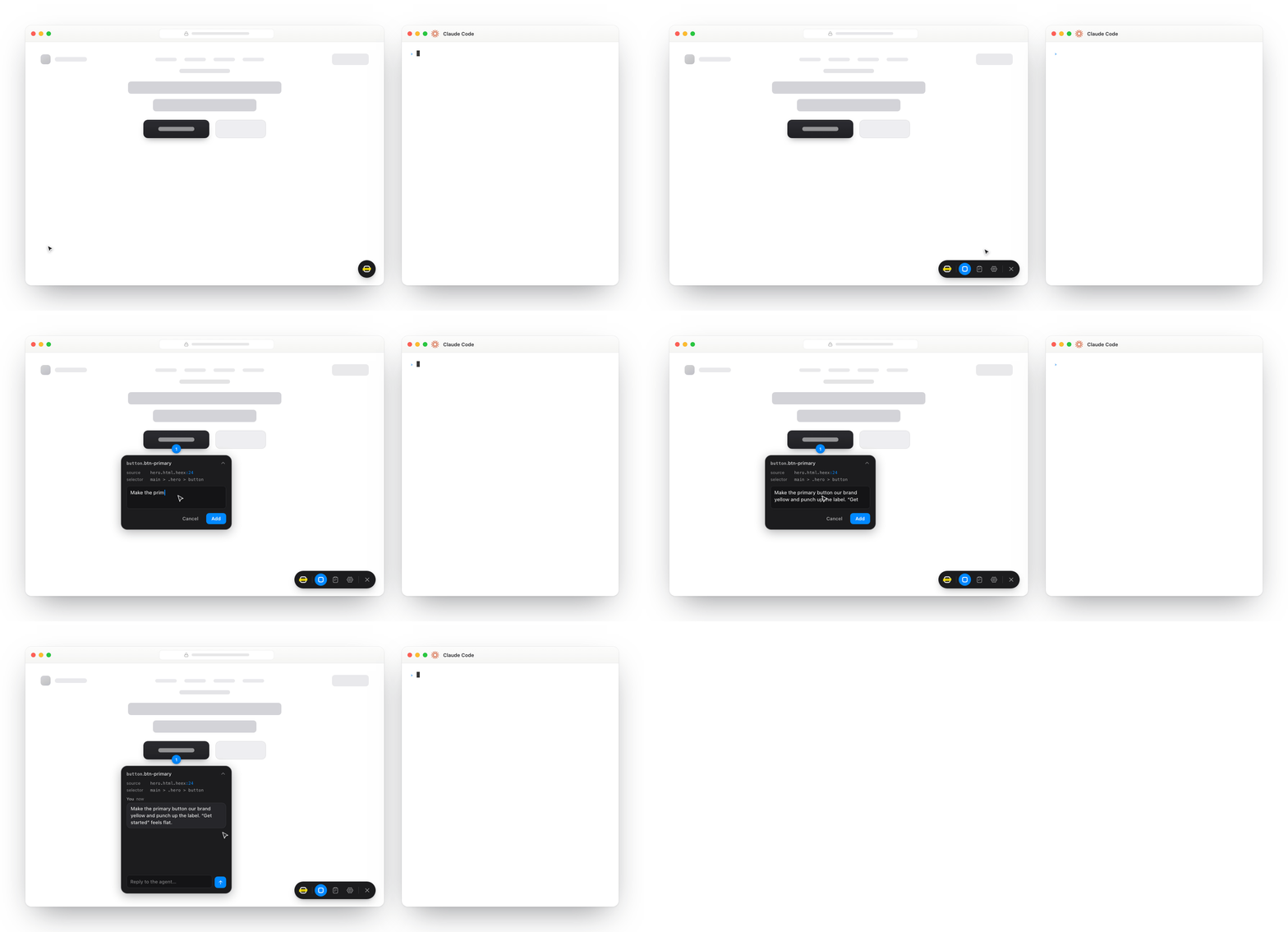
- Element annotations. Click any element on the page and leave a note. Annotai figures out where it lives in your code.
- Text annotations. Select a span of text and annotate it.
- Image attachments. Paste or drop a screenshot onto a note.
- Source location. Every note comes with the HEEx
file:linethat rendered the element, so the agent opens the right file straight away. - In-process MCP server. The agent talks to Annotai over MCP. Nothing extra to run. It lives inside the Phoenix app you already have running.
- Light and dark modes. The widget follows your system theme.
- Phoenix-aware. It reads
phx-*attributes and LiveView's HEEx annotations directly. - Dev-only. It mounts as a single plug under
:devand stays out of production.
Add Annotai to your dev deps in mix.exs:
def deps do
  [
    {:annotai, "~> 0.1", only: :dev}
  ]
end
Then add the plug to your endpoint, before the if code_reloading? do block:
# lib/my_app_web/endpoint.ex
if Mix.env() == :dev do
  plug Annotai
end
And turn on the source-mapping config so Annotai can find the file:line:
# config/dev.exs
config :phoenix_live_view, debug_heex_annotations: true, debug_attributes: true
On Igniter? The installer does both steps for you:
mix annotai.installAnnotai serves an MCP endpoint, and your agent registers it once. Swap 4000 for
your dev server's port.
claude mcp add --transport http annotai http://localhost:4000/annotai/mcpCodex registers HTTP servers in its config file. Add this to
~/.codex/config.toml:
[mcp_servers.annotai]
url = "http://localhost:4000/annotai/mcp"
Start your app and the widget shows up in the bottom-right corner. Whatever you annotate reaches the agent through these tools:
| Tool | Purpose |
|---|---|
annotai_get_pending |
List annotations waiting on the agent. |
annotai_get_annotation |
Fetch one annotation, including its reply thread. |
annotai_acknowledge |
Mark "I see this and am working on it." |
annotai_resolve |
Mark resolved (optionally with a summary of the change). |
annotai_dismiss |
Decline an annotation, with a reason. |
annotai_reply |
Add a message to an annotation's thread. |
annotai_watch_annotations |
Wait for new annotations, a hands-free loop. |
The transitions are guarded, so an annotation can't be resolved or dismissed twice and you won't end up in a weird state.
Annotai ships a skill that walks your agent through the loop: acknowledge a note
before editing, open the exact file:line, make the change, verify it, then
resolve with a short summary. It works with any agent and lives at
skills/fix-annotations/SKILL.md.
For Claude Code, drop it into .claude/skills/fix-annotations/ (this project) or
~/.claude/skills/fix-annotations/ (all of them), start a fresh session, and say
/fix-annotations:
mkdir -p .claude/skills/fix-annotations
curl -fsSL https://raw.githubusercontent.com/andrielfn/annotai/main/skills/fix-annotations/SKILL.md \
  -o .claude/skills/fix-annotations/SKILL.md
Other agents (Codex, Cursor, and so on) can read the same file through their own rules setup.
Annotations live in memory and clear out when your app restarts. That's fine for a quick loop, but a restart drops anything you hadn't dealt with yet. If you want them to stick around, turn on a local snapshot:
# config/dev.exs
config :annotai, persistence: true
That writes a snapshot to .annotai/annotations.ets, so add that to your
.gitignore. Want to move it, or cap how long resolved history sticks around?
Pass options instead:
config :annotai, persistence: [
  path: ".annotai/annotations.ets",
  ttl: {14, :day}
]pathis where the snapshot lives, relative to your app's working directory.ttlis how long to keep resolved or dismissed notes before pruning them. The default,:infinity, keeps everything. Open notes never get pruned, no matter how old they are. Takes{n, :second | :minute | :hour | :day}.
The snapshot gets written a moment after each change (they're grouped together) and read back on boot. It's plain ETS snapshot data, not a database, so there are no migrations and no schema to deal with. Kept history stays on your machine and never goes to the agent. Its tools only ever see notes that still need work.
Annotai is on by default. To shut it off completely, with no widget and no
/annotai/* routes, flip a config flag:
# config/dev.exs
config :annotai, enabled: false
Or drive it from an environment variable:
# config/dev.exs
config :annotai, enabled: System.get_env("DISABLE_ANNOTAI") != "true"
Then run DISABLE_ANNOTAI=true mix phx.server and Annotai stays out of the way.