-
Notifications
You must be signed in to change notification settings - Fork 684
REST API Security Documentation
Selim Emre Toy edited this page Aug 8, 2020
·
12 revisions
This guide explains how to Control REST API Security on Ant Media Server. You can able to secure your REST Services with IP Filter feature.
If you want some IP addresses to be able to access REST APIs, you should add IP’s or IP Ranges in Dashboard > {Application} > Settings > IP Filtering Settings in panel.
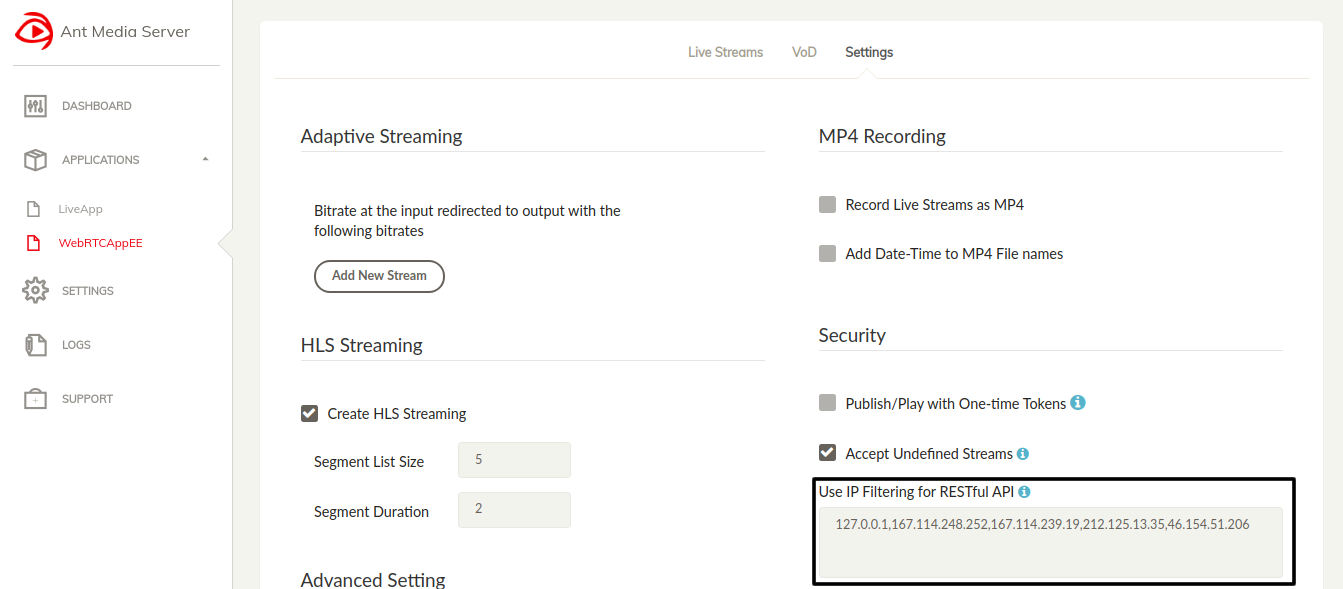
If 127.0.0.1 is deleted, requests in the server(localhost) is disabled. People in the same network but in different machines still cannot access the REST API when 127.0.0.1 is on the list.
If you want to remove REST Filter in AMS, you should delete below codes in SERVER_FOLDER/webapp/Application(LiveApp or etc.)/WEB-INF/web.xml
<filter>
<filter-name>AuthenticationFilter</filter-name>
<filter-class>io.antmedia.console.rest.AuthenticationFilter</filter-class>
</filter>
<filter-mapping>
<filter-name>AuthenticationFilter</filter-name>`
<url-pattern>/rest/*</url-pattern>
</filter-mapping>
If you delete AuthenticationFilter code block in Application, every one can access your REST API.

images/project
- Introduction
- Quick Start
- Installation
- Publishing Live Streams
- Playing Live Streams
- Conference Call
- Peer to Peer Call
- Adaptive Bitrate(Multi-Bitrate) Streaming
- Data Channel
- Video on Demand Streaming
- Simulcasting to Social Media Channels
- Clustering & Scaling
- Monitor Ant Media Servers with Apache Kafka and Grafana
- WebRTC SDKs
- Security
- Integration with your Project
- Advanced
- WebRTC Load Testing
- TURN Servers
- AWS Wavelength Deployment
- Multi-Tenancy Support
- Monitor Ant Media Server with Datadog
- Clustering in Alibaba
- Playlist
- Kubernetes
- Time based One Time Password
- Kubernetes Autoscaling
- Kubernetes Ingress
- How to Install Ant Media Server on EKS
- Release Tests
- Spaceport Volumetric Video
- WebRTC Viewers Info
- Webhook Authentication for Publishing Streams
- Recording Streams
- How to Update Ant Media Server with Cloudformation
- How to Install Ant Media Server on GKE
- Ant Media Server on Docker Swarm
- Developer Quick Start
- Recording HLS, MP4 and how to recover
- Re-streaming update
- Git Branching
- UML Diagrams
