The Advanced Video and Instrument Alignment Library.





AvialSync is a desktop viewer for looking through an experiment in time.
Use it when you have video from one or more cameras together with recordings such as sensors, electrodes, behavioural tracking, or other time-stamped measurements. It places them on one shared timeline so you can move to an event and inspect what each recording shows at that moment.
It exists for the case where the video and the signal have to agree on the same instant, and the recordings came off independently-clocked hardware. It is built for visual inspection and careful alignment: it does not acquire recordings, it does not analyse them for you, and it never silently changes a scientific timestamp. Your lab can add support for its own file types and workflows through plugins.
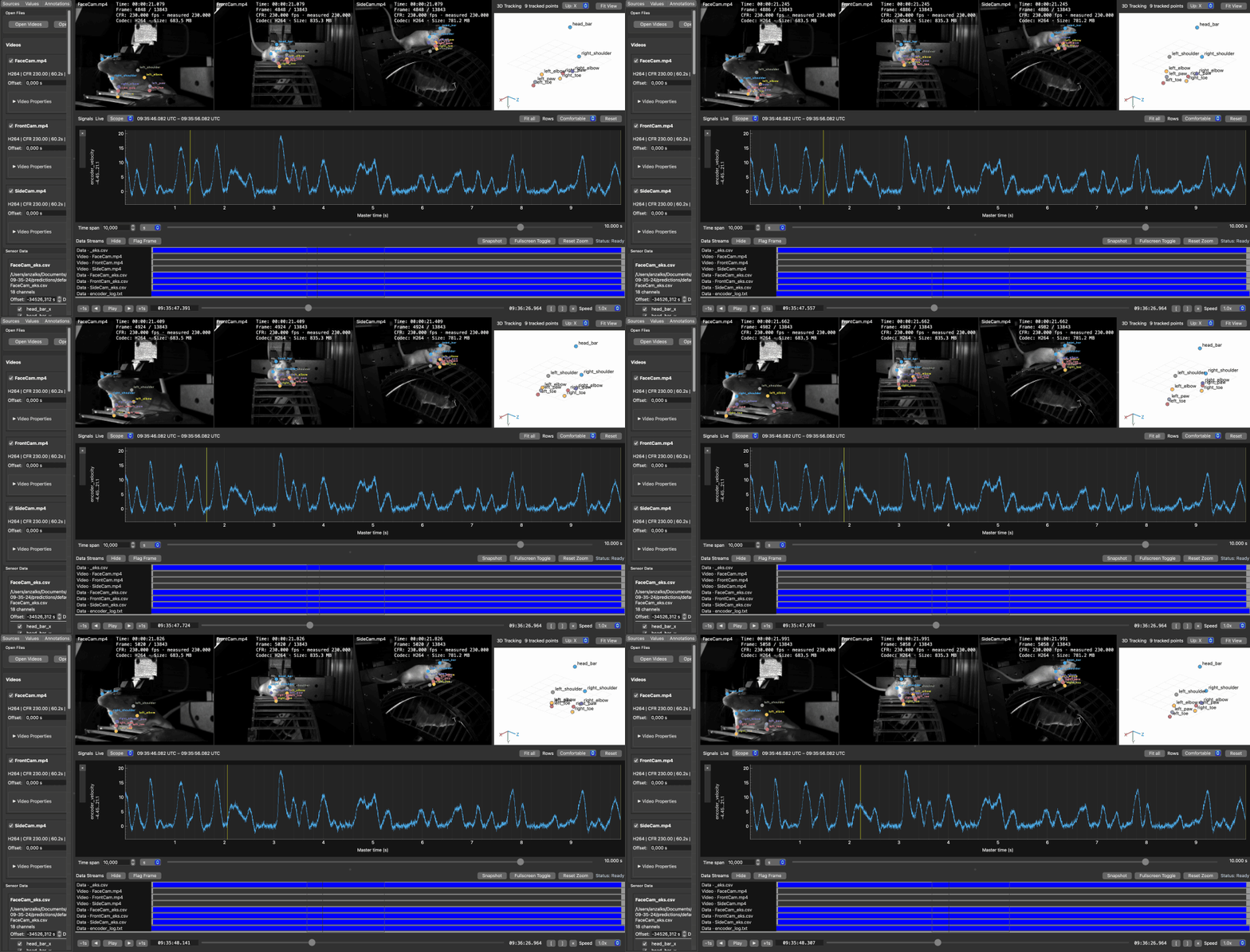
A real recording session: three cameras at 230 fps with per-camera 2D pose drawn over each view, triangulated 3D pose on the right, and wheel-encoder velocity below — one second of it, at the speed it was recorded, every source moving on one master clock. The whole folder was opened by dropping it on the window; a session plugin recognised the layout and placed each file, including the shared time base. Nothing in AvialSync knows this lab's format.
- Several camera recordings playing together on one clock.
- Sensor, electrode, and tracking traces beside the video, up to 50 kHz across many channels.
- Alignment by offset, drift, or TTL/event evidence, with the original files left unchanged.
- Event marks, A/B time ranges, and exports of snapshots or selected spans for analysis elsewhere.
With pip, on Python 3.11 or 3.12:
python -m pip install avialsync
avialsync
That is the whole install. Video decoding, proxy generation, and clip export all run inside the Python packages, so there is no media runtime to install separately and nothing to configure.
Or download a desktop installer from the
Releases page — AvialSync-Setup.exe,
AvialSync.dmg, or AvialSync.AppImage — if you would rather not manage a Python environment.
They bundle everything, install without an administrator password, and are not yet code-signed, so
the first launch needs
one extra click.
One caveat, and it is Qt's rather than AvialSync's: on Linux, PySide6 needs the usual desktop
graphics libraries (libgl1, libxkbcommon, and the xcb set). Every normal desktop already has
them; bare containers and minimal server images do not. No packaging choice removes it.
Apple silicon is required for the .dmg, and glibc 2.39+ for the AppImage; outside those, use pip.
See Installation for details.
avialsync demoThat generates and opens a complete sample session — four cameras, sensor and ephys traces, and tracking — so you can confirm the install and try everything before touching your own data. With your own recordings:
- Drag video and data files onto the window, or use Open Videos and Open Sensor/Ephys Data.
- Video appears at the top, traces below it.
- Drag the shared time bar to inspect one moment across every recording.
- If recordings do not line up, use the synchronization tools to align a visible event or TTL pulse.
A camera with no coverage at the selected time shows No Footage rather than a stale frame, and Data Streams shows when each file has data.
Full documentation is at avialsync.readthedocs.io — quickstart, first-session tutorial, supported formats, synchronization, troubleshooting, plugin guide, and a technical reference covering architecture, data handling, performance, and the development and release process.
Contributions are welcome — see CONTRIBUTING.md for setup, the four-command gate every change must pass, and the architecture rules that exist because breaking them caused real bugs. Participation is governed by our Code of Conduct.
Good places to start are format plugins (the TimeSeriesSource / VideoSource contracts are frozen
— see the plugin guide), platform
verification on real hardware, and the open items under "Pending" in HANDOUT.md.
AvialSync is free software under the GNU AGPL v3 or later. Use it, study it, modify it, redistribute it. The one condition is reciprocity: if you convey a modified version — including letting others use it over a network — you publish your changes under the same licence.
Running it in your lab, modifying it for your own use, publishing results, and writing plugins for
your own rig all sit inside this and cost nothing. A plugin that uses only the documented
TimeSeriesSource, VideoSource and SessionSource interfaces is your own work and you choose its
licence, so a loader for a proprietary instrument format need not be published.
There is no dual licence and no contributor agreement — contributions are accepted under the same AGPL, and opening a pull request is the whole process.