Telegram Connection Type is Not Recognized #16981

Description

Apache Airflow version: 2.1.1
Environment:
- Cloud provider or hardware configuration: Intel(R) Core(TM) i5-8250U CPU @ 1.60GHz , 256GB storage, 8GB memory
- OS (e.g. from /etc/os-release): Linux 20.04
- Kernel (e.g.
uname -a): Linux 5.8.0-59-lowlatency 20.04.1-Ubuntu - Install tools:
apache-airflow-providers-telegram - Others: Installed native airflow (non-docker)
What happened:
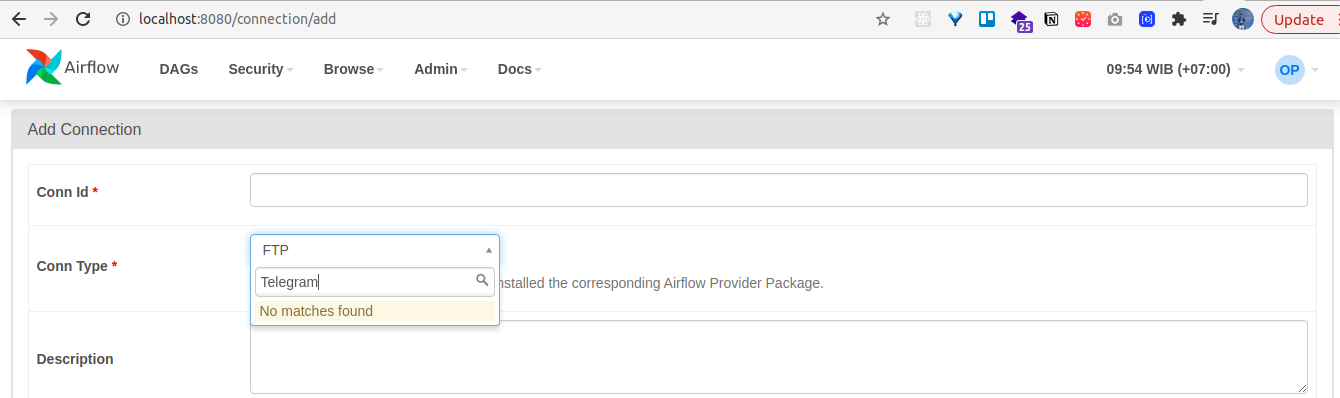
I have searched along these issues in this repo but I havent found the similar issue thus I decided to raise one. So, I was intend to use TelegramOperator to practicing send notifications to my telegram group. However I encountered an issue which the Telegram connection type is not recognized when trying to add Connections using the Airflow webserver UI. I have installed the telegram providers by using: pip install apache-airflow-providers-telegram and I've ensure that the library have been installed on my virtual environment. Here is my pip list:
Package                            Version
---------------------------------- ---------
alembic                            1.5.8
anyio                              3.2.1
apache-airflow                     2.1.1
apache-airflow-providers-ftp       1.0.1
apache-airflow-providers-google    2.2.0
apache-airflow-providers-http      1.1.1
apache-airflow-providers-imap      1.0.1
apache-airflow-providers-postgres  1.0.1
apache-airflow-providers-sqlite    1.0.2
apache-airflow-providers-telegram  2.0.0
apispec                            3.3.2
APScheduler                        3.6.3
argcomplete                        1.12.3
attrs                              20.3.0
Babel                              2.9.0
blinker                            1.4
cached-property                    1.5.2
cachetools                         4.2.2
cattrs                             1.5.0
certifi                            2020.12.5
cffi                               1.14.5
chardet                            3.0.4
click                              7.1.2
clickclick                         20.10.2
colorama                           0.4.4
colorlog                           5.0.1
commonmark                         0.9.1
connexion                          2.7.0
croniter                           0.3.37
cryptography                       3.4.7
defusedxml                         0.7.1
dill                               0.3.2
dnspython                          1.16.0
docutils                           0.16
email-validator                    1.1.2
et-xmlfile                         1.1.0
eventlet                           0.30.2
Flask                              1.1.2
Flask-AppBuilder                   3.3.1
Flask-Babel                        1.0.0
Flask-Caching                      1.10.1
Flask-JWT-Extended                 3.25.1
Flask-Login                        0.4.1
Flask-OpenID                       1.2.5
Flask-SQLAlchemy                   2.5.1
Flask-WTF                          0.14.3
gevent                             21.1.2
google-ads                         7.0.0
google-api-core                    1.26.3
google-api-python-client           1.12.8
google-auth                        1.29.0
google-auth-httplib2               0.1.0
google-auth-oauthlib               0.4.4
google-cloud-automl                2.3.0
google-cloud-bigquery              1.28.0
google-cloud-bigquery-datatransfer 3.1.1
google-cloud-bigquery-storage      2.4.0
google-cloud-bigtable              1.7.0
google-cloud-container             1.0.1
google-cloud-core                  1.6.0
google-cloud-datacatalog           3.1.1
google-cloud-dataproc              2.3.1
google-cloud-dlp                   1.0.0
google-cloud-kms                   2.2.0
google-cloud-language              1.3.0
google-cloud-logging               2.3.1
google-cloud-memcache              0.3.0
google-cloud-monitoring            2.2.1
google-cloud-os-login              2.1.0
google-cloud-pubsub                2.4.1
google-cloud-redis                 2.1.0
google-cloud-secret-manager        1.0.0
google-cloud-spanner               1.19.1
google-cloud-speech                1.3.2
google-cloud-storage               1.37.1
google-cloud-tasks                 2.2.0
google-cloud-texttospeech          1.0.1
google-cloud-translate             1.7.0
google-cloud-videointelligence     1.16.1
google-cloud-vision                1.0.0
google-cloud-workflows             0.2.0
google-crc32c                      1.1.2
google-resumable-media             1.2.0
googleapis-common-protos           1.53.0
graphviz                           0.16
greenlet                           1.0.0
grpc-google-iam-v1                 0.12.3
grpcio                             1.37.0
grpcio-gcp                         0.2.2
gunicorn                           19.10.0
h11                                0.12.0
httpcore                           0.13.6
httplib2                           0.17.4
httpx                              0.18.2
idna                               2.10
importlib-metadata                 1.7.0
importlib-resources                1.5.0
inflection                         0.5.1
iso8601                            0.1.14
isodate                            0.6.0
itsdangerous                       1.1.0
Jinja2                             2.11.3
json-merge-patch                   0.2
jsonschema                         3.2.0
lazy-object-proxy                  1.4.3
libcst                             0.3.18
lockfile                           0.12.2
Mako                               1.1.4
Markdown                           3.3.4
MarkupSafe                         1.1.1
marshmallow                        3.11.1
marshmallow-enum                   1.5.1
marshmallow-oneofschema            2.1.0
marshmallow-sqlalchemy             0.23.1
mypy-extensions                    0.4.3
natsort                            7.1.1
numpy                              1.20.2
oauthlib                           2.1.0
openapi-schema-validator           0.1.5
openapi-spec-validator             0.3.0
openpyxl                           3.0.7
packaging                          20.9
pandas                             1.2.4
pandas-gbq                         0.14.1
pendulum                           2.1.2
pip                                20.0.2
pkg-resources                      0.0.0
plyvel                             1.3.0
prison                             0.1.3
proto-plus                         1.18.1
protobuf                           3.15.8
psutil                             5.8.0
psycopg2-binary                    2.8.6
pyarrow                            2.0.0
pyasn1                             0.4.8
pyasn1-modules                     0.2.8
pycparser                          2.20
pydata-google-auth                 1.1.0
Pygments                           2.8.1
PyJWT                              1.7.1
pyOpenSSL                          19.1.0
pyparsing                          2.4.7
pyrsistent                         0.17.3
python-daemon                      2.3.0
python-dateutil                    2.8.1
python-editor                      1.0.4
python-nvd3                        0.15.0
python-slugify                     4.0.1
python-telegram-bot                13.7
python3-openid                     3.2.0
pytz                               2021.1
pytzdata                           2020.1
PyYAML                             5.4.1
requests                           2.25.1
requests-oauthlib                  1.1.0
rfc3986                            1.5.0
rich                               9.2.0
rsa                                4.7.2
setproctitle                       1.2.2
setuptools                         44.0.0
six                                1.15.0
sniffio                            1.2.0
SQLAlchemy                         1.3.24
SQLAlchemy-JSONField               1.0.0
SQLAlchemy-Utils                   0.37.0
swagger-ui-bundle                  0.0.8
tabulate                           0.8.9
tenacity                           6.2.0
termcolor                          1.1.0
text-unidecode                     1.3
tornado                            6.1
typing-extensions                  3.7.4.3
typing-inspect                     0.6.0
tzlocal                            2.1
unicodecsv                         0.14.1
uritemplate                        3.0.1
urllib3                            1.25.11
Werkzeug                           1.0.1
WTForms                            2.3.3
xlrd                               2.0.1
zipp                               3.4.1
zope.event                         4.5.0
zope.interface                     5.4.0
Hope that there are workarounds regarding this issue, thanks!
What you expected to happen:
The Connections type is recognized and shows in the dropdown when I want to add new Connections
How to reproduce it:
- Install airflow following these steps https://airflow.apache.org/docs/apache-airflow/stable/start/local.html
- Install telegram providers
pip install apache-airflow-providers-telegram - Activate env and Run
airflow webserver --port 8080 - Go to http://localhost:8080/connection/add or other base URL based on where you deploy the airflow
- On conn type, click the dropdown and type "telegram"
As minimally and precisely as possible. Keep in mind we do not have access to your cluster or dags.
If this is a UI bug, please provide a screenshot of the bug or a link to a youtube video of the bug in action
Anything else we need to know: Nothing more at this moment
How often does this problem occur? Once? Every time etc? Every time