Version 2.1.0

New features
-
Added support for text kerning (using kerning information defined in the
kernfeature of theGPOStable of the font file). -
Added options to draw underlined text.
- The
Fontconstructor now has an overload taking an additionalboolparameter, which determines whether text is underlined or not. - The style of the underline can be fine-tuned by changing the properties of the
Font.Underlineobject.
- The
Examples
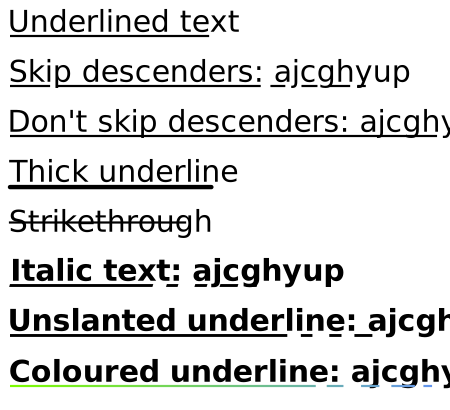
// Font with underline enabled
Font underlinedFont = new Font(FontFamily.ResolveFontFamily(FontFamily.StandardFontFamilies.Helvetica), 30, true);

graphics.FillText(10, 10, "Underlined text", underlinedFont, Colours.Black);

// By default, the underline avoids intersecting glyphs that fall below the baseline.
graphics.FillText(10, 60, "Skip descenders: ajcghyup", underlinedFont, Colours.Black);

// It is also possible to draw the underline over the descenders.
Font underlinedFontNoSkip = new Font(FontFamily.ResolveFontFamily(FontFamily.StandardFontFamilies.Helvetica), 30, true);
underlinedFontNoSkip.Underline.SkipDescenders = false;

graphics.FillText(10, 110, "Don't skip descenders: ajcghyup", underlinedFontNoSkip, Colours.Black);

// You can also change the thickness and line cap of the underline.
Font thickUnderlineFont = new Font(FontFamily.ResolveFontFamily(FontFamily.StandardFontFamilies.Helvetica), 30, true);
thickUnderlineFont.Underline.Thickness *= 2;
thickUnderlineFont.Underline.LineCap = LineCaps.Round;

graphics.FillText(10, 160, "Thick underline", thickUnderlineFont, Colours.Black);

// You can also change the position of the underline. This lets you obtain a sort of strike-through effect.
Font strikeThroughFont = new Font(FontFamily.ResolveFontFamily(FontFamily.StandardFontFamilies.Helvetica), 30, true);
strikeThroughFont.Underline.SkipDescenders = false;
strikeThroughFont.Underline.LineCap = LineCaps.Square;
strikeThroughFont.Underline.Position -= 0.45;

graphics.FillText(10, 210, "Strikethrough", strikeThroughFont, Colours.Black);

// If the font is italic, the sides of the underline will follow its slant.
Font italicFont = new Font(FontFamily.ResolveFontFamily(FontFamily.StandardFontFamilies.TimesBoldItalic), 30, true);

graphics.FillText(10, 260, "Italic text: ajcghyup", italicFont, Colours.Black);

// You can also force the underline to have straight vertical.
Font italicFontNoSlant = new Font(FontFamily.ResolveFontFamily(FontFamily.StandardFontFamilies.TimesBoldItalic), 30, true);
italicFontNoSlant.Underline.FollowItalicAngle = false;

graphics.FillText(10, 310, "Unslanted underline: ajcghyup", italicFontNoSlant, Colours.Black);

// You can draw separately the text and the underline; this lets you create an underline with a different colour.
string text = "Coloured underline: ajcghyup";

// Font to draw the text without the underline.
Font fontNoUnderline = new Font(FontFamily.ResolveFontFamily(FontFamily.StandardFontFamilies.HelveticaBold), 30);

// Underlined font to draw the underline.
Font fontWithUnderline = new Font(FontFamily.ResolveFontFamily(FontFamily.StandardFontFamilies.HelveticaBold), 30, true);

// Brush for the underline.
LinearGradientBrush underlineBrush = new LinearGradientBrush(new Point(10, 360), new Point(10 + fontNoUnderline.MeasureText(text).Width, 360), new GradientStop(Colours.LawnGreen, 0), new GradientStop(Colours.CornflowerBlue, 1));

// Fill the text without underline.
graphics.FillText(10, 360, text, fontNoUnderline, Colours.Black);

// Fill the underline without text.
graphics.FillTextUnderline(10, 360, text, fontWithUnderline, underlineBrush);