github wiki integration
Now I have enough to write the page.
- src/repodocs/publish.py
- src/repodocs/gitlinks.py
- README.md
repodocs publish-wiki pushes generated wiki pages directly into a GitHub repository's separate wiki repository (<owner>/<repo>.wiki.git), rather than to a branch of the source repo as repodocs publish does. It clones the wiki repo, overwrites only the files it stages, commits, and pushes normally (never force-pushed). Diagram poster PNGs committed into repo-docs/ are staged and pushed alongside the Markdown pages so pre-rendered diagrams appear in the wiki without depending on GitHub's mermaid renderer.
Sources: src/repodocs/publish.py:L311-L348, README.md:L156-L162
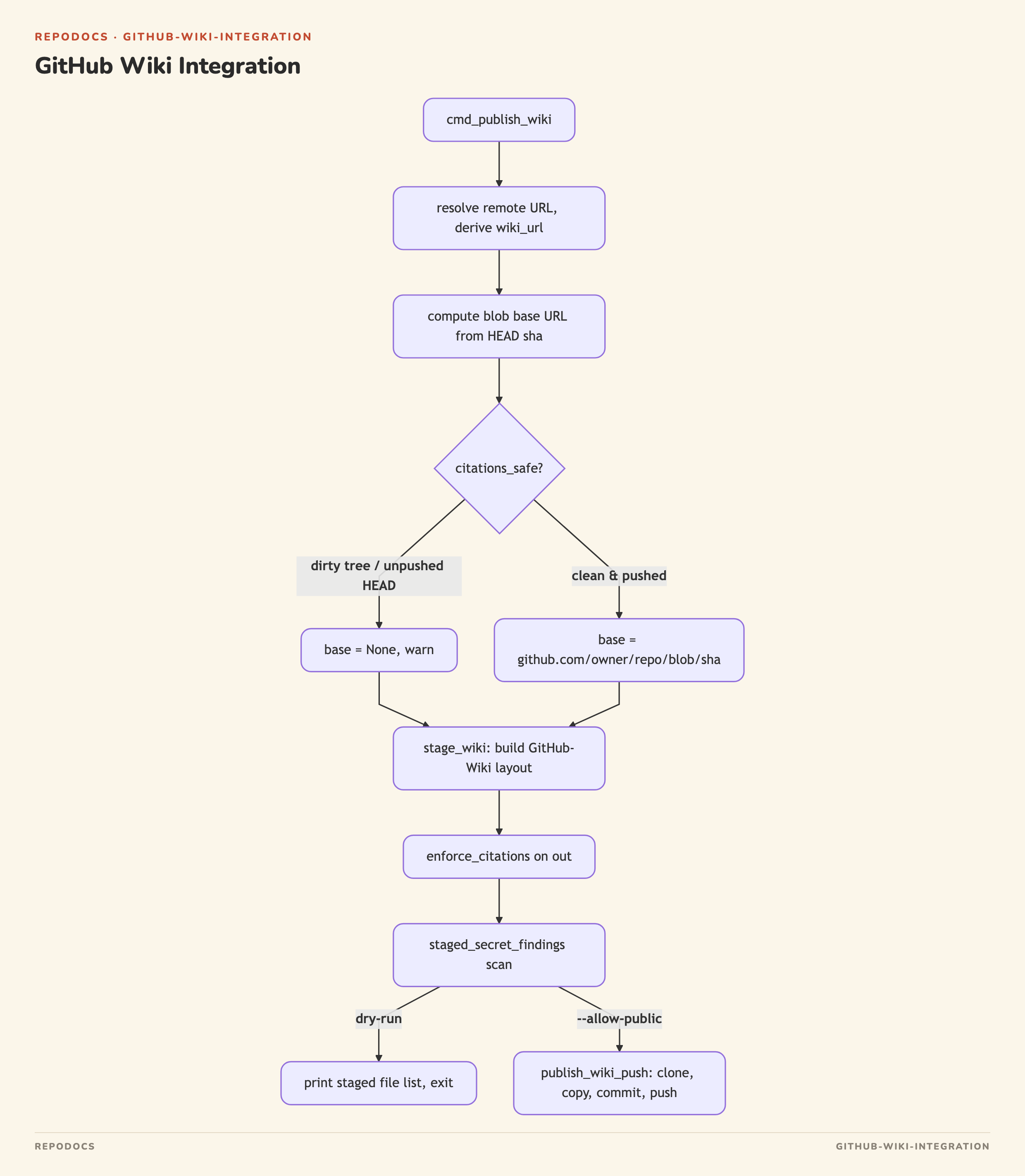
cmd_publish_wiki requires at least one .md page in out, resolves the remote's URL, and derives the wiki clone URL with wiki_remote_url; a non-github.com remote aborts the command.
Sources: src/repodocs/publish.py:L351-L360
_github_slug parses owner/repo from either the SSH (git@github.com:owner/repo.git) or HTTPS (https://github.com/owner/repo) form of a remote URL. wiki_remote_url reuses that slug to build <owner>/<repo>.wiki.git in the same scheme as the source remote (SSH stays SSH, HTTPS stays HTTPS).
Sources: src/repodocs/gitlinks.py:L24-L46
cmd_publish_wiki derives an absolute citation blob base (https://github.com/<slug>/blob/<HEAD sha>) only when the slug resolves and HEAD looks like a real sha. That base is used only if citations_safe confirms the working tree is clean (ignoring untracked entries under the output directory) and that HEAD has actually been pushed to the selected remote — otherwise citations are left relative and a warning is printed to stderr, since an absolute link to an unpushed commit would be broken.
Sources: src/repodocs/publish.py:L361-L379, src/repodocs/gitlinks.py:L64-L81
stage_wiki copies generated pages from out into a staging directory laid out for GitHub Wiki conventions:
| Source | Staged as |
|---|---|
overview.md (or index.md if no overview.md) |
Home.md |
every other *.md in out (excluding index.md) |
<slug>.md |
every *.png in out
|
<name>.png (unchanged) |
generated from plan.json order/titles |
_Sidebar.md |
Citation links inside each Markdown page are rewritten to absolute blob URLs via rewrite_citation_links(text, base) when base was computed; plan.json's page order and titles (falling back to each page's own # heading via md_title when the plan omits a title) drive the _Sidebar.md bullet list, with Home linked first when present. Any symlinked source file, including plan.json, is rejected before it is read.
Sources: src/repodocs/publish.py:L213-L266
The PNG-copy loop is the mechanism by which diagram posters ride along with the wiki export: any .png written into the wiki output directory by the diagram-rendering step is copied byte-for-byte into staging and pushed to the wiki repo in the same commit as the Markdown that references it.
Sources: src/repodocs/publish.py:L245-L247
publish_wiki_push clones wiki_url with git clone --depth 1 into a temporary directory. A clone failure whose message matches _WIKI_UNINITIALIZED_RE ("repository...not found" or "...does not exist") is reported as WikiNotInitialized, distinguishing a wiki that has no Home page yet (which GitHub refuses to let you clone) from a genuine WikiPublishError (auth, network, or other git failures). Every other staged path is written through _reject_symlink_dest, which walks each path component under the clone root and refuses to write through an existing symlink, so a manually-edited wiki clone can't redirect a write outside the clone. Only the staged filenames are git added and checked with git status --porcelain; if nothing changed, the function returns None without committing. Otherwise it commits with the fixed message "docs: publish repo wiki (repodocs)" and pushes HEAD to origin with a normal (non-force) push, returning the new commit sha.
Sources: src/repodocs/publish.py:L269-L348
Because only the staged filenames are touched (add -A -- *staged, status --porcelain -- *staged), any other page a user has added manually in the GitHub Wiki UI is left untouched.
Sources: src/repodocs/publish.py:L311-L318
cmd_publish_wiki runs the same guardrails as repodocs publish before anything is pushed:
-
enforce_citations(repo, out, subdirs=False, cmd="publish-wiki")runs after staging (so a symlinked page can't be read by the citation scanner first) and blocks on citation problems. -
staged_secret_findings(staging)scans every staged file's lines againstPUBLISH_SECRET_PATTERNS(private-key headers, GitHub tokens, cloud/API key patterns) and blocks the push if any match, reporting only path/line/pattern-label — never the matched value. -
--dry-runprints the target wiki URL and the full staged file list without pushing. - Without
--allow-public, the command dies before callingpublish_wiki_push.
Sources: src/repodocs/publish.py:L380-L403, src/repodocs/publish.py:L119-L139
repodocs publish (via cmd_publish/stage_publish/publish_push) targets a branch of the source repository as an orphan-commit force-push (for GitHub Pages hosting), refusing protected branch names (main/master/trunk). repodocs publish-wiki instead targets the repo's dedicated .wiki.git remote with a normal, non-force push into a shallow clone, and lays pages out in the Home.md / _Sidebar.md convention the GitHub Wiki UI expects. The README documents publish-wiki as the supported path for exporting into a private repo's wiki.
Sources: src/repodocs/publish.py:L81-L211, src/repodocs/publish.py:L351-L408, README.md:L156-L162
Diagram posters are produced by the optional tools/diagram_poster.ts script (Bun + Playwright + a Chromium browser), which renders a mermaid block plus an editorial shell into a pastel PNG, working around GitHub's mermaid renderer intermittently failing to load in wikis. The README instructs committing the resulting PNG into the <repo>.wiki.git repo and referencing it with ; stage_wiki's PNG-copy step and publish_wiki_push's filename-scoped add/commit/push are what carry out that commit automatically when publish-wiki is run against an out directory containing rendered PNGs.
Sources: README.md:L103-L117, src/repodocs/publish.py:L245-L247