
Browser extension to see the location of the viewed website
uDomainFlag is a Chromium browser extension that displays additional information about the domain you're visiting, including the country flag of the server, IP address, and Autonomous System Number (ASN).
Install from the Google Chrome Web Store or manually by enabling developer mode in chrome://extensions.
- Country flag on website visit
- HTTP protocol indicator (HTTP/1.0, HTTP/1.1, HTTP/2, HTTP/3, QUIC, SPDY)
- Special icon for internal or special resources
- Always up2date data using online lookups
- Privacy focused without tracking
- Quick overview of additional IP addresses and contacted ASN within popup view
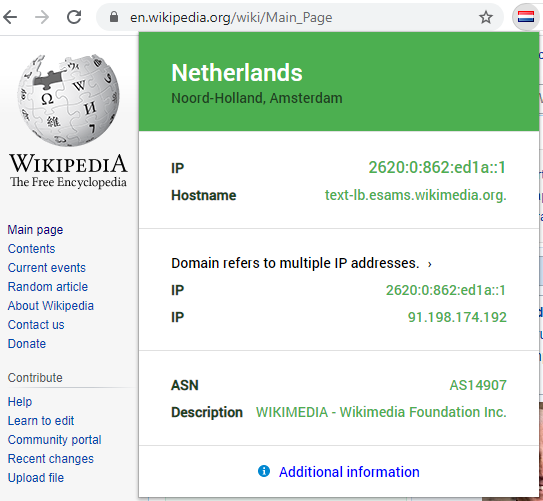
Expanded uDomainFlag information popup on the page wikipedia.org.
- The detected location of the server is displayed first.
- IP and Hostname contains the target server to which the browser connected to.
- The IP list below shows additional known addresses of the resolved domain which are available and can be used.
- The target network information contains the Autonomous System Number (ASN) and the description provided by the ASN operator.
- Using the link "Additional information" the webpage version of uDomainFlag will be opened with even more information.
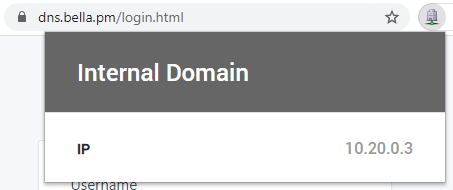
View of an internal or special purpose website was opened.
- A custom icon is displayed instead of the country flag
- In addition, the internally used IP address used to connect to the server is shown.
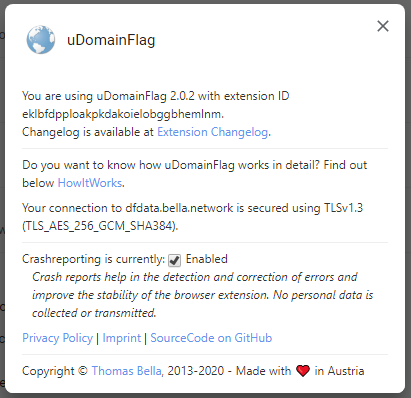
- Settings page of the extension. First containing the used version and extension ID with link to changelog.
- After the introduction a link to the HowItWorks-Page how uDomainFlag itself works and to which server uDomainFlag is connected to with the used encryption.
- The crashreporting option is enabled by default and can be disabled here. When disabling, crash reporting will be disabled for all uDomainFlag instances. If you synchronize your browser settings, this configuration option will also be synced.
Some settings can be managed using registry keys (e.g. over GPO) on Windows, using MCX preferences on macOS or a JSON config file on Linux. An example of which settings can be configured for your users:
- Server: Target server to use instead of dfdata.bella.network
- DisableCrashReports: Turns off crash reporting and does not allow the user to enable it again.
More details on all available settings and how to configure these can be found on the Admin Policies for uDomainFlag page.
A list of all releases including changelog can be found at Releases.
uDomainFlag is also available as a website at domainflag.bella.network with some additional information. This page is opened when "additional information" is clicked within the extension.
- Clone this repository -
git clone https://github.com/ashcoft/DomainCheck.git - Run
npm run buildto create the extension package - Enable developer mode in
chrome://extensions - Click "Load unpacked" and select the
platform/chromiumfolder - Make your changes and reload the extension as needed
To update the build after changes:
npm run buildThis extension uses the following permissions:
- Read your browsing history - Needed to determine the currently viewed website.
- Read and change all your data on the websites you visit - Also used to determine the viewed website and additionally to detect the used IP address of the target server. (E.g. to show if website uses a private IP address)
uDomainFlag connects primarily to dfdata.bella.network for location data, where you can also find additional information about the backend.
The full version is available at domainflag.bella.network/privacy.
The extension itself logs errors using Sentry and transmits those errors to a private self-hosted Sentry instance. Error logging can be disabled within the extension settings and this setting is synchronized to other instances if logged in within the browser.
uDomainFlag collects crash reports which can be permanently disabled within the extension settings.
No user data is collected or shared and server location lookups can't be traced back to a user.
Any generated logs are only processed to ward off attacks and are completely removed within 48 hours.
This extension uses the MPL-2.0 License license. This way the code can be verified by everyone and contributions improve the experience of every extension user.