

100% local and private. An 85 KB status bar extension that monitors your Antigravity AI model quota at a glance, without external network calls, OAuth flows, or background processes.


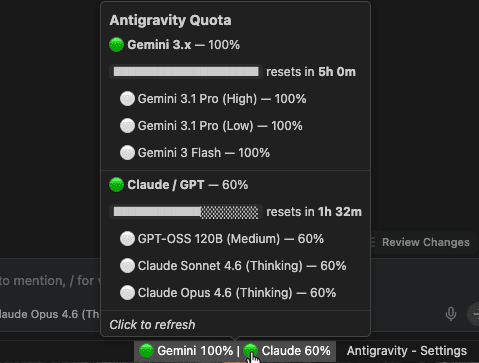
Hover for a rich Markdown tooltip with per-pool progress bars, model breakdown, and reset timers.
See your reset time directly from the status bar:
🟢 Gemini 80% [2h 15m] | 🟡 Claude 40% [45m]
Plus smart polling — the extension now pauses all background refreshes when you leave Antigravity and resumes instantly when you come back.
Cmd+Shift+P (or Ctrl+Shift+P) → search Antigravity Pulse to toggle this and other settings.
Antigravity already shows your quota in the settings panel but it requires 3 clicks to access. This extension puts it in your status bar so you always see it without navigating anywhere. Per pool, per model, one glance.
Everything runs 100% on your machine. The extension reads quota data from the Antigravity process already running locally. No requests ever leave localhost.
- No internet requests, every call stays on
127.0.0.1 - No Google authentication, no OAuth, no tokens stored, no login required
- No data sent to any server, your usage patterns stay private
- No special permissions, no filesystem access, no telemetry
The entire extension is 85 KB unpacked. No bundled webviews, no CSS frameworks, no localization files. Three TypeScript files compiled to plain JavaScript.
- Activates in milliseconds
- Smart polling: refreshes every 30 seconds while Antigravity is focused, pauses entirely when you switch away
- Zero dependencies beyond the VS Code API
Each model pool gets a color-coded health indicator directly in the status bar:
| Icon | Status | Remaining |
|---|---|---|
| 🟢 | Healthy | > 50% |
| 🟡 | Low | 20% – 50% |
| 🔴 | Critical | < 20% |
Antigravity groups AI models into independent quota pools, each resetting every ~5 hours:
| Label | Pool | Includes |
|---|---|---|
| Gemini | Gemini 3.x | Gemini 3 Pro (High), Gemini 3 Pro (Low), Gemini 3 Flash |
| Claude | Claude / GPT | Claude Sonnet 4.5, Claude Opus 4.5, GPT-OSS 120B |
| Gem Flash | Gemini 3 Flash | Gemini 3 Flash |
Each pool's quota is tracked independently. Exhausting Claude/GPT does not affect your Gemini quota.
Hover over the status bar item for a detailed, formatted breakdown:
- Per-pool remaining percentage with visual progress bars
- Time until reset for each pool
- Individual model quotas when models within a pool differ
- Clean Markdown formatting, no popup windows
- Process detection scans for the Antigravity
language_serverprocess - Token extraction reads the CSRF token from the process arguments
- Port discovery finds the correct local API port
- Local API call
POST https://127.0.0.1:{port}/.../GetUserStatus, strictly local - Display groups models by pool, updates the status bar every 30 seconds
Install from Open VSX. In the Extensions panel, search for Antigravity Pulse @sort:name to find the extension directly, then click Install. You'll get automatic updates with every new release.
Manual install (no auto-updates)
- Download the
.vsixfrom Releases Cmd+Shift+P→ Extensions: Install from VSIX...- Select the file and reload
For the Forked version, run this to install to custom profile:
ag --install-extension <ext.vsix> --user-data-dir <data-dir>
# Example:
ag --install-extension ./ag-pulse-api-1.4.2.vsix --user-data-dir ~/.ag-profiles/acc-dataSince this extension requires no external dependencies (only core VS Code types), building and testing is straightforward:
- Ensure dependencies are installed:
npm install(though it primarily relies on@types/vscode) - To compile:
npm run compileornpm run watch(for live recompilation) - To package into a vsix file:
npm run package - Test locally: Open the project in VS Code (or Antigravity IDE) and press `F5` to launch a new Extension Development Host window with the extension activated.
| Setting | Default | Description |
|---|---|---|
antigravityPulse.pollingInterval |
30 |
Refresh interval in seconds (min: 30) |
antigravityPulse.clockFormat |
auto |
Clock format for reset times: auto (OS locale), 12h, or 24h |
antigravityPulse.showResetTime |
false |
Show time until quota reset next to each pool in the status bar |
antigravityPulse.smartPolling |
true |
Pause polling when Antigravity is not focused and resume on return |
- Antigravity IDE must be running (the extension reads from its local process)
This is an open-source project and contributions are welcome. If you find a bug, have a feature request, or want to submit a PR, head to the GitHub repo.
If Antigravity Pulse saves you time, consider giving it a ⭐ to help others find it.