Repository navigation

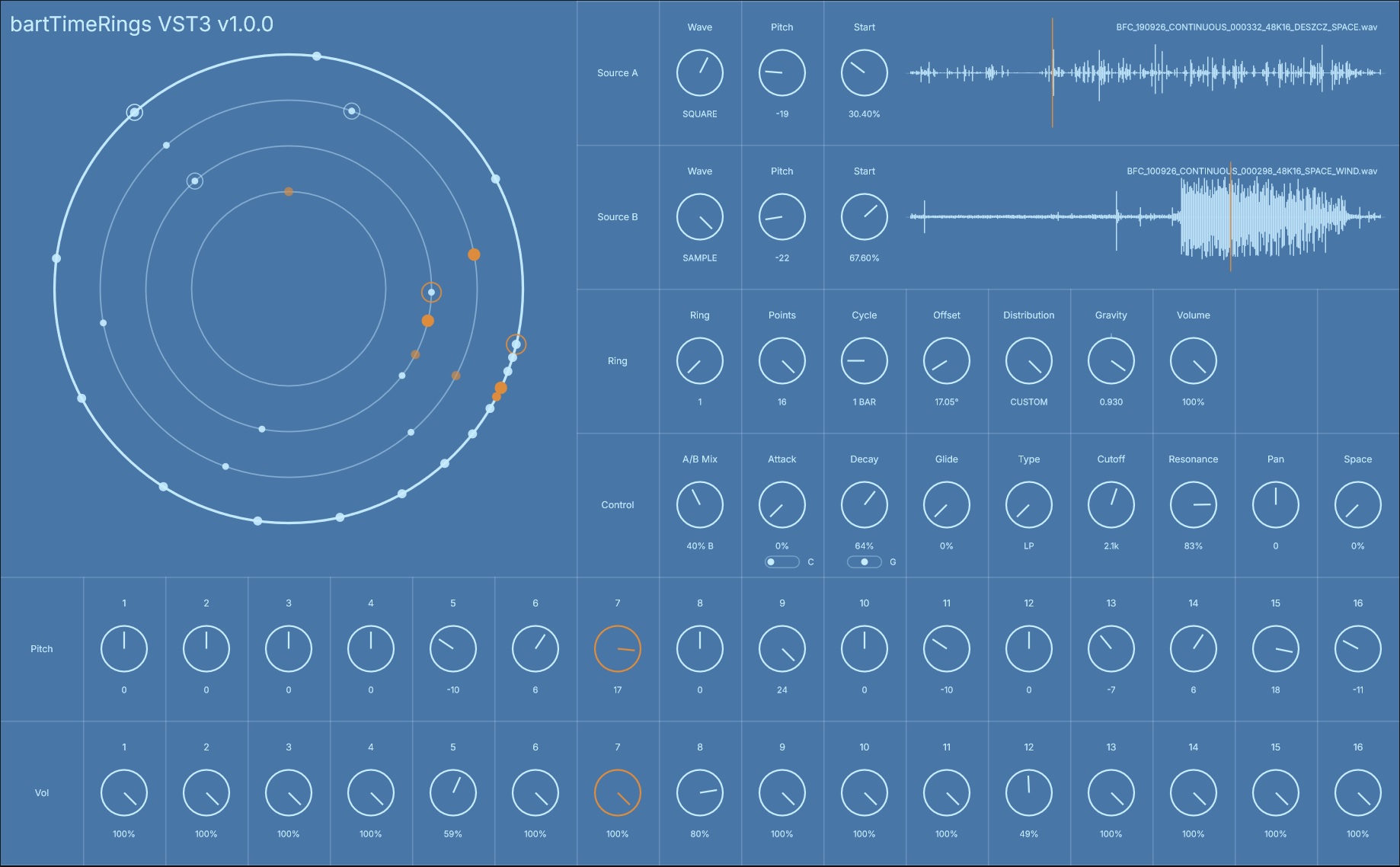
bartTimeRings is a four-ring geometric audio sequencer, synthesizer and sampler.
Ring is time. Point is sound.
Each Ring represents an independent cycle in time. Points placed around the Ring define when its sound is triggered.
Each Ring contains two independent sound sources. Source A and Source B can use SINE, TRI, SAW, SQUARE, NOISE or a loaded WAV sample.
The two sources are combined with A/B MIX and processed independently for each Ring.
POINTS sets the number of active points from 0 to 16.
CYCLE sets the rotation length of each Ring from 1/4 bar to 64 bars.
OFFSET rotates the entire Ring and moves its events through time.
DISTRIBUTION arranges the points using EVEN, FIBONACCI, FIB REV, PRIME, PRIME REV, RANDOM or CUSTOM geometry.
GRAVITY deforms the current geometry around the grabbed point while keeping the points ordered.
Each point stores its own PITCH and VOL, so changing the geometry changes the timing without rewriting the sound sequence.
From stable circular patterns and polymetric sequences to evolving percussion, filtered noise, pitched samples and irregular geometric rhythms.
SOURCES
Each Ring contains Source A and Source B.
Available source types:
- SINE
- TRI
- SAW
- SQUARE
- NOISE
- SAMPLE
PITCH transposes each source from -30 to +30 semitones.
When SAMPLE is selected, a WAV file can be dragged directly onto the waveform area.
START defines the playback start position inside the loaded sample.
Clicking the waveform previews the sample from the current START position.
ENVELOPE AND RING CONTROL
Each Ring has its own Attack, Decay, Glide, Filter, Resonance, Volume, Pan and Space controls.
ATTACK and DECAY can operate in three timing modes:
- C — Cycle
- S — Sync
- G — Gap
This allows the envelope timing to relate to the Ring in different ways instead of behaving only as a conventional fixed-time envelope.
GLIDE smooths pitch transitions between consecutive triggers.
The Ring also provides LP / BP / HP filtering with Cutoff and Resonance, plus independent Volume, Pan and Space.
POINT CONTROL
Each of the 16 possible points has its own PITCH and VOL value.
Point PITCH is applied on top of the Source Pitch setting.
Point VOL acts as an individual trigger level.
Changing the geometry changes when the points trigger without rewriting their Pitch or Volume values.
INTERACTION
- Drag empty Ring space — Offset
- Drag a point — Gravity
- Ctrl + drag a point — CUSTOM position
- Shift + drag — fine adjustment
- Click a Ring or point — select that Ring
- Double-click a knob — reset its value
- Right-click a Ring, point or RING selector — Copy Ring / Paste Ring / Paste Settings
SAMPLE FILES
bartTimeRings stores the paths of loaded WAV files with the plug-in state.
The WAV files themselves are not embedded inside the DAW project or plug-in state, so important samples should be kept in a stable location.
FORMAT
- Windows 64-bit
- VST3 instrument
- Built with JUCE 8
- Free / donationware
Tested in:
- FL Studio
- Bitwig Studio
INSTALLATION
Extract the ZIP and copy the entire bartTimeRings.vst3 folder to:
C:\Program Files\Common Files\VST3
Then rescan your VST3 plugins if necessary.
SHA-256
6F4C0A356F3F8D3AFB20CD2E47CFBDD381955DFFDBFC5FECCDD37916988BE1CC
bartTimeRings is free to use.
Donations are welcome, but never required.
Copyright © 2026 bartFXAudio